

編輯:Android 開發實例
幾乎每個 App 都會有一頁「關於」或「使用說明」,內容通常包含版本號、作者、功能列表與專案連結。與其每次手寫 Dialog,不如繼承 AlertDialog 做一個專用的 HelpDialog,把版面配置、標題與按鈕一次處理乾淨,之後任何 Activity 只要 new 一下就能用。
這個做法的關鍵在於 setView():它允許你把任意 layout 塞進對話框的主體區域,於是原本只能放文字的提示框,瞬間變成可以承載捲動畫面的資訊頁。
import android.app.AlertDialog;
import android.content.Context;
import android.view.View;
import com.iwidsets.task.manager.R;
public class HelpDialog extends AlertDialog {
public HelpDialog(Context context) {
super(context);
final View view = getLayoutInflater().inflate(R.layout.help_dialog, null);
setButton(context.getText(R.string.close), (OnClickListener) null);
setIcon(R.drawable.icon);
setTitle("AndTask version:" + R.string.version);
setView(view);
}
}
幾行程式碼做了四件事:把 help_dialog 版面膨脹成 View、掛上一顆「關閉」按鈕(監聽器傳 null,因為關閉是 Dialog 的預設行為)、設定左上角圖示、把標題與版本字串拼起來。由於版本號寫在 strings.xml 裡,改版時只動資源檔就好。
內容量多時建議直接放在 strings.xml,再用 basic 的 HTML 標籤做簡單排版:
<string name="help_dialog_text">
<i>Author: fonter.yang</i>
n
<i>
<a href="https://www.android.tgbus.com">Android教程 </a>
</i>
n
n
<i>AndTask - Android Task Manager</i>
n
This's an easy-to use task management software,it allows you to switch on or off running programs/apps/services.
n
n
<b>Feature</b>
n
1) Switch and Stop Tasks/Processes/Apps/Services
2) Shows Memory Info and Apps Info
3) Uninstall Apps
</string>
說明文字往往超過一頁,所以外層必須包 ScrollView,否則超出部分會被裁掉、連關閉都看不到內容:
<FrameLayout xmlns:android="https://schemas.android.com/apk/res/android"
android:layout_height="wrap_content"
android:layout_width="fill_parent"
>
<ScrollView xmlns:android="https://schemas.android.com/apk/res/android"
android:layout_height="fill_parent"
android:layout_width="fill_parent"
>
<TextView
android:layout_height="fill_parent"
android:layout_width="fill_parent"
android:padding="6dip"
android:text="@string/help_dialog_text"
/>
</ScrollView>
</FrameLayout>
最外層的 FrameLayout 是為了讓版面高度用 wrap_content 而不撐滿整個對話框,內層 ScrollView 負責承載過長的內容,TextView 的 6dip 內距則讓文字不會貼邊。三層結構各司其職,換成任何長度都不會破版。
最後提醒一點:早期專案常用 <a href> 呈現連結,但 TextView 只會把 URL 上色,點擊需要額外設定 MovementMethod 才會真的開啟瀏覽器。若要支援點擊,可在 HelpDialog 建構子中對該 TextView 呼叫 setMovementMethod(LinkMovementMethod.getInstance())。
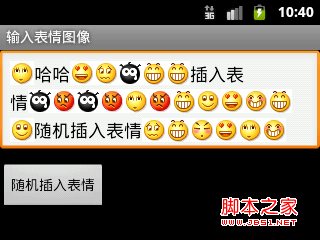 Android 開發技巧:像 QQ 一樣在輸入框中混排文字與表情圖像
和 TextView 一樣,EditText 也能進行圖文混排。差別在於 TextView 只用來顯示圖文混排效果,而 EditText 不僅能顯示,還能混合輸入文字與圖
 Android記事本範例剖析(一):入口、清單與 Intent 匹配機制
這是 Android 記事本範例系列的第一篇。與其直接背誦 API,不如從一個完整的小程式開始,觀察入口、列表、Intent 與 ContentProvider 如何串起
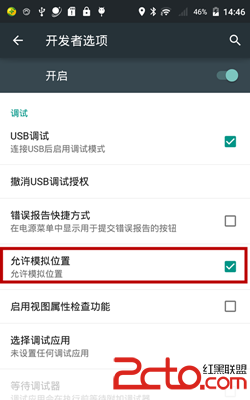 Android 模擬定位實作教學:權限宣告、狀態偵測與座標注入
想在 App 裡驗證定位功能,卻不方便真的出門跑一條路線?Android 系統本身內建了「模擬位置」機制:只要在開發者選項中指定一支代理程式,系統 GPS 就會回報你自己
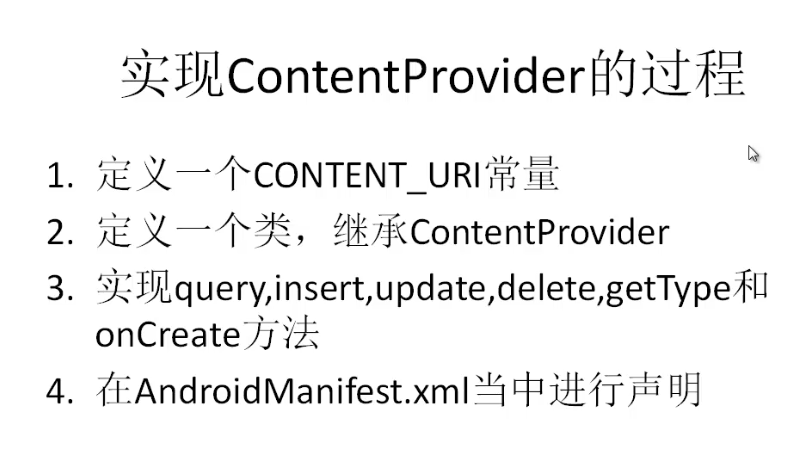 Android ContentProvider 深入實戰:自定義共享數據的 Provider
ContentProvider 為存儲與獲取數據提供了統一接口,可以實現跨應用的數據共享;而 SQLite 只能在同一進程內共享。此外 Android 為音頻、視頻、圖片