

編輯:Android 開發實例
當畫面上的內容多到一頁放不下時,就需要 ScrollView。它的運作方式是把子元件包起來,內容超出螢幕時就能透過滑動捲動來瀏覽其餘部分。
ScrollView 只支援垂直捲動。若需要水平滾動,要改用 HorizontalScrollView;若兩個方向都要,就得自己實作或採用其他方案。
以下版面配置放入九張圖片,垂直堆疊後必然超出螢幕高度,正好用來展示捲動效果。
<?xml version="1.0" encoding="utf-8"?>
<ScrollView xmlns:android="https://schemas.android.com/apk/res/android"
    android:layout_width="fill_parent"
    android:layout_height="fill_parent"
    android:scrollbars="vertical">
    <LinearLayout android:orientation="vertical"
        android:layout_width="fill_parent"
        android:layout_height="fill_parent">
        <ImageView android:layout_width="wrap_content"
            android:layout_height="wrap_content"
            android:src="@drawable/p1"
            android:layout_gravity="center_horizontal"/>
        <ImageView android:layout_width="wrap_content"
            android:layout_height="wrap_content"
            android:src="@drawable/p1"
            android:layout_gravity="center_horizontal"/>
        <ImageView android:layout_width="wrap_content"
            android:layout_height="wrap_content"
            android:src="@drawable/p1"
            android:layout_gravity="center_horizontal"/>
        <ImageView android:layout_width="wrap_content"
            android:layout_height="wrap_content"
            android:src="@drawable/p1"
            android:layout_gravity="center_horizontal"/>
        <ImageView android:layout_width="wrap_content"
            android:layout_height="wrap_content"
            android:src="@drawable/p1"
            android:layout_gravity="center_horizontal"/>
        <ImageView android:layout_width="wrap_content"
            android:layout_height="wrap_content"
            android:src="@drawable/p1"
            android:layout_gravity="center_horizontal"/>
        <ImageView android:layout_width="wrap_content"
            android:layout_height="wrap_content"
            android:src="@drawable/p1"
            android:layout_gravity="center_horizontal"/>
        <ImageView android:layout_width="wrap_content"
            android:layout_height="wrap_content"
            android:src="@drawable/p1"
            android:layout_gravity="center_horizontal"/>
        <ImageView android:layout_width="wrap_content"
            android:layout_height="wrap_content"
            android:src="@drawable/p1"
            android:layout_gravity="center_horizontal"/>
    </LinearLayout>
</ScrollView>
android:scrollbars="vertical" 明確指定只顯示垂直捲軸,避免視覺上多出一條用不到的線。
這是最常見的錯誤。ScrollView 繼承自 FrameLayout,一次只能容納一個子 View。因此範例中必須先包一層 LinearLayout,把所有內容收在裡面。若直接放入多個元件,編譯階段就會報錯。
仔細看範例,最外層 ScrollView 的高度是 fill_parent,但內層 LinearLayout 的高度卻也是 fill_parent,這在嚴格情況下會讓內容被壓縮而無法捲動。正確做法有兩種:
wrap_content,讓它依內容自然撐開。fill_parent 並搭配此用法,讓 ScrollView 依內容與螢幕中較大者決定。實務上遇到「ScrollView 不能捲」的問題,九成是這個屬性設錯。
若內容是大量結構相同的項目(例如幾百筆資料列表),請用 ListView 或 RecyclerView,不要用 ScrollView 塞 LinearLayout。原因在於 ScrollView 會一次建立全部子 View 並全部配置記憶體,項目一多就會 OOM 或嚴重卡頓;而 ListView / RecyclerView 有 view 回收機制,只保留螢幕上可見的項目。ScrollView 適合的是「數量固定且不多」的內容,例如設定頁、註冊表單。
另外,ScrollView 內部不宜再放 ListView 或其他可捲動元件,兩者的觸碰事件會互相搶奪導致捲動失效。若確實有此需求,需自行處理事件攔截(onInterceptTouchEvent)。
 Android JSON 解析器:從結構化資料中讀取所需欄位
JSON 是什麼?JSON(JavaScript Object Notation)是一種輕量級、易於閱讀與撰寫的資料交換格式。相較於 XML,JSON 的語法更簡潔,特別
 在源碼層面獲取當前調用 API 的應用名稱
做 ROM 定製或者修改系統源碼時,經常需要知道「現在是哪個應用在調用我」。比如攝像頭被打開時,想記錄下來是哪個 App 喚醒的。這個信息在 framework 層是可以
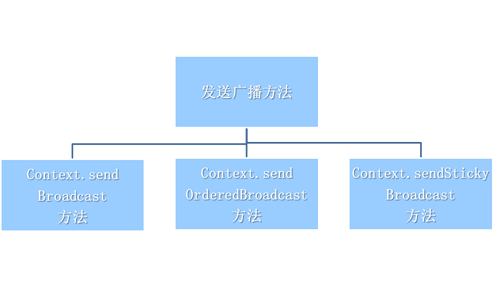 Android 廣播機制淺析:發送、接收與配置
熟悉 Android 程式設計的人都知道,廣播是 Android 開發中一項重要的功能。Android 裡有各式各樣的廣播,例如:電池狀態變化、訊號強弱、電話接聽、簡訊接
 在 Android 裡顯示「載入中」的轉圈動畫(ProgressBar Spinner)
使用者按下按鈕之後,若畫面毫無反應,通常不到兩秒就會開始懷疑是不是當機了。給他一個轉圈的載入動畫,是最便宜也最有效的解法。Android 把這個需求交給 Progress