

編輯:Android 開發實例
android.view.VelocityTracker 主要用來跟蹤觸摸屏事件(如 flinging 及其他手勢事件)的速度。透過 addMovement(MotionEvent) 把一個 MotionEvent 加入到實例中;隨後可調用 getXVelocity() 或 getYVelocity() 取得橫向與豎向速度——但在取值之前,請先調用 computeCurrentVelocity(int) 來初始化速度單位。
void addMovement(MotionEvent event):把用戶的移動事件加入跟蹤器。
void clear():把跟蹤器重置到初始狀態。
void computeCurrentVelocity(int units, float maxVelocity):根據已收集的點計算當前速度。units 是速度的基本時間單位:取值 1 表示「每毫秒移動多少像素」,取值 1000 表示「每秒移動多少像素」。maxVelocity 則是速度上限。
void computeCurrentVelocity(int units):等效於以 Float.MAX_VALUE 為上限調用上面的重載版本。
float getXVelocity() / getXVelocity(int id):取得最後計算出的 X 速度。
float getYVelocity() / getYVelocity(int id):取得最後計算出的 Y 速度。
static VelocityTracker obtain():獲取一個新的 VelocityTracker 實例。
void recycle():歸還實例以便復用。
private VelocityTracker mVelocityTracker; // 聲明變量

// 在 onTouchEvent(MotionEvent ev) 中:
if (mVelocityTracker == null) {
    mVelocityTracker = VelocityTracker.obtain(); // 獲得實例
}
mVelocityTracker.addMovement(ev); // 加入當前事件

// 當事件為 MotionEvent.ACTION_UP 時計算速度:
final VelocityTracker velocityTracker = mVelocityTracker;
// 參數 1000 表示「每秒像素數」
velocityTracker.computeCurrentVelocity(1000);
Log.i("test", "velocityTraker" + velocityTracker.getXVelocity());
1. 當你需要跟蹤觸摸屏事件速度時,用 obtain() 取得一個 VelocityTracker 實例。
2. 在 onTouchEvent 回調中,用 addMovement(MotionEvent) 把當前移動事件傳給該對象。
3. 用 computeCurrentVelocity(int units) 計算當前速度,再用 getXVelocity()、getYVelocity() 取值。
譯自:https://developer.android.com/reference/android/view/VelocityTracker.html
參照自:https://blog.jrj.com.cn/4586793646,5298605a.html
 Android 進度指示器 Spinner 使用教學
在 Android 中,當任務執行時間無法預估時,常會使用 indeterminate 形式的進度條,也就是俗稱的 Spinner 或旋轉式進度條。它會持續旋轉,用來告知
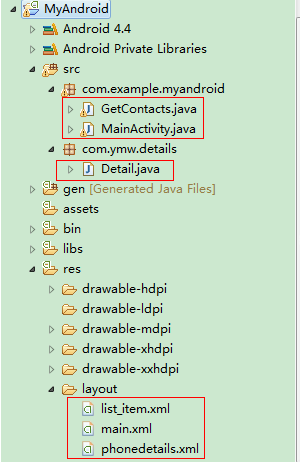 Android 讀取通訊錄、撥打電話、發送短信與長按菜單綜合實戰
這是一個把多個基礎知識點串起來的小項目:用 ListView 展示手機通訊錄,單擊直接撥號,長按彈出菜單,菜單裡可以查看詳情或發送短信。適合拿來熟悉 ContentPro
 Android 音樂播放器:MediaPlayer 播放與跳轉
若要在 Android App 中播放音樂,MediaPlayer 是最直接的選擇。它可以播放 raw 資源中的音訊檔,也能搭配 SeekBar 做進度控制。 載入音樂檔
 Android 自定義滑動式抽屜菜單的完整實現
Android 雖然自帶了 SlidingDrawer 和 DrawerLayout 這類抽屜效果控制項,但實際項目中,這些內建控制項往往會限制功能的發揮,難以精準滿足設