

編輯:Android 開發實例
上一節我們學會了在 main.xml 裡定義 Button,這一節來看它如何響應點擊,並順帶用上提示元件 Toast。
按鈕的事件處理在 Android 中由 Button.OnClickListener 負責,寫過 Java 的人對 OnXxxListener 這類命名應該不陌生。範例的效果是:點下按鈕後,TextView 的文字改變,同時畫面下方浮出一段持續片刻的 Toast 提醒。
[點擊前效果圖]
[點擊後效果圖]
<?xml version="1.0" encoding="utf-8"?>
<LinearLayout xmlns:android="https://schemas.android.com/apk/res/android"
    android:layout_width="fill_parent"
    android:layout_height="fill_parent"
    android:orientation="vertical">

    <TextView
        android:id="@+id/textview1"
        android:layout_width="fill_parent"
        android:layout_height="wrap_content"
        android:text="@string/hello" />

    <Button
        android:id="@+id/button1"
        android:layout_width="wrap_content"
        android:layout_height="wrap_content"
        android:layout_gravity="right"
        android:text="確定" />
</LinearLayout>
兩個細節值得說明:android:id 是讓 Java 端能用 findViewById() 找到這個控件;android:layout_gravity="right" 讓按鈕靠右對齊。
package com.android.test;

import android.app.Activity;
import android.os.Bundle;
import android.view.View;
import android.widget.Button;
import android.widget.TextView;
import android.widget.Toast;

public class ButtonDemo extends Activity {

    private TextView textview1;
    private Button button1;

    public void onCreate(Bundle savedInstanceState) {
        super.onCreate(savedInstanceState);
        setContentView(R.layout.main);

        // 透過 id 取得 main.xml 裡定義的 TextView 與 Button
        textview1 = (TextView) findViewById(R.id.textview1);
        button1 = (Button) findViewById(R.id.button1);

        // 掛上點擊事件
        button1.setOnClickListener(new Button.OnClickListener() {
            public void onClick(View v) {
                // Toast 提示
                Toast.makeText(ButtonDemo.this,
                        "TextView 裡的文字改變了,你注意到了嗎?",
                        Toast.LENGTH_LONG).show();

                // 改變 TextView 的文字
                textview1.setText("歡迎來到魏祝林的部落格!");
            }
        });
    }
}
Toast.makeText(context, text, duration) 的第三個參數只有兩種選擇:Toast.LENGTH_SHORT(約 2 秒)與 Toast.LENGTH_LONG(約 3.5 秒)。它不會搶走焦點、不能攔截點擊,因此適合傳達「不中斷操作」的訊息;若需要使用者明確回應,該用的是 Dialog。
寫法上還有個小差異:除了匿名內部類,也可以讓 Activity 直接實作 OnClickListener,或是使用 Java 8 之後的 Lambda 寫法(需相應的編譯設定)。三者效果相同,選團隊一致的寫法即可。
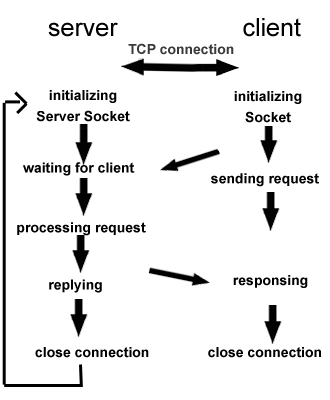 Android 中的 TCP 與 UDP 傳輸實作
TCP 與 UDP 是 Android 網路開發中常見的傳輸協定。TCP 面向連接、可靠且按序傳輸;UDP 無連接、低延遲,適合理會即時性較高的場景。TCP 通訊概念TC
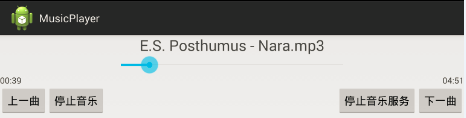 動手做一個 Android 音樂播放器:Service + MediaPlayer + 廣播的完整實作
先看一下我們要做出來的清爽介面: 如果只用 Activity 來做這種東西那就太簡單了——播放必須在離開介面後持續進行,所以我們用的是 Service。 設計思路 動
 Android Spinner 載入提示:從使用者等待心理談 ProgressBar 的用法
當一個操作無法預估還要多久時,使用者需要的不是精確的百分比,而是一個持續存在的「我沒死掉」訊號。Android 把這件事交給 ProgressBar 的不確定模式,也就是
 Android 載入 Spinner:為未知的等待時間做一個轉不停的提示
使用者最討厭的不是慢,而是「不知道還要慢多久」。當一個操作沒有明確的完成百分比時,我們需要的不只是一個進度數字,而是一個持續轉動、告訴使用者「系統還活著」的提示。Andr