

編輯:Android 開發實例
Intent 是 Android 元件溝通的核心。當你呼叫 startActivity(),系統會依 Intent 攜帶的 action 與資料,找出最合適的程式來接單執行。以下整理開發時最常用到的幾種意圖寫法。
Uri uri = Uri.parse("https://www.fengfly.com");
Intent intent = new Intent(Intent.ACTION_VIEW, uri);
startActivity(intent);
Uri uri = Uri.parse("geo:38.899533,-77.036476");
Intent intent = new Intent(Intent.Action_VIEW, uri);
startActivity(intent);
Uri uri = Uri.parse("tel:13800138000");
Intent intent = new Intent(Intent.ACTION_DIAL, uri);
startActivity(intent);
Intent intent = new Intent(Intent.ACTION_VIEW);
intent.putExtra("sms_body", "FENGFLY.COM");
intent.setType("vnd.android-dir/mms-sms");
startActivity(intent);
Uri uri = Uri.parse("smsto:13800138000");
Intent intent = new Intent(Intent.ACTION_SENDTO, uri);
intent.putExtra("sms_body", "FENGFLY.COM");
startActivity(intent);
Uri uri = Uri.parse("content://media/external/images/media/exp");
Intent intent = new Intent(Intent.ACTION_SEND);
intent.putExtra("sms_body", "FENGFLY.COM");
intent.putExtra(Intent.EXTRA_STREAM, uri);
intent.setType("image/png");
startActivity(intent);
Uri uri = Uri.parse("mailto:[email protected]");
Intent intent = new Intent(Intent.ACTION_SENDTO, uri);
startActivity(intent);
用 chooser 讓使用者挑選郵件用戶端:
Intent intent = new Intent(Intent.ACTION_SEND);
intent.putExtra(Intent.EXTRA_EMAIL, "[email protected]");
intent.putExtra(Intent.EXTRA_TEXT, "郵件內容。");
intent.setType("text/plain");
startActivity(Intent.createChooser(intent, "Choose Email Client"));
同時指定收件人、副本、主旨與格式:
Intent intent = new Intent(Intent.ACTION_SEND);
String[] tos = {"[email protected]"};
String[] ccs = {"[email protected]"};
intent.putExtra(Intent.EXTRA_EMAIL, tos);
intent.putExtra(Intent.EXTRA_CC, ccs);
intent.putExtra(Intent.EXTRA_TEXT, "郵件內容。");
intent.putExtra(Intent.EXTRA_SUBJECT, "郵件主題");
intent.setType("message/rfc822");
startActivity(Intent.createChooser(intent, "Choose Email Client"));
加上附件:
Intent intent = new Intent(Intent.ACTION_SEND);
intent.putExtra(Intent.EXTRA_SUBJECT, "主題");
intent.putExtra(Intent.EXTRA_STREAM, "file:///sdcard/fengfly.mp3");
intent.setType("audio/mp3");
startActivity(Intent.createChooser(intent, "Choose Email Client"));
Intent intent = new Intent(Intent.ACTION_VIEW);
Uri uri = Uri.parse("file:///sdcard/fengfly.mp3");
intent.setDataAndType(uri, "audio/mp3");
startActivity(intent);
原文中的 startActivintenty() 應為 startActivity() 的筆誤。另外 ACTION_DIAL 只會帶使用者到撥號畫面而不會直接撥出,若真要直接撥號需用 ACTION_CALL 並加上 CALL_PHONE 權限;基於資安與使用者體驗,多數應用商店政策建議優先用前者。發送郵件時 EXTRA_EMAIL 要傳字串陣列,傳單一字串在部分版本上不會生效。
 Android 仿今日頭條下拉導航菜單:PopupWindow 加 GridView 實作
本文完整示範如何在 Android 中做出「下拉導航選擇菜單」的效果,也就是點一下頂部標題,下方展開一排圖文並茂的分類選單。這種互動在新聞客戶端裡很常見,用來容納較多的分
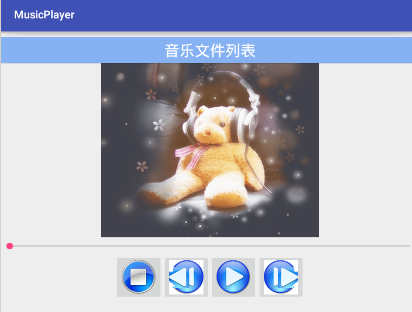 Android 簡易音樂播放器實作:從介面到背景播放
這篇文章整理一個適合入門的 Android 音樂播放器範例,重點在於把播放控制交給背景 Service,再透過 Binder 讓 Activity 與 Service
 Android 進度指示:用 Loading Spinner 告訴使用者「正在忙」
當 App 要跑一段時間的任務(例如讀取網路資料、解壓縮檔案)時,如果畫面完全沒有反應,使用者往往會以為程式當掉了。這時候就需要一個進度條來回饋狀態。 Android
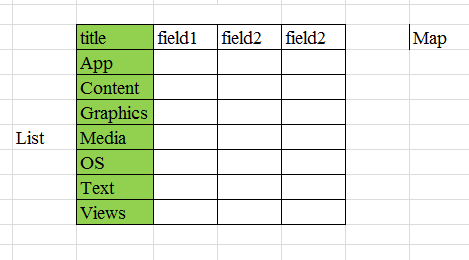 Android ApiDemo 系列二:ListActivity、SimpleAdapter 與 PackageManager
ApiDemo 的主畫面是一個 ListActivity,用來列出大量範例。它以 SimpleAdapter 將資料來源轉換為清單畫面,並透過 PackageManage