

編輯:Android 開發實例
Tab 讓多個頁面共用同一個 Activity 容器,使用者點頁籤即可切換內容。實作 Tab 的固定流程是:在版面配置中用 FrameLayout 準備各頁內容、讓 Activity 繼承 TabActivity、透過 getTabHost() 取得 TabHost,最後用 TabHost 逐一新增頁籤。
最直白的寫法是在 newTabSpec() 之後串上 setIndicator() 設定頁籤文字,再用 setContent() 指向版面配置中某個 View 的 ID。
package com.amaker.test;

import android.app.TabActivity;
import android.os.Bundle;
import android.view.LayoutInflater;
import android.widget.TabHost;
import android.widget.Toast;
import android.widget.TabHost.OnTabChangeListener;

public class MainActivity extends TabActivity {
    @Override
    public void onCreate(Bundle savedInstanceState) {
        super.onCreate(savedInstanceState);

        TabHost th = getTabHost();

        LayoutInflater.from(this).inflate(R.layout.main, th.getTabContentView(), true);

        th.addTab(th.newTabSpec("all").setIndicator("所有通話記錄").setContent(R.id.TextView01));
        th.addTab(th.newTabSpec("ok").setIndicator("已接來電").setContent(R.id.TextView02));
        th.addTab(th.newTabSpec("cancel").setIndicator("未接來電").setContent(R.id.TextView03));

        th.setOnTabChangedListener(
            new OnTabChangeListener() {
                @Override
                public void onTabChanged(String tabId) {
                    Toast.makeText(MainActivity.this, tabId, Toast.LENGTH_LONG).show();
                }
            }
        );
    }
}
注意 inflate() 時傳入的是 th.getTabContentView(),而不是一般 Activity 的 setContentView();TabActivity 內部已經準備好三層容器(TabHost、TabWidget、FrameLayout),我們只是把內容填進最內層。
對應的版面配置用 FrameLayout 疊放三個 TextView,每個 TextView 就是一個頁籤的內容:
<?xml version="1.0" encoding="utf-8"?>
<FrameLayout xmlns:android="https://schemas.android.com/apk/res/android"
    android:id="@+id/FrameLayout01"
    android:layout_width="wrap_content"
    android:layout_height="wrap_content">

    <TextView
        android:id="@+id/TextView01"
        android:layout_width="wrap_content"
        android:layout_height="wrap_content"
        android:text="所有通話記錄"></TextView>

    <TextView
        android:id="@+id/TextView02"
        android:layout_width="wrap_content"
        android:layout_height="wrap_content"
        android:text="已接來電"></TextView>

    <TextView
        android:id="@+id/TextView03"
        android:layout_width="wrap_content"
        android:layout_height="wrap_content"
        android:text="未接來電"></TextView>

</FrameLayout>
當每個頁籤的內容需要依資料動態產生時,做法一就不夠用了。此時讓 Activity 實作 TabHost.TabContentFactory 介面,並在 createTabContent() 中依 tag 回傳對應的 View。
package com.amaker.test;

import java.util.ArrayList;
import java.util.List;

import android.app.TabActivity;
import android.os.Bundle;
import android.view.View;
import android.widget.ArrayAdapter;
import android.widget.ListView;
import android.widget.TabHost;

public class MainActivity extends TabActivity implements
        TabHost.TabContentFactory {

    @Override
    public void onCreate(Bundle savedInstanceState) {
        super.onCreate(savedInstanceState);
        TabHost th = getTabHost();
        th.addTab(th.newTabSpec("all").setIndicator("所有通話記錄").setContent(this));
        th.addTab(th.newTabSpec("ok").setIndicator("已接來電").setContent(this));
        th.addTab(th.newTabSpec("cancel").setIndicator("未接來電").setContent(this));
    }

    public View createTabContent(String tag) {
        ListView lv = new ListView(this);
        List<String> list = new ArrayList<String>();
        list.add(tag);
        if (tag.equals("all")) {
            list.add("tom");
            list.add("kite");
            list.add("rose");
        } else if (tag.equals("ok")) {
            list.add("tom");
            list.add("kite");
        } else {
            list.add("rose");
        }

        ArrayAdapter adapter = new ArrayAdapter(this,
                android.R.layout.simple_list_item_checked, list);
        lv.setAdapter(adapter);
        return lv;
    }
}
這種寫法的好處是 setContent(this) 把 Activity 本身當成內容工廠,createTabContent() 會在該頁籤第一次被顯示時才呼叫,因此不必事先在 XML 裡準備所有 View,也方便依 tag 決定要載入哪些資料。
需留意的是,TabActivity 在新版 Android 已不建議使用,官方 hướng 改以 Fragment 搭配 TabLayout 與 ViewPager 實作,觀念(頁籤綁定內容、切換時通知)則完全相通。
 Android 音訊播放實作:MediaPlayer 與播放控制
MediaPlayer 可用來播放 raw 或指定來源的音訊。建立物件後,即可控制播放、暫停與跳轉。 MediaPlayer mediaPlayer = MediaPla
 Android 登錄頁面實作:表單驗證與錯誤次數控制
登錄頁面的基本需求 登錄畫面通常包含使用者名稱、密碼與登錄按鈕。為了避免暴力嘗試,還可以加入錯誤次數限制。當次數用完時,停用登錄按鈕或提示使用者稍後再試。 建立輸入欄位
 Android Library:模塊化與工程擴展的實踐
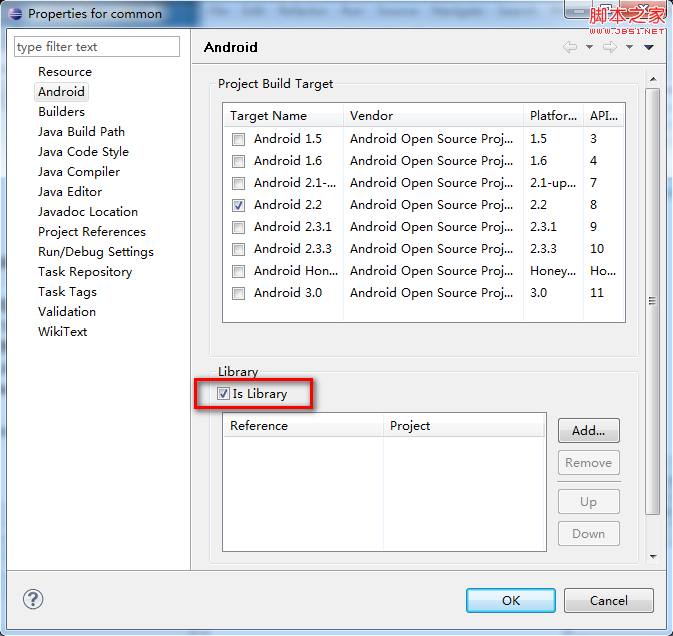
1. 需求從哪來 無論是 .NET 還是 Java 平台,合理的分層架構都是最主流的模塊化思路,dll 與 jar 因此風靡各處。 某天團隊找到我:要在 Android
 Android 登入頁面範例:憑證驗證與剩餘嘗試次數提示
登入畫面的作用是向使用者索取憑證,以取得特定應用的存取權,例如登入社群平台或個人服務。本章說明如何建立這樣一個登入介面,並處理安全性與錯誤嘗試的問題。 首先必須定義兩個