

編輯:Android 開發實例
Gallery 是 Android 相當好用的看圖元件, horizontal 捲動的縮圖列加上中間放大的選中效果,天生就適合做相簿。它替開發者省下不少自幹捲動與對齊的工夫,視覺呈現也頗為體面。本文要示範 Gallery 的基本用法,並用反射機制動態讀取資源中的圖片,省去逐一列 ID 的麻煩。
main.xml 源碼:
- <?xml version="1.0" encoding="utf-8"?>
- <LinearLayout xmlns:android="https://schemas.android.com/apk/res/android"
- android:orientation="vertical"
- android:layout_width="fill_parent"
- android:layout_height="fill_parent"
- >
- <Gallery android:id="@+id/gallery" android:layout_height="fill_parent" android:layout_width="fill_parent"></Gallery>
- </LinearLayout>
Gallery 本身只是個容器,真正決定顯示什麼、怎麼顯示的是 Adapter。這裡自訂 ImageAdapter 繼承 BaseAdapter,在建構子中透過 R.drawable.class.getDeclaredFields() 把所有資源欄位掃過一遍,跳過 icon 之後,用 field.getInt 取出每張圖的 ID 存進 imgList;同時順手用 BitmapFactory 解開圖片、量出寬高,一併存到 imgSizes,供稍後設定 Layout 尺寸使用。
getView 是每次要顯示縮圖時被呼叫的地方。這裡直接 new 一個 ImageView,用 setImageResource 塞入對應圖片,setScaleType(FIT_XY) 讓圖片填滿邊界,最後以 Gallery.LayoutParams 套用前面量到的實際寬高。Gallery 的子項必須使用 Gallery.LayoutParams,用一般的 LinearLayout 參數是不會生效的。
最後掛上 OnItemClickListener,點一下就把目前 position 寫進標題,方便確認事件有沒有觸發。
程式源碼:
- package com.testImageView;
- import java.lang.reflect.Field;
- import java.util.ArrayList;
- import android.app.Activity;
- import android.content.Context;
- import android.graphics.Bitmap;
- import android.graphics.BitmapFactory;
- import android.os.Bundle;
- import android.view.View;
- import android.view.ViewGroup;
- import android.widget.AdapterView;
- import android.widget.BaseAdapter;
- import android.widget.Gallery;
- import android.widget.ImageView;
- import android.widget.AdapterView.OnItemClickListener;
- public class testImageView extends Activity {
- private Gallery mGallery;
- @Override
- public void onCreate(Bundle savedInstanceState) {
- super.onCreate(savedInstanceState);
- setContentView(R.layout.main);
- mGallery = (Gallery)findViewById(R.id.gallery);
- try {
- mGallery.setAdapter(new ImageAdapter(this));
- } catch (IllegalArgumentException e) {
- // TODO Auto-generated catch block
- e.printStackTrace();
- } catch (IllegalAccessException e) {
- e.printStackTrace();
- }
- mGallery.setOnItemClickListener(new OnItemClickListener() {
- public void onItemClick(AdapterView parent, View v, int position, long id) {
- testImageView.this.setTitle(String.valueOf(position));
- }
- });
- }
- /*
- * class ImageAdapter is used to control gallery source and operation.
- */
- private class ImageAdapter extends BaseAdapter{
- private Context mContext;
- private ArrayList<Integer> imgList=new ArrayList<Integer>();
- private ArrayList<Object> imgSizes=new ArrayList<Object>();
- public ImageAdapter(Context c) throws IllegalArgumentException, IllegalAccessException{
- mContext = c;
- //用反射機制來獲取資源中的圖片ID和尺寸
- Field[] fields = R.drawable.class.getDeclaredFields();
- for (Field field : fields)
- {
- if (!"icon".equals(field.getName()))//除了icon之外的圖片
- {
- int index=field.getInt(R.drawable.class);
- //保存圖片ID
- imgList.add(index);
- //保存圖片大小
- int size[]=new int[2];
- Bitmap bmImg=BitmapFactory.decodeResource(getResources(),index);
- size[0]=bmImg.getWidth();size[1]=bmImg.getHeight();
- imgSizes.add(size);
- }
- }
- }
- @Override
- public int getCount() {
- // TODO Auto-generated method stub
- return imgList.size();
- }
- @Override
- public Object getItem(int position) {
- // TODO Auto-generated method stub
- return position;
- }
- @Override
- public long getItemId(int position) {
- // TODO Auto-generated method stub
- return position;
- }
- @Override
- public View getView(int position, View convertView, ViewGroup parent) {
- // TODO Auto-generated method stub
- ImageView i = new ImageView (mContext);
- //從imgList取得圖片ID
- i.setImageResource(imgList.get(position).intValue());
- i.setScaleType(ImageView.ScaleType.FIT_XY);
- //從imgSizes取得圖片大小
- int size[]= new int[2];
- size=(int[]) imgSizes.get(position);
- i.setLayoutParams(new Gallery.LayoutParams(size[0], size[1]));
- return i;
- }
- };
- }
 用ViewPager高仿launcher左右拖動效果
前一篇高仿 launcher 和墨跡天氣的左右拖動效果收穫了不少好評。那一版主要靠自定義 ViewGroup 來實現,寫起來頗為繁瑣。今天改用 ViewPager 這個類
 Android 載入動畫怎麼做?ProgressBar 轉圈指示器完整說明
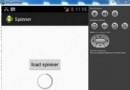
使用者按下一顆按鈕後若畫面毫無反應,通常會以為 App 當掉了。這時候一個小小的旋轉動畫,就能把「不確定要等多久」的焦慮大幅降低。Android 的 ProgressBa
 使用 Android MenuInflater 創建菜單項
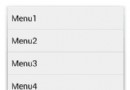
MenuInflater 提供了一種更簡潔的方式來建立選單。相較於在程式碼中逐一新增 MenuItem,我們可以在 res/menu 目錄下建立 XML 菜單檔,再由 A
 Android 中的 TCP 與 UDP 傳輸實作
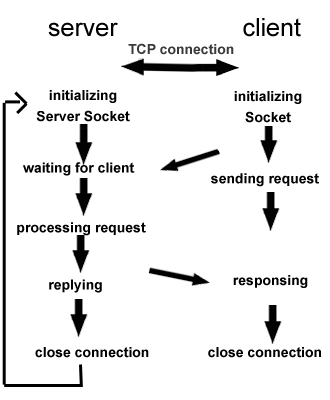
TCP 與 UDP 是 Android 網路開發中常見的傳輸協定。TCP 面向連接、可靠且按序傳輸;UDP 無連接、低延遲,適合理會即時性較高的場景。TCP 通訊概念TC