

編輯:Android 開發實例
當團隊有多台機器在同一個伺服器上開發,每次都從網際網路抓 Android 原始碼既慢又浪費頻寬。把 OMAP-Android 的程式庫在本機做一份鏡像,成員就能在內網快速 clone,不必再繞外網。
本文假設本機伺服器已經裝好 repo、git 與一台 git server。若尚未準備,請參考:
重要:如果你在防火牆後面工作,建立鏡像時必須用到 corkscrew。設定 corkscrew 時有個關鍵細節——要讓 git 僅在 clone kernel.org 與 omapzoom.org 時才經過 corkscrew。否則當你之後要從本機鏡像做 clone,git 也會硬走防火牆,結果找不到你的內網伺服器。
在本機伺服器上開一個目錄放鏡像。請注意 git server 必須設定為要對外匯出這個目錄。舉例來說,若 git server 匯出的是 /pub/gittrees,那麼可以這樣建:
接著執行:
cd /pub/gittrees/omap-android/sync 完成後還有一步不能省:要改 OMAP-Android 的 manifest,讓成員 clone 時被導向本機伺服器而不是外部站台。做法是先 clone 一份 manifest 下來(以一般 user 身分即可,只要在鏡像所在目錄有寫入權限)。以下範例假設本機 IP 是 192.168.0.100,且 git server 以 --base-path=/pub/gittrees 啟動:
編輯 ~/omap-android-manifest.git/default.xml,把遠端 korg 與 omap 的 fetch 位置改成鏡像的 IP 與目錄名稱,例如:
最後把這個改動 commit 並推回上層 git 樹(下方 user 為修改 manifest 的使用者名稱):
cd ~/omap-android-manifest.git鏡像設定至此完成。
同一個網路上的開發機只要執行以下指令即可:
cd ~重要:之後若用 repo sync 更新鏡像,而 manifest 期間被上游改動過,這次 sync 會把你先前對 default.xml 做的修改覆蓋掉。所以每次更新鏡像前,先確認 manifest 是否有變動。
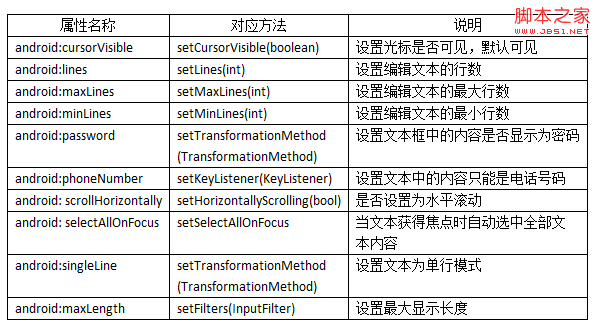 Android EditView 控件常用屬性與監聽技巧全解析
什麼是 EditView 在 Android 的界面體系裡,EditView(正式名稱為 EditText)扮演著「可輸入文本框」的角色。它並不是一個全新的控件,而是繼承
 Android 教學:用 RadioButton 實作圖文上下或左右排列
在 Android 開發中,經常會需要用到同時帶有圖片與文字的按鈕。本文就來示範如何利用 RadioButton,輕鬆做出圖片與文字「上下排列」或「左右排列」的效果。程式
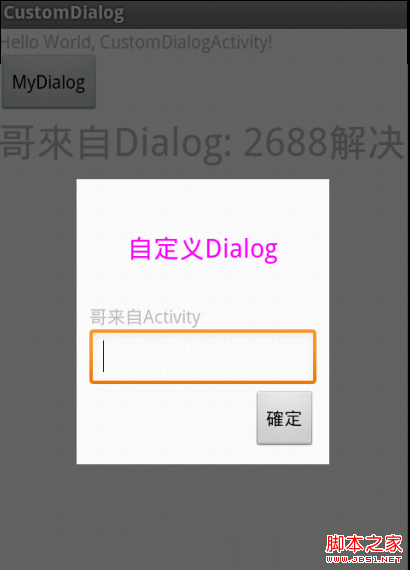 Android 控件封裝:把 Dialog 包成可重複使用的自定義元件
自定義 Dialog 幾乎每個專案都會寫,但每次都寫一遍實在混亂。與其反覆拼湊,不如一次封裝好,以後直接 copy 使用。 主 Activity public c
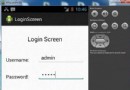 Android 登入畫面完整教學:從 inputType 密碼欄到錯誤次數計數器
登入應用程式的畫面,用來詢問憑證以登入某個特定的應用,例如 Facebook、微博等服務。本章要介紹的是:如何建立一個登入介面,以及如何處理安全性與錯誤嘗試這兩件事。