編輯:Android開發教程
Button,ImageButton,EditText,ChcekBox,ToggleButton
除了最常用的TextView,Android還提供了一些其他的基本控件。
Button
ImageButton
EditText
CheckBox
RadioGroup和RadioButton
ToggleButton
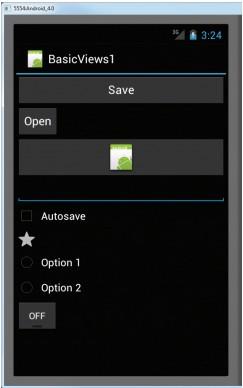
下面的例子,展示如何使用這些基本控件。
1. 創建一個工程:BasicViews。
2. main.xml 中的代碼。
<?xml version="1.0" encoding="utf-8"?>
<LinearLayout xmlns:android="http://schemas.android.com/apk/res/android"
    android:layout_width="fill_parent"
    android:layout_height="fill_parent"
    android:orientation="vertical" >

<Button android:id="@+id/btnSave"
    android:layout_width="fill_parent"
    android:layout_height="wrap_content"
    android:text="@string/save"
    android:onClick="btnSaved_clicked"/>

<Button android:id="@+id/btnOpen"
    android:layout_width="wrap_content"
    android:layout_height="wrap_content"
    android:text="Open" />

<ImageButton android:id="@+id/btnImg1"
    android:layout_width="fill_parent"
    android:layout_height="wrap_content"
    android:src="@drawable/ic_launcher" />

<EditText android:id="@+id/txtName"
    android:layout_width="fill_parent"
    android:layout_height="wrap_content" />

<CheckBox android:id="@+id/chkAutosave"
    android:layout_width="fill_parent"
    android:layout_height="wrap_content"
    android:text="Autosave" />

<CheckBox android:id="@+id/star"
    style="?android:attr/starStyle"
    android:layout_width="wrap_content"
    android:layout_height="wrap_content" />


<RadioGroup android:id="@+id/rdbGp1"
    android:layout_width="fill_parent"
    android:layout_height="wrap_content"
    android:orientation="vertical" >

    <RadioButton android:id="@+id/rdb1"
        android:layout_width="fill_parent"
        android:layout_height="wrap_content"
        android:text="Option 1" />

    <RadioButton android:id="@+id/rdb2"
        android:layout_width="fill_parent"
        android:layout_height="wrap_content"
        android:text="Option 2" />

</RadioGroup>


<ToggleButton android:id="@+id/toggle1"
    android:layout_width="wrap_content"
    android:layout_height="wrap_content" />

</LinearLayout>
3. F11調試。
 Android開發入門(五)屏幕組件 5.6 FrameLayout幀布局
FrameLayout就是屏幕上的一個“定位器”,可以使用它去顯示一個單一的視圖。被添加到FrameLayout上 的視圖views總是被固定在這
 Android簡明開發教程一:概述
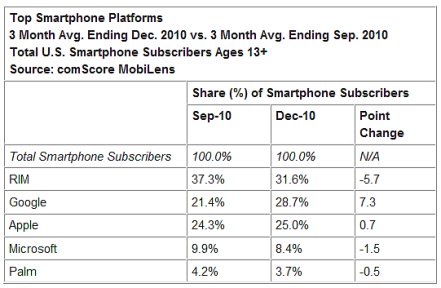
自Google推出Android手機平台以來,采用Android作為平台的手機和平板電腦越來越普及。下圖是2010年9月和12月三個月幾 個主流智能手機平台在美國的市場占
 android安全問題(三) 釣魚程序
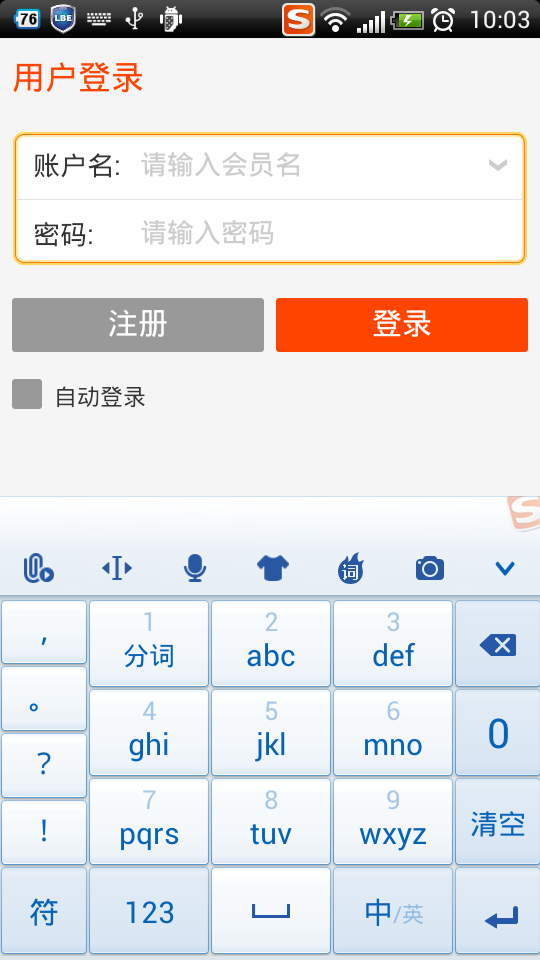
這個話題是繼續android安全問題(二) 程序鎖延伸的之前我已經展示了如何制作程序鎖。當打 開指定應用的時候,彈出一個密碼頁面。程序鎖的話題雖然是和安全相關,但是這應該
 Android官方提供的支持不同屏幕大小的全部方法
本文將告訴你如何讓你的應用程序支持各種不同屏幕大小,主要通過以下幾種辦法:讓你的布局 能充分的自適應屏幕根據屏幕的配置來加載合適的UI布局確保正確的布局應用在正確的設備屏