編輯:Android開發教程
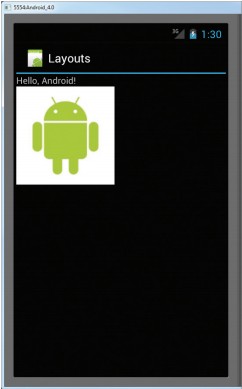
FrameLayout就是屏幕上的一個“定位器”,可以使用它去顯示一個單一的視圖。被添加到FrameLayout上 的視圖views總是被固定在這個布局的左上角。考慮以下的代碼:
<?xml version="1.0" encoding="utf-8"?>
<RelativeLayout xmlns:android="http://schemas.android.com/apk/res/android"
    android:id="@+id/RLayout"
    android:layout_width="fill_parent"
    android:layout_height="fill_parent" >

    <TextView
        android:id="@+id/lblComments"
        android:layout_width="wrap_content"
        android:layout_height="wrap_content"
        android:layout_alignParentLeft="true"
        android:layout_alignParentTop="true"
        android:text="Hello, Android!" />

    <FrameLayout
        android:layout_width="wrap_content"
        android:layout_height="wrap_content"
        android:layout_alignLeft="@+id/lblComments"
        android:layout_below="@+id/lblComments"
        android:layout_centerHorizontal="true" >

        <ImageView
            android:layout_width="wrap_content"
            android:layout_height="wrap_content"
            android:src="@drawable/droid" >
        </ImageView>
    </FrameLayout>

</RelativeLayout>
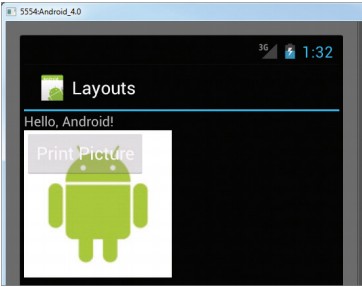
這裡,在RelativeLayout中內嵌了一個FrameLayuout,在FrameLayuout 中內嵌了一個ImageView。效果圖:
但是,如果想要在這個FrameLayuout中添加另外的view(比如一個Button),那麼這個view就會重疊在“之 前的”view上面(本例中是顯示圖片的ImageView)。代碼:
<?xml version="1.0" encoding="utf-8"?>
<RelativeLayout xmlns:android="http://schemas.android.com/apk/res/android"
    android:id="@+id/RLayout"
    android:layout_width="fill_parent"
    android:layout_height="fill_parent" >

    <TextView
        android:id="@+id/lblComments"
        android:layout_width="wrap_content"
        android:layout_height="wrap_content"
        android:layout_alignParentLeft="true"
        android:layout_alignParentTop="true"
        android:text="Hello, Android!" />

    <FrameLayout
        android:layout_width="wrap_content"
        android:layout_height="wrap_content"
        android:layout_alignLeft="@+id/lblComments"
        android:layout_below="@+id/lblComments"
        android:layout_centerHorizontal="true" >

        <ImageView
            android:layout_width="wrap_content"
            android:layout_height="wrap_content"
            android:src="@drawable/droid" >
        </ImageView>

        <Button
            android:layout_width="124dp"
            android:layout_height="wrap_content"
            android:text="Print Picture" />
    </FrameLayout>

</RelativeLayout>
最終效果圖:
查看本欄目更多精彩內容:http://www.bianceng.cn/OS/extra/
 Android開發入門(一)詳解活動 1.6 顯示復雜對話框
除了“對話框”進度條,也可以創建一個顯示“操作進度”的對話框,例如顯示正在下載的狀態。1. 創建一個工程:Dialog。2
 Android LibGDX游戲引擎開發教程(八) 中文字體的顯示和繪制(下)
在上一篇的文章中,我們介紹了Hiero這個非常好用工具的使用,但是LIbgdx的BitmapFont不支持多圖,常 用漢字3500個,你總不能用hiero自己做吧,那怎麼
 Mono for Android安裝配置破解
【針對4.2.5版本】對移動開發一直比較感興趣,可是沒有學習過JAVA,聽說了Mono項目,網上也已經有了破解文件,就 決定自己裝一個學做開發。本來Mono for An
 Android ApiDemos示例解析(23) App->Intents
Intents 這個例子的代碼非常簡單:Intent intent = new Intent(Intent.ACTION_GET_CONTENT); intent