編輯:Android開發教程
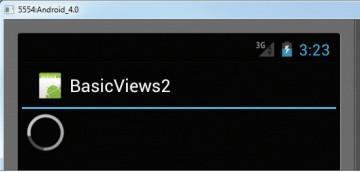
當執行某些正在處理的任務時,ProgressBar提供了一個可視化的反饋。例如,你在從web服務器下載數據 ,然後需要更新下載的狀態。在這種情況下,ProgressBar就是一個很好的選擇。下面的例子,展示如何去使 用ProgressBar。
1. 創建一個工程,BasicViews2。
2. main.xml中的代碼。
<?xml version="1.0" encoding="utf-8"?>
<LinearLayout xmlns:android="http://schemas.android.com/apk/res/android"
    android:layout_width="fill_parent"
    android:layout_height="fill_parent"
    android:orientation="vertical" >

<ProgressBar android:id="@+id/progressbar"
    android:layout_width="wrap_content"
    android:layout_height="wrap_content" />

</LinearLayout>
3、Basic2Activity.java中的代碼。
public class BasicViews2Activity extends Activity {
    static int progress;
    ProgressBar progressBar;
    int progressStatus = 0;
    Handler handler = new Handler();

    /** Called when the activity is first created. */
    @Override
    public void onCreate(Bundle savedInstanceState) {
        super.onCreate(savedInstanceState);
        setContentView(R.layout.main);

        progress = 0;
        progressBar = (ProgressBar) findViewById(R.id.progressbar);

        //---do some work in background thread---
        new Thread(new Runnable()
        {
            public void run()
            {
                //?do some work here?
                while (progressStatus < 10)
                {
                    progressStatus = doSomeWork();

                }

                //---hides the progress bar---
                handler.post(new Runnable()
                {
                    public void run()
                    {
                        //---0 - VISIBLE; 4 - INVISIBLE; 8 - GONE---
                        progressBar.setVisibility(View.GONE);
                    }
                });
            }

            //---do some long running work here---
            private int doSomeWork()
            {
                try {
                    //---simulate doing some work---
                    Thread.sleep(500);
                } catch (InterruptedException e)
                {
                    e.printStackTrace();
                }
                return ++progress;
            }
        }).start();
    }
}
4、F11調試,會看見ProgressBar的動畫,5秒之後,動畫消失。
 Android中如何顯示Emoji表情字符
一、下載AndroidEmoji.ttf字體地址1:Github Android Platform地址2:AndroidEmoji.ttf.zip二、使用2.1將字體拷貝
 Android開發入門(十)基本控件 10.4 AutoCompleteTextView
AutoCompleteTextView和EditText很相似,事實上,AutoCompleteTextView就是EditText的子類。使用 AutoComplet
 android FragmentTabhost實現選項卡
在Android3.0之後,google創造了Fragment,因此原來的Tabhost已經不推薦使用了,現在一般推薦使用FragmentTabhost。google考慮
 android中window、view與activity的關系
通過討論這個問題,我們能夠見識到google是對面向對象模式的理解,能夠理解android底層的一些調用。 這也是一道很常見的面試題。我們這篇文章就來解決這四個問題:An