編輯:Android開發教程
我們已經知道,一個activity通過使用Intent對象調用另外一個activity。為了能讓其他activity做出回 應,還需要在AndroidManifest.xml中配置<intent-filter>元素,同時指定action和category。例如 :
<intent-filter >
    <action android:name="com.manoel.SecondActivity" />
    <category android:name="android.intent.category.DEFAULT" />
</intent-filter>
1. 新建一個工程,創建一個類:MyBrowserActivity.java。同時在 res/layout中創建一個xml文件:brwoser.xml。
2. AndroidManifest.xml
<?xml version="1.0" encoding="utf-8"?>
<manifest xmlns:android="http://schemas.android.com/apk/res/android"
    package="com.manoel.Intents"
    android:versionCode="1"
    android:versionName="1.0" >

    <uses-sdk android:minSdkVersion="14" />
    <uses-permission android:name="android.permission.CALL_PHONE"/>
    <uses-permission android:name="android.permission.INTERNET"/>
    <application
        android:icon="@drawable/ic_launcher"
        android:label="@string/app_name" >
        <activity
            android:label="@string/app_name"
            android:name=".IntentsActivity" >
            <intent-filter >
                <action android:name="android.intent.action.MAIN" />
                <category android:name="android.intent.category.LAUNCHER" />
            </intent-filter>
        </activity>


        <activity android:name=".MyBrowserActivity"
                  android:label="@string/app_name">
            <intent-filter>
                <action android:name="android.intent.action.VIEW" />
                <action android:name="com.manoel.MyBrowser" />
                <category android:name="android.intent.category.DEFAULT" />
                <data android:scheme="http" />
            </intent-filter>
        </activity>


    </application>

</manifest>
3. 在main.xml中添加一個Button元素。
<?xml version="1.0" encoding="utf-8"?>
<LinearLayout xmlns:android="http://schemas.android.com/apk/res/android"
    android:layout_width="fill_parent"
    android:layout_height="fill_parent"
    android:orientation="vertical" >

    <Button
        android:id="@+id/btn_launchMyBrowser"
        android:layout_width="fill_parent"
        android:layout_height="wrap_content"
        android:onClick="onClickLaunchMyBrowser"
        android:text="Launch My Browser" />

</LinearLayout>
4.IntentsActivity.java
public class IntentsActivity

extends Activity {

    /** Called when the activity is first created. */
    @Override
    public void onCreate(Bundle savedInstanceState) {
        super.onCreate(savedInstanceState);
        setContentView(R.layout.main);
    }

    public void onClickLaunchMyBrowser(View view) {
        Intent i = new Intent("com.manoel.MyBrowser");
                i.setData(Uri.parse("http://www.amazon.com"));
                startActivity(i);
    }

}
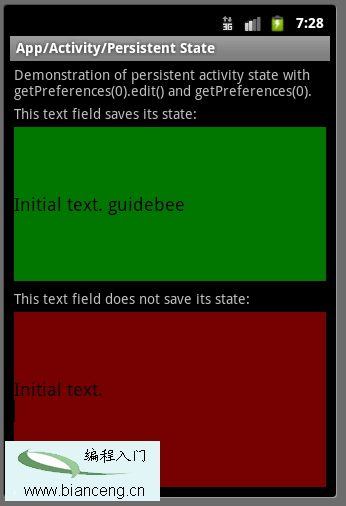 Android ApiDemos示例解析(9) App-Activity-Persistent State
Android 提供了多種存儲數據的方法,其中最簡單的是使用Shared Preferences. Shared Preferences 可以存儲 Key/value 對
 Android實現Parcelable對象序列化的實例
bundle.putParcelable可以實現傳遞對象,但是這個對象的類必須實現Parcelable接口才能夠使用。下面是一個簡單的在Activity之間傳遞對象的例子
 Android中如何實現Socket大文件斷點上傳
什麼是Socket?所謂Socket通常也稱作“套接字”,用於描述IP地址和端口,是一個通信連的句柄,應用程序通常通過“套接字&rdq
 Android LibGDX游戲引擎開發教程(四) 各個模塊的詳細介紹
博主思來想去,覺得還是想把這個教程寫的再細一點,讓讀者能夠更清楚的了解LibGDX這個游戲引擎整體 的架構,所以也就總結出了這樣一篇文章。一、模塊概述作為游戲開發人員,我