編輯:Android開發教程
相信每個項目都會有用戶反饋建議等功能,這個實現的方法很多,下面是我實現的方法,供大家交流。首 先看具體界面,三個字段。名字,郵箱為選填,可以為空,建議不能為空。如有需要可以給我留言。
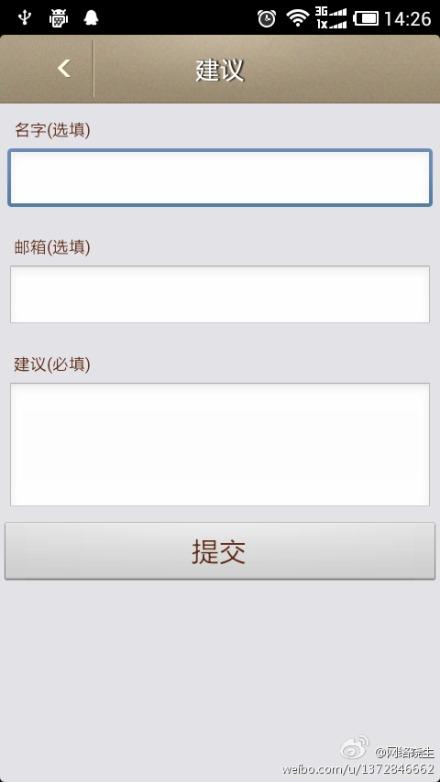
下面貼出布局代碼,這裡用到一個<include layout="@layout/uphead">就是把另外一個 布局文件引入到這個布局中。
<?xml version="1.0" encoding="utf-8"?>
<LinearLayout xmlns:android="http://schemas.android.com/apk/res/android"
    android:layout_width="match_parent"
    android:layout_height="match_parent"
    android:orientation="vertical"
    android:background="@color/bg_gray" >
    <include layout="@layout/uphead"/>

    <!-- Name Label -->
    <TextView android:layout_width="fill_parent"
        android:layout_height="wrap_content"
        android:text="名字(選填)"
        android:paddingLeft="10dip"
        android:paddingRight="10dip"
        android:textColor="@color/coffee"
        android:paddingTop="10dip"
        android:textSize="12sp"/>

    <!-- Input Name -->
    <EditText android:id="@+id/inputName"
        android:layout_width="fill_parent"
        android:layout_height="wrap_content"
        android:layout_margin="5dip"
        android:layout_marginBottom="15dip"
        android:singleLine="true"/>

    <!-- Price Label -->
    <TextView android:layout_width="fill_parent"
        android:layout_height="wrap_content"
        android:text="郵箱(選填)"
        android:paddingLeft="10dip"
        android:paddingRight="10dip"
        android:textColor="@color/coffee"
        android:paddingTop="10dip"
        android:textSize="12sp"/>

    <!-- Input Price -->
    <EditText android:id="@+id/inputEmail"
        android:layout_width="fill_parent"
        android:layout_height="wrap_content"
        android:layout_margin="5dip"
        android:layout_marginBottom="15dip"
        android:singleLine="true"/>

    <!-- Description Label -->
    <TextView android:layout_width="fill_parent"
        android:layout_height="wrap_content"
        android:text="建議(必填)"
        android:paddingLeft="10dip"
        android:paddingRight="10dip"
        android:paddingTop="10dip"
        android:textColor="@color/coffee"
        android:textSize="12sp"/>

    <!-- Input description -->
    <EditText android:id="@+id/inputDesc"
        android:layout_width="fill_parent"
        android:layout_height="wrap_content"
        android:layout_margin="5dip"
        android:layout_marginBottom="15dip"
        android:lines="4"
        android:gravity="top"/>

    <!-- Button Create Product -->
    <Button android:id="@+id/btnCreateProduct"
        android:layout_width="fill_parent"
        android:layout_height="wrap_content"
        android:text="提交"
        android:textSize="20sp"
        android:textColor="@color/coffee"
        />

</LinearLayout>
 Android GUI系統之SurfaceFlinger(9) Project Butter黃油計劃
1.1 SurfaceFlinger從這一小節開始,我們正式切入SurfaceFlinger的分析。為了保持講解的連貫性,部分內容可能在前面的章節中已經有所涉及了,接下來
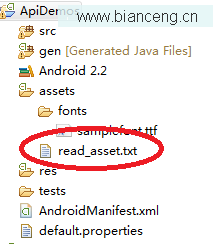 Android ApiDemos示例解析(47):Content->Assets->Read Asset
android.Content包定義了一些類,這些類主要用於在設備上訪問或是發布數據,主要有三個包構成。Content 共享 (android.content) 主要用於
 Android webview通過http get下載文件下載兩次的現象和解決方法
一、現象一般通過Android webview進行下載文件的方法是1.重寫DownloadListener的onDownloadStart方法,在onDownloadSt
 Android ApiDemos示例解析 (27)
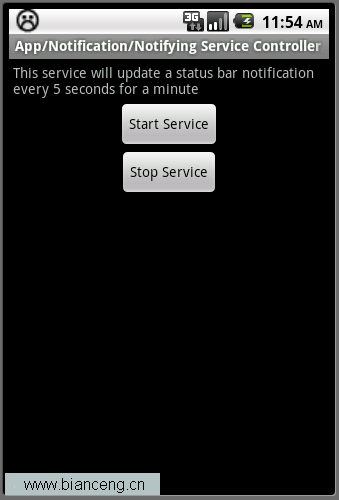
App->Notification->Notifying Service Controller這個例子介紹了如何在Service中使用Notification