編輯:Android開發教程
1.介紹
在制作android應用的時候,常常用到很多string,就是一些文字,這裡介紹一種方法,將所有string封裝在一個string.xml文件中,通過styles.xml控制string的大小等屬性。在代碼中,只要調用string的id即可。這樣符合面向對象的編程思想,而且也能使android應用更好的適應各種分辨率的手機!
2.具體實現
首先,我們在value文件夾下建立string.xml用於存放string,建立styles.xml用於控制string的屬性。(無視其他xml)
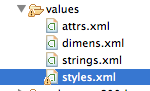
在string.xml中,我們聲明一些string,注意name
<?xml version="1.0" encoding="utf-8"?>
<resources>

    <string name="hello">Hello World, GameActivity!</string>
    <string name="app_name">镖镖必達</string>
    <string name="help">幫助信息\n此游戲是一款單指飛镖游戲\n點擊屏幕發射飛镖\n連擊可以獲得更高分數</string>
    <string name="about">關於游戲\n\n薊門邊IT創意工作室出品\nRhythmMaker原班人馬打造\n單指RPG手游巅峰之作\n技術:zixiyaoren@gmail.com
        \n美術:Rou7in@gmail.com</string>
    <string name="title_activity_other">OtherActivity</string>
    <string name="action_settings">Settings</string>
    <string name="hello_world">Hello world!</string>

</resources>
在styles.xml中
<resources>

    <!--
        Base application theme, dependent on API level. This theme is replaced
        by AppBaseTheme from res/values-vXX/styles.xml on newer devices.
    -->
    <style name="AppBaseTheme" parent="android:Theme.Light">
        <!--
            Theme customizations available in newer API levels can go in
            res/values-vXX/styles.xml, while customizations related to
            backward-compatibility can go here.
        -->
    </style>

    <!-- Application theme. -->
    <style name="AppTheme" parent="AppBaseTheme">
        <!-- All customizations that are NOT specific to a particular API-level can go here. -->
    </style>
<style name="label_white">
        <item name="android:textSize">38px</item>//字體大小
        <item name="android:textColor">#0000FF</item>//顏色是藍色
        <item name="android:gravity">center</item>//居中
        <item name="android:textStyle">bold</item>//加粗
    </style>

</resources>
配置完xml文件,我們看看在代碼中怎麼調用!
比如我們要調用string.xml中命名為help的string。只要在對象中類似於這種setText(R.string.help);調用方法就可以,跟圖片的用法是一樣的!
查看本欄目更多精彩內容:http://www.bianceng.cn/OS/extra/
 Android版本的KMPlayer
PC上流行的播放器KMPlayer開始注重移動平台,推出了面向安卓的版本。Android版KMPlayer支持Android 4.0及以上版本,其特性包括:媒體庫功能,方
 Android與db4o的完美結合:Password Manager
項目簡介這裡提供的Password Manager項目是Steven Osborn編寫的PasswordSafe(在Apache License下發行)的改寫版,目前已經
 Android ApiDemos示例解析(28):App->Notification->NotifyWithText
除了使用Notification之外,Toast也可以用來通知用戶某件事發生了,Toast為一個透明的對話框,可以在屏幕上顯示幾秒 鐘後自動消失。功能上有點類似Tool
 Android的進程和線程模型
Android進程模型在安裝Android應用程序的時候,Android會為每個程序分配一個Linux用戶ID,並設置相應的權限,這樣其它應用程序就不能訪問此應用程序所擁