

編輯:Android 資訊
在 Android 專案裡,網路請求幾乎無處不在。把拉回來的字串響應、串流資料或圖片好好留下來,一方面能省下用戶的行動數據,另一方面也能讓弱網甚至離線場景下的頁面不至於開天窗,順帶還能明顯改善整體的反應速度。只要聊到緩存,記憶體這一層肯定跑不掉,這裡選用 LruCache 來看家。
麻煩的是 LruCache 再快也只是活在行程裡,App 一被系統回收就什麼都不剩。想要真正持久化,就得把資料落到檔案系統上,也就是所謂的 Disk 級緩存,寫進內部儲存或 SD 卡。這部分我們借用 DiskLruCache 這個工具類——顧名思義,它用 LRU 演算法把資料往磁碟上排隊存放,超出容量配額就淘汰最久沒被摸過的那筆。
先看一眼簡單的實作演示:
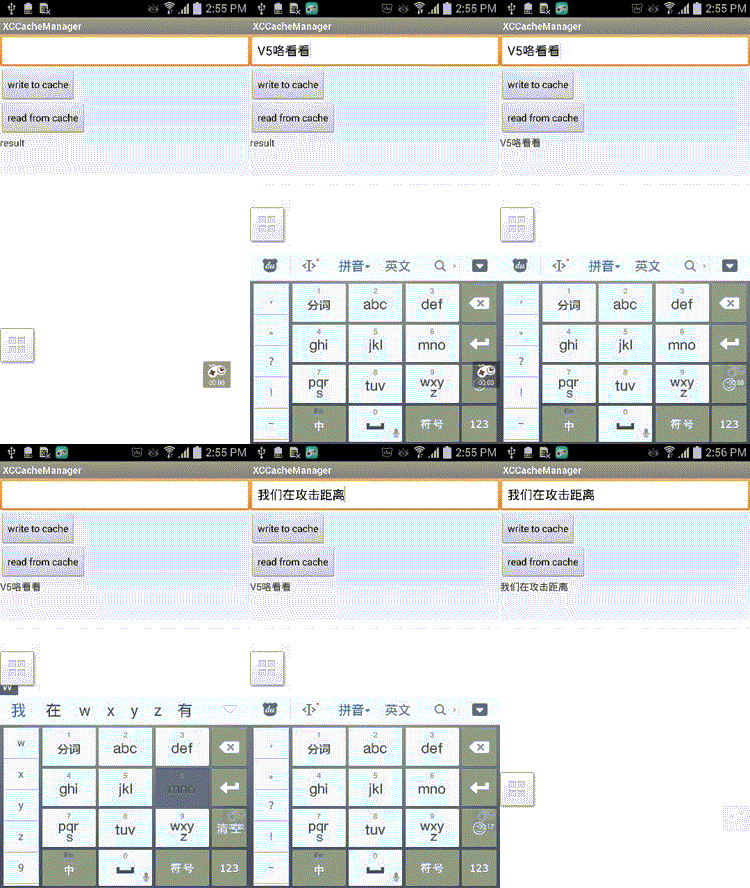
不論記憶體還是磁碟,本質上都是「讀」與「寫」兩件事,所以先抽出一個統一的契約——Cache 介面:
public interface Cache {
    String get(final String key);
    void put(final String key, final String value);
    boolean remove(final String key);
}
接著讓 MemoryCache 實作這個介面,內部由 LruCache 承擔實際工作:
/**
 * 記憶體緩存類
 * Created by caizhiming on 2015/12/4.
 */
public class MemoryCache implements Cache {

    private LruCache<String, String> mMemoryLruCache;
    private EvictedListener mEvictedListener;

    public MemoryCache() {
        init();
    }

    public MemoryCache(EvictedListener listener) {
        init();
        this.mEvictedListener = listener;
    }

    public void setEvictedListener(EvictedListener listener) {
        this.mEvictedListener = listener;
    }

    public boolean hasEvictedListener() {
        return mEvictedListener != null;
    }

    private void init() {
        // 計算可使用的最大記憶體
        final int maxMemory = (int) (Runtime.getRuntime().maxMemory() / 1024);
        // 取可用空間的四分之一作為緩存上限
        final int cacheSize = maxMemory / 4;

        mMemoryLruCache = new LruCache<String, String>(cacheSize) {
            @Override
            protected int sizeOf(String key, String value) {
                return value.getBytes().length;
            }

            @Override
            protected void entryRemoved(boolean evicted, String key, String oldValue, String newValue) {
                if (evicted && mEvictedListener != null) {
                    mEvictedListener.handleEvictEntry(key, oldValue);
                }
            }
        };
    }

    @Override
    public String get(String key) {
        return mMemoryLruCache.get(key);
    }

    @Override
    public void put(String key, String value) {
        mMemoryLruCache.put(key, value);
    }

    @Override
    public boolean remove(String key) {
        return Boolean.parseBoolean(mMemoryLruCache.remove(key));
    }

    /**
     * 當記憶體緩存淘汰資料時回呼,
     * 由 CacheManager 的 MEMORY_FIRST 策略用來把資料下沉到磁碟
     */
    public interface EvictedListener {
        void handleEvictEntry(String evictKey, String evictValue);
    }
}
這裡有兩個值得留意的細節:容量取「最大可用記憶體的四分之一」是社群裡比較通行的保守做法;sizeOf 以位元組數計量,讓 LRU 的淘汰判斷建立在真實佔用而非「筆數」上。而 EvictedListener 是後續「記憶體滿了就落磁碟」的關鍵鉤子。
同樣實作 Cache 介面,把讀寫背後的引擎換成 DiskLruCache:
/**
 * Disk 磁碟緩存類
 * Created by caizhiming on 2015/12/4.
 */
public class DiskCache implements Cache {

    private DiskLruCache mDiskLruCache = null;

    public DiskCache(Context context) {
        init(context);
    }

    /** 初始化 DiskLruCache */
    public void init(Context context) {
        try {
            File cacheDir = getDiskCacheDir(context, "http_cache");
            if (!cacheDir.exists()) {
                cacheDir.mkdirs();
            }
            mDiskLruCache = DiskLruCache.open(cacheDir, getAppVersion(context), 1, 10 * 1024 * 1024);
        } catch (IOException e) {
            e.printStackTrace();
        }
    }

    @Override
    public String get(String key) {
        try {
            DiskLruCache.Snapshot snapShot = mDiskLruCache.get(hashKeyForDisk(key));
            if (snapShot != null) {
                return snapShot.getString(0);
            }
        } catch (IOException e) {
            e.printStackTrace();
        }
        return null;
    }

    @Override
    public void put(String key, String value) {
        DiskLruCache.Editor editor = null;
        try {
            editor = mDiskLruCache.edit(hashKeyForDisk(key));
            if (editor != null) {
                editor.set(0, value);
                editor.commit();
            }
            mDiskLruCache.flush();
        } catch (IOException e) {
            e.printStackTrace();
        }
    }

    @Override
    public boolean remove(String key) {
        try {
            return mDiskLruCache.remove(hashKeyForDisk(key));
        } catch (IOException e) {
            e.printStackTrace();
        }
        return false;
    }

    /** 從磁碟讀回一張圖片 */
    public Bitmap getImageCache(String key) {
        try {
            DiskLruCache.Snapshot snapShot = mDiskLruCache.get(hashKeyForDisk(key));
            if (snapShot != null) {
                InputStream is = snapShot.getInputStream(0);
                return BitmapFactory.decodeStream(is);
            }
        } catch (IOException e) {
            e.printStackTrace();
        }
        return null;
    }

    /** 背景執行緒下載並寫入圖片緩存 */
    public void putImageCache(final String key) {
        new Thread(new Runnable() {
            @Override
            public void run() {
                try {
                    DiskLruCache.Editor editor = mDiskLruCache.edit(hashKeyForDisk(key));
                    if (editor != null) {
                        OutputStream outputStream = editor.newOutputStream(0);
                        if (downloadUrlToStream(key, outputStream)) {
                            editor.commit();
                        } else {
                            editor.abort();
                        }
                    }
                    mDiskLruCache.flush();
                } catch (IOException e) {
                    e.printStackTrace();
                }
            }
        }).start();
    }

    private boolean downloadUrlToStream(String urlString, OutputStream outputStream) {
        HttpURLConnection urlConnection = null;
        BufferedOutputStream out = null;
        BufferedInputStream in = null;
        try {
            URL url = new URL(urlString);
            urlConnection = (HttpURLConnection) url.openConnection();
            in = new BufferedInputStream(urlConnection.getInputStream(), 8 * 1024);
            out = new BufferedOutputStream(outputStream, 8 * 1024);
            int b;
            while ((b = in.read()) != -1) {
                out.write(b);
            }
            return true;
        } catch (IOException e) {
            e.printStackTrace();
        } finally {
            if (urlConnection != null) {
                urlConnection.disconnect();
            }
            CloseUtils.closeCloseable(out);
            CloseUtils.closeCloseable(in);
        }
        return false;
    }

    /** 磁碟緩存的 key 必須是合法檔名,因此統一做一次 MD5 */
    public String hashKeyForDisk(String key) {
        String cacheKey;
        try {
            final MessageDigest mDigest = MessageDigest.getInstance("MD5");
            mDigest.update(key.getBytes());
            cacheKey = bytesToHexString(mDigest.digest());
        } catch (NoSuchAlgorithmException e) {
            cacheKey = String.valueOf(key.hashCode());
        }
        return cacheKey;
    }

    private String bytesToHexString(byte[] bytes) {
        StringBuilder sb = new StringBuilder();
        for (int i = 0; i < bytes.length; i++) {
            String hex = Integer.toHexString(0xFF & bytes[i]);
            if (hex.length() == 1) {
                sb.append('0');
            }
            sb.append(hex);
        }
        return sb.toString();
    }

    /** 優先使用外部快取目錄,不滿足條件時退回內部快取目錄 */
    public File getDiskCacheDir(Context context, String uniqueName) {
        String cachePath;
        if (Environment.MEDIA_MOUNTED.equals(Environment.getExternalStorageState())
                || !Environment.isExternalStorageRemovable()) {
            cachePath = context.getExternalCacheDir().getPath();
        } else {
            cachePath = context.getCacheDir().getPath();
        }
        return new File(cachePath + File.separator + uniqueName);
    }

    /** DiskLruCache 用版本號判斷是否需要清理舊資料 */
    public int getAppVersion(Context context) {
        try {
            PackageInfo info = context.getPackageManager()
                    .getPackageInfo(context.getPackageName(), 0);
            return info.versionCode;
        } catch (PackageManager.NameNotFoundException e) {
            e.printStackTrace();
        }
        return 1;
    }
}
三個實務上的坑值得記住:URL 不能直接當檔名,必須雜湊;open() 的版本號一旦變動,舊快取會被整體清掉,升級時要意識到這件事;寫入後記得 flush(),否則資料可能還停在緩衝區裡。
(1)用執行緒池承載讀寫
磁碟 I/O 放到主執行緒上無疑是 ANR 邀請函。這裡用固定長度的執行緒池,執行緒數對齊 CPU 核心數:
private static XCCacheManager mInstance = null;
private Strategy mStrategy = Strategy.MEMORY_FIRST;

private ExecutorService mExecutor = null;   // 執行緒池
private MemoryCache mMemoryCache;           // 記憶體緩存
private DiskCache mDiskCache;               // 磁碟緩存

private void init(Context context) {
    mExecutor = Executors.newFixedThreadPool(Runtime.getRuntime().availableProcessors());
    mDiskCache = new DiskCache(context);
    mMemoryCache = new MemoryCache();
}
(2)單例 + 應用級 Context
public static XCCacheManager getInstance(Context context, Strategy strategy) {
    if (mInstance == null) {
        synchronized (XCCacheManager.class) {
            if (mInstance == null) {
                mInstance = new XCCacheManager(context.getApplicationContext(), strategy);
            }
        }
    } else {
        mInstance.setStrategy(strategy);
    }
    return mInstance;
}
傳入 applicationContext 而不是 Activity,可以避免記憶體洩漏 this 的老問題。
(3)三種緩存策略
enum Strategy {
    MEMORY_ONLY(0),
    MEMORY_FIRST(1),
    DISK_ONLY(3);

    int id;

    Strategy(int id) {
        this.id = id;
    }
}
預設走 MEMORY_FIRST。業務對即時性要求極高的場景可以只讀記憶體;只想驗證磁碟邏輯時則用 DISK_ONLY。
(4)按策略讀取
/**
 * 從緩存中讀取 value
 */
public String readCache(final String key) {
    Future<String> ret = mExecutor.submit(new Callable<String>() {
        @Override
        public String call() throws Exception {
            switch (mStrategy) {
                case MEMORY_ONLY:
                    return mMemoryCache.get(key);
                case MEMORY_FIRST:
                    String result = mMemoryCache.get(key);
                    return result != null ? result : mDiskCache.get(key);
                case DISK_ONLY:
                    return mDiskCache.get(key);
            }
            return null;
        }
    });
    try {
        return ret.get();
    } catch (InterruptedException e) {
        e.printStackTrace();
    } catch (ExecutionException e) {
        e.printStackTrace();
    }
    return null;
}
(5)按策略寫入
/**
 * 將 value 寫入緩存
 */
public void writeCache(final String key, final String value) {
    mExecutor.submit(new Runnable() {
        @Override
        public void run() {
            switch (mStrategy) {
                case MEMORY_FIRST:
                    if (!mMemoryCache.hasEvictedListener()) {
                        mMemoryCache.setEvictedListener(new MemoryCache.EvictedListener() {
                            @Override
                            public void handleEvictEntry(String evictKey, String evictValue) {
                                // 記憶體被擠掉的資料,順勢下沉到磁碟
                                mDiskCache.put(evictKey, evictValue);
                            }
                        });
                    }
                    mMemoryCache.put(key, value);
                    break;
                case MEMORY_ONLY:
                    if (mMemoryCache.hasEvictedListener()) {
                        mMemoryCache.setEvictedListener(null);
                    }
                    mMemoryCache.put(key, value);
                    break;
                case DISK_ONLY:
                    mDiskCache.put(key, value);
                    break;
            }
        }
    });
}
整份設計最漂亮的一筆在這裡:記憶體淘汰事件被接到磁碟寫入上,形成天然的兩級瀑布——熱資料留在記憶體,被擠出去的順流而下寫進檔案,下次請求還能撈回來。
原始碼下載:https://download.csdn.net/detail/jczmdeveloper/9348031
GitHub 倉庫:https://github.com/jczmdeveloper/XCCacheManager
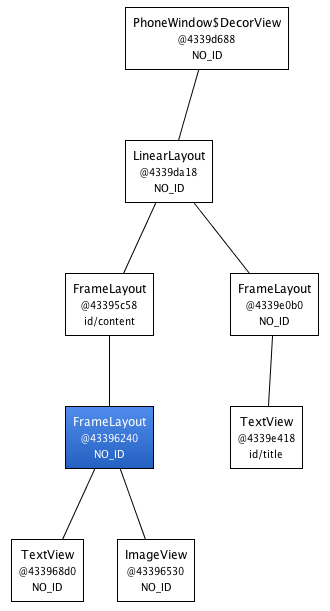 Android 佈局優化:ViewStub、include、merge 的用法與源碼解析
做開發時 UI 佈局是繞不開的話題。隨著頁面變多,佈局的重複與複雜度也會同步上升。Android 官方提供了幾個優化手段,但網路上的資料多半是官方文檔的翻譯,講得很淺,一
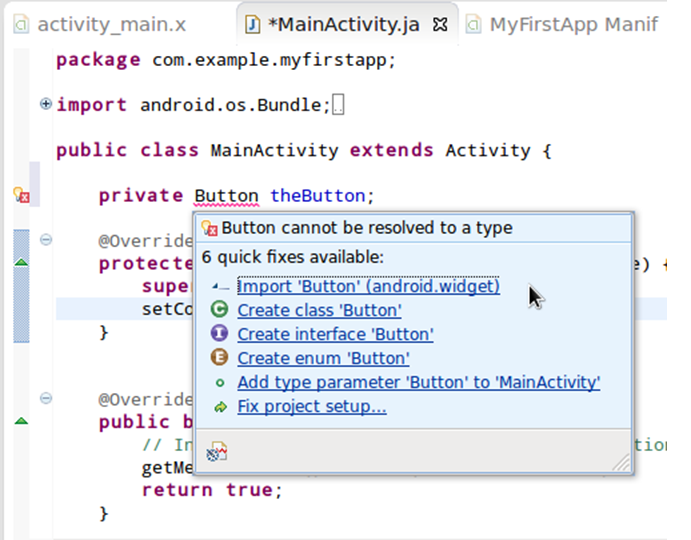 Android SDK 簡明教程:使用者互動
在這篇教程中,我們將對之前所加入的 Button 元素進行設定,以實現對使用者點擊的檢測與響應。為了達成這一目標,我們需要在應用程式的主 Activity 類中略微涉及
 Android 經典側滑菜單 SlidingMenu 使用指南
本文由碼農網 – 小峰原創,轉載請看清文末的轉載要求,歡迎參與我們的付費投稿計劃! SlidingMenu 是一款開源的 Android 類庫,能讓開發者在自己的 App
 Android Service 與電話、短信監聽的合規實踐
在 Android 中,Service 常用於執行不需要使用者持續操作的背景工作。有些開發情境會需要感知電話狀態或簡訊變化,例如通話管理、訊息通知或企業內部通訊。這類功能