

編輯:Android 資訊
Go 算不上新語言,但這兩年它長出了不少有意思的能力,採用它的知名專案數量也在快速攀升。此前我寫過一篇介紹 SitePoint 所用技術選型的文章,其中提到行動端的支持,於是便決定親自試試這條路能走多遠。
開心地看到 Android 對 Go 抱持友善態度。一方面兩者都出自 Google,另一方面,大概也與不少開發者心裡那個「用 Go 取代 Java」的念頭有關。

首先你需要 Go 1.5 以上的版本。接著安裝 GoMobile 工具鏈,它負責把 Go 程式碼編譯成 Android 與 iOS 上可執行的產物:
go get golang.org/x/mobile/cmd/gomobile
gomobile init
官方範例位於 GoLangInstalldir/src/golang.org/x/mobile/example/。若尚未拉下範例,執行:
go get -d golang.org/x/mobile/example/basic
對不少應用而言,編譯 Go 原生程式時先忽略那些與平台深度綁定的 API 是可以接受的。若你的需求落在下面這個子集裡,那麼編譯現有 Go 程式碼會輕.lastname 得超乎預期:
接下來直接拿 gomobile 專案裡的範例開刀,之後把它換成你自己的檔案即可。
打包 APK:
gomobile build -target=android golang.org/x/mobile/example/basic
直接裝進設備:
gomobile install golang.org/x/mobile/example/basic
打包 IPA:
gomobile build -target=ios golang.org/x/mobile/example/basic
部署環節就沒 Android 這麼體貼了——iOS 沒有統一的安裝指令,你得用自己熟悉的工具把包推到實機或模擬器上,例如 ios-deploy。
把上面的流程換成 golang.org/x/mobile/example/audio 再跑一遍,你會更有體會。
你不必精通 Go(我本人也談不上精通),先看它做了什麼。開頭是一串 import:
import (
    "golang.org/x/mobile/app"
    "golang.org/x/mobile/asset"
    ...
)
如果去翻 GoLangInstalldir/src/golang.org/x/mobile/* 底下的檔案,你會發現一批會被編進最終產物的 Java 與 Objective-C 原始碼。再往程式碼深處看,各處都能找到對 app、glctx 這些包的呼叫。
用 Go 寫邏輯、編出精簡的執行檔沒什麼問題,但嚴格說來它還不是原生的——所有依賴的底層庫依然是 Java 或 Objective-C / Swift。想改善這份「異質感」,Go Mobile 團隊提供了另一條路:把 Go 套件綁定(bind)進原生專案裡當普通函式庫使用。
特別是當你想在多個平台間共享同一批 Go 業務邏輯時,這個能力非常實用。入門門檻低,但長期維護的成本需要提前想清楚。
用 Android Studio 匯入 GoLangInstalldir/src/golang.org/x/mobile/example/bind/android,打開 build.gradle(hello 模組),把 GOPATH 與 Go 的執行路徑填對。以下是我的設定(我用 Homebrew 裝的 Go):
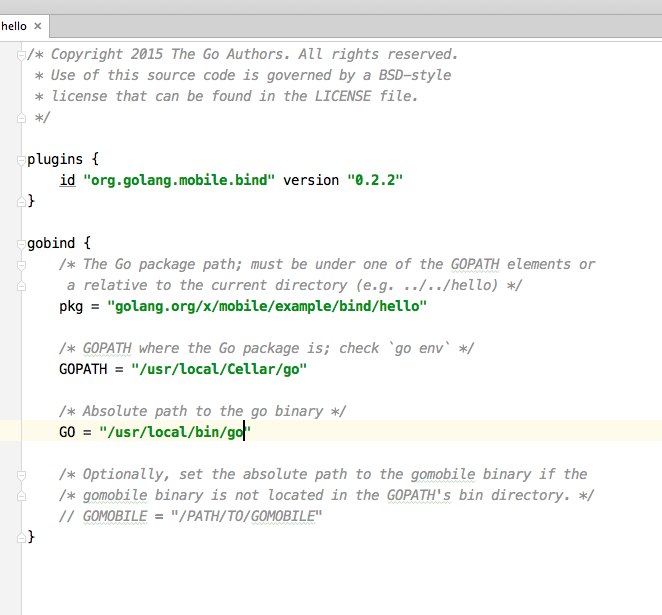
Gradle 同步完成後就能部署到模擬器或真機。
提醒:目前這種方式只支援 ARM 架構的設備與模擬器。
來看 Java 與 Go 兩邊的程式碼。首先是 MainActivity.java:
package org.golang.example.bind;

import android.app.Activity;
import android.os.Bundle;
import android.widget.TextView;

import go.hello.Hello;

public class MainActivity extends Activity {
    private TextView mTextView;

    @Override
    protected void onCreate(Bundle savedInstanceState) {
        super.onCreate(savedInstanceState);
        setContentView(R.layout.activity_main);
        mTextView = (TextView) findViewById(R.id.mytextview);

        // 直接呼叫 Go 函式
        String greetings = Hello.Greetings("Android and Gopher");
        mTextView.setText(greetings);
    }
}
對應的 src/golang.org/x/mobile/example/bind/hello/hello.go:
package hello

import "fmt"

func Greetings(name string) string {
    return fmt.Sprintf("Hello, %s!", name)
}
關鍵就在 import go.hello.Hello 這一行:Go 檔案裡的 Greetings 函式,在 Java 端變成 Hello.Greetings(...) 可以直接呼叫。不需要什麼複雜手勢,Go 函式與原生 UI 元件之間的橋就搭起來了。
步驟不同。先執行:
cd GoLang_Install_dir/src/golang.org/x/mobile/example/bind
gomobile bind -target=ios golang.org/x/mobile/example/bind/hello
這會在目前目錄產出一個 Hello.framework,接著就能在專案裡引用它。
用 Xcode 打開 GoLangInstalldir/src/golang.org/x/mobile/example/bind/ios/bind.xcodeproj,把 Hello.framework 拖進專案,視需要勾選 “Copy items”。目錄結構會變成這樣:
建置並執行(體感比 Android 更「原生」一些),你會看到 Objective-C 端直接呼叫 Go 函式。
#import "ViewController.h"
#import "hello/Hello.h"   // gomobile bind 產生的標頭檔,位於 hello.framework

@interface ViewController ()
@end

@implementation ViewController

@synthesize textLabel;

- (void)loadView {
    [super loadView];
    textLabel.text = GoHelloGreetings(@"iOS and Gopher");
}

@end
#import "hello/Hello.h" 引入剛才產生的 framework,下一行則呼叫它對外暴露的函式來設定 label 文字。
若專案是 Swift,也能直接 reuse 同一份自動產生的 Objective-C framework:
let msg = Hello.GoHelloGreetings("gopher")
坦白說,答案偏保守。如果你已經在用 Go 寫應用,也不那麼計較是否「純原生」,那就繼續往下走——建置與部署 Go 原生應用的門檻確實很低。若願意再投入一些精力嘗試 bind,天花板會更高,但仍需對維護成本保持克制。
反過來,如果你目前完全沒在用 Go,我不建議為了做原生行動應用而現在切換技術棧。不過我有很強的預感:在不久的将來,Go 會是這個方向上相當有潛力的選項。
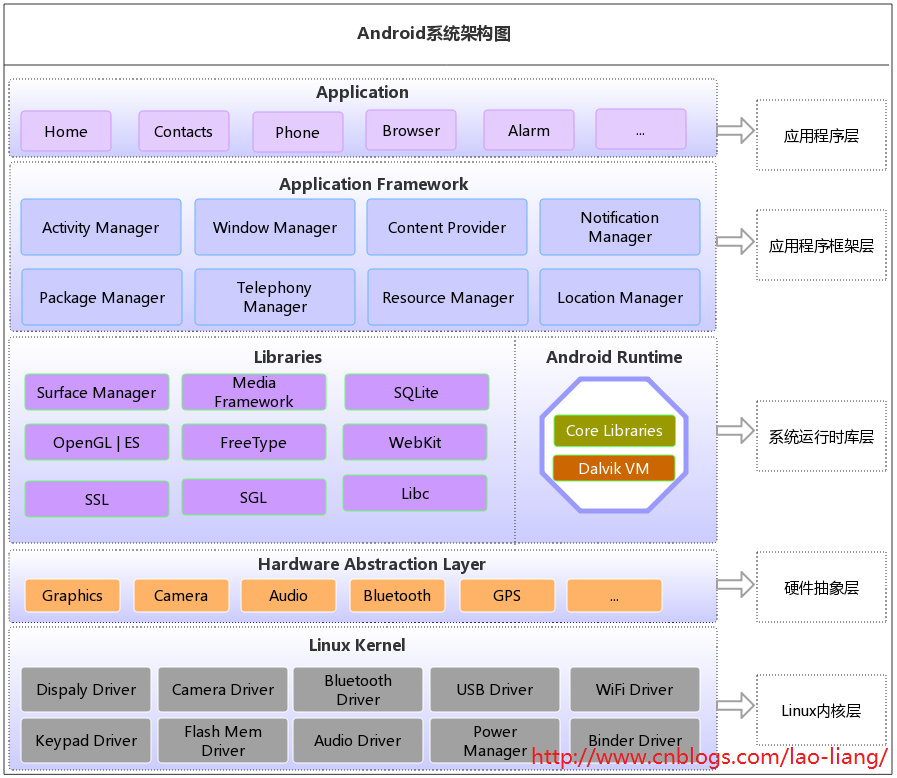 從系統架構到 SE Android:一篇讀懂 Android 安全機制
本文以 Android 的系統架構為起點,逐層剖析其安全設計思路,重點聚焦於 SE Android 的引入背景,並在最後梳理當前 Android 面臨的安全現狀與主流防護
 Android 開發中的 MVP 架構:從上帝類說到依賴規則
這陣子「架構」兩個字被提起的頻率明顯變高,身邊的同事和工程師朋友聊起來也繞不開這個話題。說實話,我對 MVP 和 DDD 的理解還算不上透徹,但我們的新項目最終還是選擇了
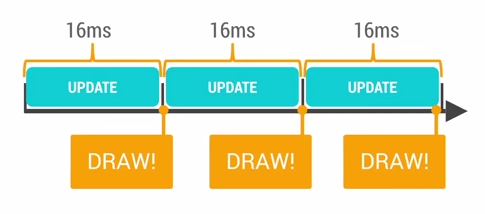 Google 官方 Android 性能優化課程精華:渲染、記憶體與電量
2015 年初,Google 推出了一組 Android 性能優化示範課程,十幾支短片,每支三五分鐘。它不只講底層原理,也示範了用哪些工具定位問題、怎麼改。內容大致分三塊
 Android 反編譯工具與操作流程總覽
前言 開發難免會遇到這種情況:某個功能自己摸不出頭緒,但別人的 App 裡已經跑得好好的。這時候反編譯就是個不錯的學習途徑——拆解開來看看對方是怎麼做的,順便也能觀察它的