

編輯:初階開發
如何在 Android 系統中發送帶附件的電子郵件?其實借助 Intent 就能輕鬆實現,短短十行代碼即可搞定。下面以 SD 卡上的 android123.cwj 檔案為例,示範如何透過 Intent 發送帶附件的郵件。完整代碼如下:
File file = new File("/sdcard/android123.cwj"); //附件文件地址
Intent intent = new Intent(Intent.ACTION_SEND);
intent.putExtra("subject", file.getName());
intent.putExtra("body", "android123 - email sender"); //正文
intent.putExtra(Intent.EXTRA_STREAM, Uri.fromFile(file)); //添加附件,附件為file對象
if (file.getName().endsWith(".gz")) {
intent.setType("application/x-gzip"); //如果是gz使用gzip的mime
} else if (file.getName().endsWith(".txt")) {
intent.setType("text/plain"); //純文本則用text/plain的mime
} else {
intent.setType("application/octet-stream"); //其他的均使用流當做二進制數據來發送
}
startActivity(intent); //調用系統的mail客戶端進行發送
這段代碼的巧妙之處在於根據附件的副檔名動態設置 MIME 類型:gz 檔案用 application/x-gzip,純文本用 text/plain,其餘則統一按二進制流 application/octet-stream 處理。透過 Intent.ACTION_SEND 搭配 EXTRA_STREAM,就能調起系統郵件客戶端完成發送,既簡潔又實用。
 Android 執行緒間通信:Handler 與 Looper
Android 提供 Handler 與 Looper 來處理執行緒間的訊息溝通。例如子執行緒從網路下載圖片後,可透過綁定在主執行緒的 Handler 發送訊息,讓 UI
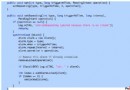 深入理解 Android PendingIntent
Intent 本身比較好理解:它類似一條消息,發給其他 Activity,對方收到後立即執行。 真正容易讓人困惑的是 PendingIntent——它到底是什麼,又是怎樣
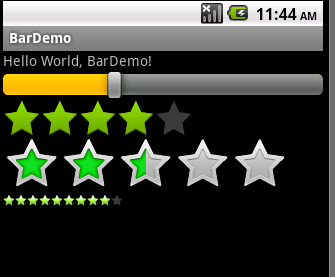 Android 開發實作:SeekBar 與 RatingBar 的用法
SeekBar:可拖動的進度條 先在版面檔裡放進控制項: <SeekBar android:id=@+id/mySeekBar android:la
 Android UI 佈局:LinearLayout 與 RelativeLayout
Android 介面設計中,LinearLayout 與 RelativeLayout 是最常見的兩種佈局方式。理解它們的特性,有助於建立清晰且易於維護的畫面結構。共用屬