

編輯:初階開發
Intent 本身比較好理解:它類似一條消息,發給其他 Activity,對方收到後立即執行。
真正容易讓人困惑的是 PendingIntent——它到底是什麼,又是怎樣被執行的?下面以 alarm service 為例走一遍完整流程。
// 創建一個 PendingIntent
Intent intent = new Intent(ALARM_ALERT_ACTION);
intent.putExtra(ID, id);
intent.putExtra(TIME, atTimeInMillis);
PendingIntent sender = PendingIntent.getBroadcast(
        context, 0, intent, PendingIntent.FLAG_CANCEL_CURRENT);

// 獲得 AlarmManager 並註冊一個新鬧鈴(一次性鬧鈴的設置)
AlarmManager am = (AlarmManager) getSystemService(ALARM_SERVICE);
am.set(AlarmManager.POWER_OFF_WAKEUP, atTimeInMillis, sender);
AlarmManager.set() 會轉而調用 AlarmManagerService.set()。
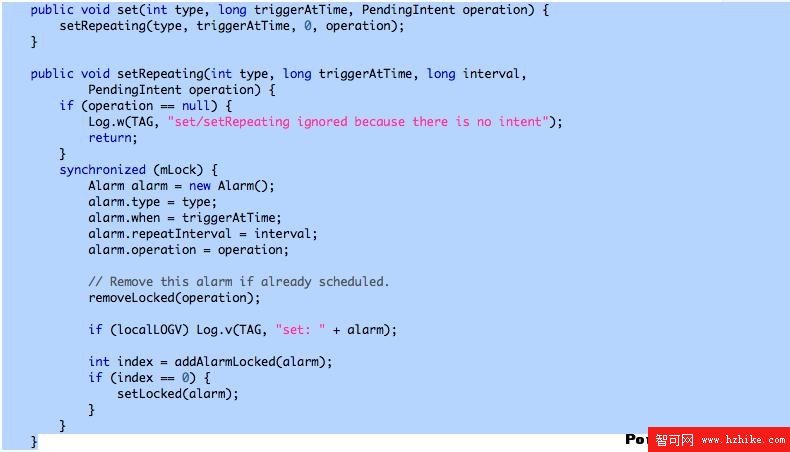
從 AlarmManagerService.set() 的核心代碼可以看到,它並沒有做什麼複雜的事——只是把這個 PendingIntent 保存下來而已。
AlarmManagerService 會週期性地檢查是否有鬧鈴到期,一旦到期便交由 AlarmThread 處理:
alarm.Operation.send(mContext, 0,
        mBackgroundIntent.putExtra(Intent.EXTRA_ALARM_COUNT, alarm.count),
        mResultReceiver, mHandler);
也就是說,最終是通過 PendingIntent.send() 來執行被封裝的 intent 操作,於是本例中那條 ALARM_ALERT_ACTION 的廣播就被發了出來。
PendingIntent.send() 可以傳入一個 IAlarmReceiver(或 PendingResult)參數。由於 send() 通常在 service 中執行,其對應的 onSendFinished() 一般也是在 service 進程中被回調的。一句話總結:PendingIntent 是「授權 + 延遲執行」的封裝,它讓你不必親自到點執行,只需把操作描述清楚交給系統保管。
 Android ApiDemo 逐項拆解:Graphics 與 View 篇(下)
接續上一篇,這裡整理 ApiDemo 中 Gallery、Grid、ImageSwitcher、ImageView、LayoutAnimation 與 LinearLay
 Android 開發講義(三):MediaPlayer 的三種設計寫法比較
本節用同一個 MP3 播放器需求,實作三種版本,逐步對比純繼承、繼承加委託混合、以及後續章節的純委託,藉此看清「繼承的副作用」究竟長什麼樣子。 範例一:採單純繼承 撰寫
 Android GridView 網格版面實作:自定義 ImageAdapter
先前提到過 GridView 也是一種 AdapterView,和 ListView 頗為相似。實際用過一輪之後有些心得,在此分享。 思路 1. 既然與 ListVie
 Android IPC 框架分析:Binder、Service 與 Service Manager
宏觀角度 在 Android 中,Activity 與 Service 可能託管於不同行程。不同行程之間若要交換資料,就屬於 IPC。Binder 是 Android 為