

編輯:進階開發
當畫面裡同時有 EditText 或 AutoCompleteTextView 時,視圖一載入,輸入焦點往往會自動跳到第一個輸入框,鍵盤也跟著彈出來。這在只是想讓使用者先看頁面的場景下顯得很打擾。
原始布局大致如下:
<LinearLayout
    android:layout_width="fill_parent"
    android:layout_height="fill_parent"
    android:orientation="vertical">

    <EditText
        android:id="@+id/EditText01"
        android:hint="@string/hint"
        android:layout_width="wrap_content"
        android:layout_height="wrap_content"
        android:text="">
    </EditText>

    <Button
        android:id="@+id/Button02"
        android:layout_width="wrap_content"
        android:layout_height="wrap_content"
        android:text="@string/button_text">
    </Button>
</LinearLayout>
要讓焦點不要落在輸入框上,最省事的做法是在布局的父容器加上 android:focusable="true" 與 android:focusableInTouchMode="true",讓容器本身搶下焦點:
<LinearLayout
    android:layout_width="fill_parent"
    android:layout_height="fill_parent"
    android:orientation="vertical"
    android:focusable="true"
    android:focusableInTouchMode="true">
    ...
</LinearLayout>
效果如下:
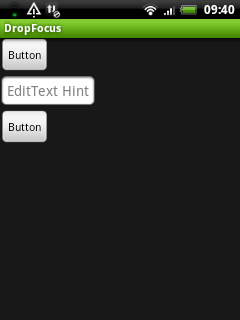
不必寫任何 Java 程式碼就把焦點移開了,這大概是最簡單的解法。如果頁面上有多個可聚焦元件干擾,也可以在 onCreate 裡對特定 view 呼叫 requestFocus() 明確指定初始焦點。
 動手做一個 Android 貪食蛇:自訂 View 的繪製與刷新邏輯全解析
本文聚焦在 Android 的 UI 實作上,以經典的 Snake 貪食蛇專案為例,把自訂 View 的初始化、繪製與刷新機制講清楚。基本的操作這裡不多贅述,直接進主題。
 完美的Android手機作業系統:從Eee PC到電視機
Android手機作業系統的設計初衷是智慧型手機平台,但已有數家筆記型電腦與數位相框廠商對它做了嘗試,並進一步探索在自家領域拓展這項業務的可能。 為什麼它能跨出 } A
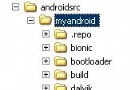 動手把 Android 源碼匯入 Eclipse:完整操作步驟
想把 Android 平台源碼放進 Eclipse 裡閱讀與除錯,光有原始碼是不夠的,還需要一份對應的編譯產物。本文用圖文並茂的方式,示範從取得源碼到成功掛上除錯器的完整
 Android Content Provider:跨應用程式共享資料的完整實作
Content Provider(內容提供者)的職責,是把一個應用程式的資料開放給其他應用程式查詢,這些請求由 ContentResolver 類別的方法來處理。資料的存