

編輯:關於 Android 程式設計
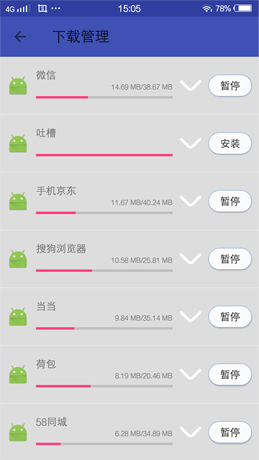
AsyncTask 除了方便我們在子執行緒中更新 UI,還能借助內建的執行緒池來跑多個並行任務。下面是一個以 AsyncTask 實作多執行緒下載的完整例子。
01 效果圖
02 核心類別 — DownloadTask
public class DownloadTask extends AsyncTask<String, Integer, Integer> { public static final int TYPE_SUCCESS = 0; public static final int TYPE_FAILURE = 1; public static final int TYPE_PAUSE = 2; public static final int TYPE_CANCEL = 3; public int positionDownload; private boolean isPaused = false; private boolean isCancelled = false; private DownloadListener downloadListener; private int lastProgress; public DownloadTask(DownloadListener downloadListener){ this.downloadListener = downloadListener; } public void setDownloadListener(DownloadListener downloadListener){ this.downloadListener = downloadListener; } @Override protected Integer doInBackground(String... params) { InputStream is = null; RandomAccessFile savedFile = null; File file = null; long downloadLength = 0; String downloadUrl = params[0]; positionDownload = Integer.parseInt(params[1]); String fileName = downloadUrl.substring(downloadUrl.lastIndexOf("/")); String directory = Environment.getExternalStoragePublicDirectory(Environment.DIRECTORY_DOWNLOADS).getPath(); file = new File(directory + fileName); if(file.exists()){ downloadLength = file.length(); } long contentLength = getContentLength(downloadUrl); if(contentLength == 0){ return TYPE_FAILURE; } else if(contentLength == downloadLength){ return TYPE_SUCCESS; } OkHttpClient client = new OkHttpClient(); Request request = new Request.Builder() .addHeader("RANGE", "bytes="+downloadLength+"-") .url(downloadUrl) .build(); try { Response response = client.newCall(request).execute(); if(response != null){ is = response.body().byteStream(); savedFile = new RandomAccessFile(file, "rw"); savedFile.seek(downloadLength); byte[] buffer = new byte[1024]; int total = 0; int length; while((length = is.read(buffer)) != -1){ if(isCancelled){ response.body().close(); return TYPE_CANCEL; } else if(isPaused) { response.body().close(); return TYPE_PAUSE; } total += length; savedFile.write(buffer, 0, length); int progress = (int) ((total + downloadLength) * 100 / contentLength); int currentDownload = (int) (total + downloadLength); publishProgress(positionDownload, progress, currentDownload, (int) contentLength); } response.body().close(); return TYPE_SUCCESS; } } catch (IOException e) { e.printStackTrace(); } finally { try { if(is != null) is.close(); if(savedFile != null) savedFile.close(); if(isCancelled && file != null) file.delete(); } catch (IOException e) { e.printStackTrace(); } } return TYPE_FAILURE; } @Override protected void onProgressUpdate(Integer... values) { int progress = values[1]; if(progress > lastProgress){ downloadListener.onProgress(values[0], progress, values[2], values[3]); lastProgress = progress; } } @Override protected void onPostExecute(Integer status) { switch (status){ case TYPE_SUCCESS: downloadListener.onSuccess(positionDownload); break; case TYPE_FAILURE: downloadListener.onFailure(); break; case TYPE_PAUSE: downloadListener.onPause(); break; case TYPE_CANCEL: downloadListener.onCancel(); break; } } public void pauseDownload(){ isPaused = true; } public void cancelDownload(){ isCancelled = true; } private long getContentLength(String downloadUrl) { OkHttpClient client = new OkHttpClient(); Request request = new Request.Builder() .url(downloadUrl) .build(); Response response = null; try { response = client.newCall(request).execute(); if(response != null && response.isSuccessful()){ long contentLength = response.body().contentLength(); response.body().close(); return contentLength; } } catch (IOException e) { e.printStackTrace(); } return 0; } }
這裡有兩個關鍵設計:一是以 RandomAccessFile 搭配 RANGE 請求標頭,讓中斷後的下載能從既有檔案長度續傳;二是用四個狀態常數區分成功、失敗、暫停與取消,透過 onPostExecute 分派給監聽者。
03 核心類別 — DownloadService
public class DownloadService extends Service { private Map<String, DownloadTask> downloadTaskMap = new HashMap<>(); private DownloadBinder mBinder = new DownloadBinder(); @Override public IBinder onBind(Intent intent) { return mBinder; } private Notification getNotification(String title, int progress) { Intent intent = new Intent(this, MainActivity.class); PendingIntent pendingIntent = PendingIntent.getActivity(this, 0, intent, 0); NotificationCompat.Builder builder = new NotificationCompat.Builder(this); builder.setSmallIcon(R.mipmap.ic_launcher); builder.setLargeIcon(BitmapFactory.decodeResource(getResources(), R.mipmap.ic_launcher)); builder.setContentIntent(pendingIntent); builder.setContentTitle(title); if(progress > 0){ builder.setContentText(progress + "%"); builder.setProgress(100, progress, false); } return builder.build(); } private NotificationManager getNotificationManager() { return (NotificationManager) getSystemService(NOTIFICATION_SERVICE); } class DownloadBinder extends Binder { public void startDownload(String url, int position, DownloadListener listener){ if(!downloadTaskMap.containsKey(url)){ DownloadTask downloadTask = new DownloadTask(listener); downloadTask.executeOnExecutor(AsyncTask.THREAD_POOL_EXECUTOR, url, position+""); downloadTaskMap.put(url, downloadTask); if(downloadTaskMap.size() == 1){ startForeground(1, getNotification("正在下載" + downloadTaskMap.size(), -1)); } else{ getNotificationManager().notify(1, getNotification("正在下載" + downloadTaskMap.size(), -1)); } } } public void updateDownload(String url, DownloadListener listener){ if(downloadTaskMap.containsKey(url)){ DownloadTask downloadTask = downloadTaskMap.get(url); if(downloadTask != null){ downloadTask.setDownloadListener(listener); } } } public void pauseDownload(String url){ if(downloadTaskMap.containsKey(url)){ DownloadTask downloadTask = downloadTaskMap.get(url); if(downloadTask != null){ downloadTask.pauseDownload(); } downloadTaskMap.remove(url); if(downloadTaskMap.size() > 0){ getNotificationManager().notify(1, getNotification("正在下載" + downloadTaskMap.size(), -1)); } else { stopForeground(true); getNotificationManager().notify(1, getNotification("全部暫停下載", -1)); } } } public void downloadSuccess(String url){ if(downloadTaskMap.containsKey(url)){ DownloadTask downloadTask = downloadTaskMap.get(url); downloadTaskMap.remove(url); if(downloadTask != null){ downloadTask = null; } if(downloadTaskMap.size() > 0){ getNotificationManager().notify(1, getNotification("正在下載" + downloadTaskMap.size(), -1)); } else { stopForeground(true); getNotificationManager().notify(1, getNotification("下載成功", -1)); } } } public boolean isDownloading(String url){ if(downloadTaskMap.containsKey(url)){ return true; } return false; } public void cancelDownload(String url){ if(downloadTaskMap.containsKey(url)){ DownloadTask downloadTask = downloadTaskMap.get(url); if(downloadTask != null){ downloadTask.cancelDownload(); } downloadTaskMap.remove(url); if(downloadTaskMap.size() > 0){ getNotificationManager().notify(1, getNotification("正在下載" + downloadTaskMap.size(), -1)); } else { stopForeground(true); getNotificationManager().notify(1, getNotification("全部取消下載", -1)); } } if(url != null){ String fileName = url.substring(url.lastIndexOf("/")); String directory = Environment.getExternalStoragePublicDirectory(Environment.DIRECTORY_DOWNLOADS).getPath(); File file = new File(directory + fileName); if(file.exists()){ file.delete(); Toast.makeText(DownloadService.this, "Deleted", Toast.LENGTH_SHORT).show(); } } } } }
Service 這層以 Map 保存每個 url 對應的 DownloadTask,透過 Binder 對外提供開始、更新、暫停、取消等操作;同時用 startForeground 搭配通知列顯示整體下載進度,避免下載過程中被系統回收。特別值得注意的是 executeOnExecutor(AsyncTask.THREAD_POOL_EXECUTOR, ...),這正是讓多個下載任務真正並行而非排隊的關鍵。
04 原始碼
下載位址請見文末。
以上就是本文的全部內容,希望對你的學習有所幫助。
 Android N 行為變更整理:效能、權限、輔助工具與 NDK 的開發影響
Android N 除了帶來一批新特性,也對系統與 API 的行為做了一系列調整。這些變更多半不是「新功能」,而是「原本能用的寫法忽然不管用了」,因此風險反而更高。以下整
 Android 入門:四種 UI 布局構建方式完整梳理
一句話開場 使用者打開一個 App 的第一眼,看到的就是介面。簡潔、順眼、操作直覺的 UI,往往能迅速贏得認可;而凌亂擁擠的畫面,再強的功能也很難被發現。所以寫 Andr
 Android 手寫筆跡實作思路:用速度控制筆觸粗細
因為工作需求,對這塊做了一些研究,把思路記錄下來。 問題出在哪 熟悉 Canvas 的人都知道,單純用 drawPath 就能在 View 上畫出線條。但手寫筆的關鍵在
 關於 Android Button 響應頁面跳轉的常見問題解析
在 Android 應用中,Button 的點擊事件通常有兩種寫法,本文將說明這兩種方式,並釐清初學者最常遇到的頁面跳轉錯誤。 一、兩種常見的監聽寫法 第一種是使用具名的