

編輯:關於 Android 程式設計
分享兩個在專案裡相當順手的日期工具類別。
第一個負責計算與今天的間隔天數:
package com.utils.datecount; import java.text.SimpleDateFormat; import java.util.Date; import java.util.GregorianCalendar; public class DateCount { /** * datelevel 0為7天內,1為7到15天,2為15天以上 */ public static int datelevel = 0; public static int positionweek = -1; public static int position2week = -1; /** * 獲取與今天時間差 * @param endTime * @return */ public static double countDate(String startTime) { Date curDate = new Date(System.currentTimeMillis());// 獲取當前時間 SimpleDateFormat simpleDateFormat = new SimpleDateFormat("yyyy-MM-dd");// 輸入日期的格式 Date date = null; try { date = simpleDateFormat.parse(startTime); if (date == null) return 0; } catch (java.text.ParseException e) { return 0; // e.printStackTrace(); } GregorianCalendar cal1 = new GregorianCalendar(); GregorianCalendar cal2 = new GregorianCalendar(); cal1.setTime(date); cal2.setTime(curDate); double dayCount = (cal2.getTimeInMillis() - cal1.getTimeInMillis()) / (1000 * 3600 * 24);// 從間隔毫秒變成間隔天數 return dayCount; } }
第二個是日期格式化工具類別,把字串與 Date 之間的轉換、加減天數、時間相加等常見操作都收攏在一起:
package com.utils.tools; import java.text.ParseException; import java.text.SimpleDateFormat; import java.util.Calendar; import java.util.Date; import android.text.TextUtils; import android.text.format.DateFormat; /** * 日期格式化工具類 * * @author Harryxu * */ public class DateUtil { public static Date convert2Date(String format, String dateStr) { Date date = null; try { if (TextUtils.isEmpty(format)) format = "yyyy-MM-dd HH:mm:ss"; return new java.sql.Date(new SimpleDateFormat(format).parse(dateStr).getTime()); } catch (IllegalArgumentException e) { e.printStackTrace(); } catch (Exception e) { e.printStackTrace(); } return date; } public static CharSequence formatDate(String format, String dateStr) { Date date = null; try { date = new SimpleDateFormat("yyyy-MM-dd HH:mm:ss").parse(dateStr); } catch (IllegalArgumentException e) { e.printStackTrace(); } catch (Exception e) { e.printStackTrace(); } if (date == null) date = new Date(); if (TextUtils.isEmpty(format)) format = "yyyy-MM-dd"; return DateFormat.format(format, date); } /** * 根據偏量值取得傳入時間的前後天數 * * @param date * @param offset 時間偏量值 * @return */ public static Date getNextPreDay(Date date, int offset) { Calendar calendar = Calendar.getInstance(); calendar.setTime(date); calendar.add(Calendar.DAY_OF_MONTH, offset); date = calendar.getTime(); return date; } public static int getDays(Date date1, Date date2) { Date kaishi = date1, jieshu = date2; if (date1.compareTo(date2) > 0) { kaishi = date2; jieshu = date1; } long diff = jieshu.getTime() - kaishi.getTime(); float days = diff / 24f / 60 / 60 / 1000; return (int) ((days - (int) days) >= 0 ? (days + 1) : days); } public static String addMinites( String time, int addminite){ SimpleDateFormat myFormatter = new SimpleDateFormat("HH:mm"); Calendar totime = Calendar.getInstance(); java.util.Date date = null; try { date = myFormatter.parse(time); } catch (ParseException e) { e.printStackTrace(); } if (date == null) return null; totime.setTime(date); totime.add(Calendar.MINUTE, addminite); date = totime.getTime(); return myFormatter.format(date); } }
這兩個類別的分工很清楚:DateCount 專注在「距今多少天」這種相對計算,常用於列表的分組標籤;DateUtil 則負責格式轉換與日期偏移,像是推算前後 N 天、計算兩個日期相差幾天、在 "HH:mm" 上做分鐘加減等。實際使用時記得留意 SimpleDateFormat 並非執行緒安全,若要在多執行緒環境共用,建議改為每次建立新實例或改用 ThreadLocal 包裝。
以上就是本文的全部內容,希望對你的學習有所幫助。
 Android Service 啟動流程解析
開頭說明很多初學者在剛接觸 Service 時,容易把它誤解為一個背景執行緒。事實上,Service 本身運行在主線程中,適合處理背景任務,但不適合直接執行長時間的耗時運
 Android 多行水平滚动分页 GridView 实例源码详解
GridView 默认是垂直滚动的,但很多应用场景需要实现多行、水平滚动的分页效果,比如首页的运营位轮播。本文将带大家一起实现一个这样的自定义分页 GridView。
 百度專車怎麼用?在哪裡打開一篇帶你上手
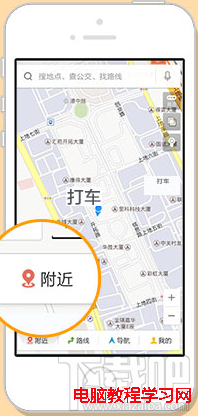
百度專車強勢登場,在國內專車市場新增一名競爭者,勢必帶來新一輪的搭乘優惠。那麼來勢洶洶的百度專車究竟怎麼用、在哪裡打開呢?以下就教大家使用百度專車。開啟最新版百度地圖 A
 Android ListPopupWindow 的使用與常見場景
ListPopupWindow 的用法與 PopupWindow 大同小異,用過後者基本看一眼就能上手。它的優勢在於自帶列表適配器與錨點定位,非常適合做「點擊輸入框彈出候