

編輯:關於 Android 程式設計
作為一名有幾年 Android 經驗的開發者,今天和大家一起實戰一款常見的 App 首頁。頁面看起來簡單,但涉及的功能點還真不少:輪播圖、分類入口、下拉刷新、上拉加載、卡片水波紋。代碼如有不足,還望各路同仁指點。
整個首頁架構使用 LRecyclerView,自帶下拉刷新和自動加載:
compile 'com.github.jdsjlzx:LRecyclerView:1.3.3'
無限循環輪播圖使用 convenientbanner,流暢度不錯,還可以自定義過渡動畫:
compile 'com.bigkoo:convenientbanner:2.0.5'
網絡請求依賴 okhttp,封裝庫用的 okgo:
compile 'com.lzy.net:okgo:2.1.4'
九宮格圖片:
compile 'com.lzy.widget:ninegridview:0.2.0'
以及 ButterKnife 自動注入等。圖片加載使用 Glide,並做了二次封裝。
1. 首頁展示輪播圖

2. 下拉刷新
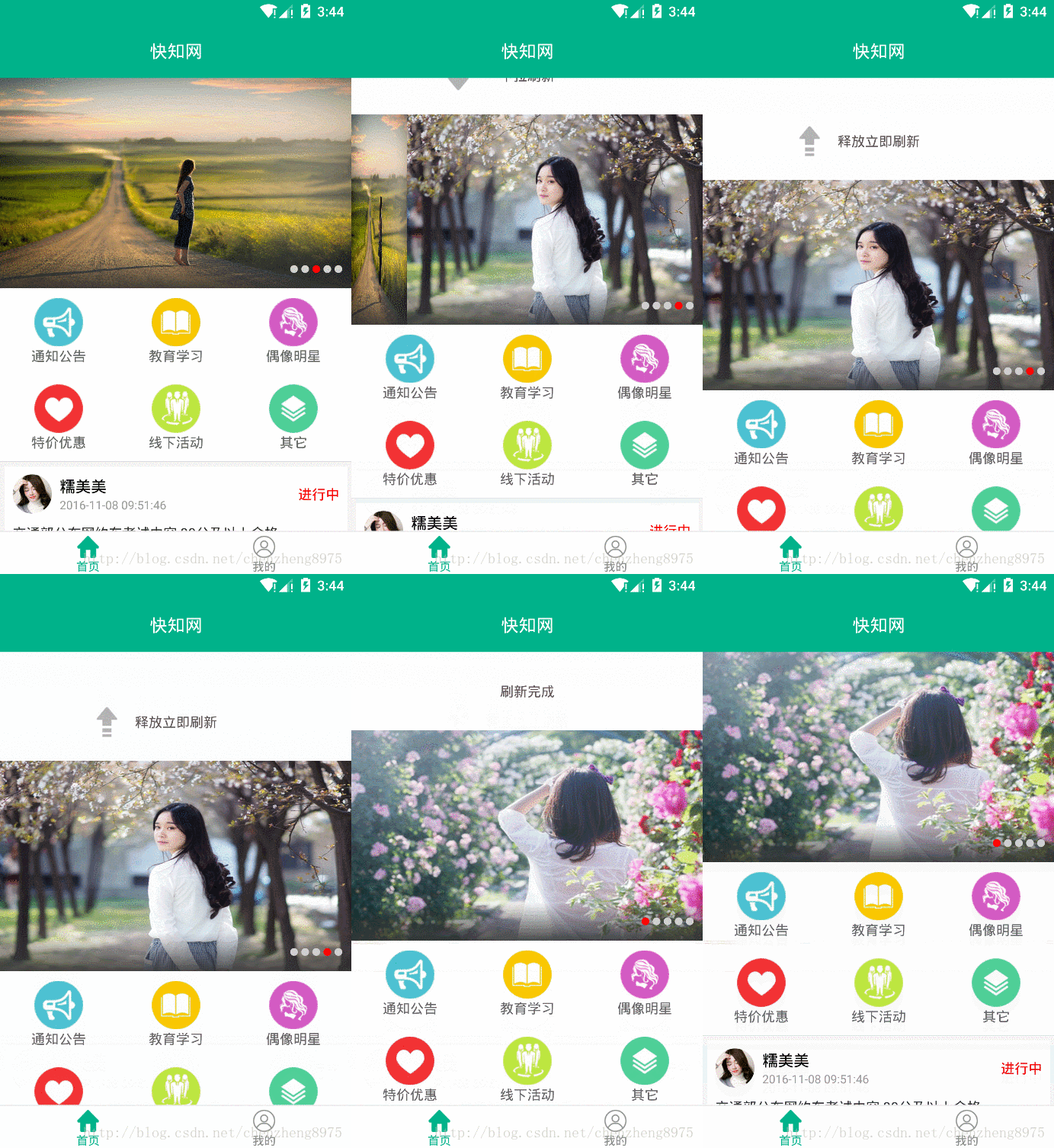
3. 自動加載

4. CardView 水波紋動畫

LRecyclerView 作為主框架,輪播圖與分類網格列表作為 header 放在 index_header.xml 中。
IndexFragment.java
package com.czhappy.commonindexdemo.fragment;

import android.os.Bundle;
import android.support.v4.app.Fragment;
import android.support.v4.view.ViewPager;
import android.support.v7.widget.LinearLayoutManager;
import android.view.LayoutInflater;
import android.view.View;
import android.view.ViewGroup;
import android.widget.AdapterView;
import android.widget.ImageView;
import android.widget.LinearLayout;
import android.widget.TextView;

import com.bigkoo.convenientbanner.ConvenientBanner;
import com.bigkoo.convenientbanner.holder.CBViewHolderCreator;
import com.czhappy.commonindexdemo.KuaiZhiApplication;
import com.czhappy.commonindexdemo.R;
import com.czhappy.commonindexdemo.adapter.CampaignListAdapter;
import com.czhappy.commonindexdemo.adapter.ClassflyListAdapter;
import com.czhappy.commonindexdemo.jsonparse.JSONObject;
import com.czhappy.commonindexdemo.jsonparse.ReflectUtil;
import com.czhappy.commonindexdemo.model.CampaignList;
import com.czhappy.commonindexdemo.model.Classfly;
import com.czhappy.commonindexdemo.model.IndexBanner;
import com.czhappy.commonindexdemo.model.IndexBannerList;
import com.czhappy.commonindexdemo.okhttp.LoadingDialogCallback;
import com.czhappy.commonindexdemo.utils.AccordionTransformer;
import com.czhappy.commonindexdemo.utils.Api;
import com.czhappy.commonindexdemo.utils.NetworkImageHolderView;
import com.czhappy.commonindexdemo.utils.ToastUtil;
import com.czhappy.commonindexdemo.view.GridViewForScrollView;
import com.github.jdsjlzx.interfaces.OnLoadMoreListener;
import com.github.jdsjlzx.interfaces.OnRefreshListener;
import com.github.jdsjlzx.recyclerview.LRecyclerView;
import com.github.jdsjlzx.recyclerview.LRecyclerViewAdapter;
import com.github.jdsjlzx.recyclerview.ProgressStyle;
import com.lzy.okgo.OkGo;

import java.util.ArrayList;
import java.util.List;

import butterknife.BindView;
import butterknife.ButterKnife;
import okhttp3.Call;
import okhttp3.Response;

/**
 * Description:
 * User: chenzheng
 * Date: 2016/9/9 0009
 * Time: 17:18
 */
public class IndexFragment extends Fragment implements ViewPager.OnPageChangeListener {

    @BindView(R.id.back_iv) ImageView backIv;
    @BindView(R.id.layout_back) LinearLayout layoutBack;
    @BindView(R.id.title_tv) TextView titleTv;
    @BindView(R.id.right_tv) TextView rightTv;
    @BindView(R.id.layout_right) LinearLayout layoutRight;
    @BindView(R.id.campaign_recyclerview) LRecyclerView mRecyclerView;

    private View mView;
    private GridViewForScrollView classflyGridview;
    private LinearLayout pointGroup;
    private ConvenientBanner convenientBanner;
    private TextView bannerTitleTv;
    private List<String> networkImages = new ArrayList<String>();
    private int lastPosition = 0;
    private CampaignListAdapter campaignListAdapter;
    private ClassflyListAdapter classflyListAdapter;
    private IndexBannerList indexBannerList;
    private CampaignList campaignList;
    private LRecyclerViewAdapter mLRecyclerViewAdapter;

    public int pageNum = 1;
    public int pageSize = 4;

    @Override
    public View onCreateView(LayoutInflater inflater, ViewGroup container, Bundle savedInstanceState) {
        mView = inflater.inflate(R.layout.fragment_index, container, false);
        ButterKnife.bind(this, mView);
        initView();
        initClassfly();
        return mView;
    }

    private void initView() {
        backIv.setVisibility(View.GONE);
        titleTv.setText("快知網");
        layoutRight.setVisibility(View.INVISIBLE);

        campaignListAdapter = new CampaignListAdapter(getActivity());
        mLRecyclerViewAdapter = new LRecyclerViewAdapter(campaignListAdapter);
        mRecyclerView.setAdapter(mLRecyclerViewAdapter);
        mRecyclerView.setLayoutManager(new LinearLayoutManager(getActivity()));
        mRecyclerView.setRefreshProgressStyle(ProgressStyle.LineSpinFadeLoader);
        mRecyclerView.setArrowImageView(R.drawable.ic_pulltorefresh_arrow);
        mRecyclerView.setLoadingMoreProgressStyle(ProgressStyle.BallSpinFadeLoader);

        // add a HeaderView
        final View header = LayoutInflater.from(getActivity())
                .inflate(R.layout.index_header, (ViewGroup) mView.findViewById(android.R.id.content), false);
        classflyGridview = (GridViewForScrollView) header.findViewById(R.id.classfly_gridview);
        classflyGridview.setFocusable(false);
        pointGroup = (LinearLayout) header.findViewById(R.id.point_group);
        convenientBanner = (ConvenientBanner) header.findViewById(R.id.convenientBanner);
        bannerTitleTv = (TextView) header.findViewById(R.id.banner_title_tv);
        mLRecyclerViewAdapter.addHeaderView(header);

        mRecyclerView.setOnRefreshListener(new OnRefreshListener() {
            @Override
            public void onRefresh() {
                pageNum = 1;
                doRequest(pageNum, true);
                requestBannerList();
            }
        });

        mRecyclerView.setOnLoadMoreListener(new OnLoadMoreListener() {
            @Override
            public void onLoadMore() {
                pageNum++;
                doRequest(pageNum, false);
            }
        });

        // 設置頭部加載顏色
        mRecyclerView.setHeaderViewColor(R.color.colorAccent, R.color.dark, android.R.color.white);
        // 設置底部加載顏色
        mRecyclerView.setFooterViewColor(R.color.colorAccent, R.color.dark, android.R.color.white);
        // 設置底部加載文字提示
        mRecyclerView.setFooterViewHint("拼命加載中", "已經全部為你呈現了", "網絡不給力啊,點擊再試一次吧");
        mRecyclerView.setRefreshing(true);
    }

    private void initClassfly() {
        List<Classfly> list = new ArrayList<Classfly>();
        Classfly c1 = new Classfly("3", "通知公告", R.mipmap.classfly_bg1);
        Classfly c2 = new Classfly("4", "教育學習", R.mipmap.classfly_bg2);
        Classfly c3 = new Classfly("5", "偶像明星", R.mipmap.classfly_bg3);
        Classfly c4 = new Classfly("6", "特價優惠", R.mipmap.classfly_bg4);
        Classfly c5 = new Classfly("7", "線下活動", R.mipmap.classfly_bg5);
        Classfly c6 = new Classfly("8", "其它", R.mipmap.classfly_bg6);
        list.add(c1);
        list.add(c2);
        list.add(c3);
        list.add(c4);
        list.add(c5);
        list.add(c6);

        classflyListAdapter = new ClassflyListAdapter(getActivity());
        classflyGridview.setAdapter(classflyListAdapter);
        classflyListAdapter.setItems(list);
        classflyGridview.setOnItemClickListener(new AdapterView.OnItemClickListener() {
            @Override
            public void onItemClick(AdapterView<?> parent, View view, int position, long id) {
            }
        });
    }

    private void doRequest(int page, final boolean isRefresh) {
        OkGo.post(Api.GET_CAMPAIGN_LIST)
                .tag(this)
                .params("currentPage", String.valueOf(page))
                .params("pageSize", String.valueOf(pageSize))
                .execute(new LoadingDialogCallback(getActivity()) {
                    @Override
                    public void onSuccess(String s, Call call, Response response) {
                        if (isRefresh) {
                            mRecyclerView.refreshComplete();
                        } else {
                            mRecyclerView.loadMoreComplete();
                        }
                        try {
                            campaignList = (CampaignList) ReflectUtil
                                    .copy(CampaignList.class, new JSONObject(s));
                        } catch (Exception e) {
                            e.printStackTrace();
                        }
                        if (campaignList != null) {
                            String result = campaignList.getResult();
                            if (Api.SUCCESS.equals(result)) {
                                int j = campaignList.getData().size();
                                if (isRefresh) {
                                    campaignListAdapter.clear();
                                }
                                if (j != pageSize) {
                                    mRecyclerView.setNoMore(true);
                                }
                                campaignListAdapter.addAll(campaignList.getData());
                            } else {
                                ToastUtil.show(getActivity(), campaignList.getMsg());
                            }
                        }
                    }

                    @Override
                    public void onError(Call call, Response response, Exception e) {
                        super.onError(call, response, e);
                        if (isRefresh) {
                            mRecyclerView.refreshComplete();
                        } else {
                            mRecyclerView.loadMoreComplete();
                        }
                        KuaiZhiApplication.showResultToast(getActivity(), call, e);
                    }
                });
    }

    private void requestBannerList() {
        OkGo.post(Api.GET_INDEX_BANNER_LIST)
                .tag(this)
                .cacheKey("cache_index_banner_list")
                .execute(new LoadingDialogCallback(getActivity()) {
                    @Override
                    public void onCacheSuccess(String s, Call call) {
                        super.onCacheSuccess(s, call);
                        analysisIndexBannerRequest(s);
                    }

                    @Override
                    public void onSuccess(String s, Call call, Response response) {
                        analysisIndexBannerRequest(s);
                    }

                    @Override
                    public void onError(Call call, Response response, Exception e) {
                        super.onError(call, response, e);
                        KuaiZhiApplication.showResultToast(getActivity(), call, e);
                    }
                });
    }

    private void analysisIndexBannerRequest(String s) {
        try {
            indexBannerList = (IndexBannerList) ReflectUtil
                    .copy(IndexBannerList.class, new JSONObject(s));
        } catch (Exception e) {
            e.printStackTrace();
        }
        if (indexBannerList != null) {
            String result = indexBannerList.getResult();
            if (Api.SUCCESS.equals(result)) {
                networkImages.clear();
                for (IndexBanner ib : indexBannerList.getData()) {
                    networkImages.add(ib.getBanner_url());
                }
                setRecommendInfo();
                initBanner();
            } else {
                ToastUtil.show(getActivity(), indexBannerList.getMsg());
            }
        }
    }

    private void initBanner() {
        convenientBanner.setPages(new CBViewHolderCreator<NetworkImageHolderView>() {
            @Override
            public NetworkImageHolderView createHolder() {
                return new NetworkImageHolderView();
            }
        }, networkImages).setOnPageChangeListener(this);// 監聽翻頁事件
        convenientBanner.setPageTransformer(new AccordionTransformer());
        convenientBanner.startTurning(3000);
        convenientBanner.setOnItemClickListener(new com.bigkoo.convenientbanner.listener.OnItemClickListener() {
            @Override
            public void onItemClick(int position) {
            }
        });
    }

    private void setRecommendInfo() {
        pointGroup.removeAllViews();
        for (int i = 0; i < indexBannerList.getData().size(); i++) {
            // 添加指示點
            ImageView point = new ImageView(getActivity());
            LinearLayout.LayoutParams params = new LinearLayout.LayoutParams(
                    LinearLayout.LayoutParams.WRAP_CONTENT,
                    LinearLayout.LayoutParams.WRAP_CONTENT);
            if (i != indexBannerList.getData().size() - 1) {
                params.rightMargin = 10;
            }
            point.setLayoutParams(params);
            point.setBackgroundResource(R.drawable.point_bg);
            if (i == 0) {
                point.setEnabled(true);
            } else {
                point.setEnabled(false);
            }
            pointGroup.addView(point);
        }
    }

    @Override
    public void onPageScrolled(int position, float positionOffset, int positionOffsetPixels) {
    }

    @Override
    public void onPageSelected(int position) {
        // 改變指示點的狀態
        // 把當前點 enable 為 true
        if (indexBannerList != null && indexBannerList.getData() != null
                && indexBannerList.getData().size() > 0) {
            bannerTitleTv.setText(indexBannerList.getData().get(position).getBanner_title());
        }
        pointGroup.getChildAt(position).setEnabled(true);
        // 把上一個點設為 false
        pointGroup.getChildAt(lastPosition).setEnabled(false);
        lastPosition = position;
    }

    @Override
    public void onPageScrollStateChanged(int state) {
    }
}
fragment_index.xml
<?xml version="1.0" encoding="utf-8"?>
<LinearLayout xmlns:android="https://schemas.android.com/apk/res/android"
    xmlns:app="https://schemas.android.com/apk/res-auto"
    android:layout_width="match_parent"
    android:layout_height="match_parent"
    android:background="@color/bg_color"
    android:orientation="vertical">

    <include
        android:id="@+id/include_id"
        layout="@layout/titlelayout_theme"
        android:layout_width="match_parent"
        android:layout_height="wrap_content" />

    <com.github.jdsjlzx.recyclerview.LRecyclerView
        android:id="@+id/campaign_recyclerview"
        android:layout_width="match_parent"
        android:layout_height="match_parent"
        app:layout_behavior="@string/appbar_scrolling_view_behavior"/>
</LinearLayout>
index_header.xml
<?xml version="1.0" encoding="utf-8"?>
<LinearLayout xmlns:android="https://schemas.android.com/apk/res/android"
    android:layout_width="match_parent"
    android:layout_height="match_parent"
    android:orientation="vertical">

    <FrameLayout
        android:layout_width="match_parent"
        android:layout_height="wrap_content">

        <com.bigkoo.convenientbanner.ConvenientBanner
            xmlns:app="https://schemas.android.com/apk/res-auto"
            android:id="@+id/convenientBanner"
            android:layout_width="match_parent"
            android:layout_height="@dimen/index_banner_height"
            app:canLoop="true" />

        <LinearLayout
            android:layout_width="match_parent"
            android:layout_height="wrap_content"
            android:layout_gravity="bottom"
            android:background="@drawable/gradient_bg"
            android:gravity="center_vertical"
            android:orientation="horizontal"
            android:padding="10dp">

            <TextView
                android:id="@+id/banner_title_tv"
                android:layout_width="0dp"
                android:layout_height="wrap_content"
                android:layout_weight="1"
                android:ellipsize="end"
                android:singleLine="true"
                android:textColor="@color/white"
                android:textSize="@dimen/s_size" />

            <LinearLayout
                android:id="@+id/point_group"
                android:layout_width="wrap_content"
                android:layout_height="wrap_content"
                android:gravity="center"
                android:orientation="horizontal">
            </LinearLayout>
        </LinearLayout>
    </FrameLayout>

    <com.czhappy.commonindexdemo.view.GridViewForScrollView
        android:id="@+id/classfly_gridview"
        android:layout_width="match_parent"
        android:layout_height="wrap_content"
        android:background="@color/white"
        android:numColumns="3" />

    <View
        android:layout_width="match_parent"
        android:layout_height="0.5dp"
        android:background="#dddddd" />
</LinearLayout>
CampaignListAdapter.java
package com.czhappy.commonindexdemo.adapter;

import android.content.Context;
import android.support.v7.widget.CardView;
import android.view.View;
import android.widget.ImageView;
import android.widget.LinearLayout;
import android.widget.TextView;

import com.czhappy.commonindexdemo.R;
import com.czhappy.commonindexdemo.glide.GlideImgManager;
import com.czhappy.commonindexdemo.model.Campaign;
import com.czhappy.commonindexdemo.model.CampaignImage;
import com.czhappy.commonindexdemo.utils.ToastUtil;
import com.czhappy.commonindexdemo.utils.Utils;
import com.lzy.ninegrid.ImageInfo;
import com.lzy.ninegrid.NineGridView;
import com.lzy.ninegrid.preview.NineGridViewClickAdapter;

import java.util.ArrayList;
import java.util.List;

import butterknife.BindView;
import butterknife.ButterKnife;

/**
 * Description:
 * User: chenzheng
 * Date: 2016/9/14 0014
 * Time: 17:45
 */
public class CampaignListAdapter extends ListBaseAdapter<Campaign> {

    private Context mContext;

    @BindView(R.id.user_head_iv) ImageView userHeadIv;
    @BindView(R.id.username_tv) TextView usernameTv;
    @BindView(R.id.createtime_tv) TextView createtimeTv;
    @BindView(R.id.status_tv) TextView statusTv;
    @BindView(R.id.title_tv) TextView titleTv;
    @BindView(R.id.desc_tv) TextView descTv;
    @BindView(R.id.campaign_time_tv) TextView campaignTimeTv;
    @BindView(R.id.prise_iv) ImageView priseIv;
    @BindView(R.id.prise_count_tv) TextView priseCountTv;
    @BindView(R.id.comment_count_tv) TextView commentCountTv;
    @BindView(R.id.nineGrid) NineGridView nineGrid;
    @BindView(R.id.address_tv) TextView addressTv;
    @BindView(R.id.cardView) CardView cardView;
    @BindView(R.id.layout_address) LinearLayout layoutAddress;

    public CampaignListAdapter(Context context) {
        super(context);
        this.mContext = context;
    }

    @Override
    public int getLayoutId() {
        return R.layout.campaign_list_item;
    }

    @Override
    public void onBindItemHolder(SuperViewHolder holder, int position) {
        ButterKnife.bind(this, holder.itemView);
        final Campaign campaign = mDataList.get(position);

        if (!Utils.isEmpty(campaign.getStart_time()) && Utils.isEmpty(campaign.getEnd_time())) {
            campaignTimeTv.setText("自" + Utils.StringDateFormat(campaign.getStart_time(), "yyyy-MM-dd HH:mm") + "起");
        } else {
            campaignTimeTv.setText(Utils.StringDateFormat(campaign.getStart_time(), "yyyy-MM-dd HH:mm")
                    + "至" + Utils.StringDateFormat(campaign.getEnd_time(), "yyyy-MM-dd HH:mm"));
        }

        commentCountTv.setText(campaign.getComment_count());
        createtimeTv.setText(campaign.getCreate_time());
        descTv.setText(campaign.getCampaign_desc());
        priseCountTv.setText(campaign.getPraise_count());
        usernameTv.setText(campaign.getNickname());

        if (!Utils.isEmpty(campaign.getCampaign_address())) {
            layoutAddress.setVisibility(View.VISIBLE);
            addressTv.setText(campaign.getCampaign_address());
        } else {
            layoutAddress.setVisibility(View.GONE);
        }

        if ("1".equals(campaign.getIs_praise())) {
            priseIv.setImageResource(R.mipmap.ding_checked_icon);
        } else {
            priseIv.setImageResource(R.mipmap.ding_uncheck_icon);
        }

        String statusStr = Utils.checkTimeStatus(campaign.getStart_time(), campaign.getEnd_time());
        statusTv.setText(statusStr);
        if ("未開始".equals(statusStr)) {
            statusTv.setTextColor(mContext.getResources().getColor(R.color.blue));
        } else if ("進行中".equals(statusStr)) {
            statusTv.setTextColor(mContext.getResources().getColor(R.color.red));
        } else if ("已結束".equals(statusStr)) {
            statusTv.setTextColor(mContext.getResources().getColor(R.color.common_gray9));
        }

        titleTv.setText(campaign.getCampaign_name());
        GlideImgManager.loadCircleImage(mContext, campaign.getHead_img(), userHeadIv);

        ArrayList<ImageInfo> imageInfo = new ArrayList<>();
        List<CampaignImage> images = campaign.getImg_list();
        if (images != null) {
            for (CampaignImage image : images) {
                ImageInfo info = new ImageInfo();
                info.setThumbnailUrl(image.getImage_url());
                info.setBigImageUrl(image.getImage_url());
                imageInfo.add(info);
            }
        }
        nineGrid.setAdapter(new NineGridViewClickAdapter(mContext, imageInfo));

        cardView.setOnClickListener(new View.OnClickListener() {
            @Override
            public void onClick(View v) {
                ToastUtil.show(mContext, campaign.getCampaign_name());
            }
        });
    }
}
campaign_list_item.xml
<?xml version="1.0" encoding="utf-8"?>
<RelativeLayout xmlns:android="https://schemas.android.com/apk/res/android"
    xmlns:app="https://schemas.android.com/apk/res-auto"
    android:layout_width="match_parent"
    android:layout_height="wrap_content"
    android:padding="5dp">

    <android.support.v7.widget.CardView
        android:id="@+id/cardView"
        android:layout_width="match_parent"
        android:layout_height="wrap_content"
        android:focusable="true"
        android:clickable="true"
        android:foreground="@drawable/card_foreground"
        app:cardCornerRadius="@dimen/card_radius"
        app:cardPreventCornerOverlap="false"
        app:elevation="3dp">

        <LinearLayout
            android:layout_width="match_parent"
            android:layout_height="wrap_content"
            android:orientation="vertical"
            android:padding="8dp">

            <LinearLayout
                android:layout_width="match_parent"
                android:layout_height="wrap_content"
                android:gravity="center_vertical"
                android:orientation="horizontal">

                <ImageView
                    android:id="@+id/user_head_iv"
                    android:layout_width="40dp"
                    android:layout_height="40dp"
                    android:src="@mipmap/ic_img_user_default" />

                <LinearLayout
                    android:layout_width="0dp"
                    android:layout_height="wrap_content"
                    android:layout_marginLeft="8dp"
                    android:layout_weight="1"
                    android:orientation="vertical">

                    <TextView
                        android:id="@+id/username_tv"
                        android:layout_width="wrap_content"
                        android:layout_height="wrap_content"
                        android:text="zhangsan"
                        android:textColor="@color/black"
                        android:textSize="@dimen/m_size" />

                    <TextView
                        android:id="@+id/createtime_tv"
                        android:layout_width="wrap_content"
                        android:layout_height="wrap_content"
                        android:text="2016-06-21 12:56:21"
                        android:textColor="@color/common_gray9"
                        android:textSize="@dimen/ss_size" />
                </LinearLayout>

                <TextView
                    android:id="@+id/status_tv"
                    android:layout_width="wrap_content"
                    android:layout_height="wrap_content"
                    android:text="未開始"
                    android:textColor="@color/common_gray9"
                    android:textSize="@dimen/s_size" />
            </LinearLayout>

            <TextView
                android:id="@+id/title_tv"
                android:layout_width="wrap_content"
                android:layout_height="wrap_content"
                android:layout_marginTop="10dp"
                android:text="活動標題活動標題活動標題活動標"
                android:textColor="@color/common_gray3"
                android:textSize="@dimen/s_size" />

            <LinearLayout
                android:layout_width="match_parent"
                android:layout_height="wrap_content"
                android:gravity="center_vertical"
                android:layout_marginTop="3dp"
                android:orientation="horizontal">

                <ImageView
                    android:layout_width="wrap_content"
                    android:layout_height="wrap_content"
                    android:src="@mipmap/attend_time_icon_bg" />

                <TextView
                    android:id="@+id/campaign_time_tv"
                    android:layout_width="wrap_content"
                    android:layout_height="wrap_content"
                    android:ellipsize="end"
                    android:maxLines="2"
                    android:layout_marginLeft="5dp"
                    android:text="2016-06-21 12:56 - 2016-06-21 12:56"
                    android:textColor="@color/common_gray9"
                    android:textSize="@dimen/s_size" />
            </LinearLayout>

            <LinearLayout
                android:id="@+id/layout_address"
                android:layout_width="match_parent"
                android:layout_height="wrap_content"
                android:gravity="center_vertical"
                android:layout_marginTop="3dp"
                android:orientation="horizontal">

                <ImageView
                    android:layout_width="wrap_content"
                    android:layout_height="wrap_content"
                    android:src="@mipmap/address_icon_bg" />

                <TextView
                    android:id="@+id/address_tv"
                    android:layout_width="wrap_content"
                    android:layout_height="wrap_content"
                    android:ellipsize="end"
                    android:maxLines="2"
                    android:layout_marginLeft="5dp"
                    android:textColor="@color/common_gray9"
                    android:textSize="@dimen/s_size" />
            </LinearLayout>

            <TextView
                android:id="@+id/desc_tv"
                android:layout_width="wrap_content"
                android:layout_height="wrap_content"
                android:layout_marginTop="5dp"
                android:ellipsize="end"
                android:maxLines="2"
                android:text="活動標題活動標題活動標題活動標題活動標題活動標題"
                android:textColor="@color/common_gray9"
                android:textSize="@dimen/s_size" />

            <com.lzy.ninegrid.NineGridView
                android:id="@+id/nineGrid"
                android:layout_width="match_parent"
                android:layout_height="wrap_content"
                android:layout_marginTop="5dp"
                app:ngv_gridSpacing="3dp"
                app:ngv_maxSize="9"
                app:ngv_mode="grid"
                app:ngv_singleImageRatio="1"
                app:ngv_singleImageSize="250dp"/>

            <LinearLayout
                android:layout_width="match_parent"
                android:layout_height="wrap_content"
                android:layout_marginTop="15dp"
                android:gravity="center_vertical"
                android:orientation="horizontal">

                <View
                    android:layout_width="0dp"
                    android:layout_height="1dp"
                    android:layout_weight="1" />

                <ImageView
                    android:id="@+id/prise_iv"
                    android:layout_width="wrap_content"
                    android:layout_height="wrap_content"
                    android:src="@mipmap/ding_uncheck_icon" />

                <TextView
                    android:id="@+id/prise_count_tv"
                    android:layout_width="wrap_content"
                    android:layout_height="wrap_content"
                    android:layout_marginLeft="5dp"
                    android:text="26"
                    android:textColor="@color/common_gray6"
                    android:textSize="@dimen/s_size" />

                <ImageView
                    android:layout_width="wrap_content"
                    android:layout_height="wrap_content"
                    android:layout_marginLeft="25dp"
                    android:src="@mipmap/comment_icon" />

                <TextView
                    android:id="@+id/comment_count_tv"
                    android:layout_width="wrap_content"
                    android:layout_height="wrap_content"
                    android:layout_marginLeft="5dp"
                    android:text="26"
                    android:textColor="@color/common_gray6"
                    android:textSize="@dimen/s_size" />
            </LinearLayout>
        </LinearLayout>
    </android.support.v7.widget.CardView>
</RelativeLayout>
幾個設計上的小結:下拉刷新時把 pageNum 重置為 1,加載更多時自增,並用 isRefresh 標記復用同一個請求方法;當返回數據量少於 pageSize 時調用 setNoMore(true) 關閉加載更多;輪播的指示點用 ImageView 的 enabled 狀態切換高亮,配合 onPageSelected 回調即可同步。CardView 的水波紋效果則來自 android:foreground 設置的 card_foreground 選擇器。
https://xiazai.jb51.net/201701/yuanma/AndroidAPPDemo(jb51.net).rar
以上就是本文的全部內容,希望對大家的學習有所幫助。
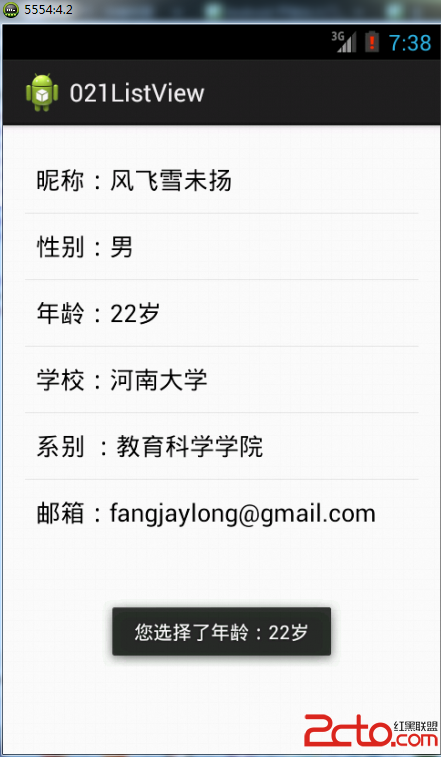 從零開始學 Android(二十一):ListView 與三種 Adapter 的實戰
除了 ScrollView 之外,還有一種專門用來呈現多筆資料並支援滾動的元件——ListView。它本身有對應的 ListView 類別,繼承結構如下: java.l
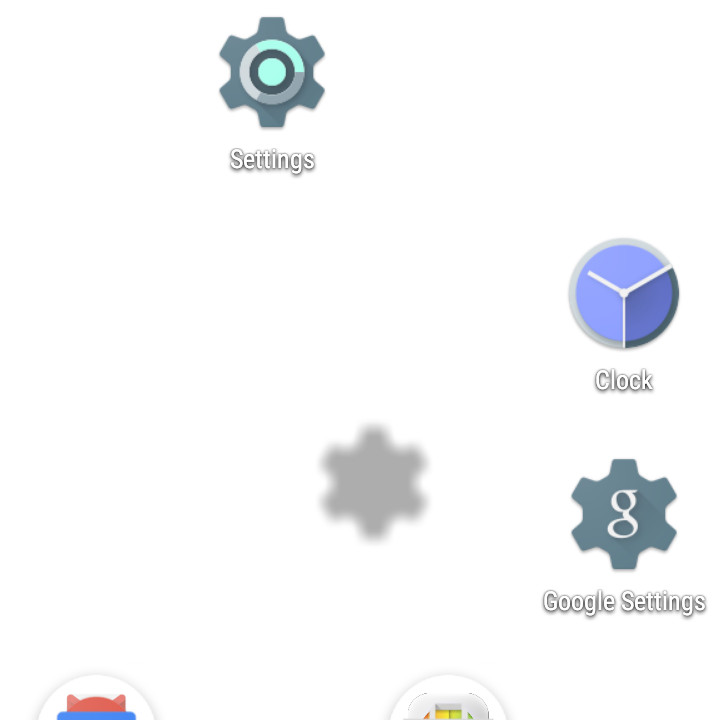 Launcher3 桌面圖標拖動機制筆記:事件攔截、落點計算與重排
拖動時的視覺回饋 在 Launcher3 中,桌面圖標的拖動體驗包含許多細節。當使用者按下圖標時,會出現輕微的按壓回饋;開始拖動後,周圍受影響的圖標會產生搖動動畫,以提示
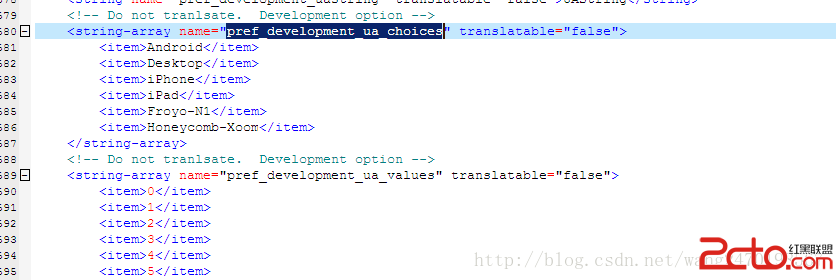 Android 4.4 Browser 瀏覽器模式選項默認值修改指南
在定製 Android 4.4 系統時,往往需要修改內置 Browser 瀏覽器的默認「瀏覽器模式」(即 User-Agent 模式)。實現方法很簡單,只需定位並修改對應
 Android 簡單實現圓盤抽獎轉盤界面
閒來無事,做了一個簡單的抽獎轉盤 UI 實現,分享出來供大家參考。 自定義 HalfCircle 控件 這個轉盤的核心是自定義一個 HalfCircle 視圖,通過