

編輯:關於 Android 程式設計
在 App 開發中,底部選單是相當常見的控制項,每次都要重寫一堆程式碼著實麻煩。今天我們就沿用前幾篇教學中介紹的控制項,進一步封裝出一個可複用的底部選單。先來看效果圖:
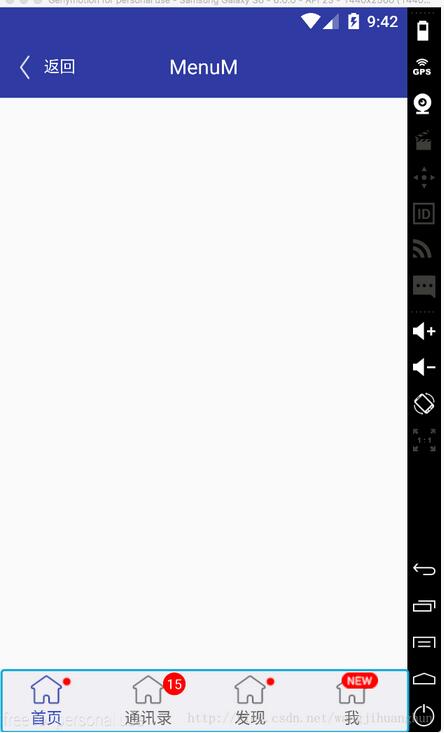
它主要具備以下功能:
1. 設定 icon 以及點擊後的 icon
2. 設定文字
3. 設定文字顏色以及點擊後的文字顏色
4. 設定未讀數量、more 以及 new 提示
我們先看如何使用,再看它如何實作。
1. 在版面檔中引用 MenuM
 <com.landptf.view.MenuM
 android:id="@+id/mm_bottom"
 android:layout_width="match_parent"
 android:layout_height="56dp"
 android:layout_alignParentBottom="true"
 landptf:backColor="@color/content"
 landptf:textColor="@color/text"
 landptf:textColorPress="@color/colorPrimary"
 landptf:count="4" />
這裡要特別說明 count 屬性,它代表選單項的數量。
2. 在 Activity 中初始化
 final MenuM mmBottom = (MenuM) findViewById(R.id.mm_bottom);
 mmBottom.setText(text);
 mmBottom.setIconDrawable(iconDrawable);
 mmBottom.setIconDrawablePress(iconDrawablePress);
 //設置默認選中第一項
 mmBottom.setPressState(0, MotionEvent.ACTION_DOWN);
 mmBottom.setOnItemClickListener(new MenuM.OnItemClickListener() {
 @Override public void onItemClick(int position) {
 Toast.makeText(MenuMTestActivity.this, mmBottom.getText(position), Toast.LENGTH_SHORT).show();
 }
 });
 mmBottom.setUnReadCount(0, 100);
 mmBottom.setUnReadCount(1, 15);
 mmBottom.setVisibilityMore(2, View.VISIBLE);
 mmBottom.setVisibilityNew(3, View.VISIBLE);
以下是幾個全域變數的設定:
 text = new String[]{"首頁", "通訊錄", "發現", "我"};
 //為了演示方便我只找了兩張icon,在實際開發中一般需要從網絡上下載,然後在設置
 Drawable drawable = getResources().getDrawable(R.drawable.icon_home_page);
 Drawable drawablePress = getResources().getDrawable(R.drawable.icon_home_page_press);
 iconDrawable = new Drawable[]{drawable, drawable, drawable, drawable};
 iconDrawablePress = new Drawable[]{drawablePress, drawablePress, drawablePress, drawablePress};
以上就是全部的使用程式碼,是不是相當方便呢?接下來我們來看它如何實作。
1. 在 style 中定義了幾個屬性,這裡不再贅述,可查看原始碼,文末會附上完整下載位址。
2. MenuM.java
 package com.landptf.view;
 import android.content.Context;
 import android.content.res.ColorStateList;
 import android.content.res.TypedArray;
 import android.graphics.drawable.Drawable;
 import android.support.annotation.Nullable;
 import android.util.AttributeSet;
 import android.util.Log;
 import android.view.MotionEvent;
 import android.view.View;
 import android.view.ViewGroup;
 import android.widget.LinearLayout;
 import android.widget.RelativeLayout;
 import com.landptf.R;
 import java.util.ArrayList;
 import java.util.List;
 /**
 * Created by landptf on 2017/01/15.
 * 菜單,可用於底部導航菜單,以及內容區的菜單列表
 */
 public class MenuM extends LinearLayout {
 private static final String TAG = MenuM.class.getSimpleName();
 private Context mContext;
 private List<MenuItemM> menuList;
 private List<RelativeLayout> rlList;
 private OnItemClickListener mOnItemClickListener;
 private int count = 0;
 public MenuM(Context context) {
 this(context, null, 0);
 }
 public MenuM(Context context, AttributeSet attrs) {
 this(context, attrs, 0);
 }
 public MenuM(Context context, AttributeSet attrs, int defStyle) {
 super(context, attrs, defStyle);
 mContext = context;
 init(attrs, defStyle);
 }
 private void init(AttributeSet attrs, int defStyle) {
 setOrientation(LinearLayout.HORIZONTAL);
 TypedArray a = mContext.obtainStyledAttributes(attrs, R.styleable.menuM, defStyle, 0);
 if (a != null) {
 //初始化菜單數量
 count = a.getInteger(R.styleable.menuM_count, 0);
 if (count > 0) {
 initControl();
 }
 //設置背景色
 ColorStateList colorList = a.getColorStateList(R.styleable.menuM_backColor);
 if (colorList != null) {
 int backColor = colorList.getColorForState(getDrawableState(), 0);
 if (backColor != 0) {
 setBackColor(backColor);
 }
 }
 //設置文字的顏色
 ColorStateList textColorList = a.getColorStateList(R.styleable.menuM_textColor);
 if (textColorList != null) {
 int textColor = textColorList.getColorForState(getDrawableState(), 0);
 if (textColor != 0) {
 setTextColor(textColor);
 }
 }
 //記錄View被按下時文字的顏色
 ColorStateList textColorPressList = a.getColorStateList(R.styleable.menuM_textColorPress);
 if (textColorPressList != null) {
 int textColorPress = textColorPressList.getColorForState(getDrawableState(), 0);
 if (textColorPress != 0) {
 setTextColorPress(textColorPress);
 }
 }
 //設置文本字體大小
 float textSize = a.getFloat(R.styleable.menuM_textSize, 0);
 if (textSize != 0) {
 setTextSize(textSize);
 }
 a.recycle();
 }
 }
 /**
 * 由於MenuItemM是有ButtonExtendM擴展而來,為了適應上下左右不同的樣式
 * 需要在MenuItemM外層嵌套一層RelativeLayout,暫時沒有找到更好的替代方案
 */
 private void initControl() {
 rlList = new ArrayList<>(count);
 menuList = new ArrayList<>(count);
 for (int i = 0; i < count; i++) {
 RelativeLayout rlPanel = new RelativeLayout(mContext);
 LinearLayout.LayoutParams lp = new LinearLayout.LayoutParams(0, ViewGroup.LayoutParams.MATCH_PARENT);
 lp.weight = 1;
 rlPanel.setLayoutParams(lp);
 final MenuItemM menuItem = new MenuItemM(mContext);
 RelativeLayout.LayoutParams lpR = new RelativeLayout.LayoutParams(ViewGroup.LayoutParams.WRAP_CONTENT, ViewGroup.LayoutParams.WRAP_CONTENT);
 lpR.addRule(RelativeLayout.CENTER_IN_PARENT);
 menuItem.setLayoutParams(lpR);
 menuItem.setOnClickListener(new MenuItemM.OnClickListener() {
 @Override public void onClick(View v) {
 //此處需要根據view獲取position
 MenuM.this.onClick(getPosition(menuItem));
 }
 });
 rlPanel.addView(menuItem);
 menuList.add(menuItem);
 rlList.add(rlPanel);
 addView(rlPanel);
 }
 }
 /**
 * 設置View的背景色
 * @param backColor
 */
 public void setBackColor(int backColor) {
 if (backColor == 0) return;
 if (!checkCount()) {
 return;
 }
 for (RelativeLayout item : rlList) {
 item.setBackgroundColor(backColor);
 }
 for (MenuItemM item : menuList) {
 item.setBackColor(backColor);
 }
 }
 /**
 * 設置文字的顏色
 * @param textColor
 */
 public void setTextColor(int textColor) {
 if (textColor == 0) return;
 if (!checkCount()) {
 return;
 }
 for (MenuItemM item : menuList) {
 item.setTextColor(textColor);
 }
 }
 /**
 * 設置View被按下時文字的顏色
 * @param textColorPress
 */
 public void setTextColorPress(int textColorPress) {
 if (textColorPress == 0) return;
 if (!checkCount()) {
 return;
 }
 for (MenuItemM item : menuList) {
 item.setTextColorPress(textColorPress);
 }
 }
 /**
 * 設置icon的圖片
 * @param iconDrawable
 */
 public void setIconDrawable(Drawable[] iconDrawable) {
 if (count != iconDrawable.length) {
 Log.e(TAG, "the iconDrawable length do not equals count");
 return;
 }
 for (int i = 0; i < count; i++) {
 if (iconDrawable[i] != null) {
 menuList.get(i).setIconDrawable(iconDrawable[i]);
 }
 }
 }
 /**
 * 設置icon的圖片
 * @param iconDrawable
 */
 public void setIconDrawable(List<Drawable> iconDrawable) {
 if (count != iconDrawable.size()) {
 Log.e(TAG, "the iconDrawable length do not equals count");
 return;
 }
 for (int i = 0; i < count; i++) {
 if (iconDrawable.get(i) != null) {
 menuList.get(i).setIconDrawable(iconDrawable.get(i));
 }
 }
 }
 /**
 * 設置View被按下時的icon的圖片
 * @param iconDrawablePress
 */
 public void setIconDrawablePress(Drawable[] iconDrawablePress) {
 if (count != iconDrawablePress.length) {
 Log.e(TAG, "the iconDrawable length do not equals count");
 return;
 }
 for (int i = 0; i < count; i++) {
 if (iconDrawablePress[i] != null) {
 menuList.get(i).setIconDrawablePress(iconDrawablePress[i]);
 }
 }
 }
 /**
 * 設置View被按下時的icon的圖片
 * @param iconDrawablePress
 */
 public void setIconDrawablePress(List<Drawable> iconDrawablePress) {
 if (count != iconDrawablePress.size()) {
 Log.e(TAG, "the iconDrawable length do not equals count");
 return;
 }
 for (int i = 0; i < count; i++) {
 if (iconDrawablePress.get(i) != null) {
 menuList.get(i).setIconDrawablePress(iconDrawablePress.get(i));
 }
 }
 }
 /**
 * 設置顯示的文本內容
 * @param text
 */
 public void setText(CharSequence[] text) {
 for (int i = 0; i < count; i++) {
 menuList.get(i).setText(text[i]);
 }
 }
 /**
 * 設置顯示的文本內容
 * @param text
 */
 public void setText(List<CharSequence> text) {
 if (count != text.size()) {
 Log.e(TAG, "the text length do not equals count");
 return;
 }
 for (int i = 0; i < count; i++) {
 menuList.get(i).setText(text.get(i));
 }
 }
 /**
 * 獲取顯示的文本
 * @return
 */
 public String getText(int index) {
 if (!checkIndex(index)) {
 return "";
 }
 return menuList.get(index).getText();
 }
 /**
 * 設置文本字體大小
 * @param size
 */
 public void setTextSize(float size) {
 if (!checkCount()) {
 return;
 }
 for (MenuItemM item : menuList) {
 item.setTextSize(size);
 }
 }
 /**
 * 設置更多提示是否顯示
 * 如果顯示則先重置new和未讀數量圖標
 * @param visibleMore
 */
 public void setVisibilityMore(int index, int visibleMore) {
 if (!checkIndex(index)) {
 return;
 }
 menuList.get(index).setVisibilityMore(visibleMore);
 }
 /**
 * 設置New提示是否顯示
 * 如果顯示則先重置更多和未讀數量圖標
 * @param visibleNew
 */
 public void setVisibilityNew(int index, int visibleNew) {
 if (!checkIndex(index)) {
 return;
 }
 menuList.get(index).setVisibilityNew(visibleNew);
 }
 /**
 * 設置未讀數量
 * 如果小於等於0,表示隱藏
 * 如果大於99,則將其隱藏,同時顯示更多的提示
 * 如果在0-99區間,則隱藏更多和new圖標
 * @param unReadCount
 */
 public void setUnReadCount(int index, int unReadCount) {
 if (!checkIndex(index)) {
 return;
 }
 menuList.get(index).setUnReadCount(unReadCount);
 }
 /**
 * 設置為被選中狀態
 * @param index
 * @param state in MotionEvent.ACTION_DOWN or MotionEvent.ACTION_UP
 */
 public void setPressState(int index, int state) {
 if (!checkIndex(index)) {
 return;
 }
 menuList.get(index).setPressState(state);
 }
 /**
 * 設置菜單點擊事件
 * @param listener
 */
 public void setOnItemClickListener(@Nullable OnItemClickListener listener) {
 mOnItemClickListener = listener;
 }
 private void onClick(int position) {
 for (int i = 0; i < count; i++) {
 if (i == position) {
 setPressState(i, MotionEvent.ACTION_DOWN);
 } else {
 setPressState(i, MotionEvent.ACTION_UP);
 }
 }
 mOnItemClickListener.onItemClick(position);
 }
 /**
 * 獲取點擊菜單項的位置
 * @param item
 * @return
 */
 private int getPosition(MenuItemM item) {
 for (int i = 0; i < count; i++) {
 if (item == menuList.get(i)) {
 return i;
 }
 }
 return -1;
 }
 /**
 * 檢查是否設置了Count參數
 * @return
 */
 private boolean checkCount() {
 if (count == 0) {
 Log.e(TAG, "You must set the count first");
 return false;
 }
 return true;
 }
 /**
 * 校驗輸入參數是否合法
 * @param index
 * @return
 */
 private boolean checkIndex(int index) {
 if (!checkCount()) {
 return false;
 }
 if (index < 0 || index >= count) {
 Log.e(TAG, "the index is wrong");
 return false;
 }
 return true;
 }
 public interface OnItemClickListener {
 void onItemClick(int position);
 }
 }
程式碼邏輯並不複雜,相信大家都看得懂。這裡面使用了 MenuItemM 自訂控制項,若有不清楚的地方,可以參考之前的教學或查看原始碼。全部程式碼已託管於開源中國的碼雲上,歡迎大家下載使用。
希望這份底部選單封裝教學能對大家有所幫助。
 Android 中 View 實現彈性滑動的三種方法——開發藝術探索筆記
一、什麼是彈性滑動 彈性滑動又稱漸進式滑動,做法是把一次大位移拆成許多小位移,在一段時間內逐步完成,讓滑動看起來有加速減速的過渡感,而不是硬邦邦地瞬移。所有實作方式背後都
 Android ScrollView 的兩種宣告方式
Android 的版面配置一般來說有兩種宣告方式:一種寫在 XML 裡,另一種用程式碼動態建立。ScrollView 兩者都支援。 方式一:XML 宣告 <?xm
 Android TabLayout 結合 ViewPager 實現分頁切換教學
在 Android 中,TabLayout 與 ViewPager 是非常常見的組合,適合用來建立頂部頁籤與可滑動頁面的結構。只要把兩者綁定在一起,就能讓使用者透過點擊頁
 Android 自繪圖形必學:Path 常用 API 完整解析
Path 在自訂 View 中的角色在 Android 自繪場景中,Path 用於描述線段、曲線、圓弧與封閉圖形。它常與 Canvas、Paint 搭配,也能與 xfer