

編輯:關於 Android 程式設計
上一篇文章《自定義viewgroup(2)》地址:https://www.jb51.net/article/100610.htm
能拖動只是第一步。上一篇的版本有個明顯缺陷:往右拖到底會拉出一片空白,往左拖也會把內容推過頭,體驗很差。這一篇就來處理邊界——在 ACTION_UP 時判斷當前位置是否越界,越界就強制拉回合法範圍。
程式碼:
package com.example.libingyuan.horizontallistview.ScrollViewGroup; import android.content.Context; import android.util.AttributeSet; import android.util.DisplayMetrics; import android.view.MotionEvent; import android.view.View; import android.view.ViewGroup; import android.view.WindowManager; import android.widget.Scroller; /** * 自訂ViewGroup * 在滾動的基礎上,增加了邊界限制 */ public class ScrollViewGroup extends ViewGroup { //滾動計算輔助類 private Scroller mScroller; //手指落點的X坐標 private float mLastMotionX = 0; //螢幕寬度 private int screenWidth; /** * 使用new關鍵字建立物件的時候呼叫 * @param context 上下文 */ public ScrollViewGroup(Context context) { this(context, null); } /** * 在XML檔案中使用的時候呼叫 * @param context 上下文 * @param attrs 屬性:如 android:layout_width="wrap_content" */ public ScrollViewGroup(Context context, AttributeSet attrs) { this(context, attrs, 0); } /** * 在xml檔案中呼叫,並且使用了自訂屬性的時候呼叫 * @param context 上下文 * @param attrs 屬性:如 android:layout_width="wrap_content" * @param defStyleAttr 自訂屬性的id */ public ScrollViewGroup(Context context, AttributeSet attrs, int defStyleAttr) { super(context, attrs, defStyleAttr); init(context); } /** * 初始化方法 * 初始化滾動輔助類Scroller以及計算出螢幕寬度 * @param context */ private void init(Context context) { mScroller = new Scroller(context); WindowManager manager = (WindowManager) context .getSystemService(Context.WINDOW_SERVICE); DisplayMetrics outMetrics = new DisplayMetrics(); manager.getDefaultDisplay().getMetrics(outMetrics); screenWidth = outMetrics.widthPixels; } /** * 滾動時需要重寫的方法,用於控制滾動 */ @Override public void computeScroll() { //判斷滾動時候停止 if (mScroller.computeScrollOffset()) { //滾動到指定的位置 scrollTo(mScroller.getCurrX(), mScroller.getCurrY()); //這句話必須寫,否則不能即時刷新 postInvalidate(); } } /** * 手指觸螢幕事件監聽 * @param event * @return */ @Override public boolean onTouchEvent(MotionEvent event) { // TODO Auto-generated method stub int action = event.getAction(); float x = event.getX(); switch (action) { case MotionEvent.ACTION_DOWN: if (!mScroller.isFinished()) { mScroller.abortAnimation(); } mLastMotionX = event.getX(); break; case MotionEvent.ACTION_MOVE: float delt = mLastMotionX - x; mLastMotionX = x; scrollBy((int) delt, 0); break; case MotionEvent.ACTION_UP: View lastChild=getChildAt(getChildCount()-1); int finalyChild= (int) (lastChild.getX()+lastChild.getWidth()-screenWidth); if (getScrollX()<0){ scrollTo(0,0); } if (getScrollX()>=finalyChild) scrollTo(finalyChild,0); invalidate(); break; default: break; } return true; } @Override protected void onMeasure(int widthMeasureSpec, int heightMeasureSpec) { //重新設置寬高 this.setMeasuredDimension(measureWidth(widthMeasureSpec, heightMeasureSpec), measureHeight(widthMeasureSpec, heightMeasureSpec)); } /** * 測量寬度 */ private int measureWidth(int widthMeasureSpec, int heightMeasureSpec) { // 寬度 int sizeWidth = MeasureSpec.getSize(widthMeasureSpec); int modeWidth = MeasureSpec.getMode(widthMeasureSpec); //父控件的寬(wrap_content) int width = 0; int childCount = getChildCount(); //重新測量子view的寬度,以及最大高度 for (int i = 0; i < childCount; i++) { View child = getChildAt(i); measureChild(child, widthMeasureSpec, heightMeasureSpec); MarginLayoutParams lp = (MarginLayoutParams) child.getLayoutParams(); int childWidth = child.getMeasuredWidth() + lp.leftMargin + lp.rightMargin; width += childWidth; } return modeWidth == MeasureSpec.EXACTLY ? sizeWidth : width; } /** * 測量高度 */ private int measureHeight(int widthMeasureSpec, int heightMeasureSpec) { //高度 int sizeHeight = MeasureSpec.getSize(heightMeasureSpec); int modeHeight = MeasureSpec.getMode(heightMeasureSpec); //父控件的高(wrap_content) int height = 0; int childCount = getChildCount(); //重新測量子view的寬度,以及最大高度 for (int i = 0; i < childCount; i++) { View child = getChildAt(i); measureChild(child, widthMeasureSpec, heightMeasureSpec); MarginLayoutParams lp = (MarginLayoutParams) child.getLayoutParams(); int childHeight = child.getMeasuredHeight() + lp.topMargin + lp.bottomMargin; height += childHeight; } height = height / childCount; return modeHeight == MeasureSpec.EXACTLY ? sizeHeight : height; } /** * 給子布局設定位置 */ @Override protected void onLayout(boolean changed, int l, int t, int r, int b) { int childLeft = 0;//子View左邊的間距 int childWidth;//子View的寬度 int height = getHeight();//螢幕的寬度 int childCount = getChildCount();//子View的數量 for (int i = 0; i < childCount; i++) { View child = getChildAt(i); MarginLayoutParams lp = (MarginLayoutParams) child.getLayoutParams(); childWidth = child.getMeasuredWidth() + lp.leftMargin + lp.rightMargin; child.layout(childLeft, 0, childLeft + childWidth, height); childLeft += childWidth; } } @Override public LayoutParams generateLayoutParams(AttributeSet attrs) { return new MarginLayoutParams(getContext(), attrs); } }
邊界值的算法是重點:最大可滾動距離等於「最後一個子 View 的右邊界座標減去螢幕寬度」,也就是內容總寬扣掉可視區域。小於 0 就回到原點,大於這個值就貼齊最後一項。這樣一來,無論怎麼拖都不會出現空白帶。
以上就是本文的全部內容,希望對大家的學習有所幫助,也希望大家多多支持本站。
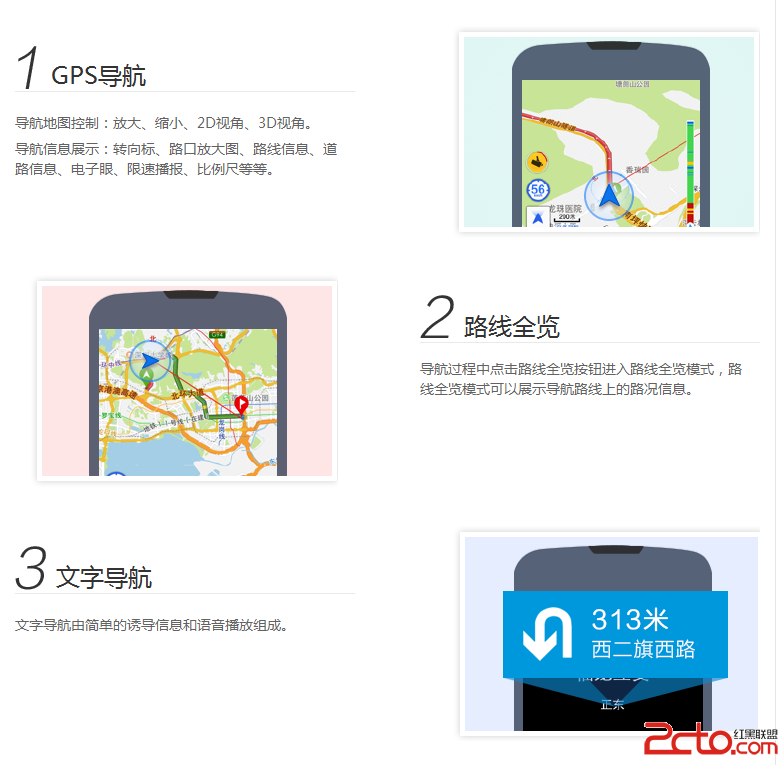 Android Studio 百度地圖開發(三):地圖導航功能實現
Android Studio 百度地圖開發(3)地圖導航開發環境:Win7 64 位,Android Studio,導航 SDK 版本 3.1.0。一、緣起寫定位功能時,
 Android Dex 方法數上限解析與應對思路
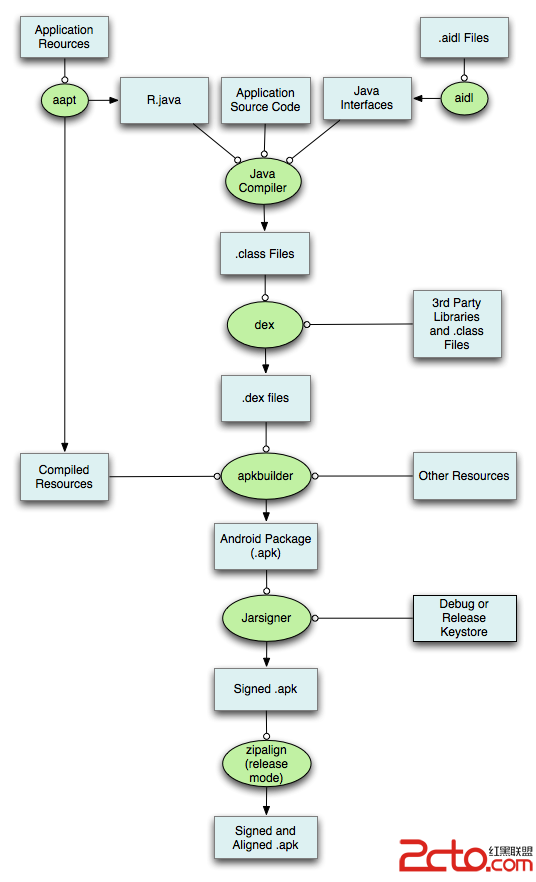
Android 編譯流程概覽 要理解 Dex 方法數限制,可以先看 Android 應用的編譯流程。專案中的資源會先由 aapt 編譯,並產生 R.java;aidl 會
 Android 螢幕適配需要注意的重點總整理
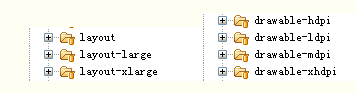
Android 裝置的螢幕尺寸與解析度五花八門,做好螢幕適配是開發中不可忽略的一環。以下整理幾個關鍵要點。 基本原則 盡量使用線性版面(LinearLayout)與相
 Android 源碼中的命令模式:定義、結構與 PackageManagerService 解析
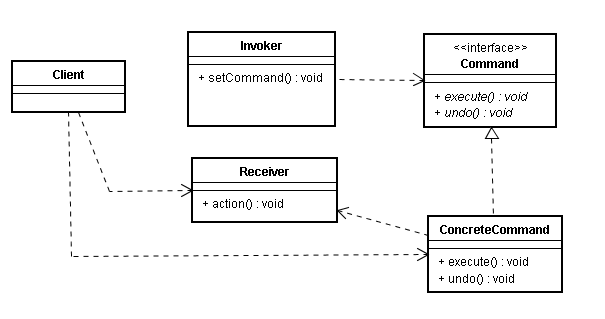
寫在前面 這個系列此前已經聊過:從裝飾者模式到 Context 類族、當觀察者模式和回調機制遇上 Android 源碼、Android 源碼中的靜態工廠方法、Androi