

編輯:關於 Android 程式設計
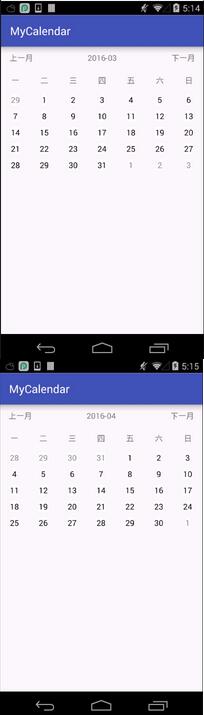
做一個能翻月的月曆,核心其實只有兩件事:算出該月第一天是星期幾、該月總共有幾天,然後把上個月和下個月的剩餘格子補滿。以下示範一個只負責顯示月份的版本,尚未加入當日標記與記事功能。
/** * 獲取該月天數 */ public static int getCurrentMonthDay(long millSec) { Calendar calendar = Calendar.getInstance(); calendar.setTimeInMillis(millSec); calendar.set(Calendar.DATE, 1); calendar.roll(Calendar.DATE, -1); int dateCount = calendar.get(Calendar.DATE); return dateCount; } /** * 獲取當月第一天 */ public static long getFirOfMonth(long millSec) { Calendar calendar = Calendar.getInstance(); calendar.setTimeInMillis(millSec); calendar.set(Calendar.DATE, 1); return calendar.getTimeInMillis(); } /** * 獲取當前時間戳 */ public static long getCurrentTime() { Calendar calendar = Calendar.getInstance(); return calendar.getTimeInMillis(); } /** * 獲取上一月/下一月 */ public static long getLastOrNextMonth(long millSec, int count) { Calendar calendar = Calendar.getInstance(); calendar.setTimeInMillis(millSec); calendar.add(Calendar.MONTH, count); return calendar.getTimeInMillis(); } /** * 格式化到月份 */ public static String long2str(long millSec) { SimpleDateFormat sdf = new SimpleDateFormat("yyyy-MM"); return sdf.format(new Date(millSec)); }
getCurrentMonthDay() 是個值得記住的小技巧:先把日期設為 1 號,再用 roll(DATE, -1) 回退一天,就能停在「上個月的最後一天」,此時的 DATE 值正好等於本月天數。閏年二月、大小月都不用自己寫判斷。
getLastOrNextMonth() 則靠 add(Calendar.MONTH, count) 一次前進或後退,傳 -1 就是上個月。
我用一個 List 存放每一天。由於原先預期每天可能帶記事資訊,所以封裝了一個 DayBean;若不需要,直接存時間戳也可以。
private void setCalendarList(long millSecs) { beans.clear(); Calendar calendar = Calendar.getInstance(); calendar.setTimeInMillis(millSecs); // int nor = today.getDay(); int max = DateUtil.getCurrentMonthDay(millSecs); /** * 當月日歷 */ for (int i = 1; i <= max; i++) { DayBean bean = new DayBean(); Calendar cc = Calendar.getInstance(); cc.setTimeInMillis(millSecs); cc.add(Calendar.DAY_OF_MONTH, i - 1); setBean(bean, cc); bean.setIsCurrentMonth(true); beans.add(bean); } //上月結余 int fir_day_of_week = beans.get(0).getCalendar().get(Calendar.DAY_OF_WEEK); Log.e("AAA", "week_last:" + fir_day_of_week); if (fir_day_of_week != 2) { if(fir_day_of_week == 1){ for (int i = 0; i < 6; i++) { DayBean bean = new DayBean(); Calendar cc = Calendar.getInstance(); cc.setTimeInMillis(millSecs); cc.add(Calendar.DAY_OF_MONTH, -i -1); setBean(bean, cc); Log.e("AAA", "last:" + bean.getDay()); bean.setIsCurrentMonth(false); beans.add(0, bean); } }else{ for (int i = 0; i < fir_day_of_week-2; i++) { DayBean bean = new DayBean(); Calendar cc = Calendar.getInstance(); cc.setTimeInMillis(millSecs); cc.add(Calendar.DAY_OF_MONTH, -i-1); setBean(bean, cc); Log.e("AAA", "last:" + bean.getDay()); bean.setIsCurrentMonth(false); beans.add(0, bean); } } } //下月 int last_day_of_week = beans.get(beans.size() - 1).getCalendar().get(Calendar.DAY_OF_WEEK); Log.e("AAA", "week_next:" + last_day_of_week); if (last_day_of_week != 1) { for (int i = last_day_of_week; i < 8; i++) { DayBean bean = new DayBean(); Calendar cc = Calendar.getInstance(); cc.setTimeInMillis(millSecs); cc.add(Calendar.DAY_OF_MONTH, i - last_day_of_week); setBean(bean, cc); Log.e("AAA", "next:" + bean.getDay()); bean.setIsCurrentMonth(false); beans.add(bean); } } GridViewAdapter adapter = new GridViewAdapter(this, beans); mGridView.setAdapter(adapter); } private void setBean(DayBean bean, Calendar cc) { bean.setCalendar(cc); bean.setDay(cc.get(Calendar.DAY_OF_MONTH)); }
這段邏輯最容易出錯的地方是 Calendar.DAY_OF_WEEK 的返回值:週日是 1、週一是 2……週六是 7。因為月曆通常把週一放第一格,所以程式碼裡用 fir_day_of_week - 2 來算前面要補幾格;當第一天剛好是週日(值為 1)時,減法會變負數,因此必須另外特例處理補滿 6 格。
月末同理:最後一天的 DAY_OF_WEEK 若不等於 1(週日),就一路補下個月的日期,直到湊滿整週。
我在 DayBean 裡放了一個「是否本月」的旗標,Adapter 依此切換字色:本月黑、非本月灰;今日則加底色強調。
@Override public View getView(int position, View convertView, ViewGroup parent) { ViewHolder holder; if (convertView == null) { convertView = inflater.inflate(R.layout.item_layout, null); holder = new ViewHolder(); holder.day_text = (TextView) convertView.findViewById(R.id.day_text); convertView.setTag(holder); } else { holder = (ViewHolder) convertView.getTag(); } holder.day_text.setText(beans.get(position).getDay() + ""); if (beans.get(position).isToday()) { holder.day_text.setBackgroundColor(Color.RED); } else { holder.day_text.setBackgroundColor(Color.WHITE); } if (beans.get(position).isCurrentMonth()) { holder.day_text.setTextColor(Color.BLACK); } else { holder.day_text.setTextColor(Color.GRAY); } return convertView; } class ViewHolder { TextView day_text; }
這裡用了 ViewHolder 模式把 findViewById 的結果快取下來,避免每次捲動都重複查找視圖,是 ListView/GridView 效能的基本功。
若要往下延伸,可以考慮:把「今日」的判定改成比對年月日而非僅比對日期數字、加入點擊後跳轉日誌頁的互動、用 RecyclerView 搭配 GridLayoutManager 取代 GridView 以取得更好的回收效率,以及把日期計算邏輯抽成獨立的工具類方便測試。
以上就是以 GridView 實作月曆的完整思路,核心永遠是「月初星期幾 + 本月幾天」這兩個數字,剩下的都是排列與樣式。
 基於 Android 的 3D 視頻播放示例代碼解析
作者:Mark Liu 簡介 本文介紹一個名為 Video3D 的示例應用,它基於 Android 4.0 Ice Cream Sandwich(ICS)的 Media
 Android 5.0 新特性 overview
Android 5.0 是 Google 於 2014 年 10 月 15 日(美國太平洋時間)發布的全新 Android 操作系統,英文名為 Lollipop,翻譯過來
 Android 開發系列(五):內部檔案的新建與讀取
本篇要實作兩件很基本的事:在 Android 中建立一個檔案並寫入內容,以及把內容讀回來。 目標介面如下: 輸入檔名與內容,按下按鈕,就會存成一個檔案。 一、字串資源
 Android 四大組件之 Service:啟動方式、生命週期與前台服務
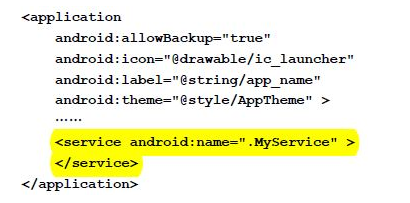
一、Service 的基本概念 四大組件都運行在主線程上。Service 是一種可以在不定時間內於後台運行、且不與使用者直接互動的應用組件,每個 Service 都必須在