

編輯:關於 Android 程式設計
Android 的 SQLite 資料庫預設存放在應用程式目錄下。若裝置已 root,資料庫檔案可能被存取,因此對敏感資料進行加密是必要的。SQLCipher 是在 SQLite 基礎上擴充的開源加密資料庫方案,適合行動裝置使用。
dependencies {
    compile 'net.zetetic:android-database-sqlcipher:3.4.0'
}使用 SQLCipher 時,所有 SQLite 相關類別都要改為引用 net.sqlcipher.database。
import net.sqlcipher.database.SQLiteDatabase;
import net.sqlcipher.database.SQLiteOpenHelper;

public class DBCipherHelper extends SQLiteOpenHelper {

    private static final String DB_NAME = "test_cipher_db";
    public static final String DB_PWD = "whoislcj";
    public static final String TABLE_NAME = "person";
    public static final String FIELD_ID = "id";
    public static final String FIELD_NAME = "name";

    public DBCipherHelper(Context context) {
        super(context, DB_NAME, null, 1);
        SQLiteDatabase.loadLibs(context);
    }

    @Override
    public void onCreate(SQLiteDatabase db) {
        String sql = "CREATE TABLE " + TABLE_NAME + " ("
                + FIELD_ID + " integer primary key autoincrement, "
                + FIELD_NAME + " text not null);";
        db.execSQL(sql);
    }

    @Override
    public void onUpgrade(SQLiteDatabase db, int oldVersion, int newVersion) {
    }
}請注意:SQLiteDatabase.loadLibs(context) 不可省略,否則會無法正確載入加密相關函式庫。
傳統 SQLite 取得資料庫的方式如下:
SQLiteDatabase db = dbHelper.getWritableDatabase();SQLCipher 則需要傳入密碼:
SQLiteDatabase db = dbHelper.getWritableDatabase(DBCipherHelper.DB_PWD);
SQLiteDatabase readableDb = dbHelper.getReadableDatabase(DBCipherHelper.DB_PWD);插入資料:
ContentValues cv = new ContentValues();
cv.put(DBCipherHelper.FIELD_NAME, name);
db.insert(DBCipherHelper.TABLE_NAME, null, cv);
查詢資料:
Cursor cursor = db.query(
        DBCipherHelper.TABLE_NAME,
        new String[]{DBCipherHelper.FIELD_NAME},
        null, null, null, null, null);

while (cursor.moveToNext()) {
    String name = cursor.getString(0);
}SQLCipher 也支援傳統 SQLite 的事務寫法:
db.beginTransaction();
try {
    db.insert(DBCipherHelper.TABLE_NAME, null, cv);
    db.setTransactionSuccessful();
} finally {
    db.endTransaction();
}
透過 SQLCipher,可以在不改變太多既有 SQLite 使用習慣的情況下,為本機資料庫加上一層加密保護。
 Retrofit 進階(三):批量上傳與上傳進度監聽
由於 gif 圖較大,我把圖放在了 GitHub 上,博客裡若顯示不出來可以點擊傳送門查看。本文代碼寫於 md,可讀性一般,敬請諒解。 1. 前言 上一篇我們介紹了 Re
 Android 與 BLE 終端通信實戰:Service、Characteristic 與讀寫
穿戴裝置這幾年相當熱門,也把相關技術帶動起來,其中一項就是 BLE(Bluetooth Low Energy)。BLE 是藍牙 4.0 的核心 Profile,主打快速搜
 Android WindowManager 機制解析,以及「覆蓋層釣魚」風險與防禦
本文從 WindowManager 的運作機制出發,說明 Android 視窗體系如何組裝畫面,並進一步討論一個真實存在過的攻擊手法——利用系統層級的浮動視窗偽造登入畫面
 ListView 點擊 Item 展開菜單實現代碼詳解
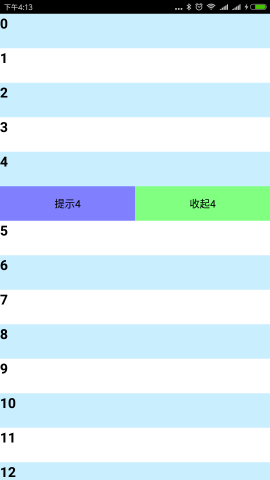
一、概述本文要實作的效果是:點擊 ListView 的 Item 時顯示菜單,如下圖所示。 需要實現的邏輯如下:1)點擊一個普通 item,展開當前菜單,同時關閉其他菜