

編輯:關於 Android 程式設計
穿戴裝置這幾年相當熱門,也把相關技術帶動起來,其中一項就是 BLE(Bluetooth Low Energy)。BLE 是藍牙 4.0 的核心 Profile,主打快速搜尋、快速連線、超低功耗維持連線與傳輸,弱點是資料傳輸速率偏低;正因為低功耗的特性,它被廣泛用於穿戴裝置。
要注意版本門檻:Android 4.3 才開始支援 BLE API,因此本文的程式碼請跑在藍牙 4.0 且系統為 Android 4.3 以上的環境。本文使用的 BLE 終端是一個藍牙 4.0 的串口藍牙模組。(筆者的 i9100 刷上 4.4 之後,也能與 BLE 模組通信。)
BLE 分為 Service、Characteristic、Descriptor 三個層級,三者都以 UUID 作為唯一識別碼。一個藍牙 4.0 終端可以包含多個 Service;一個 Service 可以包含多個 Characteristic;一個 Characteristic 含有一個 Value 與多個 Descriptor;一個 Descriptor 也含有一個 Value。
一般來說,Characteristic 是手機與 BLE 終端交換資料的關鍵。Characteristic 有幾個與權限相關的欄位,例如 PERMISSION 與 PROPERTY,其中最常用的是 PROPERTY。本範例使用的藍牙模組甚至沒有標準的 Characteristic PERMISSION。PROPERTY 是以位元運算組合成讀寫屬性,例如 READ|WRITE、READ|WRITE_NO_RESPONSE|NOTIFY,因此讀到之後必須再拆解成各項組合(本文程式碼已含此拆解方法)。
本文的程式改寫自 Android 4.3 Sample 中的 BluetoothLeGatt,把冗餘的部分移除,將 BLE 裝置資訊透過 Log 輸出,並保留必要的讀寫方法,盡量簡化到一眼就能看懂。
連上 BLE 裝置後,程式會枚舉出所有 Service、Characteristic 與 Descriptor,並往 uuid=0000ffe1-0000-1000-8000-00805f9b34fb 這個 Characteristic 寫入「send data->」,模組收到後透過串口傳到 PC 的串口助手:
04-21 18:28:25.465: E/DeviceScanActivity(12254): -->service type:PRIMARY
04-21 18:28:25.465: E/DeviceScanActivity(12254): -->includedServices size:0
04-21 18:28:25.465: E/DeviceScanActivity(12254): -->service uuid:00001800-0000-1000-8000-00805f9b34fb
04-21 18:28:25.465: E/DeviceScanActivity(12254): ---->char uuid:00002a00-0000-1000-8000-00805f9b34fb
04-21 18:28:25.465: E/DeviceScanActivity(12254): ---->char permission:UNKNOW
04-21 18:28:25.465: E/DeviceScanActivity(12254): ---->char property:READ
04-21 18:28:25.470: E/DeviceScanActivity(12254): ---->char uuid:00002a04-0000-1000-8000-00805f9b34fb
04-21 18:28:25.475: E/DeviceScanActivity(12254): ---->char property:READ
04-21 18:28:25.480: E/DeviceScanActivity(12254): -->service uuid:0000ffe0-0000-1000-8000-00805f9b34fb
04-21 18:28:25.480: E/DeviceScanActivity(12254): ---->char uuid:0000ffe1-0000-1000-8000-00805f9b34fb
04-21 18:28:25.480: E/DeviceScanActivity(12254): ---->char permission:UNKNOW
04-21 18:28:25.480: E/DeviceScanActivity(12254): ---->char property:READ|WRITE_NO_RESPONSE|NOTIFY|
04-21 18:28:26.025: E/DeviceScanActivity(12254): onCharRead BLE DEVICE read 0000ffe1-0000-1000-8000-00805f9b34fb -> 00
最後這行是由 BluetoothGattCallback 的 onCharacteristicRead() 回呼時印出的。
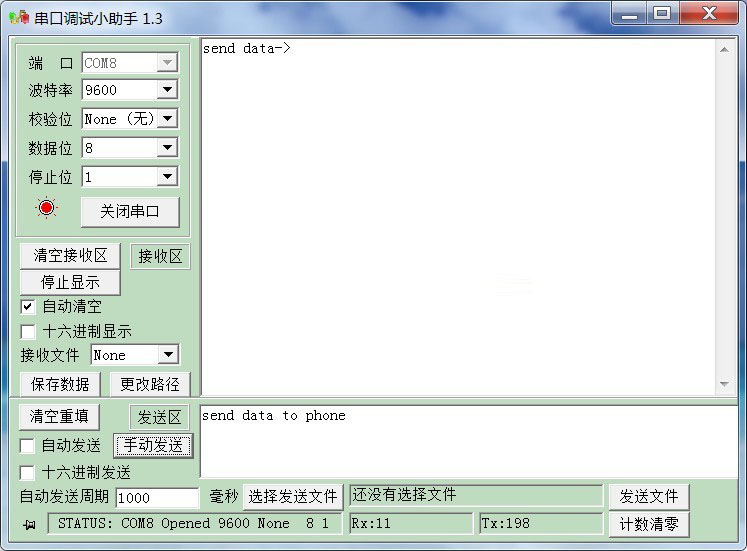
以下 Log 則是 PC 端串口工具透過 BLE 模組送過來的資料,由 onCharacteristicChanged() 印出:
04-21 18:30:18.260: E/DeviceScanActivity(12254): onCharWrite BLE DEVICE write 0000ffe1-0000-1000-8000-00805f9b34fb -> send data to phone
04-21 18:30:18.745: E/DeviceScanActivity(12254): onCharWrite BLE DEVICE write 0000ffe1-0000-1000-8000-00805f9b34fb -> send data to phone
04-21 18:30:19.085: E/DeviceScanActivity(12254): onCharWrite BLE DEVICE write 0000ffe1-0000-1000-8000-00805f9b34fb -> send data to phone
public class DeviceScanActivity extends ListActivity {
    private final static String TAG = DeviceScanActivity.class.getSimpleName();
    private final static String UUID_KEY_DATA = "0000ffe1-0000-1000-8000-00805f9b34fb";
    private LeDeviceListAdapter mLeDeviceListAdapter;
    /** 搜尋 BLE 終端 */
    private BluetoothAdapter mBluetoothAdapter;
    /** 讀寫 BLE 終端 */
    private BluetoothLeClass mBLE;
    private boolean mScanning;
    private Handler mHandler;
    // 掃描 10 秒後停止
    private static final long SCAN_PERIOD = 10000;

    @Override
    public void onCreate(Bundle savedInstanceState) {
        super.onCreate(savedInstanceState);
        getActionBar().setTitle(R.string.title_devices);
        mHandler = new Handler();

        // 用這個判斷裝置是否支援 BLE,再決定要不要停用相關功能
        if (!getPackageManager().hasSystemFeature(PackageManager.FEATURE_BLUETOOTH_LE)) {
            Toast.makeText(this, R.string.ble_not_supported, Toast.LENGTH_SHORT).show();
            finish();
        }

        // API 18 以上建議透過 BluetoothManager 取得 BluetoothAdapter
        final BluetoothManager bluetoothManager =
                (BluetoothManager) getSystemService(Context.BLUETOOTH_SERVICE);
        mBluetoothAdapter = bluetoothManager.getAdapter();

        if (mBluetoothAdapter == null) {
            Toast.makeText(this, R.string.error_bluetooth_not_supported, Toast.LENGTH_SHORT).show();
            finish();
            return;
        }

        // 開啟藍牙
        mBluetoothAdapter.enable();
        mBLE = new BluetoothLeClass(this);
        if (!mBLE.initialize()) {
            Log.e(TAG, "Unable to initialize Bluetooth");
            finish();
        }

        // 發現 BLE 終端 Service 時的回呼
        mBLE.setOnServiceDiscoverListener(mOnServiceDiscover);
        // 與 BLE 終端有資料交互時的事件
        mBLE.setOnDataAvailableListener(mOnDataAvailable);
    }

    @Override
    protected void onResume() {
        super.onResume();
        mLeDeviceListAdapter = new LeDeviceListAdapter(this);
        setListAdapter(mLeDeviceListAdapter);
        scanLeDevice(true);
    }

    @Override
    protected void onPause() {
        super.onPause();
        scanLeDevice(false);
        mLeDeviceListAdapter.clear();
        mBLE.disconnect();
    }

    @Override
    protected void onStop() {
        super.onStop();
        mBLE.close();
    }

    @Override
    protected void onListItemClick(ListView l, View v, int position, long id) {
        final BluetoothDevice device = mLeDeviceListAdapter.getDevice(position);
        if (device == null) {
            return;
        }
        if (mScanning) {
            mBluetoothAdapter.stopLeScan(mLeScanCallback);
            mScanning = false;
        }
        mBLE.connect(device.getAddress());
    }

    private void scanLeDevice(final boolean enable) {
        if (enable) {
            // 經過預設時間後停止掃描
            mHandler.postDelayed(new Runnable() {
                @Override
                public void run() {
                    mScanning = false;
                    mBluetoothAdapter.stopLeScan(mLeScanCallback);
                    invalidateOptionsMenu();
                }
            }, SCAN_PERIOD);
            mScanning = true;
            mBluetoothAdapter.startLeScan(mLeScanCallback);
        } else {
            mScanning = false;
            mBluetoothAdapter.stopLeScan(mLeScanCallback);
        }
        invalidateOptionsMenu();
    }

    /** 搜尋到 BLE 終端服務的事件 */
    private BluetoothLeClass.OnServiceDiscoverListener mOnServiceDiscover =
            new OnServiceDiscoverListener() {
        @Override
        public void onServiceDiscover(BluetoothGatt gatt) {
            displayGattServices(mBLE.getSupportedGattServices());
        }
    };

    /** 與 BLE 終端有資料交互的事件 */
    private BluetoothLeClass.OnDataAvailableListener mOnDataAvailable =
            new OnDataAvailableListener() {
        /** BLE 終端資料被讀取的事件 */
        @Override
        public void onCharacteristicRead(BluetoothGatt gatt,
                BluetoothGattCharacteristic characteristic, int status) {
            if (status == BluetoothGatt.GATT_SUCCESS) {
                Log.e(TAG, "onCharRead " + gatt.getDevice().getName() + " read "
                        + characteristic.getUuid().toString() + " -> "
                        + Utils.bytesToHexString(characteristic.getValue()));
            }
        }

        /** 收到 BLE 終端寫入資料的回呼 */
        @Override
        public void onCharacteristicWrite(BluetoothGatt gatt,
                BluetoothGattCharacteristic characteristic) {
            Log.e(TAG, "onCharWrite " + gatt.getDevice().getName() + " write "
                    + characteristic.getUuid().toString() + " -> "
                    + new String(characteristic.getValue()));
        }
    };

    // 裝置掃描回呼
    private BluetoothAdapter.LeScanCallback mLeScanCallback = new BluetoothAdapter.LeScanCallback() {
        @Override
        public void onLeScan(final BluetoothDevice device, int rssi, byte[] scanRecord) {
            runOnUiThread(new Runnable() {
                @Override
                public void run() {
                    mLeDeviceListAdapter.addDevice(device);
                    mLeDeviceListAdapter.notifyDataSetChanged();
                }
            });
        }
    };

    private void displayGattServices(List<BluetoothGattService> gattServices) {
        if (gattServices == null) {
            return;
        }
        for (BluetoothGattService gattService : gattServices) {
            // ----- Service 的欄位資訊 ----- //
            int type = gattService.getType();
            Log.e(TAG, "-->service type:" + Utils.getServiceType(type));
            Log.e(TAG, "-->includedServices size:" + gattService.getIncludedServices().size());
            Log.e(TAG, "-->service uuid:" + gattService.getUuid());

            // ----- Characteristic 的欄位資訊 ----- //
            List<BluetoothGattCharacteristic> gattCharacteristics = gattService.getCharacteristics();
            for (final BluetoothGattCharacteristic gattCharacteristic : gattCharacteristics) {
                Log.e(TAG, "---->char uuid:" + gattCharacteristic.getUuid());
                int permission = gattCharacteristic.getPermissions();
                Log.e(TAG, "---->char permission:" + Utils.getCharPermission(permission));
                int property = gattCharacteristic.getProperties();
                Log.e(TAG, "---->char property:" + Utils.getCharPropertie(property));
                byte[] data = gattCharacteristic.getValue();
                if (data != null && data.length > 0) {
                    Log.e(TAG, "---->char value:" + new String(data));
                }

                // UUID_KEY_DATA 是可以與藍牙模組串口通信的 Characteristic
                if (gattCharacteristic.getUuid().toString().equals(UUID_KEY_DATA)) {
                    // 測試讀取目前的 Characteristic 資料,會觸發 mOnDataAvailable.onCharacteristicRead()
                    mHandler.postDelayed(new Runnable() {
                        @Override
                        public void run() {
                            mBLE.readCharacteristic(gattCharacteristic);
                        }
                    }, 500);

                    // 訂閱 Characteristic 的通知,收到模組資料後會觸發 onCharacteristicWrite()
                    mBLE.setCharacteristicNotification(gattCharacteristic, true);

                    // 設定要寫入的內容
                    gattCharacteristic.setValue("send data->");
                    // 往藍牙模組寫入資料
                    mBLE.writeCharacteristic(gattCharacteristic);
                }

                // ----- Descriptor 的欄位資訊 ----- //
                List<BluetoothGattDescriptor> gattDescriptors = gattCharacteristic.getDescriptors();
                for (BluetoothGattDescriptor gattDescriptor : gattDescriptors) {
                    Log.e(TAG, "-------->desc uuid:" + gattDescriptor.getUuid());
                    int descPermission = gattDescriptor.getPermissions();
                    Log.e(TAG, "-------->desc permission:" + Utils.getDescPermission(descPermission));
                    byte[] desData = gattDescriptor.getValue();
                    if (desData != null && desData.length > 0) {
                        Log.e(TAG, "-------->desc value:" + new String(desData));
                    }
                }
            }
        }
    }
}
一是訂閱通知的順序:要收到模組主動送出的資料,必須先對目標 Characteristic 呼叫 setCharacteristicNotification(gattCharacteristic, true),這一步底層會去寫入 CCCD Descriptor(UUID 為 00002902),少了它就不會有 onCharacteristicChanged 回呼。
二是執行緒:BLE 的回呼都發生在 binder 執行緒,絕不能直接在裡面更新 UI,範例中一律用 runOnUiThread() 切回主執行緒。
三是 GATT 操作必須序列化。BluetoothGatt 的讀寫、descriptor 設定等指令必須等前一個完成回呼之後才能送下一個,連續快速下指令會導致內部狀態機錯亂而全部失敗,實務上通常用一個佇列來排隊。
四是權限:Android 12 起需要 BLUETOOTH_SCAN(含 neverForLocation 以外的情境需搭配位置權限)與 BLUETOOTH_CONNECT。
有興趣的讀者可以動手實測看看程式的執行狀況,希望對你的 Android 開發有所幫助。
 自定義 MyPullUpMenu:仿 iOS 上拉菜單控件實現思路
前陣子接了一個國外客戶的外包專案,首頁需要做一個類似 iOS 的上拉菜單。一開始試了各種現成方案,Spinner、DrawerLayout、SlidingMenu 輪番上
 Android ListView 元件詳解與範例程式碼
Android 列表元件 ListView 列表元件是開發中經常使用的元件,使用時需要為它提供一個 Adapter,由 Adapter 決定顯示樣式與資料來源。 以下看一
 Android 設計模式:單例模式的五種常見實作與取捨
為什麼需要單例模式單例模式常用於「只需要一個實例」的情境,例如全域設定、連線管理或大型物件。若每次都要重新建立,不僅浪費資源,也可能造成狀態不一致。餓漢式單例在類別載入時
 Android 日期與時間元件整理:TimePicker、DatePicker 與 Calendar
Android 中處理日期與時間的常用類別有五个:TimePicker、DatePicker、TimePickerDialog、DatePickerDialog 與 Ca