

編輯:關於 Android 程式設計
購物車的多選邏輯看起來簡單,實作起來卻容易漏 case:勾選店鋪要自動勾選店內所有商品、取消某個商品要讓店鋪變成半選或不選、底部全選框又必須同步反映全域狀態。本文用 RecyclerView 巢狀 RecyclerView 的架構,把這套邏輯完整走一遍。
bean(店鋪)內含 List<cbean>(商品)。 public class MainActivity extends AppCompatActivity {
private RecyclerView recyclerView;
private CheckBox checkBox;
private recyclerAdapter adapter;
private RecyclerView.LayoutManager manager;
private List<bean> list;
private List<cbean> cbeanList, cbeanListcp;
@Override
protected void onCreate(Bundle savedInstanceState) {
super.onCreate(savedInstanceState);
setContentView(R.layout.activity_main);
recyclerView = (RecyclerView) findViewById(R.id.recyclerview);
checkBox = (CheckBox) findViewById(R.id.shop_checkbox);
list = new ArrayList<>();
// 第一家店的資料
cbeanList = new ArrayList<>();
cbean c = new cbean();
c.setText("商品");
c.setIscheck(false);
cbean c1 = new cbean();
c1.setText("商品1");
c1.setIscheck(false);
cbeanList.add(c);
cbeanList.add(c1);
bean b = new bean();
b.setIscheck(false);
b.setText("店名");
b.setList(cbeanList);
// 第二家店的資料
cbeanListcp = new ArrayList<>();
cbean c2 = new cbean();
c2.setText("商品2");
c2.setIscheck(false);
cbean c3 = new cbean();
c3.setText("商品3");
c3.setIscheck(false);
cbeanListcp.add(c2);
cbeanListcp.add(c3);
bean b1 = new bean();
b1.setIscheck(false);
b1.setText("店名1");
b1.setList(cbeanListcp);
list.add(b);
list.add(b1);
manager = new LinearLayoutManager(this);
recyclerView.setLayoutManager(manager);
recyclerView.setHasFixedSize(true); // 效能優化
adapter = new recyclerAdapter(list);
recyclerView.setAdapter(adapter);
// ===== 底部全選框 =====
checkBox.setOnCheckedChangeListener(new CompoundButton.OnCheckedChangeListener() {
@Override
public void onCheckedChanged(CompoundButton buttonView, boolean isChecked) {
if (isChecked) {
for (int i = 0; i < list.size(); i++) {
list.get(i).setIscheck(true); // 全選店鋪
for (int j = 0; j < list.get(i).getList().size(); j++) {
list.get(i).getList().get(j).setIscheck(true); // 全選店內商品
}
}
} else {
// 只有真的全部都被選取時,才執行取消
// 避免「取消某店或某商品」時,全選框被誤設為全不選
if (allSelect() == list.size()) {
for (int i = 0; i < list.size(); i++) {
list.get(i).setIscheck(false);
for (int j = 0; j < list.get(i).getList().size(); j++) {
list.get(i).getList().get(j).setIscheck(false);
}
}
}
}
UpdateRecyclerView();
}
});
// ===== 店鋪 / 商品層的回呼 =====
adapter.setCallBack(new recyclerAdapter.allCheck() {
@Override
public void OnCheckListener(boolean isSelected, int position) {
// 記錄店鋪勾選狀態
list.get(position).setIscheck(isSelected);
// 同步底部全選框
if (allSelect() == list.size()) {
checkBox.setChecked(true);
} else {
checkBox.setChecked(false);
}
if (isSelected) {
// 勾選店鋪 → 連帶勾選底下所有商品
for (int i = 0; i < list.get(position).getList().size(); i++) {
list.get(position).getList().get(i).setIscheck(true);
}
} else {
// 若該店所有商品本來都是選取的,取消店鋪時一併取消商品
// 避免出現「店鋪沒選但商品全選」的矛盾狀態
if (allChildSelect(position) == list.get(position).getList().size()) {
for (int i = 0; i < list.get(position).getList().size(); i++) {
list.get(position).getList().get(i).setIscheck(false);
}
}
}
UpdateRecyclerView();
}
@Override
public void OnItemCheckListener(boolean isSelected, int parentposition, int chaildposition) {
// 記錄商品勾選狀態
list.get(parentposition).getList().get(chaildposition).setIscheck(isSelected);
// 該店商品全選 → 店鋪也設為選取
if (allChildSelect(parentposition) == list.get(parentposition).getList().size()) {
list.get(parentposition).setIscheck(true);
} else {
list.get(parentposition).setIscheck(false);
}
UpdateRecyclerView();
}
});
}
/* 解決 RecyclerView 直接刷新時可能發生的錯誤 */
private void UpdateRecyclerView() {
Handler handler = new Handler();
final Runnable r = new Runnable() {
public void run() {
adapter.notifyDataSetChanged();
}
};
handler.post(r);
}
// 統計被勾選的店鋪數
private int allSelect() {
int sum = 0;
for (int i = 0; i < list.size(); i++) {
if (list.get(i).ischeck()) {
sum++;
}
}
return sum;
}
// 統計指定店鋪中被勾選的商品數
private int allChildSelect(int position) {
int sum = 0;
for (int i = 0; i < list.get(position).getList().size(); i++) {
if (list.get(position).getList().get(i).ischeck()) {
sum++;
}
}
return sum;
}
}
 public class recyclerAdapter extends RecyclerView.Adapter<recyclerAdapter.MyHolder> {

     private List<bean> list;

     public recyclerAdapter(List<bean> list) {
         this.list = list;
     }

     public static class MyHolder extends RecyclerView.ViewHolder {
         private RecyclerView recyclerView;
         private TextView textView;
         private CheckBox checkBox;
         private recyclerAdapter1 adapter;
         private RecyclerView.LayoutManager manager;

         public CheckBox getCheckBox() { return checkBox; }
         public RecyclerView getRecyclerView() { return recyclerView; }
         public TextView getTextView() { return textView; }

         public MyHolder(View itemView) {
             super(itemView);
             recyclerView = (RecyclerView) itemView.findViewById(R.id.list_items);
             textView = (TextView) itemView.findViewById(R.id.tv_name);
             checkBox = (CheckBox) itemView.findViewById(R.id.checkbox0);
             manager = new LinearLayoutManager(itemView.getContext());
             recyclerView.setLayoutManager(manager);
         }
     }

     @Override
     public MyHolder onCreateViewHolder(ViewGroup parent, int viewType) {
         View view = LayoutInflater.from(parent.getContext()).inflate(R.layout.shop_item, null);
         return new MyHolder(view);
     }

     @Override
     public void onBindViewHolder(final MyHolder holder, final int position) {
         // 為每家店鋪建立內層 adapter
         holder.adapter = new recyclerAdapter1(list.get(position).getList());
         holder.recyclerView.setAdapter(holder.adapter);
         holder.getTextView().setText(list.get(position).getText());
         holder.getCheckBox().setChecked(list.get(position).ischeck());

         holder.getCheckBox().setOnCheckedChangeListener(new CompoundButton.OnCheckedChangeListener() {
             @Override
             public void onCheckedChanged(CompoundButton buttonView, boolean isChecked) {
                 // 把店鋪的勾選變化往上回呼
                 if (mCallBack != null) {
                     mCallBack.OnCheckListener(isChecked, position);
                 }
             }
         });

         // 把內層 RecyclerView 的勾選事件繼續往上回呼
         holder.adapter.setCallBack(new recyclerAdapter1.allCheck() {
             @Override
             public void OnCheckListener(boolean isChecked, int childpostion) {
                 if (mCallBack != null) {
                     mCallBack.OnItemCheckListener(isChecked, position, childpostion);
                 }
             }
         });

         holder.itemView.setTag(list.get(position));
     }

     @Override
     public int getItemCount() {
         return list.size();
     }

     private allCheck mCallBack;

     public void setCallBack(allCheck callBack) {
         mCallBack = callBack;
     }

     public interface allCheck {
         // 店鋪勾選變化的回呼
         void OnCheckListener(boolean isSelected, int position);
         // 店內商品勾選變化的回呼
         void OnItemCheckListener(boolean isSelected, int parentposition, int chaildposition);
     }
 }
 public class recyclerAdapter1 extends RecyclerView.Adapter<recyclerAdapter1.MyHolder> {

     private List<cbean> cbeanList;

     public recyclerAdapter1(List<cbean> cbeanList) {
         this.cbeanList = cbeanList;
     }

     public static class MyHolder extends RecyclerView.ViewHolder {
         private TextView textView;
         private CheckBox checkBox;

         public TextView getTextView() { return textView; }
         public CheckBox getCheckBox() { return checkBox; }

         public MyHolder(View itemView) {
             super(itemView);
             textView = (TextView) itemView.findViewById(R.id.checkbox_tv);
             checkBox = (CheckBox) itemView.findViewById(R.id.checkbox1);
         }
     }

     @Override
     public MyHolder onCreateViewHolder(ViewGroup parent, int viewType) {
         View view = LayoutInflater.from(parent.getContext()).inflate(R.layout.check_item, null);
         return new MyHolder(view);
     }

     @Override
     public void onBindViewHolder(final MyHolder holder, final int position) {
         holder.getTextView().setText(cbeanList.get(position).getText());
         holder.getCheckBox().setChecked(cbeanList.get(position).ischeck());

         holder.getCheckBox().setOnCheckedChangeListener(new CompoundButton.OnCheckedChangeListener() {
             @Override
             public void onCheckedChanged(CompoundButton buttonView, boolean isChecked) {
                 // 把商品勾選變化回呼給第一層 RecyclerView
                 if (mCallBack != null) {
                     mCallBack.OnCheckListener(isChecked, position);
                 }
             }
         });

         holder.itemView.setId(position);
     }

     @Override
     public int getItemCount() {
         return cbeanList.size();
     }

     private allCheck mCallBack;

     public void setCallBack(allCheck callBack) {
         mCallBack = callBack;
     }

     public interface allCheck {
         // 商品勾選變化的回呼
         void OnCheckListener(boolean isChecked, int childpostion);
     }
 }
 // 店鋪
 public class bean {
     private boolean ischeck;
     private String text;
     private List<cbean> list;

     public boolean ischeck() { return ischeck; }
     public void setIscheck(boolean ischeck) { this.ischeck = ischeck; }
     public String getText() { return text; }
     public void setText(String text) { this.text = text; }
     public List<cbean> getList() { return list; }
     public void setList(List<cbean> list) { this.list = list; }
 }

 // 商品
 public class cbean {
     private boolean ischeck;
     private String text;

     public boolean ischeck() { return ischeck; }
     public void setIscheck(boolean ischeck) { this.ischeck = ischeck; }
     public String getText() { return text; }
     public void setText(String text) { this.text = text; }
 }
 <?xml version="1.0" encoding="utf-8"?>
 <LinearLayout xmlns:android="https://schemas.android.com/apk/res/android"
     xmlns:tools="https://schemas.android.com/tools"
     android:id="@+id/activity_main"
     android:layout_width="match_parent"
     android:layout_height="match_parent"
     android:orientation="vertical"
     tools:context="com.example.cuboo.myapplication.MainActivity">

     <android.support.v7.widget.RecyclerView
         android:id="@+id/recyclerview"
         android:layout_width="match_parent"
         android:layout_height="wrap_content"
         android:layout_weight="1">
     </android.support.v7.widget.RecyclerView>

     <LinearLayout
         android:layout_width="match_parent"
         android:layout_height="wrap_content">
         <CheckBox
             android:id="@+id/shop_checkbox"
             android:layout_marginLeft="12dp"
             android:layout_width="24dp"
             android:layout_height="24dp"
             android:layout_gravity="left|center"
             android:padding="12dp"
             android:gravity="center" />
     </LinearLayout>
 </LinearLayout>
 <?xml version="1.0" encoding="utf-8"?>
 <LinearLayout xmlns:android="https://schemas.android.com/apk/res/android"
     android:orientation="vertical"
     android:layout_width="match_parent"
     android:layout_height="match_parent">

     <LinearLayout
         android:layout_width="match_parent"
         android:layout_height="wrap_content">
         <CheckBox
             android:id="@+id/checkbox0"
             android:layout_width="24dp"
             android:layout_height="24dp" />
         <TextView
             android:id="@+id/tv_name"
             android:text="店名"
             android:gravity="center"
             android:layout_width="match_parent"
             android:layout_height="wrap_content" />
     </LinearLayout>

     <View
         android:layout_width="match_parent"
         android:layout_height="0.5dp"
         android:background="@color/colorAccent"/>

     <android.support.v7.widget.RecyclerView
         android:id="@+id/list_items"
         android:layout_width="match_parent"
         android:layout_height="wrap_content">
     </android.support.v7.widget.RecyclerView>

     <View
         android:layout_width="match_parent"
         android:layout_height="48dp"
         android:background="@color/colorAccent"/>
 </LinearLayout>
 <?xml version="1.0" encoding="utf-8"?>
 <LinearLayout xmlns:android="https://schemas.android.com/apk/res/android"
     android:orientation="horizontal"
     android:layout_width="match_parent"
     android:layout_height="60dp">

     <CheckBox
         android:layout_gravity="center"
         android:id="@+id/checkbox1"
         android:layout_width="24dp"
         android:layout_height="24dp" />

     <TextView
         android:id="@+id/checkbox_tv"
         android:text="222"
         android:layout_weight="1"
         android:layout_gravity="center"
         android:gravity="center"
         android:layout_width="wrap_content"
         android:layout_height="wrap_content" />
 </LinearLayout>
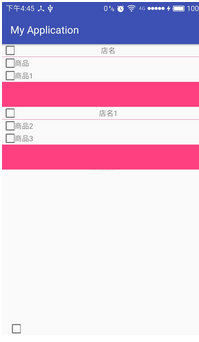
執行結果:
setChecked() 再掛監聽器,順序建議先設值再掛 listener,避免觸發誤判。Handler.post() 延後刷新以避開部分時序錯誤。實務上更推薦用 DiffUtil 計算差異,並只更新受影響的 position。wrap_content 遞迴測量問題,必要時在外層設 setNestedScrollingEnabled(false)。 Android 屬性動畫(Property Animation)完全解析(上):從 ObjectAnimator 到 AnimatorSet
Android 提供了三類動畫機制:View Animation、Drawable Animation 與 Property Animation。View Animati
 Android AIDL 跨進程傳遞自訂對象:Parcelable 打包與解包完整實作
黑夜給了我黑色的眼睛,我卻用它尋找光明。 跨進程傳值的幾種選擇 AIDL 天生支援跨進程傳值,實務上常見三類做法: · 廣播:最常見,傳小數據合適,缺點是承載量有限
 Android 編程實現向桌面添加快捷方式的兩種方法
本文講解 Android 編程實現向桌面添加快捷方式的兩種方法,分享給大家參考。 有時候為了使用方便,需要在桌面上添加快捷方式,下面介紹兩種做法。 方法一 void s
 Android 4.4 KitKat Phone 工作流程淺析(一):概要與學習計劃
美國時間 2013 年 10 月 31 日,Google 正式發表 Android 4.4 KitKat。官方強調這一版降低了硬體門檻、提升了執行效率。三個月後,不少人已