

編輯:關於 Android 程式設計
ExpandableListView 專門用來顯示「兩層」的垂直捲動列表,最典型的例子就是通訊錄的群組展開/收合。它的運作方式與 ListView 類似,但資料源需要同時提供「群組」與「子項」兩種資料。
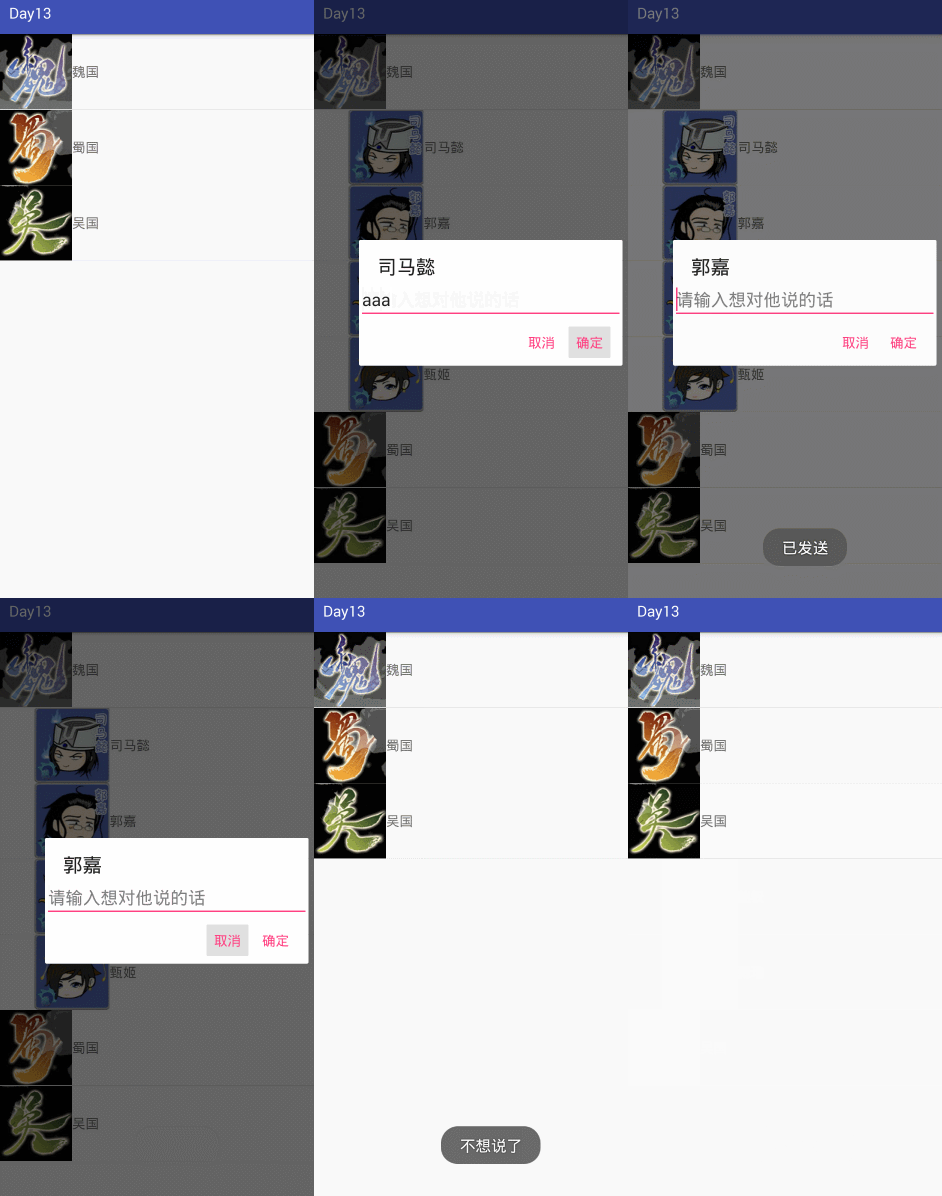
BaseExpandableListAdapter,覆寫其中的多個方法(每個方法的用途在程式碼註解中都有說明)。getGroupView() 負責群組列,getChildView() 負責子項列,依需求自行設計樣式。ExpandableListView.setAdapter(),展開/收合的功能就完成了。 <?xml version="1.0" encoding="utf-8"?>
<LinearLayout xmlns:android="https://schemas.android.com/apk/res/android"
android:orientation="vertical"
android:layout_width="match_parent"
android:layout_height="match_parent">
<ExpandableListView
android:layout_width="match_parent"
android:layout_height="match_parent"
android:id="@+id/el">
</ExpandableListView>
</LinearLayout>
 <?xml version="1.0" encoding="utf-8"?>
 <LinearLayout xmlns:android="https://schemas.android.com/apk/res/android"
     xmlns:app="https://schemas.android.com/apk/res-auto"
     android:orientation="horizontal"
     android:layout_width="wrap_content"
     android:layout_height="wrap_content"
     android:gravity="center_vertical">

     <ImageView
         android:layout_width="wrap_content"
         android:layout_height="wrap_content"
         app:srcCompat="@mipmap/ic_launcher"
         android:id="@+id/iv_group" />

     <TextView
         android:text="TextView"
         android:layout_width="wrap_content"
         android:layout_height="wrap_content"
         android:id="@+id/tv_group" />
 </LinearLayout>
用 paddingLeft="50dp" 讓子項視覺上縮排,層級關係更清楚。
 <?xml version="1.0" encoding="utf-8"?>
 <LinearLayout xmlns:android="https://schemas.android.com/apk/res/android"
     xmlns:app="https://schemas.android.com/apk/res-auto"
     android:orientation="horizontal"
     android:layout_width="wrap_content"
     android:layout_height="wrap_content"
     android:gravity="center_vertical"
     android:paddingLeft="50dp">

     <ImageView
         android:layout_width="wrap_content"
         android:layout_height="wrap_content"
         app:srcCompat="@mipmap/ic_launcher"
         android:id="@+id/iv_item" />

     <TextView
         android:text="TextView"
         android:layout_width="wrap_content"
         android:layout_height="wrap_content"
         android:id="@+id/tv_item" />
 </LinearLayout>
 <?xml version="1.0" encoding="utf-8"?>
 <LinearLayout xmlns:android="https://schemas.android.com/apk/res/android"
     android:orientation="vertical"
     android:layout_width="match_parent"
     android:layout_height="match_parent">

     <EditText
         android:layout_width="match_parent"
         android:layout_height="wrap_content"
         android:id="@+id/et"
         android:hint="請輸入想對他說的話"/>
 </LinearLayout>
 import android.os.Bundle;
 import android.support.annotation.Nullable;
 import android.support.v7.app.AlertDialog;
 import android.support.v7.app.AppCompatActivity;
 import android.view.View;
 import android.view.ViewGroup;
 import android.widget.BaseExpandableListAdapter;
 import android.widget.ExpandableListView;
 import android.widget.ImageView;
 import android.widget.TextView;
 import android.widget.Toast;
 import android.content.DialogInterface;

 public class ExpandableListViewDemo extends AppCompatActivity {

     ExpandableListView el;

     // 群組名稱與對應圖示,順序需一一對應
     String[] country = { "魏國", "蜀國", "吳國" };
     int[] icon = { R.mipmap.wei, R.mipmap.shu, R.mipmap.wu };

     // 二維陣列定義各群組的成員與頭像,同樣需一一對應
     String[][] heros = {
             { "司馬懿", "郭嘉", "夏侯惇", "甄姬" },
             { "劉備", "趙雲", "張飛" },
             { "孫權", "周瑜" }
     };
     int[][] icons = {
             { R.mipmap.simayi, R.mipmap.guojia, R.mipmap.xiahoudun, R.mipmap.zhenji },
             { R.mipmap.liubei, R.mipmap.zhaoyun, R.mipmap.zhangfei },
             { R.mipmap.sunquan, R.mipmap.zhouyu }
     };

     @Override
     protected void onCreate(@Nullable Bundle savedInstanceState) {
         super.onCreate(savedInstanceState);
         setContentView(R.layout.expandable_layout);

         el = (ExpandableListView) findViewById(R.id.el);

         // 子項點擊事件
         el.setOnChildClickListener(new ExpandableListView.OnChildClickListener() {
             @Override
             public boolean onChildClick(ExpandableListView parent, View v,
                                        int groupPosition, int childPosition, long id) {
                 // 取出被點擊成員的姓名
                 TextView tv = (TextView) v.findViewById(R.id.tv_item);
                 String name = tv.getText().toString();
                 show(v, name);
                 return false;
             }
         });

         el.setAdapter(new MyAdapter());
     }

     // 彈出自訂 AlertDialog
     public void show(View v, String name) {
         AlertDialog.Builder builder = new AlertDialog.Builder(this);
         builder.setTitle(name); // 標題即為被點擊的人物名

         View msg = getLayoutInflater().inflate(R.layout.altertdialog_layout, null);
         builder.setView(msg);

         builder.setPositiveButton("確定", new DialogInterface.OnClickListener() {
             @Override
             public void onClick(DialogInterface dialog, int which) {
                 Toast.makeText(ExpandableListViewDemo.this, "已發送", Toast.LENGTH_SHORT).show();
             }
         });

         builder.setNegativeButton("取消", new DialogInterface.OnClickListener() {
             @Override
             public void onClick(DialogInterface dialog, int which) {
                 Toast.makeText(ExpandableListViewDemo.this, "不想說了", Toast.LENGTH_SHORT).show();
             }
         });

         builder.show();
     }

     // 自訂 Adapter
     class MyAdapter extends BaseExpandableListAdapter {

         // 群組數量
         @Override
         public int getGroupCount() {
             return country.length;
         }

         // 各群組的子項數量
         @Override
         public int getChildrenCount(int groupPosition) {
             return heros[groupPosition].length;
         }

         // 取得對應群組名稱
         @Override
         public Object getGroup(int groupPosition) {
             return country[groupPosition];
         }

         // 取得對應子項
         @Override
         public Object getChild(int groupPosition, int childPosition) {
             return heros[groupPosition][childPosition];
         }

         @Override
         public long getGroupId(int groupPosition) {
             return groupPosition;
         }

         @Override
         public long getChildId(int groupPosition, int childPosition) {
             return childPosition;
         }

         // ID 是否隨底層資料變動而改變
         @Override
         public boolean hasStableIds() {
             return true;
         }

         // 群組列(含 ViewHolder 優化)
         @Override
         public View getGroupView(int groupPosition, boolean isExpanded,
                                  View convertView, ViewGroup parent) {
             ViewHolder vh;
             if (convertView == null) {
                 convertView = getLayoutInflater().inflate(R.layout.group_layout, null);
                 vh = new ViewHolder();
                 vh.tv = (TextView) convertView.findViewById(R.id.tv_group);
                 vh.iv = (ImageView) convertView.findViewById(R.id.iv_group);
                 convertView.setTag(vh);
             }
             vh = (ViewHolder) convertView.getTag();
             vh.tv.setText(country[groupPosition]);
             vh.iv.setImageResource(icon[groupPosition]);
             return convertView;
         }

         // 子項列(含 ViewHolder 優化)
         @Override
         public View getChildView(int groupPosition, int childPosition, boolean isLastChild,
                                  View convertView, ViewGroup parent) {
             ViewHolder vh;
             if (convertView == null) {
                 convertView = getLayoutInflater().inflate(R.layout.child_layout, null);
                 vh = new ViewHolder();
                 vh.tv = (TextView) convertView.findViewById(R.id.tv_item);
                 vh.iv = (ImageView) convertView.findViewById(R.id.iv_item);
                 convertView.setTag(vh);
             }
             vh = (ViewHolder) convertView.getTag();
             vh.tv.setText(heros[groupPosition][childPosition]);
             vh.iv.setImageResource(icons[groupPosition][childPosition]);
             return convertView;
         }

         class ViewHolder {
             ImageView iv;
             TextView tv;
         }

         // 子項是否可點擊
         @Override
         public boolean isChildSelectable(int groupPosition, int childPosition) {
             return true;
         }
     }
 }
match_parent 的列表有助於避免填充 item 時重複渲染,減少 getView() 被頻繁呼叫。findViewById() 的結果快取在 tag 中,顯著提升容器內元件查找的效率。選型建議:ExpandableListView 在 Android 8.0 時已被標記為不建議使用。新專案若要做分組列表,直接用 RecyclerView 搭配多種 viewType(或使用 ConcatAdapter)會更靈活,效能與可維護性都更好。
 Android 實現智能機器人聊天完整實作
背景:關於實作聊天機器人,其實是個偶然的機會。公司需要做一個 iOS 版的機器人,用於自動購物,於是 iOS 部門就研發了一個。我覺得這種機器人挺有意思,想搞清楚背後到底
 華為安卓手機工程模式詳解:能查到哪些資訊
上一篇介紹了安卓手機撥號盤裡的隱藏暗碼。除了那些通用代碼,各大廠商其實也都在自家系統裡埋了自己的工程模式。以華為為例,裡面的資訊實用度相當高:不只可以對部分固件做升級,還
 手把手實現 Android 文件管理器:源碼全解析
一、項目背景 如今不少移動設備都自帶資源管理器,但它們並非 Android 系統原生,而是手機廠商與 app 開發商合作的結果,通過第三方軟件預裝在出廠手機中,還不能自行
 Android 界面編程:導航欄與菜單(六)
2.7 導航欄與菜單 2.7.1 ActionBar ActionBar 是 Android 3.0(API 11)起加入的新特性,位於 Activity 視窗的頂部,