

編輯:關於 Android 程式設計
ScrollView 和 ListView 大家都不陌生,但這兩個東西湊在一起就容易出狀況。舉例來說,如果我們想在列表下方再放一些額外的控制項,並希望它們跟著一起滑動,最直覺的做法就是用 ScrollView 把整包內容裹起來。想法很美,現實很骨感,我們實際跑一次看看。
先建一個 Activity,版面裡擺一個 ListView:
<?xml version="1.0" encoding="utf-8?> <LinearLayout xmlns:android="https://schemas.android.com/apk/res/android" xmlns:tools="https://schemas.android.com/tools" android:layout_width="match_parent" android:layout_height="match_parent" android:orientation="vertical" tools:context="com.lin.mr.mystudy.scrollview.TestActivity"> <ListView android:id="@+id/listView" android:layout_width="match_parent" android:layout_height="wrap_content"> </ListView> </LinearLayout>
程式碼裡用迴圈灌入資料,再交給 ArrayAdapter 呈現。這裡偷個懶,item 版面直接用系統提供的 android.R.layout.simple_list_item_1。
public class TestActivity extends Activity { private ListView listView; private ArrayList<String> list; @Override protected void onCreate(Bundle savedInstanceState) { super.onCreate(savedInstanceState); setContentView(R.layout.activity_test); listView = (ListView) findViewById(R.id.listView); findViewById(R.id.ll_container); list = new ArrayList<>(); //生成需要顯示到ListView中的數據 for (int i = 0; i < 30; i++) { list.add("這是數據"+i); } //使用ArrayAdapter適配數據 listView.setAdapter(new ArrayAdapter<String>(this, android.R.layout.simple_list_item_1,list)); } }
確認這個 Activity 是啟動頁,跑起來一切正常:
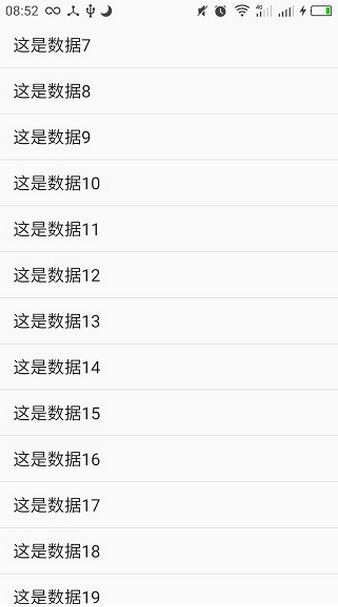
但現在需求來了:要在這個列表的上方或下方補幾個控制項,並讓它們一起滑動。試試最直覺的寫法:
<?xml version="1.0" encoding="utf-8?> <ScrollView xmlns:android="https://schemas.android.com/apk/res/android" xmlns:tools="https://schemas.android.com/tools" android:layout_width="match_parent" android:layout_height="match_parent" tools:context="com.lin.mr.mystudy.scrollview.TestActivity"> <LinearLayout android:layout_width="match_parent" android:layout_height="match_parent" android:orientation="vertical"> <ListView android:id="@+id/listView" android:layout_width="match_parent" android:layout_height="wrap_content"> </ListView> <ImageView android:layout_width="wrap_content" android:layout_height="wrap_content" android:src="@mipmap/ic_launcher" /> <ImageView android:layout_width="wrap_content" android:layout_height="wrap_content" android:src="@mipmap/ic_launcher" /> <Button android:layout_width="match_parent" android:layout_height="wrap_content" android:text="按鈕一" /> <Button android:layout_width="match_parent" android:layout_height="wrap_content" android:text="按鈕二" /> </LinearLayout> </ScrollView>
在列表頭尾各加了幾個元件,全部包進 LinearLayout,最外層換成 ScrollView。再跑一次,麻煩來了:
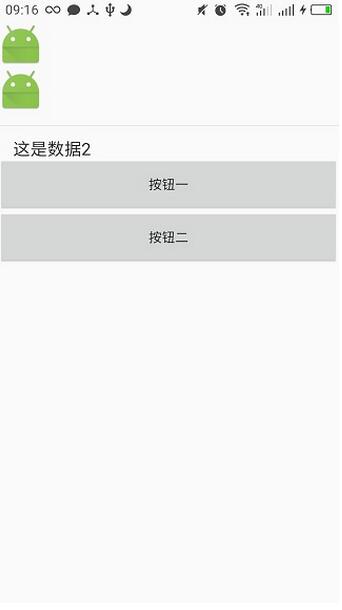
我們的 ListView 只剩下薄薄一行!滑是能滑,但永遠只看得見一筆資料。怎麼辦?
別急,有個簡單辦法可以救回來:自訂一個 ListView,改寫它的測量方式。
/** * 自定義ListView */ public class MyListView extends ListView { public MyListView(Context context) { super(context); } public MyListView(Context context, AttributeSet attrs) { super(context, attrs); } public MyListView(Context context, AttributeSet attrs, int defStyleAttr) { super(context, attrs, defStyleAttr); } @Override protected void onMeasure(int widthMeasureSpec, int heightMeasureSpec) { heightMeasureSpec = MeasureSpec.makeMeasureSpec(Integer.MAX_VALUE>>2,//右移運算符,相當於除於4 MeasureSpec.AT_MOST);//測量模式取最大值 super.onMeasure(widthMeasureSpec,heightMeasureSpec);//重新測量高度 } }
重點是重寫 onMeasure,把 heightMeasureSpec 重新定義成一個很大的值(一般取最大值的四分之一),測量模式設為 AT_MOST,再交回父類別重新測量。這樣 ListView 就會依內容撐開高度,而不是被壓縮。
接著在版面檔改用這個自訂控制項:
<?xml version="1.0" encoding="utf-8?> <ScrollView xmlns:android="https://schemas.android.com/apk/res/android" xmlns:tools="https://schemas.android.com/tools" android:layout_width="match_parent" android:layout_height="match_parent" tools:context="com.lin.mr.mystudy.scrollview.TestActivity"> <LinearLayout android:layout_width="match_parent" android:layout_height="match_parent" android:orientation="vertical"> <ImageView android:layout_width="wrap_content" android:layout_height="wrap_content" android:src="@mipmap/ic_launcher" /> <ImageView android:layout_width="wrap_content" android:layout_height="wrap_content" android:src="@mipmap/ic_launcher" /> <com.lin.mr.mystudy.scrollview.MyListView android:id="@+id/listView" android:layout_width="match_parent" android:layout_height="wrap_content"> </com.lin.mr.mystudy.scrollview.MyListView> <Button android:layout_margin="4dp" android:layout_width="match_parent" android:layout_height="wrap_content" android:text="按鈕一" /> <Button android:layout_margin="4dp" android:layout_width="match_parent" android:layout_height="wrap_content" android:text="按鈕二" /> </LinearLayout> </ScrollView>
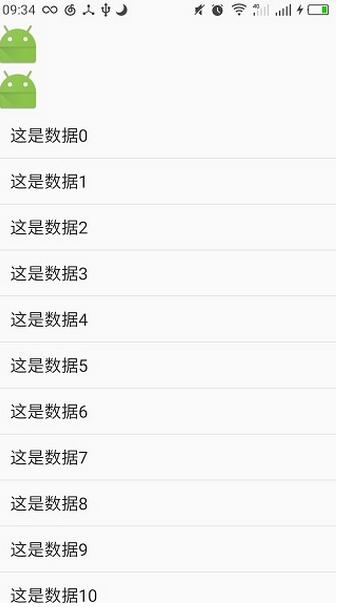
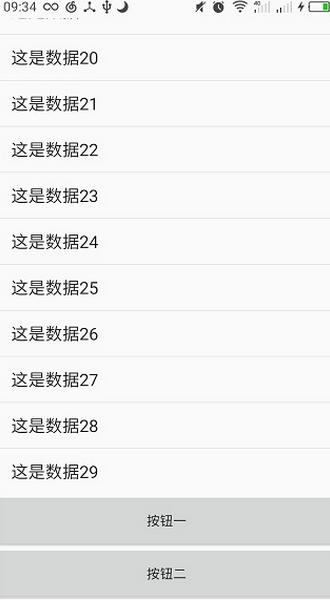
跑起來之後,ListView 完整顯示了,頭尾的配置也能滑到。
其實要在列表頭尾放東西,未必要動用 ScrollView。把頭部與底部各自做成一個獨立版面,再呼叫 ListView 的 addHeaderView 或 addFooterView,同樣能達到效果,而且不會有嵌套滑動的困擾——這通常才是更值得優先考慮的方案。
以上就是這次的整理,希望對遇到相同問題的人有幫助。
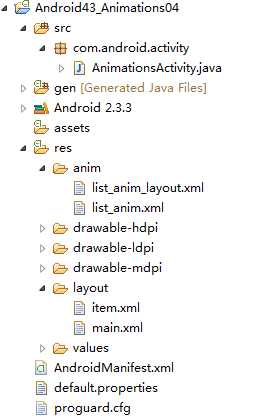 Android 動畫總整理:Tween、Frame、LayoutAnimation 與監聽器
Android 動畫系統涵蓋多種形式,常見的有 Tweened Animation、Frame-by-frame Animation、LayoutAnimationCon
 自訂 ProgressBar:任何圖片都能變成轉圈動畫
今天群裡有人問怎麼自訂 Android Holo 主題下的 ProgressBar。剛好我之前做過類似的事——透過自寫動畫加上自訂 Style,可以用任何一張圖片當作 P
 Fresco 詳解:SimpleDraweeView 加載圖片基礎用法
Fresco 簡單使用——SimpleDraweeView 學前須知: 在日常加載圖片時(無論是網路下載還是讀取本地),我們經常會遇到這樣的需求:圖片加載過程中要顯示「加
 百度專車怎麼用?在哪裡打開一篇帶你上手
百度專車強勢登場,在國內專車市場新增一名競爭者,勢必帶來新一輪的搭乘優惠。那麼來勢洶洶的百度專車究竟怎麼用、在哪裡打開呢?以下就教大家使用百度專車。開啟最新版百度地圖 A