

編輯:關於 Android 程式設計
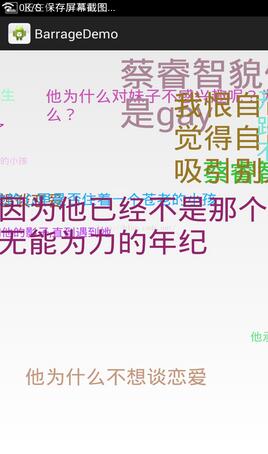
很多專案都需要彈幕功能,最典型的就是影片播放時把其他使用者發送的評論飄過畫面。本文示範一個可運作的最小實作。
整體思路並不複雜:把「由右向左的平移動畫、文字內容、字型大小、移動速度」等屬性一起封裝進 BarrageItem,再由 BarrageView 負責生成、排布與回收這些項目。這裡暫未處理含表情的彈幕,後續會持續補充。
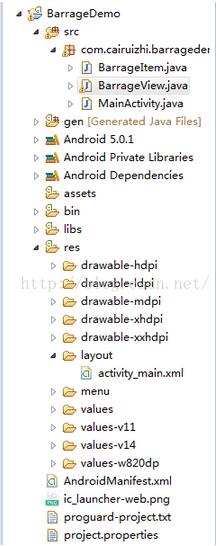
public class BarrageItem { public TextView textView; public int textColor; public String text; public int textSize; // 移動速度 public int moveSpeed; // 垂直方向顯示的位置 public int verticalPos; // 文字顯示佔據的寬度 public int textMeasuredWidth; }
由於彈幕的顏色、大小、速度都是隨機的,需要用最大值與最小值來約束範圍,再在此範圍內取隨機值。文字內容這裡先寫死一組固定值。
public class BarrageView extends RelativeLayout { private Context mContext; private BarrageHandler mHandler = new BarrageHandler(); private Random random = new Random(System.currentTimeMillis()); // 兩個彈幕的最小間隔時間 private static final long BARRAGE_GAP_MIN_DURATION = 1000; // 兩個彈幕的最大間隔時間 private static final long BARRAGE_GAP_MAX_DURATION = 2000; // 速度,ms private int maxSpeed = 12000; // 速度,ms private int minSpeed = 8000; // 文字最大值 private int maxSize = 50; // 文字最小值 private int minSize = 10; private int totalHeight = 0; private int lineHeight = 0;// 每一行彈幕的高度 private int totalLine = 0;// 彈幕的行數 private String[] itemText = { "他們都說蔡睿智很帥,但他總覺得自己很丑", "他們都說蔡睿智是男神,但他只覺得自己是男生", "蔡睿智不是男神,蔡睿智是男生", "蔡睿智貌似是gay", "蔡睿智是彎的", "蔡睿智是彎的,還好現在掰回來了", "他承受了他這個年紀不該有的機智與帥氣,他好累", "我恨自己的顏值,我覺得自己的才華才是吸引別人的地方", "他為什麼對妹子不感興趣呢?為什麼?", "他為什麼不想談戀愛", "他不會去愛別人,同時也不希望別人去愛他,他已經習慣一個人了", "他的心裡是否住著一個蒼老的小孩", "他的世界一直就是他和他的影子,直到遇到她", "她引導他走出了自己的世界,改變他的很多看法", "他漸漸的發現自己已經離不開他,他選擇不再去壓抑自己", "因為他已經不是那個無能為力的年紀", "她經常說他高冷,現在越來越覺得他悶騷", "開始他一直與她保持朋友距離,但他發現自己根本做不到"}; private int textCount; public BarrageView(Context context, AttributeSet attrs, int defStyleAttr) { super(context, attrs, defStyleAttr); mContext = context; _init(); } public BarrageView(Context context, AttributeSet attrs) { this(context, null, 0); } public BarrageView(Context context) { this(context, null); } private void _init() { textCount = itemText.length; int duration = (int) ((BARRAGE_GAP_MAX_DURATION - BARRAGE_GAP_MIN_DURATION) * Math .random()); mHandler.sendEmptyMessageDelayed(0, duration); } @Override public void onWindowFocusChanged(boolean hasWindowFocus) { super.onWindowFocusChanged(hasWindowFocus); totalHeight = getMeasuredHeight(); lineHeight = getLineHeight(); totalLine = totalHeight / lineHeight; } private void generateItem() { BarrageItem item = new BarrageItem(); String tx = itemText[(int) (Math.random() * textCount)]; int sz = (int) (minSize + (maxSize - minSize) * Math.random()); item.textView = new TextView(mContext); item.textView.setText(tx); item.textView.setTextSize(sz); item.textView.setTextColor(Color.rgb(random.nextInt(256), random.nextInt(256), random.nextInt(256))); item.textMeasuredWidth = (int) getTextWidth(item, tx, sz); item.moveSpeed = (int) (minSpeed + (maxSpeed - minSpeed) * Math.random()); if (totalLine == 0) { totalHeight = getMeasuredHeight(); lineHeight = getLineHeight(); totalLine = totalHeight / lineHeight; } item.verticalPos = random.nextInt(totalLine) * lineHeight; showBarrageItem(item); } private void showBarrageItem(final BarrageItem item) { int leftMargin = this.getRight() - this.getLeft() - this.getPaddingLeft(); LayoutParams params = new LayoutParams(LayoutParams.WRAP_CONTENT, LayoutParams.WRAP_CONTENT); params.addRule(RelativeLayout.ALIGN_PARENT_TOP); params.topMargin = item.verticalPos; this.addView(item.textView, params); Animation anim = generateTranslateAnim(item, leftMargin); anim.setAnimationListener(new Animation.AnimationListener() { @Override public void onAnimationStart(Animation arg0) { } @Override public void onAnimationRepeat(Animation arg0) { } @Override public void onAnimationEnd(Animation arg0) { //動畫結束後必須回收,否則 View 會無限累積 item.textView.clearAnimation(); BarrageView.this.removeView(item.textView); } }); item.textView.startAnimation(anim); } private TranslateAnimation generateTranslateAnim(BarrageItem item, int leftMargin) { TranslateAnimation anim = new TranslateAnimation(leftMargin, -item.textMeasuredWidth, 0, 0); anim.setDuration(item.moveSpeed); anim.setInterpolator(new AccelerateDecelerateInterpolator()); anim.setFillAfter(true); return anim; } /** * 計算 TextView 中字串的寬度 */ public float getTextWidth(BarrageItem item, String text, float Size) { Rect bounds = new Rect(); TextPaint paint; paint = item.textView.getPaint(); paint.getTextBounds(text, 0, text.length(), bounds); return bounds.width(); } /** 取得每一行彈幕的最大高度 */ private int getLineHeight() { BarrageItem item = new BarrageItem(); String tx = itemText[0]; item.textView = new TextView(mContext); item.textView.setText(tx); item.textView.setTextSize(maxSize); Rect bounds = new Rect(); TextPaint paint; paint = item.textView.getPaint(); paint.getTextBounds(tx, 0, tx.length(), bounds); return bounds.height(); } class BarrageHandler extends Handler { @Override public void handleMessage(Message msg) { super.handleMessage(msg); generateItem(); // 每個彈幕產生的時間隨機 int duration = (int) ((BARRAGE_GAP_MAX_DURATION - BARRAGE_GAP_MIN_DURATION) * Math .random()); this.sendEmptyMessageDelayed(0, duration); } } }
垂直位置如何避免重疊。如果讓彈幕的垂直位置完全隨機,一定會出現重疊。解法是按彈幕高度的最大值把容器高度等分成 totalLine 條軌道,再讓彈幕隨機落在這些軌道上。這個計算放在 onWindowFocusChanged 中,因為只有此時 getMeasuredHeight() 才拿得到有效值。
為什麼必須在動畫結束時 removeView。onAnimationEnd 裡的 removeView 不是可選的優化,而是必要的。若不移除,每生成一條彈幕就會永久佔據一個子 View,長時間播放後記憶體會持續攀升。
public class MainActivity extends Activity { @Override protected void onCreate(Bundle savedInstanceState) { super.onCreate(savedInstanceState); setContentView(R.layout.activity_main); } }
目前這份實作還缺少「使用者自己發送彈幕」的能力,後續會補上。另外若要投入正式專案,建議再考慮兩件事:一是把轨道分配改成「記錄每條軌道最後一顆彈幕的尾部位置」,只有間距足夠時才發車,比純隨機更不容易追尾;二是把 TextView 改成物件池複用,避免高頻 addView/removeView 帶來的效能抖動。
 淺談 EventBus:Android 發布訂閱事件總線
EventBus 是一款針對 Android 優化的發布/訂閱事件總線,主要用來替代 Intent、Handler、Broadcast 等元件,在 Activity、Fr
 仿墨跡天氣:在Android中透過自訂zip包換膚
這裡來聊聊墨跡天氣的換膚做法。需要先聲明:以下原理是我透過反編譯並參考網上一些資料推測出來的,僅供參考;如果你有更理想的方式,非常歡迎一起交流。墨跡天氣下載的皮膚本質上就
 Android 實現二維碼掃描登入網頁的實作
之前寫過一個二維碼掃描 demo,用的是 Zxing 框架。後續在掃描二維碼時遇到一些問題,比如壓縮圖片、調整掃描視窗大小等等。後來單位要求做掃描登入功能,發現最大的難點
 Android Studio 1.4 的七個實用新特性盤點
前段時間把 Android Studio 更新到了 1.4,當時沒太在意。今天翻了一遍官方更新日誌,發現這個版本其實加了不少真能提升效率的功能,值得分享一下。 清單如下: