

編輯:關於 Android 程式設計
本例需要一個輸入框輸入號碼,以及一個撥打按鈕,本質是點擊按鈕後呼叫系統的撥號功能。
<LinearLayout xmlns:android="https://schemas.android.com/apk/res/android"
    android:layout_width="match_parent"
    android:layout_height="match_parent"
    android:orientation="vertical">
    <TextView
        android:layout_width="wrap_content"
        android:layout_height="wrap_content"
        android:text="請輸入號碼" />
    <EditText
        android:id="@+id/et_phone"
        android:layout_width="match_parent"
        android:layout_height="wrap_content" />
    <Button
        android:id="@+id/bt_call"
        android:layout_width="wrap_content"
        android:layout_height="wrap_content"
        android:text="撥打" />
</LinearLayout>
public class MainActivity extends Activity {
    @Override
    protected void onCreate(Bundle savedInstanceState) {
        super.onCreate(savedInstanceState);
        setContentView(R.layout.activity_main);
        Button bt = (Button) findViewById(R.id.bt_call);
        bt.setOnClickListener(new MyListener());
    }

    class MyListener implements OnClickListener {
        @Override
        public void onClick(View v) {
            EditText et = (EditText) findViewById(R.id.et_phone);
            String phone = et.getText().toString();
            Intent intent = new Intent();
            intent.setAction(Intent.ACTION_CALL);          // 直接撥打
            intent.setData(Uri.parse("tel:" + phone));     // tel: 協定不可省略
            startActivity(intent);
        }
    }
}
說明:Intent.ACTION_CALL 會直接撥號,需加上 CALL_PHONE 權限並執行期請求;若只想跳到撥號盤由使用者確認,可改用 Intent.ACTION_DIAL,則不需該權限。
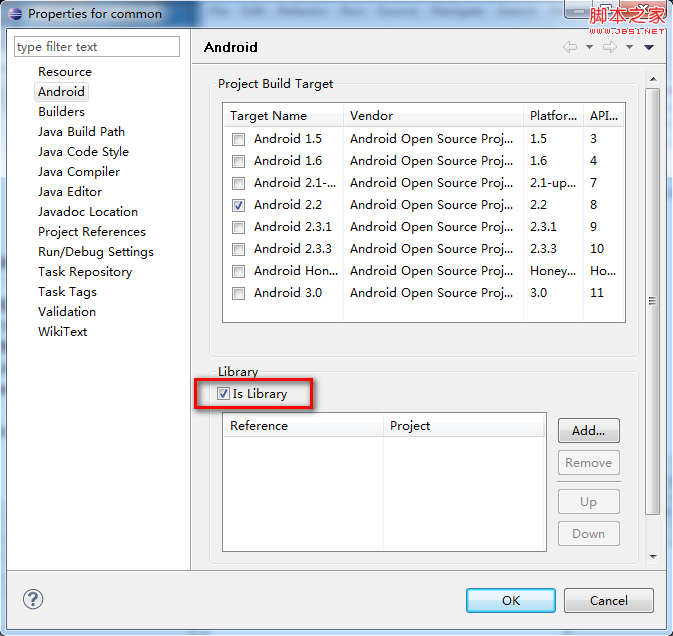 Android 模組化實踐:用 Library 打造可共用又可擴展的工程骨架
一、需求從哪來 不論是 .NET 還是 Java 平台,合理的分層架構都是最主流的模組化思路之一,dll、jar 這些產物幾乎無處不在。 某天團隊找到我,說要在 Andr
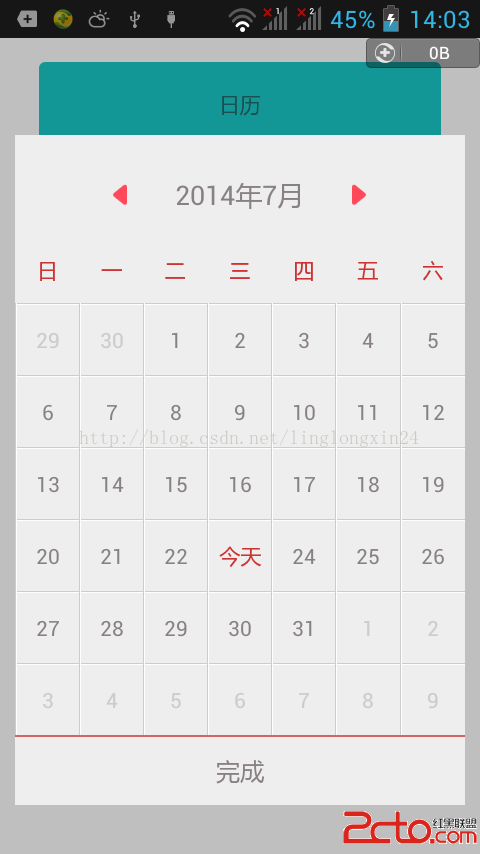 一款精緻美觀的 Android 日曆自訂控件
※效果預覽 ※使用方法 本文介紹一個相當漂亮的日曆控件 KCalendar,透過 PopupWindow 彈出,支援月份切換、日期標記與點選日期後回傳格式化結果。以下為
 使用 DrawerLayout 組件搭建側滑導航菜單
概述本文是 Android 官方 Training 課程的整理與延伸,若某些描述讀起來不夠順暢,建議對照原文查看。DrawerLayout 的 Training 原文:h
 微信誤刪的聊天記錄怎麼找回?資料救援的實際流程
誤刪了重要的微信對話,那種懊悔大概很多人都體驗過。好消息是,刪除並不等於徹底消失——在資料被新內容覆寫之前,透過專業的資料救援工具掃描殘留扇區,往往還有機會把它找回來。以