

編輯:關於 Android 程式設計
九宮格解鎖是常見的交互形式,本質上就是一個自定義 View:畫九個圓、判斷手指壓在哪個圓上、把路徑連起來,最後把序列輸出成密碼。
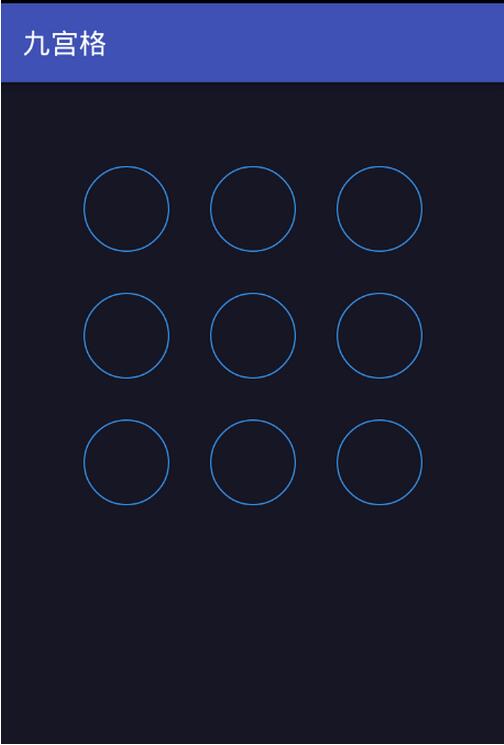
1. 程序啟動後展示 3×3 的圓點矩陣
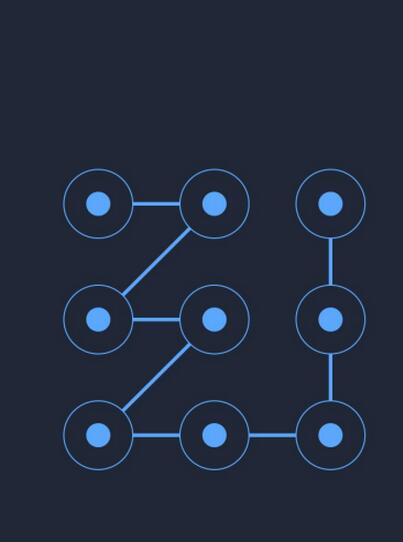
2. 按住並滑動時,出現跟手的連線
3. 手指離開後回調密碼
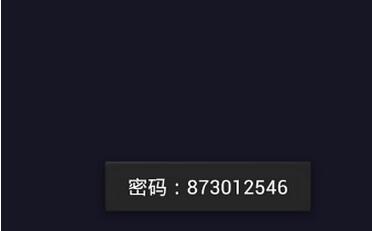
功能要點:點中某個圓,在圓心畫一個實心小圓;滑動過程中拉出一條跟手線;滑過另一個圓時產生連接線段;已選圓點數達到 4 個後抬手即保存密碼;若一路劃滿 9 個,則立即保存,不必等抬手。
1、用 Canvas 繪製圓圈、實心點與線段
2、位置判定——判斷觸摸點是否落在某個圓的範圍內
3、用集合記錄路徑並在滿足條件時回調數據
這裡不使用 XML 布局,九個點分別對應 0~8 九個編號,收集到的編號序列就是密碼。
package com.lwz.gongge;

import android.content.Context;
import android.graphics.Canvas;
import android.graphics.Color;
import android.graphics.Paint;
import android.util.AttributeSet;
import android.view.MotionEvent;
import android.view.View;
import java.util.ArrayList;
import java.util.List;

public class NineGridView extends View {
    // 畫實心圓的畫筆
    Paint paintCircle;
    // 畫線的畫筆
    Paint paintLine;
    // 單個格子寬度,約為螢幕的四分之一,同時作為圓點間距
    int width;
    // 背景顏色
    int backColor;
    // 存放已選中的圓點編號(0-8)
    List<Integer> listPassword = new ArrayList<>();
    // 當前觸屏位置
    float currX, currY;
    // 密碼位數上下限
    int minPassNum = 4;
    int maxPassNum = 9;

    public NineGridView(Context context) { super(context); init(); }
    public NineGridView(Context context, AttributeSet attrs) { super(context, attrs); init(); }

    private void init() {
        backColor = Color.rgb(0x17, 0x16, 0x25);
        paintLine = new Paint();
        paintLine.setAntiAlias(true);
        paintLine.setDither(true);
        paintLine.setColor(Color.rgb(0x37, 0x91, 0xe6));
        paintCircle = new Paint();
        paintCircle.setAntiAlias(true);
        paintCircle.setDither(true);
        paintCircle.setColor(backColor);
    }

    // 丈量階段取得可用寬度
    @Override
    protected void onMeasure(int widthMeasureSpec, int heightMeasureSpec) {
        super.onMeasure(widthMeasureSpec, heightMeasureSpec);
        width = getWidth() / 4;
    }

    @Override
    protected void onDraw(Canvas canvas) {
        super.onDraw(canvas);
        canvas.drawColor(backColor); // 清屏

        // 有路徑才畫線
        if (listPassword.size() > 0) {
            // 最後一個點的坐標
            int x = listPassword.get(listPassword.size() - 1) % 3 + 1;
            int y = listPassword.get(listPassword.size() - 1) / 3 + 1;
            paintLine.setStrokeWidth(8);
            // 從最後一個圓心連到手指位置
            canvas.drawLine(x * width, y * width, currX, currY, paintLine);
            // 用背景色圓覆蓋掉圓圈內側的線頭
            canvas.drawCircle(x * width, y * width, width / 3, paintCircle);

            // 依次連接已選中的各點
            if (listPassword.size() > 1) {
                for (int i = 0; i < listPassword.size() - 1; i++) {
                    int x1 = listPassword.get(i) % 3 + 1;
                    int y1 = listPassword.get(i) / 3 + 1;
                    int x2 = listPassword.get(i + 1) % 3 + 1;
                    int y2 = listPassword.get(i + 1) / 3 + 1;
                    paintLine.setStrokeWidth(8);
                    canvas.drawLine(x1 * width, y1 * width, x2 * width, y2 * width, paintLine);
                    canvas.drawCircle(x1 * width, y1 * width, width / 3, paintCircle);
                }
            }
        }

        // 畫九個空心圓
        paintLine.setStrokeWidth(2);
        paintLine.setStyle(Paint.Style.STROKE);
        for (int i = 0; i < 3; i++) {
            for (int j = 0; j < 3; j++) {
                canvas.drawCircle(width * (i + 1), width * (j + 1), width / 3, paintLine);
            }
        }

        // 在已選中的圓裡畫實心點
        paintLine.setStyle(Paint.Style.FILL);
        for (int i = 0; i < listPassword.size(); i++) {
            int p = listPassword.get(i);
            int x = p % 3;
            int y = p / 3;
            canvas.drawCircle(width * (x + 1), width * (y + 1), width / 6, paintLine);
        }
    }

    @Override
    public boolean onTouchEvent(MotionEvent event) {
        float x = event.getX();
        float y = event.getY();
        switch (event.getAction()) {
            case MotionEvent.ACTION_DOWN: // 按下:命中圓圈則記錄
                if (connetCircle(x, y) != -1) {
                    currX = x;
                    currY = y;
                    listPassword.add(connetCircle(x, y));
                }
                break;
            case MotionEvent.ACTION_UP: // 抬手:達到最小位數即回調
                if (listPassword.size() >= minPassNum && listener != null) {
                    listener.toListenerThePassword(getPasswordString());
                }
                listPassword.clear();
                break;
            case MotionEvent.ACTION_MOVE: // 移動:更新跟手坐標,滑過新圓則記錄
                currX = x;
                currY = y;
                int point = connetCircle(x, y);
                if (point != -1 && !listPassword.contains((Integer) point)) {
                    listPassword.add(point);
                }
                // 已達最大位數,立即回調
                if (listPassword.size() >= maxPassNum) {
                    if (listener != null) {
                        listener.toListenerThePassword(getPasswordString());
                    }
                    break;
                }
        }
        invalidate();
        return true;
    }

    // 判斷坐標是否落在以 (cx, cy) 為圓心、width/3 為半徑的圓內
    private boolean isInCircle(float x, float y, float cx, float cy) {
        return (x - cx) * (x - cx) + (y - cy) * (y - cy) < (width / 3) * (width / 3);
    }

    // 遍歷九宮格,返回命中的編號,未命中返回 -1
    private int connetCircle(float x, float y) {
        for (int i = 0; i < 3; i++) {
            for (int j = 0; j < 3; j++) {
                if (isInCircle(x, y, width * (j + 1), width * (i + 1))) {
                    return (3 * i + j);
                }
            }
        }
        return -1;
    }

    // 對外暴露的回調接口
    interface onFinishListener {
        void toListenerThePassword(String s);
    }

    onFinishListener listener;

    public void setListener(onFinishListener listener) {
        this.listener = listener;
    }

    // 把編號序列拼成密碼字符串
    public String getPasswordString() {
        String pass = "";
        for (int i = 0; i < listPassword.size(); i++) {
            pass += listPassword.get(i);
        }
        return pass;
    }
}
package com.lwz.gongge;

import android.os.Bundle;
import android.support.v7.app.AppCompatActivity;
import android.widget.Toast;

public class MainActivity extends AppCompatActivity {
    String password = "";

    @Override
    protected void onCreate(Bundle savedInstanceState) {
        super.onCreate(savedInstanceState);
        NineGridView nine = new NineGridView(this);
        setContentView(nine);
        nine.setListener(new NineGridView.onFinishListener() {
            @Override
            public void toListenerThePassword(String pass) {
                password = pass;
                Toast.makeText(MainActivity.this, "密碼:" + password, Toast.LENGTH_SHORT).show();
            }
        });
    }
}
整個元件完全用代碼繪製,沒有依賴布局文件,因此具備很好的可移植性,當成工具類直接丟進專案即可。拿到密碼之後,可以選擇寫入本地文件、存入資料庫,或者先做加密再比對;這裡只做了 Toast 提示,方便直觀看到效果。
 Android N 通知新體驗:桌面未讀提示與 MessagingService
Android N 的通知系統更強調互動與情境整合。透過 MessagingService,開發者可以建立類似訊息應用程式的通知體驗,讓使用者不必進入 App 就能閱讀、
 Android NDK 學習筆記十:JNI 域與方法描述符速查
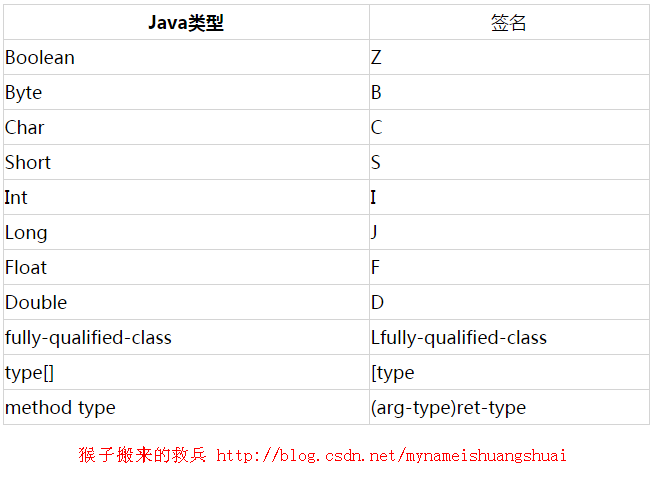
在使用 JNI 與 Java 層交互時,我們往往需要獲取域 ID 或方法 ID,而這一步的前提,是先寫出正確的域描述符與方法描述符。 好消息是,無論是域描述符還是方法描述
 Android 報警功能實作:鈴音、震動與狀態切換
需求說明 在某些應用场景中,例如緊急救援、保全或工業巡檢,需要加入報警功能。使用者點擊報警圖示後,應用 should 立即播放鈴音並啟動震動,同時透過畫面狀態切換提示目前
 Android 關於頁面怎麼做:用 AlertDialog 擴充一個 AboutDialog
幾乎每個 App 都會有這麼一頁:版本號、作者、聯絡方式、簡介。它不需要獨立 Activity,用一個 AlertDialog 承載自訂版面就足夠,而且實作乾淨。 一