

編輯:關於 Android 程式設計
BroadcastReceiver 是 Android 四大組件之一,也是最容易被低估的一個。它沒有介面,卻能在系統狀態變化時把應用喚醒。
① 廣播接收器專注於接收廣播通知並做出回應。大量廣播來自系統本身——時區變化、電量偏低、拍完一張照片、用戶切換語言等等;應用同樣可以主動發送廣播,例如告知其他應用「數據下載完成,可以用了」。
② 一個應用可以擁有任意數量的接收器,全部繼承自 BroadcastReceiver 基類。
③ 接收器沒有使用者介面,但可以啟動 Activity,或借助 NotificationManager 提醒用戶——閃燈、震動、播放提示音,通常是在狀態列放一枚持久圖標。
系統廣播由平台發出,比如 ACTION_BOOT_COMPLETED(開機完成)、ACTION_TIME_CHANGED(時間變化)、ACTION_BATTERY_LOW(電量偏低)。另一類則是我們自己定義的廣播。
① 註冊:靜態註冊寫在 AndroidManifest.xml 中,接收器必須繼承 BroadcastReceiver;動態註冊則在代碼裡調用 Context.registerReceiver,通常寫成匿名內部類。兩種方式都離不開 IntentFilter。
② 發送:通過 Context.sendBroadcast 發出,用 Intent 攜帶註冊時約定好的 Action。
③ 接收:匹配成功後系統回調 onReceive(),把承載消息的 Intent 交給你。注意 onReceive 中的代碼執行時間不要超過 5 秒,否則會彈出 ANR 對話框。
MainActivity 負責動態註冊與發送,同時演示自定義廣播和系統廣播兩種場景。
public class MainActivity extends Activity {
    private Button sendStaticBtn;
    private Button sendDynamicBtn;
    private Button sendSystemBtn;

    private static final String STATICACTION = "com.byread.static";
    private static final String DYNAMICACTION = "com.byread.dynamic";
    // 系統廣播:設備接入電源
    private static final String SYSTEMACTION = Intent.ACTION_POWER_CONNECTED;

    @Override
    public void onCreate(Bundle savedInstanceState) {
        super.onCreate(savedInstanceState);
        setContentView(R.layout.main);
        sendStaticBtn = (Button) findViewById(R.id.send_static);
        sendDynamicBtn = (Button) findViewById(R.id.send_dynamic);
        sendSystemBtn = (Button) findViewById(R.id.send_system);
        sendStaticBtn.setOnClickListener(new MyOnClickListener());
        sendDynamicBtn.setOnClickListener(new MyOnClickListener());
        sendSystemBtn.setOnClickListener(new MyOnClickListener());
    }

    class MyOnClickListener implements OnClickListener {
        @Override
        public void onClick(View v) {
            if (v.getId() == R.id.send_static) {
                Log.e("MainActivity", "發送自定義靜態註冊廣播消息");
                Intent intent = new Intent();
                intent.setAction(STATICACTION);
                intent.putExtra("msg", "接收靜態註冊廣播成功!");
                sendBroadcast(intent);
            } else if (v.getId() == R.id.send_dynamic) {
                Log.e("MainActivity", "發送自定義動態註冊廣播消息");
                Intent intent = new Intent();
                intent.setAction(DYNAMICACTION);
                intent.putExtra("msg", "接收動態註冊廣播成功!");
                sendBroadcast(intent);
            } else if (v.getId() == R.id.send_system) {
                Log.e("MainActivity", "系統廣播由系統自行發送");
                Intent intent = new Intent();
                intent.setAction(SYSTEMACTION);
                intent.putExtra("msg", "正在充電。。。。");
            }
        }
    }

    @Override
    protected void onStart() {
        super.onStart();
        Log.e("MainActivity", "註冊廣播事件");
        // 自定義動態廣播
        IntentFilter filter_dynamic = new IntentFilter();
        filter_dynamic.addAction(DYNAMICACTION);
        registerReceiver(dynamicReceiver, filter_dynamic);
        // 系統動態廣播
        IntentFilter filter_system = new IntentFilter();
        filter_system.addAction(SYSTEMACTION);
        registerReceiver(systemReceiver, filter_system);
    }

    private BroadcastReceiver dynamicReceiver = new BroadcastReceiver() {
        @Override
        public void onReceive(Context context, Intent intent) {
            Log.e("MainActivity", "接收自定義動態註冊廣播消息");
            if (intent.getAction().equals(DYNAMICACTION)) {
                String msg = intent.getStringExtra("msg");
                Toast.makeText(context, msg, Toast.LENGTH_SHORT).show();
            }
        }
    };

    private BroadcastReceiver systemReceiver = new BroadcastReceiver() {
        @Override
        public void onReceive(Context context, Intent intent) {
            if (intent.getAction().equals(SYSTEMACTION)) {
                String msg = intent.getStringExtra("msg");
                Toast.makeText(context, msg, Toast.LENGTH_SHORT).show();
            }
        }
    };

    @Override
    protected void onDestroy() {
        // 動態註冊的接收器記得反註冊,避免內存洩漏
        unregisterReceiver(dynamicReceiver);
        unregisterReceiver(systemReceiver);
        super.onDestroy();
    }
}
兩個靜態註冊的接收器:
/** 自定義靜態註冊廣播接收器 */
public class StaticReceiver extends BroadcastReceiver {
    @Override
    public void onReceive(Context context, Intent intent) {
        String msg = intent.getStringExtra("msg");
        Toast.makeText(context, msg, Toast.LENGTH_SHORT).show();
    }
}
/** 系統靜態註冊廣播接收器:低電量提醒 */
public class SystemReceiver extends BroadcastReceiver {
    @Override
    public void onReceive(Context context, Intent intent) {
        if (intent.getAction().equals(Intent.ACTION_BATTERY_LOW)) {
            Log.e("SystemReceiver", "電量低提示");
            Toast.makeText(context, "您的手機電量偏低,請及時充電", Toast.LENGTH_SHORT).show();
        }
    }
}
清單文件中的靜態註冊:
<?xml version="1.0" encoding="utf-8"?>
<manifest xmlns:android="https://schemas.android.com/apk/res/android"
    package="com.byread" android:versionCode="1" android:versionName="1.0">
    <application android:icon="@drawable/icon" android:label="@string/app_name">
        <activity android:name=".MainActivity" android:label="@string/app_name">
            <intent-filter>
                <action android:name="android.intent.action.MAIN" />
                <category android:name="android.intent.category.LAUNCHER" />
            </intent-filter>
        </activity>
        <!-- 註冊自定義靜態廣播接收器 -->
        <receiver android:name=".StaticReceiver">
            <intent-filter>
                <action android:name="com.byread.static" />
            </intent-filter>
        </receiver>
        <!-- 註冊系統靜態廣播接收器 -->
        <receiver android:name=".SystemReceiver">
            <intent-filter>
                <action android:name="android.intent.action.BATTERY_LOW" />
            </intent-filter>
        </receiver>
    </application>
</manifest>
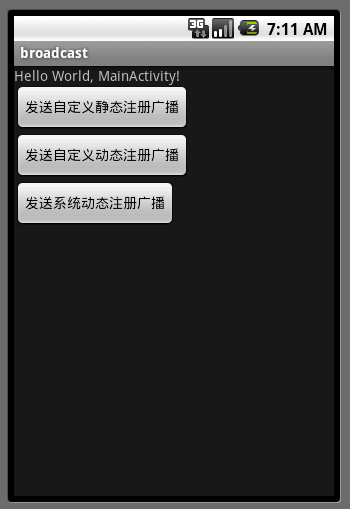
布局文件很簡單,三個按鈕分別觸發三種場景:
<?xml version="1.0" encoding="utf-8"?>
<LinearLayout xmlns:android="https://schemas.android.com/apk/res/android"
    android:orientation="vertical"
    android:layout_width="fill_parent"
    android:layout_height="fill_parent">
    <TextView android:layout_width="fill_parent" android:layout_height="wrap_content"
        android:text="@string/hello" />
    <Button android:id="@+id/send_static" android:layout_width="wrap_content"
        android:layout_height="wrap_content" android:text="發送自定義靜態註冊廣播" />
    <Button android:id="@+id/send_dynamic" android:layout_width="wrap_content"
        android:layout_height="wrap_content" android:text="發送自定義動態註冊廣播" />
    <Button android:id="@+id/send_system" android:layout_width="wrap_content"
        android:layout_height="wrap_content" android:text="發送系統動態註冊廣播" />
</LinearLayout>
運行效果:
最後補充兩點實務經驗:靜態註冊的接收器從 Android 8.0 起大量系統隱式廣播已被限制,能動態註冊就盡量動態註冊;另外別忘了在 Activity 銷毀時反註冊,否則容易引出內存洩漏。
 華為EMUI 5.0新系統怎麼樣?發布時間與新特性前瞻
華為EMUI 5.0新系統前瞻 華為基於Android打造的EMUI目前更新至4.1版本,而產業鏈消息顯示,EMUI 5.0將帶來更明顯的界面與交互調整。 據悉,新版本
 Android 圖片異步加載實作:用 LruCache 建構一級記憶體快取
為什麼一定要有快取 靠著敗敗圖縮放,我們已經能馴服單張大圖。但真實的 App 面對的不是一張大圖,而是滿版的高清多圖:資訊流、相簿、電商列表,動輒幾十張同時存在。若全部塞
 Android 學習筆記(十三):碎片 Fragment 入門(一)
碎片(Fragment)碎片可以看作另一種形式的活動,我們可以建立碎片來容納檢視。碎片總是嵌入在活動之中,一般有兩種常見形式:1、碎片 A 與碎片 B 分別處於不同的活動
 滾動列表中的視頻自動播放實戰:從 ListView 到 RecyclerView
滑動信息流時視頻會自動播放——這樣的體驗在 Facebook、Instagram、Magisto 等熱門應用裡隨處可見。本文將完整梳理如何在滾動列表(無論是 ListVi