

編輯:關於 Android 程式設計
單 Activity 多 Fragment 實現底部導航器
最近因 Android 基礎教學需要,採用「單 Activity 多 Fragment」實現類似 QQ 的底部導航器示例。這種開發模式廣泛應用於 QQ、微信、新浪等 App。關於底部導航欄的實現方式有很多,Google 在 Material Design 中也加入了 Bottom Navigation 導航控制,實現更簡單、動態效果更酷炫,但因為是基礎知識,這裡打算通過自定義來實現而不使用它(實際專案開發可考慮使用)。
BottomNavigationBar 地址:https://github.com/Ashok-Varma/BottomNavigation
整體分為兩部分:底部導航區域和內容區域。內容區域用 Fragment 作為 UI 展示,底部導航區域添加點擊事件,點擊 TAB 切換 Fragment,並做字體顏色與圖片的切換。切換上使用 add() 和 hide(),而非 replace()(兩者區別這裡不再展開,有興趣可自行搜尋)。
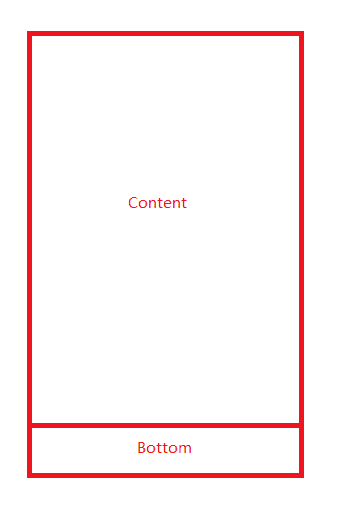
整體結構:底部導航通常由圖片和文字組成,上面為 ImageView,下面為 TextView。
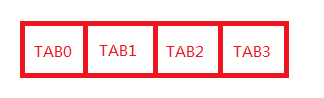
使用 RelativeLayout 並添加 weight 平分屏幕寬度。
 <?xml version="1.0" encoding="utf-8"?>
<LinearLayout xmlns:android="https://schemas.android.com/apk/res/android" android:layout_width="match_parent" android:layout_height="@dimen/bottom_height" android:background="@color/base_white" android:orientation="vertical">
<View android:layout_width="match_parent" android:layout_height="1dp" android:background="@color/gray_line" />
<LinearLayout android:layout_width="match_parent" android:layout_height="match_parent" android:orientation="horizontal">
<RelativeLayout android:layout_width="0dp" android:layout_height="match_parent" android:layout_weight="1">
<RelativeLayout android:id="@+id/layout_home" android:layout_width="wrap_content" android:layout_height="wrap_content" android:layout_centerInParent="true">
<ImageView android:id="@+id/img_home" android:layout_width="24dp" android:layout_height="24dp" android:layout_centerHorizontal="true" android:src="@mipmap/icon_home_pressed" />
<TextView android:id="@+id/tv_home" android:layout_width="wrap_content" android:layout_height="wrap_content" android:layout_below="@id/img_home" android:layout_centerHorizontal="true" android:text="首頁" android:textColor="@color/bottom_text_color_pressed" android:textSize="12sp" />
</RelativeLayout>
</RelativeLayout>
<RelativeLayout android:layout_width="0dp" android:layout_height="match_parent" android:layout_weight="1">
<RelativeLayout android:id="@+id/layout_health" android:layout_width="wrap_content" android:layout_height="wrap_content" android:layout_centerInParent="true">
<ImageView android:id="@+id/img_health" android:layout_width="24dp" android:layout_height="24dp" android:layout_centerHorizontal="true" android:src="@mipmap/icon_health_normal" />
<TextView android:id="@+id/tv_health" android:layout_width="wrap_content" android:layout_height="wrap_content" android:layout_below="@id/img_health" android:layout_centerHorizontal="true" android:text="健康" android:textColor="@color/bottom_text_color_normal" android:textSize="12sp" />
</RelativeLayout>
</RelativeLayout>
<RelativeLayout android:layout_width="0dp" android:layout_height="match_parent" android:layout_weight="1">
<RelativeLayout android:id="@+id/layout_msg" android:layout_width="wrap_content" android:layout_height="wrap_content" android:layout_centerInParent="true">
<ImageView android:id="@+id/img_msg" android:layout_width="24dp" android:layout_height="24dp" android:layout_centerHorizontal="true" android:src="@mipmap/icon_msg_normal" />
<TextView android:id="@+id/tv_msg" android:layout_width="wrap_content" android:layout_height="wrap_content" android:layout_below="@id/img_msg" android:layout_centerHorizontal="true" android:text="消息" android:textColor="@color/bottom_text_color_normal" android:textSize="12sp" />
</RelativeLayout>
</RelativeLayout>
<RelativeLayout android:layout_width="0dp" android:layout_height="match_parent" android:layout_weight="1">
<RelativeLayout android:id="@+id/layout_usercenter" android:layout_width="wrap_content" android:layout_height="wrap_content" android:layout_centerInParent="true">
<ImageView android:id="@+id/img_usercenter" android:layout_width="24dp" android:layout_height="24dp" android:layout_centerHorizontal="true" android:src="@mipmap/icon_user_normal" />
<TextView android:id="@+id/tv_usercenter" android:layout_width="wrap_content" android:layout_height="wrap_content" android:layout_below="@id/img_usercenter" android:layout_centerHorizontal="true" android:text="我的" android:textColor="@color/bottom_text_color_normal" android:textSize="12sp" />
</RelativeLayout>
</RelativeLayout>
</LinearLayout>
</LinearLayout>
 <?xml version="1.0" encoding="utf-8"?>
<LinearLayout xmlns:android="https://schemas.android.com/apk/res/android" android:id="@+id/activity_main" android:layout_width="match_parent" android:layout_height="match_parent" android:orientation="vertical" >
<FrameLayout android:layout_width="match_parent" android:layout_height="0dp" android:layout_weight="1" android:id="@+id/frame_content" />
<include layout="@layout/layout_bottom"/>
</LinearLayout>
public class MainActivity extends BaseActivity implements View.OnClickListener { private RelativeLayout layout_home; private RelativeLayout layout_health; private RelativeLayout layout_msg; private RelativeLayout layout_usercenter; private ImageView img_home; private ImageView img_health; private ImageView img_msg; private ImageView img_usercenter; private TextView tv_home; private TextView tv_health; private TextView tv_msg; private TextView tv_usercenter; private Fragment[] fragments; private int currentIndex; private int index; private int selectColor; private int unSelectColor; @Override protected void onCreate(Bundle savedInstanceState) { super.onCreate(savedInstanceState); setContentView(R.layout.activity_main); init(); } @Override public void init() { initViews(); initEvent(); initData(); } public void initViews(){ layout_health=(RelativeLayout)findViewById(R.id.layout_health); layout_home=(RelativeLayout)findViewById(R.id.layout_home); layout_msg=(RelativeLayout)findViewById(R.id.layout_msg); layout_usercenter=(RelativeLayout)findViewById(R.id.layout_usercenter); img_home=(ImageView)findViewById(R.id.img_home); img_health=(ImageView)findViewById(R.id.img_health); img_msg=(ImageView)findViewById(R.id.img_msg); img_usercenter=(ImageView)findViewById(R.id.img_usercenter); tv_home=(TextView)findViewById(R.id.tv_home); tv_health=(TextView)findViewById(R.id.tv_health); tv_msg=(TextView)findViewById(R.id.tv_msg); tv_usercenter=(TextView)findViewById(R.id.tv_usercenter); } public void initEvent(){ layout_home.setOnClickListener(this); layout_health.setOnClickListener(this); layout_msg.setOnClickListener(this); layout_usercenter.setOnClickListener(this); } public void initData(){ selectColor=getResources().getColor(R.color.bottom_text_color_pressed); unSelectColor=getResources().getColor(R.color.bottom_text_color_normal); fragments=new Fragment[4]; fragments[0]= HomeFragment.getInstance(); fragments[1]= HealthFragment.getInstance(); fragments[2]= MsgFragment.getInstance(); fragments[3]= UserCenterFragment.getInstance(); getSupportFragmentManager().beginTransaction().add(R.id.frame_content,fragments[0]).commit(); } @Override public void onClick(View view) { switch (view.getId()){ case R.id.layout_home: index=0; setTabs(index); break; case R.id.layout_health: index=1; setTabs(index); break; case R.id.layout_msg: index=2; setTabs(index); break; case R.id.layout_usercenter: index=3; setTabs(index); break; } if(currentIndex!=index){ FragmentManager fm=getSupportFragmentManager(); FragmentTransaction ft=fm.beginTransaction(); ft.hide(fragments[currentIndex]); if(!fragments[index].isAdded()){ ft.add(R.id.frame_content,fragments[index]); } ft.show(fragments[index]).commit(); } currentIndex=index; } public void setTabs(int pos){ resetColor(); switch (pos){ case 0: img_home.setImageResource(R.mipmap.icon_home_pressed); tv_home.setTextColor(selectColor); break; case 1: img_health.setImageResource(R.mipmap.icon_health_pressed); tv_health.setTextColor(selectColor); break; case 2: img_msg.setImageResource(R.mipmap.icon_msg_pressed); tv_msg.setTextColor(selectColor); break; case 3: img_usercenter.setImageResource(R.mipmap.icon_user_pressed); tv_usercenter.setTextColor(selectColor); break; } } public void resetColor(){ img_home.setImageResource(R.mipmap.icon_home_normal); img_health.setImageResource(R.mipmap.icon_health_normal); img_msg.setImageResource(R.mipmap.icon_msg_normal); img_usercenter.setImageResource(R.mipmap.icon_user_normal); tv_home.setTextColor(unSelectColor); tv_health.setTextColor(unSelectColor); tv_msg.setTextColor(unSelectColor); tv_usercenter.setTextColor(unSelectColor); } }
四個 Fragment 只是一個簡單的布局,裡面放置了一個 TextView,這裡就不再貼出來。
效果圖預覽:
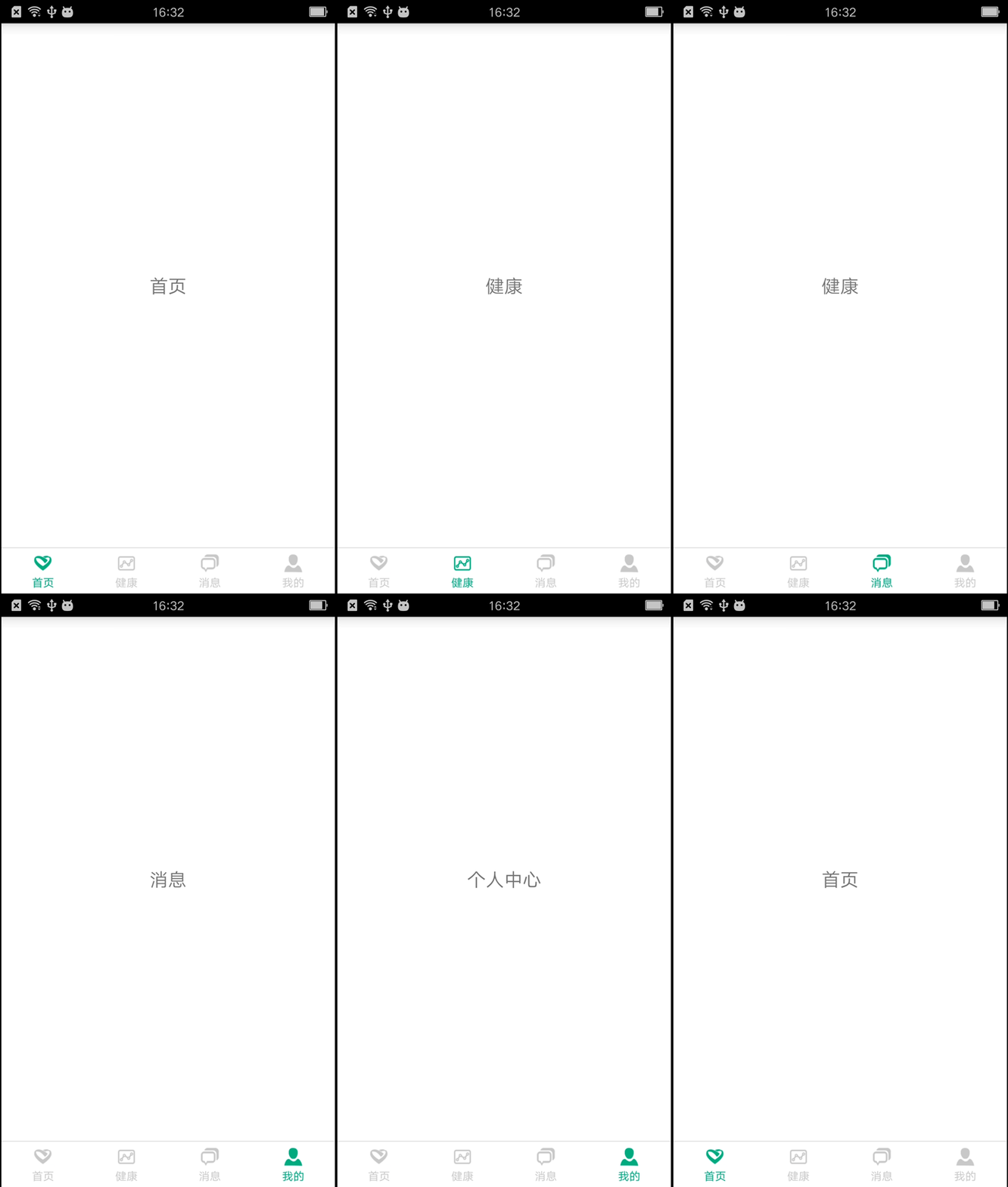
以上就是本文的全部內容,希望對你的學習有所幫助。
 Android 自定義 View 實現圓形圖片效果
今天要講的是如何在 xml 文件中通過引用自定義的 View,實現 ImageView 的圓形圖片效果。首先在項目中新建一個類,我命名為 CircleImageView;
 360奇酷手機怎麼裝SIM卡與TF卡 圖文步驟說明
360奇酷手機採用雙卡槽設計,支援雙卡雙待。那麼SIM卡該怎麼裝?下面小編帶來奇酷手機SIM卡與TF卡的安裝示範。 奇酷手機三個版本均為一體化金屬機身,卡槽位於機身左側
 Android 基於 ViewDragHelper 仿 QQ5.0 側滑界面效果
QQ5.0 的側滑效果有多種實現方案,本文我們採用 ViewDragHelper 來實現。先上效果圖:① 自定義控件 SlidingMenu 繼承 FrameLayout
 Android 事件傳遞(二):ViewGroup 的事件傳遞機制
經過上一篇的實驗,我們只分析了 View 的事件傳遞,但還有個更厲害的角色——ViewGroup 一定要說一下。 從視圖層級來看,一邊是 View、一邊是 ViewGro