

編輯:關於 Android 程式設計
本文以一個加減乘除計算機為例,示範如何在 Android 中用 Java 反射機制動態取得類別、建立實例並呼叫方法。
Java 反射機制的定義是:在運行狀態中,對於任意一個類別,都能得知它的所有屬性與方法;對於任意一個物件,都能呼叫它的任何一個方法。這種「動態取得資訊並動態呼叫方法」的能力,就稱為反射。
反射主要提供以下功能:
談到「動態語言」,社群大致認同的定義是:「程式運行時允許改變程式結構或變數類型」。以此標準,Perl、Python、Ruby 是動態語言,C++、Java、C# 不是。但 Java 雖不屬於動態語言,卻有一個非常突出的動態相關機制——Reflection。這個字本意是「反射、映象、倒影」,用在 Java 身上指的是我們可以在執行期載入、探知、使用編譯期間完全未知的類別。
換句話說,Java 程式可以載入一個執行期才知道名稱的類別,取得它的完整結構,並生成物件實體、對其欄位設值、或呼叫其方法。這種「看透類別」的能力被稱為 introspection(內省)。Reflection 與 introspection 是常被並提的兩個術語。
在 Android 中,有不少類別是被封閉的——例如 ServiceManager、藍牙模組中有大量類別並未對外開放。要使用它們,就得靠反射把類別轉成物件來操作。Android 應用本身以 Java 為基礎,自然也具備這項能力。
class operationClass {
    public float add(int parm1, int parm2)   { return parm1 + parm2; }
    public float cut(int parm1, int parm2)   { return parm1 - parm2; }
    public float ride(int parm1, int parm2)  { return parm1 * parm2; }
    public float Except(int parm1, int parm2) { return parm1 / parm2; }
}
<?xml version="1.0" encoding="utf-8"?>
<LinearLayout xmlns:android="https://schemas.android.com/apk/res/android"
    android:layout_width="fill_parent"
    android:orientation="vertical"
    android:layout_height="fill_parent">

    <EditText android:id="@+id/EditText01"
        android:layout_width="fill_parent"
        android:layout_height="wrap_content"
        android:inputType="number"></EditText>

    <EditText android:id="@+id/EditText02"
        android:layout_width="fill_parent"
        android:layout_height="wrap_content"
        android:inputType="number"></EditText>

    <TextView android:id="@+id/TextView01"
        android:layout_gravity="center"
        android:layout_width="wrap_content"
        android:layout_height="wrap_content"></TextView>

    <LinearLayout android:id="@+id/LinearLayout01"
        android:orientation="horizontal"
        android:layout_width="wrap_content"
        android:layout_height="wrap_content">
        <Button android:text="+" android:id="@+id/Button01"
            android:layout_width="wrap_content" android:layout_height="wrap_content"/>
        <Button android:text="-" android:id="@+id/Button02"
            android:layout_width="wrap_content" android:layout_height="wrap_content"/>
        <Button android:text="*" android:id="@+id/Button03"
            android:layout_width="wrap_content" android:layout_height="wrap_content"/>
        <Button android:text="/" android:id="@+id/Button04"
            android:layout_width="wrap_content" android:layout_height="wrap_content"/>
        <Button android:text="=" android:id="@+id/Button05"
            android:layout_width="wrap_content" android:layout_height="wrap_content"/>
    </LinearLayout>
</LinearLayout>
1. 取得類別物件。用完整類別名稱:
Class<?> classType = Class.forName("com.terry.operationClass");
如果已知類別名稱且它就在專案(或 jar)裡,也可以直接寫:
Class<?> classType = operationClass.class;
2. 建立物件實例。
Object invokeOperation = classType.newInstance();
3. 依名稱與參數型別取得方法。
Method addMethod = classType.getMethod("add", new Class[]{ int.class, int.class });
參數一是我們要找的方法名稱,參數二是該方法的參數型別陣列。這裡如果只寫方法名稱而漏掉參數型別,會拋 NoSuchMethodException——因為 Java 支援方法多載,必須靠參數清單才能唯一確定一個方法。
4. 呼叫方法並取得回傳值。
Object result = addMethod.invoke(invokeOperation,
        new Object[]{ new Integer(first), new Integer(second) });
第一個參數是「要在哪個物件上呼叫」,後面是實際傳入的參數。
package com.terry;

import java.lang.reflect.InvocationTargetException;
import java.lang.reflect.Method;
import android.app.Activity;
import android.os.Bundle;
import android.view.View;
import android.view.View.OnClickListener;
import android.widget.Button;
import android.widget.EditText;
import android.widget.TextView;

public class OperationActivity extends Activity {
    private EditText one, two;
    private TextView result;
    private Button add, cut, ride, Except, sum;
    int first, second;
    String operaionFun = "";

    @Override
    public void onCreate(Bundle savedInstanceState) {
        super.onCreate(savedInstanceState);
        setContentView(R.layout.main);
        findview();

        add.setOnClickListener(click);
        cut.setOnClickListener(click);
        ride.setOnClickListener(click);
        Except.setOnClickListener(click);
        sum.setOnClickListener(click);
    }

    void findview() {
        one = (EditText) findViewById(R.id.EditText01);
        two = (EditText) findViewById(R.id.EditText02);
        result = (TextView) findViewById(R.id.TextView01);
        add = (Button) findViewById(R.id.Button01);
        cut = (Button) findViewById(R.id.Button02);
        ride = (Button) findViewById(R.id.Button03);
        Except = (Button) findViewById(R.id.Button04);
        sum = (Button) findViewById(R.id.Button05);
    }

    OnClickListener click = new OnClickListener() {
        @Override
        public void onClick(View v) {
            first = Integer.parseInt(one.getText().toString());
            second = Integer.parseInt(two.getText().toString());

            switch (v.getId()) {
                case R.id.Button01: operaionFun = "+"; break;
                case R.id.Button02: operaionFun = "-"; break;
                case R.id.Button03: operaionFun = "*"; break;
                case R.id.Button04: operaionFun = "/"; break;
                case R.id.Button05:
                    try {
                        result.setText(operation(operaionFun, first, second));
                    } catch (Exception e) {
                        e.printStackTrace();
                    }
                    break;
            }
        }
    };

    /**
     * 依運算子字串,用反射動態呼叫對應方法
     */
    String operation(String oper, int first, int second)
            throws ClassNotFoundException, IllegalAccessException, InstantiationException,
            SecurityException, NoSuchMethodException, IllegalArgumentException,
            InvocationTargetException {

        // 取得類別物件
        Class<?> classType = Class.forName("com.terry.operationClass");
        // 若類別就在專案內,也可以寫成:Class<?> classType = operationClass.class;

        // 建立實例
        Object invokeOperation = classType.newInstance();

        if (oper.equals("+")) {
            Method m = classType.getMethod("add", new Class[]{ int.class, int.class });
            return m.invoke(invokeOperation, new Object[]{ first, second }).toString();
        } else if (oper.equals("-")) {
            Method m = classType.getMethod("cut", new Class[]{ int.class, int.class });
            return m.invoke(invokeOperation, new Object[]{ first, second }).toString();
        } else if (oper.equals("*")) {
            Method m = classType.getMethod("ride", new Class[]{ int.class, int.class });
            return m.invoke(invokeOperation, new Object[]{ first, second }).toString();
        } else if (oper.equals("/")) {
            Method m = classType.getMethod("Except", new Class[]{ int.class, int.class });
            return m.invoke(invokeOperation, new Object[]{ first, second }).toString();
        }
        return "";
    }
}
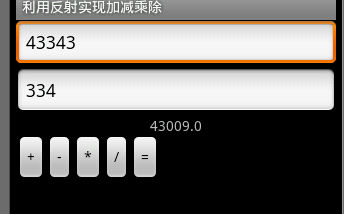
newInstance() 在早期版本上有已知效能問題。ClassNotFoundException。若只是為了「動態」而犧牲型別安全,通常不划算。proguard-rules.pro 加上 -keep 規則,否則正式簽名稱的 apk 會 crash。Map<String, Interface> 查表會比反射更快也更安全;若要做依賴注入,直接用 Dagger/Hilt 會省去大量反射樣板。補充一點:Java 中可以用 main 函式直接執行與除錯,但在 Android 裡沒有獨立的 main 進入點,直接照那種方式呼叫會出錯,需要透過 Activity 或測試框架來驅動。
以上就是反射機制的基本用法示範。理解它的原理與成本之後,才能在「真的需要」與「其實有更好的方法」之間做出正確判斷。
 仿 RadioGroup 打造可複用的單選卡片容器(以底部導航/Tab 為例)
需求很直觀:一排四張樣式相同、內容不同的卡片,同一時間只能有一張處於選中狀態,選中後回傳對應的金額。圖上只是示意效果,實際資料要從伺服器拉回來再灌進控制項。 先盤點幾種
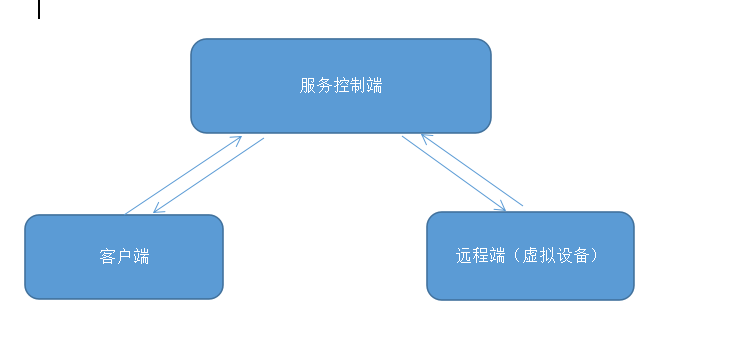 Android Binder 入門:透過 ServiceManager 與 transact 進行遠端通訊
Binder 是 Android 跨進程通信的核心機制之一。許多系統服務、輸入法框架與底層能力,都會透過 Binder 進行通訊。對應用開發者而言,理解 Binder 的
 Android 開發問題匯總:環境、Gradle、UI 與打包實務
Android Studio 與 Gradle常見問題包括 Subversion 外掛消失、dexDebug 失敗、Gradle 版本與 plugin 不相容、65K 方
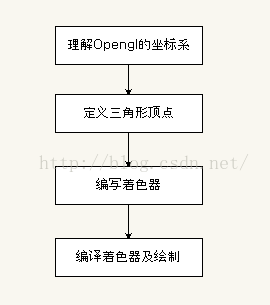 OpenGL ES 2.0 for Android:動手畫一個三角形
OpenGL ES 2.0 與 1.x 最大的差別,就是引入了著色器。要畫出一個三角形,你必須先寫程式告訴 GPU「怎麼算位置、怎麼算顏色」。本文走一遍完整流程。 整體流