

編輯:關於 Android 程式設計
下面分享一份 CircleImageView 的完整實現,核心思路是用 BitmapShader 把方形圖片當成 shader 貼到圓形區域上,再畫一層描邊做邊框。
在項目的 values 目錄下新建一個 XML 文件:New → XML → Values XML File,命名為 attrs。
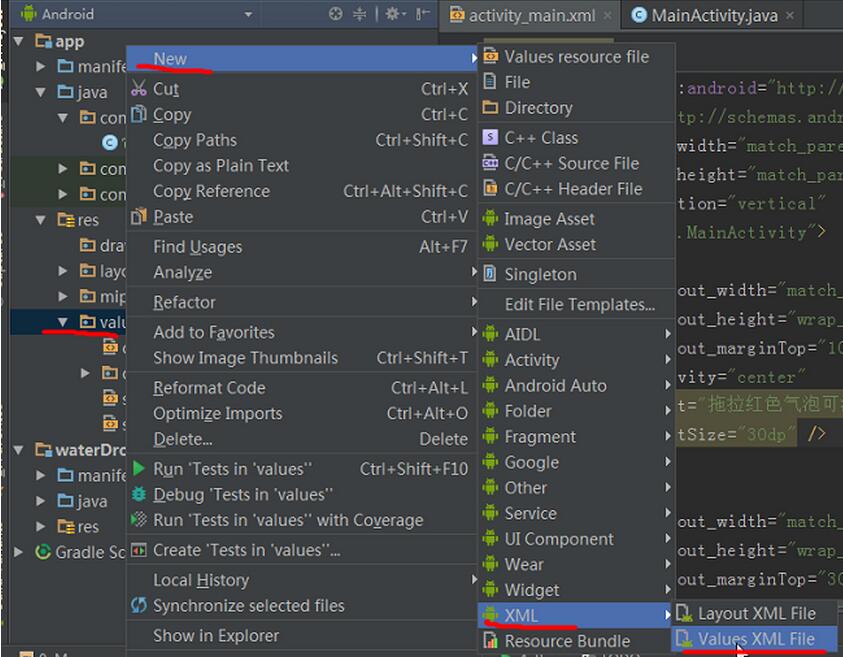
補上內容,這裡只暴露邊框寬度與邊框顏色兩個屬性:
 <?xml version="1.0" encoding="utf-8"?>
<resources>
 <declare-styleable name="CircleImageView">
 <attr name="border_width" format="dimension" />
 <attr name="border_color" format="color" />
 </declare-styleable>
</resources>
可以直接複用,逐段理解也不難:構造函數讀屬性,setup() 計算圓的半徑與 shader 矩陣,onDraw() 依次畫圖與描邊。
 import android.content.Context;
import android.content.res.TypedArray;
import android.graphics.Bitmap;
import android.graphics.BitmapShader;
import android.graphics.Canvas;
import android.graphics.Color;
import android.graphics.Matrix;
import android.graphics.Paint;
import android.graphics.RectF;
import android.graphics.Shader;
import android.graphics.drawable.BitmapDrawable;
import android.graphics.drawable.ColorDrawable;
import android.graphics.drawable.Drawable;
import android.util.AttributeSet;
import android.widget.ImageView;

public class CircleImageView extends ImageView {
 private static final ScaleType SCALE_TYPE = ScaleType.CENTER_CROP;
 private static final Bitmap.Config BITMAP_CONFIG = Bitmap.Config.ARGB_8888;
 private static final int COLORDRAWABLE_DIMENSION = 1;
 private static final int DEFAULT_BORDER_WIDTH = 0;
 private static final int DEFAULT_BORDER_COLOR = Color.BLACK;

 private final RectF mDrawableRect = new RectF();
 private final RectF mBorderRect = new RectF();
 private final Matrix mShaderMatrix = new Matrix();
 private final Paint mBitmapPaint = new Paint();
 private final Paint mBorderPaint = new Paint();

 private int mBorderColor = DEFAULT_BORDER_COLOR;
 private int mBorderWidth = DEFAULT_BORDER_WIDTH;
 private Bitmap mBitmap;
 private BitmapShader mBitmapShader;
 private int mBitmapWidth;
 private int mBitmapHeight;
 private float mDrawableRadius;
 private float mBorderRadius;
 private boolean mReady;
 private boolean mSetupPending;

 public CircleImageView(Context context) { super(context); }
 public CircleImageView(Context context, AttributeSet attrs) { this(context, attrs, 0); }

 public CircleImageView(Context context, AttributeSet attrs, int defStyle) {
  super(context, attrs, defStyle);
  super.setScaleType(SCALE_TYPE);
  TypedArray a = context.obtainStyledAttributes(
    attrs, R.styleable.CircleImageView, defStyle, 0);
  mBorderWidth = a.getDimensionPixelSize(
    R.styleable.CircleImageView_border_width, DEFAULT_BORDER_WIDTH);
  mBorderColor = a.getColor(
    R.styleable.CircleImageView_border_color, DEFAULT_BORDER_COLOR);
  a.recycle();
  mReady = true;
  if (mSetupPending) {
   setup();
   mSetupPending = false;
  }
 }

 @Override public ScaleType getScaleType() { return SCALE_TYPE; }

 @Override public void setScaleType(ScaleType scaleType) {
  if (scaleType != SCALE_TYPE) {
   throw new IllegalArgumentException(
     String.format("ScaleType %s not supported.", scaleType));
  }
 }

 @Override protected void onDraw(Canvas canvas) {
  if (getDrawable() == null) return;
  canvas.drawCircle(getWidth() / 2, getHeight() / 2, mDrawableRadius, mBitmapPaint);
  if (mBorderWidth != 0) {
   canvas.drawCircle(getWidth() / 2, getHeight() / 2, mBorderRadius, mBorderPaint);
  }
 }

 @Override protected void onSizeChanged(int w, int h, int oldw, int oldh) {
  super.onSizeChanged(w, h, oldw, oldh);
  setup();
 }

 public int getBorderColor() { return mBorderColor; }

 public void setBorderColor(int borderColor) {
  if (borderColor == mBorderColor) return;
  mBorderColor = borderColor;
  mBorderPaint.setColor(mBorderColor);
  invalidate();
 }

 public int getBorderWidth() { return mBorderWidth; }

 public void setBorderWidth(int borderWidth) {
  if (borderWidth == mBorderWidth) return;
  mBorderWidth = borderWidth;
  setup();
 }

 @Override public void setImageBitmap(Bitmap bm) {
  super.setImageBitmap(bm);
  mBitmap = bm;
  setup();
 }

 @Override public void setImageDrawable(Drawable drawable) {
  super.setImageDrawable(drawable);
  mBitmap = getBitmapFromDrawable(drawable);
  setup();
 }

 @Override public void setImageResource(int resId) {
  super.setImageResource(resId);
  mBitmap = getBitmapFromDrawable(getDrawable());
  setup();
 }

 private Bitmap getBitmapFromDrawable(Drawable drawable) {
  if (drawable == null) return null;
  if (drawable instanceof BitmapDrawable) {
   return ((BitmapDrawable) drawable).getBitmap();
  }
  try {
   Bitmap bitmap;
   if (drawable instanceof ColorDrawable) {
    bitmap = Bitmap.createBitmap(
      COLORDRAWABLE_DIMENSION, COLORDRAWABLE_DIMENSION, BITMAP_CONFIG);
   } else {
    bitmap = Bitmap.createBitmap(
      drawable.getIntrinsicWidth(), drawable.getIntrinsicHeight(), BITMAP_CONFIG);
   }
   Canvas canvas = new Canvas(bitmap);
   drawable.setBounds(0, 0, canvas.getWidth(), canvas.getHeight());
   drawable.draw(canvas);
   return bitmap;
  } catch (OutOfMemoryError e) {
   return null;
  }
 }

 private void setup() {
  if (!mReady) {
   mSetupPending = true;
   return;
  }
  if (mBitmap == null) return;

  mBitmapShader = new BitmapShader(mBitmap, Shader.TileMode.CLAMP, Shader.TileMode.CLAMP);
  mBitmapPaint.setAntiAlias(true);
  mBitmapPaint.setShader(mBitmapShader);

  mBorderPaint.setStyle(Paint.Style.STROKE);
  mBorderPaint.setAntiAlias(true);
  mBorderPaint.setColor(mBorderColor);
  mBorderPaint.setStrokeWidth(mBorderWidth);

  mBitmapHeight = mBitmap.getHeight();
  mBitmapWidth = mBitmap.getWidth();

  mBorderRect.set(0, 0, getWidth(), getHeight());
  mBorderRadius = Math.min((mBorderRect.height() - mBorderWidth) / 2,
    (mBorderRect.width() - mBorderWidth) / 2);

  mDrawableRect.set(mBorderWidth, mBorderWidth,
    mBorderRect.width() - mBorderWidth, mBorderRect.height() - mBorderWidth);
  mDrawableRadius = Math.min(mDrawableRect.height() / 2, mDrawableRect.width() / 2);

  updateShaderMatrix();
  invalidate();
 }

 private void updateShaderMatrix() {
  float scale;
  float dx = 0;
  float dy = 0;
  mShaderMatrix.set(null);
  if (mBitmapWidth * mDrawableRect.height() > mDrawableRect.width() * mBitmapHeight) {
   scale = mDrawableRect.height() / (float) mBitmapHeight;
   dx = (mDrawableRect.width() - mBitmapWidth * scale) * 0.5f;
  } else {
   scale = mDrawableRect.width() / (float) mBitmapWidth;
   dy = (mDrawableRect.height() - mBitmapHeight * scale) * 0.5f;
  }
  mShaderMatrix.setScale(scale, scale);
  mShaderMatrix.postTranslate((int) (dx + 0.5f) + mBorderWidth,
    (int) (dy + 0.5f) + mBorderWidth);
  mBitmapShader.setLocalMatrix(mShaderMatrix);
 }
}
值得留意的是 mReady / mSetupPending 這對標志:構造函數執行時 View 還沒測量出尺寸,此時 setup() 無法算出正確半徑,所以先記下「待處理」,等 onSizeChanged 回調再補做,避免拿到 0 尺寸。
先把圖片放進 res/drawable:
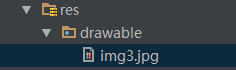
然後在布局文件中直接引用這個自定義 View,注意標籤要寫完整類名:
 <com.example.suqh.drop.CircleImageView
  android:layout_width="match_parent"
  android:layout_height="match_parent"
  android:src="@drawable/img3" />
編譯時可能會遇到 IDE 提示找不到符號:
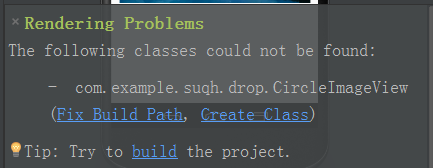
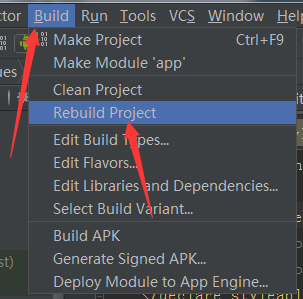
先直接點 Build 編譯一次;如果仍然報錯,就 Rebuild 一次:
最終效果:
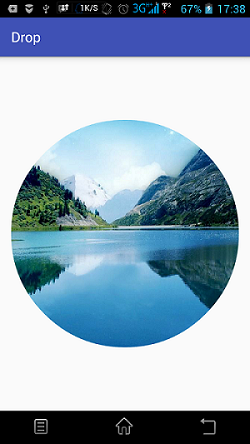
這個類之所以要寫 getBitmapFromDrawable,是因為 ImageView 的 src 可能是 ColorDrawable 等非 Bitmap 的 Drawable,直接強轉會崩,所以統一先轉成 Bitmap 再交給 shader 處理。
 應用耗電分析與優化:Battery Historian 實戰指南
在 Android 專案裡,電量消耗一直是最難量化、卻又最被用戶敏感的指標。使用者未必說得出你的產品有多少功能,但只要手機待機掉得比別人快,卸載的決定往往下得毫不留情。指
 Android 讀取手機聯絡人資訊的實作方式
聯絡人是 Android 中常見的系統資料之一。若應用程式需要顯示聯絡人清單,通常會透過 ContentResolver 查詢 ContactsContract 相關的
 Android 取得螢幕寬高的三種方式
取得螢幕寬高是 Android 開發中常見需求,例如置中元件、計算比例或動態調整版面。本文整理三種常用方式,並說明 px 與 dip 的差異。 方法一:Display
 Android Canvas 繪圖實戰:文字、Bitmap、裁剪、橢圓、線段、點與弧線一次學會
想畫一個圓形的頭像、想讓一段文字精準地落在畫布中央、想畫一條帶抗鋸齒的斜線,或者想畫出進度條那種扇形弧——這些事情在 Android 裡都繞不開兩個類:Canvas(畫布