

編輯:關於 Android 程式設計
這次來模仿小米安全中心的檢測效果。
專案網址:https://github.com/niniloveyou/GradeProgressView
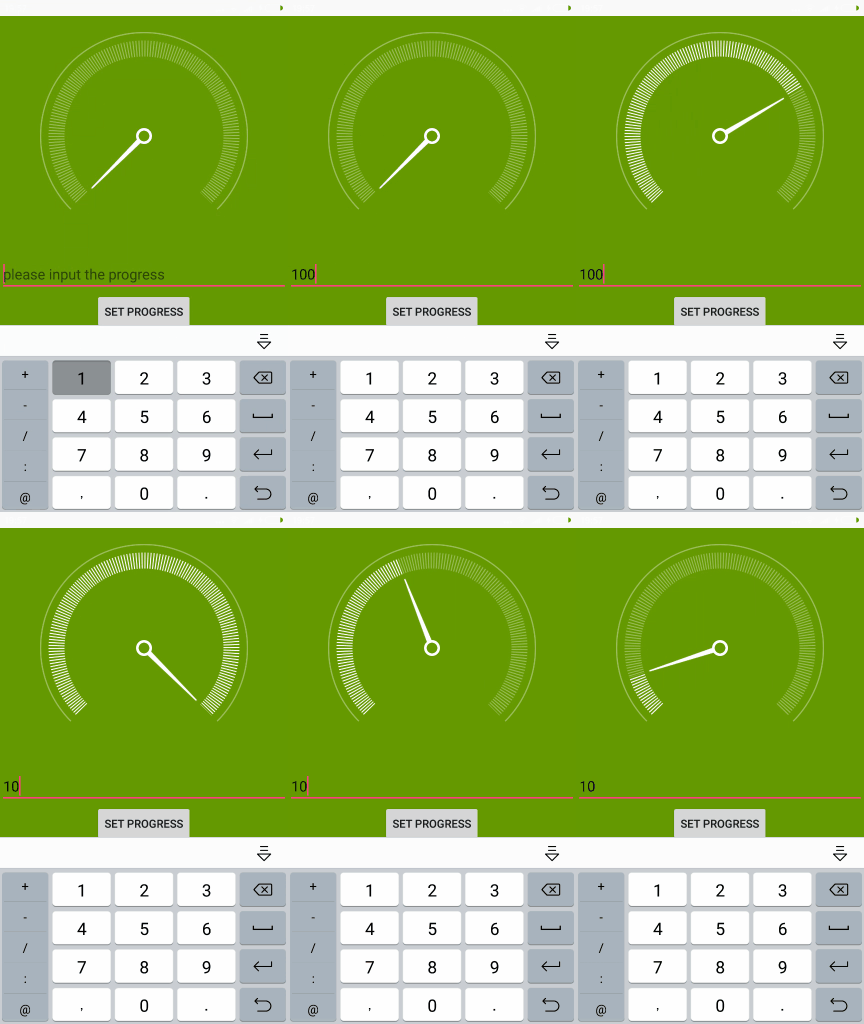
這個效果的使用場景其實不算多,主要出現在各種檢測流程中,例如垃圾清理、手機安全檢測。當然,如果你不嫌它長相特殊,拿來當一般進度條也完全可行。
拿到效果圖,先想清楚有哪些技術關卡:
有人會說,進度條還不容易?不就是這樣:
mPaint.setPathEffect(new DashPathEffect(new float[]{dashWith, dashSpace}, ...));
canvas.drawArc(mRectF, 135, 270, false, mPaint);

mPaint.setColor(Color.WHITE);
canvas.drawArc(mRectF, 135, degree, false, mPaint);
設定一個 PathEffect,畫一段 270 度的圓弧當底,再依進度算出角度畫第二段覆蓋上去,看起來完美。當時我也這麼想,於是動手實作。先畫 50%(也就是第二段蓋住第一段的一半),效果相當完美;再試試 30%——不對啊,小格子怎麼沒對齊,整個錯位了。
問題的根源在於 DashPathEffect 的虛線是從路徑起點開始依固定間距繪製的。兩段圓弧起點不同、長度不同,虛線的相位自然對不上,所以永遠不可能精準重疊。
後來換了個更簡單的思路:不覆蓋,畫兩段首尾相接的圓弧。第一段畫一半,第二段畫另一半,兩者共用同一個起點基準:
// 畫背景圓弧
canvas.drawArc(mRectF, 135 + degree, 270 - degree, false, mPaint);

// 畫進度圓弧
canvas.drawArc(mRectF, 135, degree, false, mProgressPaint);
這樣一來,兩段弧線的接縫處自然對齊,虛線也不會再錯位。
先畫出指針的路徑(一個指向右側的三角形):
mPointerPath = new Path();
mPointerPath.moveTo(centerX + pointRadius, centerY - 7);
mPointerPath.lineTo(centerX + pointRadius, centerY + 7);
mPointerPath.lineTo(mRectF.right - pointGap - lineWidth / 2, centerY);
mPointerPath.lineTo(centerX + pointRadius, centerY - 7);
mPointerPath.close();
接著在中心畫一個小圓,再把指針畫上去。關鍵在於:用 canvas.rotate() 旋轉畫布而非旋轉 Path,如此指針自然就會繞著圓心轉動。不熟悉 canvas.save() 與 canvas.restore() 作用的話建議先查一下——save 把目前畫布的矩陣狀態壓入堆疊,restore 則還原,少了這對搭配,旋轉會污染後續所有繪製。
// 畫中心圓
canvas.drawCircle(centerX, centerY, pointRadius, mInnerCirclePaint);

canvas.save();
canvas.rotate(135 + degree, centerX, centerY);
canvas.drawPath(mPointerPath, mPointerPaint);
canvas.restore();
package deadline.grade;

import android.animation.ValueAnimator;
import android.annotation.TargetApi;
import android.content.Context;
import android.graphics.Canvas;
import android.graphics.Color;
import android.graphics.DashPathEffect;
import android.graphics.Paint;
import android.graphics.Path;
import android.graphics.RectF;
import android.os.Build;
import android.support.annotation.IntRange;
import android.util.AttributeSet;
import android.view.View;
import android.view.animation.AccelerateDecelerateInterpolator;

public class GradeProgressView extends View {
    private static final String TAG = GradeProgressView.class.getSimpleName();

    private static final int DEFAULT_PROGRESS_COLOR = Color.WHITE;
    private static final int DEFAULT_BACKGROUND_COLOR = 0x5AFFFFFF;

    private int mBackgroundColor = DEFAULT_BACKGROUND_COLOR;
    private int mProgressColor = DEFAULT_PROGRESS_COLOR;

    // 進度條的每格線寬、間距、長度
    private int dashWith = 4;
    private int dashSpace = 6;
    private int lineWidth = 60;

    // 最外圈線寬,以及與進度條之間的間距
    private int outLineWidth = 5;
    private int gapWidth = 25;

    // 指針線寬、半徑,以及指針與進度條的間距
    private int pointLineWidth = 10;
    private int pointRadius = 25;
    private int pointGap = 20;

    private int mProgress = 0;

    // 外圈
    private RectF mOuterRectF;
    private Paint mOuterPaint;

    // 進度條
    private RectF mRectF;
    private Paint mPaint;
    private Paint mProgressPaint;

    // 指針
    private Paint mInnerCirclePaint;
    private Paint mPointerPaint;
    private Path mPointerPath;

    private float centerX;
    private float centerY;

    private ValueAnimator animator;
    private OnProgressChangeListener mListener;

    public GradeProgressView(Context context) {
        this(context, null);
    }

    public GradeProgressView(Context context, AttributeSet attrs) {
        this(context, attrs, 0);
    }

    public GradeProgressView(Context context, AttributeSet attrs, int defStyleAttr) {
        super(context, attrs, defStyleAttr);
        setup();
    }

    @TargetApi(Build.VERSION_CODES.LOLLIPOP)
    public GradeProgressView(Context context, AttributeSet attrs,
                             int defStyleAttr, int defStyleRes) {
        super(context, attrs, defStyleAttr, defStyleRes);
    }

    private void setup() {
        mRectF = new RectF();
        mOuterRectF = new RectF();

        mOuterPaint = new Paint(Paint.ANTI_ALIAS_FLAG);
        mOuterPaint.setStrokeWidth(outLineWidth);
        mOuterPaint.setColor(mBackgroundColor);
        mOuterPaint.setStyle(Paint.Style.STROKE);

        mPaint = new Paint(Paint.ANTI_ALIAS_FLAG);
        mPaint.setStrokeWidth(lineWidth);
        mPaint.setColor(mBackgroundColor);
        mPaint.setStyle(Paint.Style.STROKE);
        mPaint.setPathEffect(new DashPathEffect(new float[]{dashWith, dashSpace}, dashSpace));

        mProgressPaint = new Paint(Paint.ANTI_ALIAS_FLAG);
        mProgressPaint.setStrokeWidth(lineWidth);
        mProgressPaint.setColor(mProgressColor);
        mProgressPaint.setStyle(Paint.Style.STROKE);
        mProgressPaint.setPathEffect(new DashPathEffect(new float[]{dashWith, dashSpace}, dashSpace));

        mPointerPaint = new Paint(Paint.ANTI_ALIAS_FLAG);
        mPointerPaint.setStrokeWidth(pointLineWidth / 2);
        mPointerPaint.setColor(mProgressColor);
        mPointerPaint.setStyle(Paint.Style.FILL_AND_STROKE);
        mPointerPaint.setStrokeCap(Paint.Cap.ROUND);
        mPointerPaint.setShadowLayer(4, 3, 0, 0x20000000);

        mInnerCirclePaint = new Paint(Paint.ANTI_ALIAS_FLAG);
        mInnerCirclePaint.setStrokeWidth(pointLineWidth);
        mInnerCirclePaint.setColor(mProgressColor);
        mInnerCirclePaint.setStyle(Paint.Style.STROKE);
        mInnerCirclePaint.setShadowLayer(4, 3, 0, 0x20000000);
    }

    @Override
    protected void onSizeChanged(int w, int h, int oldw, int oldh) {
        super.onSizeChanged(w, h, oldw, oldh);

        int value = outLineWidth / 2;
        mOuterRectF.set(value, value, w - value, h - value);

        int gap = lineWidth / 2 + outLineWidth + gapWidth;
        mRectF.set(mOuterRectF.left + gap, mOuterRectF.top + gap,
                mOuterRectF.right - gap, mOuterRectF.bottom - gap);

        centerX = mRectF.centerX();
        centerY = mRectF.centerY();

        mPointerPath = new Path();
        mPointerPath.moveTo(centerX + pointRadius, centerY - 7);
        mPointerPath.lineTo(centerX + pointRadius, centerY + 7);
        mPointerPath.lineTo(mRectF.right - pointGap - lineWidth / 2, centerY);
        mPointerPath.lineTo(centerX + pointRadius, centerY - 7);
        mPointerPath.close();
    }

    @Override
    protected void onDraw(Canvas canvas) {
        super.onDraw(canvas);

        float degree = 2.7f * mProgress;

        // 外圈
        canvas.drawArc(mOuterRectF, 135, 270, false, mOuterPaint);
        // 背景弧
        canvas.drawArc(mRectF, 135 + degree, 270 - degree, false, mPaint);
        // 進度弧
        canvas.drawArc(mRectF, 135, degree, false, mProgressPaint);
        // 指針
        canvas.drawCircle(centerX, centerY, pointRadius, mInnerCirclePaint);
        canvas.save();
        canvas.rotate(135 + degree, centerX, centerY);
        canvas.drawPath(mPointerPath, mPointerPaint);
        canvas.restore();
    }

    @Override
    protected void onMeasure(int widthMeasureSpec, int heightMeasureSpec) {
        super.onMeasure(widthMeasureSpec, heightMeasureSpec);
        int measureWidth = MeasureSpec.getSize(widthMeasureSpec);
        int measureHeight = MeasureSpec.getSize(heightMeasureSpec);
        // 強制為正方形,取兩邊的較小值
        setMeasuredDimension(Math.min(measureHeight, measureWidth),
                Math.min(measureHeight, measureWidth));
    }

    public void setOnProgressChangeListener(OnProgressChangeListener listener) {
        this.mListener = listener;
    }

    public int getProgressColor() {
        return mProgressColor;
    }

    public void setProgressColor(int progressColor) {
        this.mProgressColor = progressColor;
        if (mProgressPaint != null) {
            mProgressPaint.setColor(mProgressColor);
        }
        if (mPointerPaint != null) {
            mPointerPaint.setColor(mProgressColor);
        }
        if (mInnerCirclePaint != null) {
            mInnerCirclePaint.setColor(mProgressColor);
        }
        postInvalidate();
    }

    public int getBackgroundColor() {
        return mBackgroundColor;
    }

    public void setBackgroundColor(int backgroundColor) {
        this.mBackgroundColor = backgroundColor;
        if (mPaint != null) {
            mPaint.setColor(mBackgroundColor);
        }
        if (mOuterPaint != null) {
            mOuterPaint.setColor(mBackgroundColor);
        }
        postInvalidate();
    }

    public int getLineWidth() {
        return lineWidth;
    }

    public void setLineWidth(int lineWidth) {
        this.lineWidth = lineWidth;
        if (mPaint != null) {
            mPaint.setStrokeWidth(lineWidth);
        }
        if (mProgressPaint != null) {
            mProgressPaint.setStrokeWidth(lineWidth);
        }
        postInvalidate();
    }

    public int getOutLineWidth() {
        return outLineWidth;
    }

    public void setOutLineWidth(int outLineWidth) {
        this.outLineWidth = outLineWidth;
        if (mOuterPaint != null) {
            mOuterPaint.setStrokeWidth(outLineWidth);
        }
        postInvalidate();
    }

    public int getGapWidth() {
        return gapWidth;
    }

    public void setGapWidth(int gapWidth) {
        this.gapWidth = gapWidth;
    }

    public int getProgress() {
        return mProgress;
    }

    public void setProgress(@IntRange(from = 0, to = 100) int progress) {
        if (progress > 100) {
            progress = 100;
        }
        if (progress < 0) {
            progress = 0;
        }
        this.mProgress = progress;
        if (mListener != null) {
            mListener.onProgressChanged(GradeProgressView.this, mProgress);
        }
        postInvalidate();
    }

    /** 以動畫方式推進到目標進度 */
    public void setProgressWidthAnimation(@IntRange(from = 0, to = 100) int progress) {
        if (progress > 100) {
            progress = 100;
        }
        if (progress < 0) {
            progress = 0;
        }
        if (animator != null && animator.isRunning()) {
            animator.cancel();
            animator = null;
        }
        animator = ValueAnimator.ofInt(mProgress, progress);
        int duration = 10 * Math.abs(progress - mProgress);
        animator.setDuration(duration);
        animator.setInterpolator(new AccelerateDecelerateInterpolator());
        animator.addUpdateListener(new ValueAnimator.AnimatorUpdateListener() {
            @Override
            public void onAnimationUpdate(ValueAnimator valueAnimator) {
                int value = (int) valueAnimator.getAnimatedValue();
                if (mProgress != value) {
                    mProgress = value;
                    if (mListener != null) {
                        mListener.onProgressChanged(GradeProgressView.this, mProgress);
                    }
                    postInvalidate();
                }
            }
        });
        animator.start();
    }

    @Override
    protected void onDetachedFromWindow() {
        super.onDetachedFromWindow();
        if (animator != null) {
            animator.cancel();
            animator = null;
        }
    }

    public interface OnProgressChangeListener {
        void onProgressChanged(GradeProgressView gradeProgressView, int progress);
    }
}
一、把硬編碼的數字抽成 styleable 屬性。目前 dashWith、lineWidth、pointRadius 這些都是寫死的成員,正式發布成可重用元件時,建議定義 declare-styleable,讓使用者在 XML 中直接設定,並在 setup() 前從 TypedArray 讀入。
二、setGapWidth() 目前不會生效。因為 mRectF 只在 onSizeChanged() 中計算一次,改了 gapWidth 卻沒有觸發重新測量。修正方式是呼叫 requestLayout() 或在 setter 中重算 mRectF 後 postInvalidate()。
三、degree = 2.7f * mProgress 這個係數來得突然。它是 270 度除以 100 的結果,建議改寫成 270f * mProgress / 100,語意自明且日後調整總角度時不必重新算。
四、可加上 dp 轉 px。自訂 View 中的尺寸若不換算,在不同螢幕密度上比例會跑掉。
以上就是本文的全部內容,希望對你的學習有所幫助。
 React Native TextInput 元件的基本用法
TextInput 是 React Native 中最重要的輸入元件之一,常用於帳號、密碼、搜尋與表單填寫。它可以同時適配 Android 與 iOS,並透過樣式表調整外
 Android TextView 進階顯示技巧合集
自定義字體Android 可透過 Typeface 載入 TTF 字體。將字體檔放入 assets 的 fonts 目錄,再以 createFromAsset 建立 Ty
 Android ListView 兩種適配器與 Item 事件監聽詳解
ListView 兩種適配器 ListView 在 Android App 中非常常見,幾乎每個 App 都會用到,比如 QQ 消息列表、通訊錄,還有酷我音樂的歌曲列表
 Android Studio 實測 UI Automator:從依賴設定到第一支測試
UI Automator 是 Android 官方提供的跨應用 UI 測試框架,它能夠模擬使用者在裝置上的操作,也能讀取目前畫面上的元件資訊,適合用來寫「打開某個 App