

編輯:關於 Android 程式設計
JSON 和 XML 是移動端最常見的兩種數據交換格式,目前 JSON 的佔有率明顯更高。本文在 Android 環境下對兩者的解析方式做一組對照,幫助你在接口對接時做出合適選擇。
無論哪種格式,解析的目的都是拿到每一個具體的值。JSON 是鍵值對形式,XML 是標簽與值的形式,本質上都是「用鍵或標簽找到對應的值」。所以兩者都可以先準備一個雙列集合來承接結果。
JSON 分三類:
XML 以標簽形式存儲,通過標簽名取值,層級關係由標簽嵌套表達。
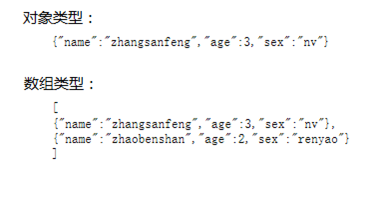
有兩條路:一是自己按數據結構分層解析,二是用開源框架。
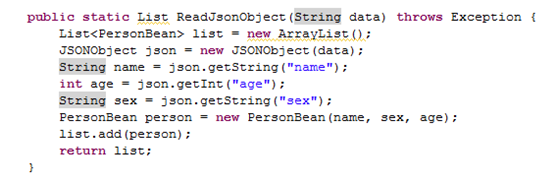
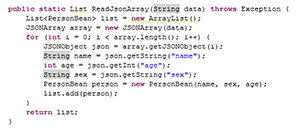
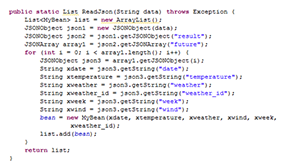
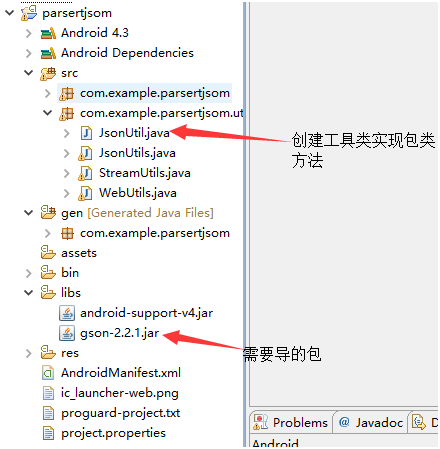
自己寫時又分三種情況:對象解析最簡單,先建 JSON 對象,用 getXxx() 系列方法取值後存入集合;數組解析先通過 JsonArray 拿到各個對象,再走對象解析流程;綜合解析則是按結構順序交替使用兩種手段,直到取到目標數據。用框架時原理相同,只是要先導包,並寫一個方法類去調用。
讀取對象類型:
讀取數組類型:
讀取綜合類型:
框架方式的目錄結構:
XML 解析是「邊讀邊解析」,自上而下依次推進,流程相對固定:
XmlPullParser 實例,設置待解析的流對象;END_DOCUMENT 跳出;START_TAG,進入標簽內部,比對標簽名,命中則用 nextText() 取文本;END_TAG,把已取到的數據存入集合;type = parser.next() 把指針往後推。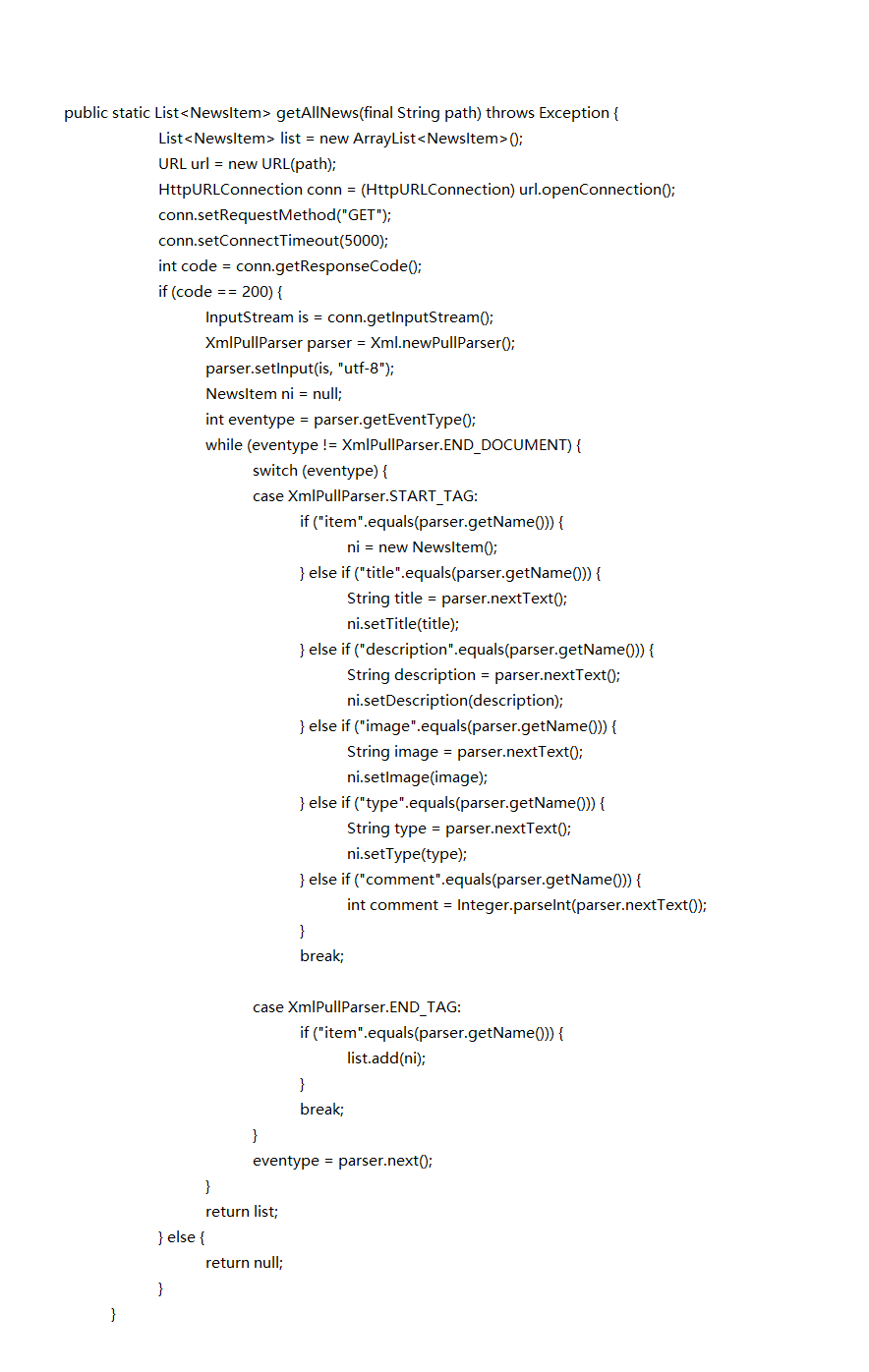
下面的案例用 Android 設備從 Tomcat 服務器分別獲取 JSON 與 XML 數據,解析後展示在界面上。
JSON 原始數據:
{
  "resultcode": "200",
  "reason": "查詢成功!",
  "result": {
    "sk": { "temp": "21", "wind_direction": "西風", "wind_strength": "2級", "humidity": "4%", "time": "14:25" },
    "today": {
      "city": "天津", "date_y": "2014年03月21日", "week": "星期五",
      "temperature": "8℃~20℃", "weather": "晴轉霾",
      "weather_id": { "fa": "00", "fb": "53" },
      "wind": "西南風微風", "dressing_index": "較冷",
      "dressing_advice": "建議著大衣、呢外套加毛衣、衛衣等服裝。",
      "uv_index": "中等", "comfort_index": "", "wash_index": "較適宜",
      "travel_index": "適宜", "exercise_index": "較適宜", "drying_index": ""
    },
    "future": [
      { "temperature": "28℃~36℃", "weather": "晴轉多雲", "weather_id": {"fa":"00","fb":"01"}, "wind": "南風3-4級", "week": "星期一", "date": "20140804" },
      { "temperature": "28℃~36℃", "weather": "晴轉多雲", "weather_id": {"fa":"00","fb":"01"}, "wind": "東南風3-4級", "week": "星期二", "date": "20140805" },
      { "temperature": "27℃~35℃", "weather": "晴轉多雲", "weather_id": {"fa":"00","fb":"01"}, "wind": "東南風3-4級", "week": "星期三", "date": "20140806" },
      { "temperature": "27℃~34℃", "weather": "多雲", "weather_id": {"fa":"01","fb":"01"}, "wind": "東南風3-4級", "week": "星期四", "date": "20140807" },
      { "temperature": "27℃~33℃", "weather": "多雲", "weather_id": {"fa":"01","fb":"01"}, "wind": "東北風4-5級", "week": "星期五", "date": "20140808" },
      { "temperature": "26℃~33℃", "weather": "多雲", "weather_id": {"fa":"01","fb":"01"}, "wind": "北風4-5級", "week": "星期六", "date": "20140809" },
      { "temperature": "26℃~33℃", "weather": "多雲", "weather_id": {"fa":"01","fb":"01"}, "wind": "北風4-5級", "week": "星期日", "date": "20140810" }
    ]
  },
  "error_code": 0
}
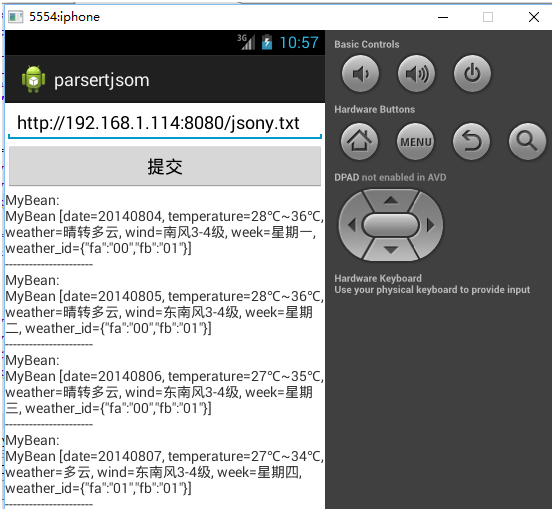
解析其中的 future 數組,結果如下:
XML 原始數據:
<?xml version="1.0" encoding="UTF-8" ?>
<channel>
  <item>
    <title>新聞標題一</title>
    <description>新聞摘要內容一</description>
    <image>https://192.168.1.103:8080/img/a.jpg</image>
    <type>1</type>
    <comment>163</comment>
  </item>
  <item>
    <title>新聞標題二</title>
    <description>新聞摘要內容二</description>
    <image>https://192.168.1.103:8080/img/b.jpg</image>
    <type>2</type>
  </item>
  <item>
    <title>新聞標題三</title>
    <description>新聞摘要內容三</description>
    <image>https://192.168.1.103:8080/img/c.jpg</image>
    <type>3</type>
  </item>
  <item>
    <title>新聞標題四</title>
    <description>新聞摘要內容四</description>
    <image>https://192.168.1.103:8080/img/d.jpg</image>
    <type>1</type>
    <comment>763</comment>
  </item>
</channel>
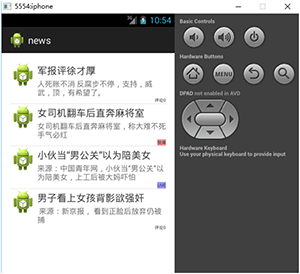
解析後的成果展示:
JSON 的優勢在於體積小、解析速度快、與前端 JavaScript 天然契合,寫起來也更省事,因此新接口基本首選 JSON。XML 的優勢在於結構嚴謹、命名空間與文檔規範完善,適合配置檔、RSS、SOAP 等需要強約定的場景。而在 Android 端,XML 解析走 XmlPullParser 是省內存的做法,它不需要像 DOM 那樣先把整棵樹load進內存。
 Android 網絡編程全景總結:從 HTTP 到 Socket 與服務器推送
概述 在正式動手之前,先釐清幾個基礎問題。 1)Android 平台有哪些網絡相關的 API? a) java.net.*(標準 Java 接口) 這個包提供了大量與聯
 Android 為圖片加上文字水印的簡易實作
為圖片加上水印的做法其實很單純,核心就是建立一個 Canvas,先畫圖再疊上文字。 public class MainActivity extends AppCompat
 Android SurfaceView 詳解(一):從內存與多線程理解它的設計
Surface 這個詞字面意思是「浮在表面的」,照字面解釋 SurfaceView 就是「浮在表面的 View」,這麼說估計要挨磚。名字的由來確實有點關係,但更準確的說法
 Android RecyclerView 使用入門:從依賴到自訂 Adapter
RecyclerView 是 support-v7 中的新元件。 RecyclerView 可以用來取代 ListView 與 GridView。顧名思義,它會自動回