

編輯:關於 Android 程式設計
初次使用 AndroidStudio 時,很多人會遇到 Gradle sync failed 的錯誤。本文記錄了一次典型的排查與解決過程,希望能幫到有相同困擾的朋友。
報錯內容如下:
Gradle sync failed: Unable to start the daemon process. This problem might be caused by incorrect configuration of the daemon. For example, an unrecognized jvm option is used. Please refer to the user guide chapter on the daemon at https://docs.gradle.org/2.10/userguide/gradle_daemon.html Please read the following process output to find out more: ----------------------- Error occurred during initialization of VM Could not reserve enough space for object heap Error: Could not create the Java Virtual Machine. Error: A fatal exception has occurred. Program will exit. Consult IDE log for more details (Help | Show Log)
剛開始接觸 AndroidStudio 時,我在網上查到很多說法,一直以為是 gradle.properties 文件中的這行配置出了問題:
org.gradle.jvmargs=-Xmx1024m -XX:MaxPermSize=512m -XX:+HeapDumpOnOutOfMemoryError -Dfile.encoding=UTF-8
也就是懷疑 -Xmx1024m 的值設置得太小。折騰了很久之後才發現,真正的原因其實是自己的電腦內存太小——只有 2G,而 Windows 系統本身差不多就要佔掉 1G 左右。
因此,只要把 -Xmx1024m 改為更小的 -Xmx512m,就能解決這個問題:
org.gradle.jvmargs=-Xmx512m -XX:MaxPermSize=512m -XX:+HeapDumpOnOutOfMemoryError -Dfile.encoding=UTF-8
以上就是對 AndroidStudio 這一錯誤的整理,後續會繼續補充相關資料。
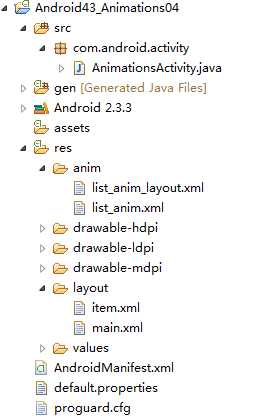 Android 動畫總整理:Tween、Frame、LayoutAnimation 與監聽器
Android 動畫系統涵蓋多種形式,常見的有 Tweened Animation、Frame-by-frame Animation、LayoutAnimationCon
 Android 語音識別方案總覽:系統 API、Service 與第三方平台
語音識別是近幾年相當熱門的能力。Android 平台本身提供了幾條路,若需求超出系統能力,也可以接第三方服務。以下整理可用的方案與各自的取捨。 方案一:用 Intent
 高德地圖定位失敗怎麼辦?分平台排查重點整理
高德地圖提供全國地圖瀏覽、地點搜尋與路線規劃,還能順便看商家的團購優惠。但一旦定位失敗,這些功能幾乎都跟著失效。以下依平台整理排查重點。 iPhone 使用者 到「
 紅米Note3指紋識別怎麼設置?完整設定教學
指紋識別已成為新一代智能手機的必備功能,它讓你的手指有了更多用途。除了免密碼解鎖,還能實現指紋支付購物、查看私密檔案等便捷操作。紅米 Note3 的指紋識別主要用在三方面