

編輯:關於 Android 程式設計
幾乎每套 SDK 都會附上範例程式來示範 API 用法,Android SDK 也不例外。它內建的 ApiDemo 把平台主要 API 拆成七大類,每個大類底下再細分小類,累計兩百多個可執行的範例,堪稱一本可以跑起來的 API 手冊。
1、App:Activity 生命週期、Dialog、Menu、Notification、Preferences、Service、Search、Alarm、AppWidget 等應用層主題。
2、Content:Assets 讀取、Resources 與 styled text、外部儲存空間存取。
3、Graphics:Bitmap 解碼與像素操作、Path 與 PathEffect、ColorFilter、Drawable、OpenGL ES 系列(含 GLSurfaceView、Cube Map、Frame Buffer Object、壓縮材質等)。
4、Media:MediaPlayer 與 VideoView 的播放實作。
5、OS:Sensors、Morse Code、SMS Messaging 等系統服務。
6、Text:Linkify、LogTextBox、Marquee 等文字顯示技巧。
7、Views:動畫、Auto Complete、Gallery、Grid、Layout(LinearLayout、RelativeLayout、TableLayout、ScrollView)、Lists、ProgressBar、Spinner、Tabs、WebView 等,是數量最多的一類。
其中 Views 底下最具代表性的幾個例子包括:
Views/Animation/Interpolators
Views/Auto Complete/1. Screen Top
Views/Layouts/LinearLayout/9. Layout Weight
Views/Layouts/TableLayout/05. Spanning and Stretchable
Views/Lists/14. Efficient Adapter
Views/Progress Bar/2. Smooth
Views/Tabs/Content By Intent
Views/WebView
App 一類則涵蓋了 App/Activity/Hello World、App/Notification/Status Bar、App/Preferences/1. Preferences from XML、App/Service/Local Service Binding 等常用情境。.Graphics 的 OpenGL ES 子目錄(Kube、Sprite Text、Touch Rotate、Translucent GLSurfaceView 等)適合想入門 3D 繪圖的開發者。
下載的 SDK 中每個 API Level 都對應一份 ApiDemo。在 Eclipse 中不需要從零開始,直接用現成範例建立即可:
File -> New -> Android Project,接著選擇「Create project from existing sample」,在下拉清單中挑選對應的 Android 版本與 ApiDemo 項目。
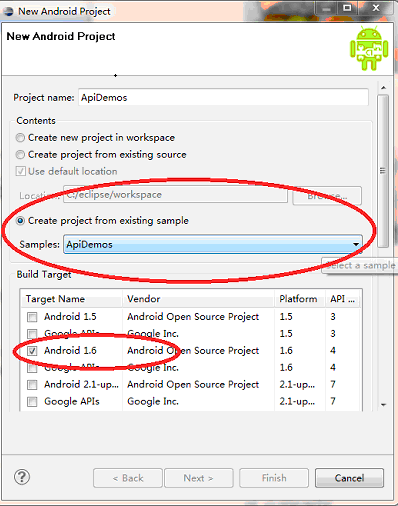
建立完成後直接 Run,就能看到分類選單,點進任一項都有可互動的演示畫面與原始碼。建議的閱讀方式是:先挑與當前任務相關的分類(例如做列表就從 Views/Lists 開始),跑起來看效果,再對照原始碼看它怎麼用 API。比起直接讀文件,這種「先看到結果、再回推實作」的路徑通常更快建立直覺。
以上就是 Android ApiDemo 範例工程的建立方式,希望能幫助到需要的朋友。
 Android 入門第一課:點擊按鈕改變文字顏色
這是一個再適合不過的 Android 入門小範例:畫面上有一行文字和三顆按鈕,點綠、藍、黃按鈕,文字就會變成對應的顏色。透過它,你能快速熟悉版面配置、控制項初始化與事件監
 透徹理解 Android 事件分發機制:View 與 ViewGroup 源碼解析
在 Android 開發中,我們經常遇到滑動沖突問題(比如 ScrollView、SlidingMenu 與 ListView 的嵌套),要解決它,就必須深入理解 And
 Android 內存洩漏全面總結
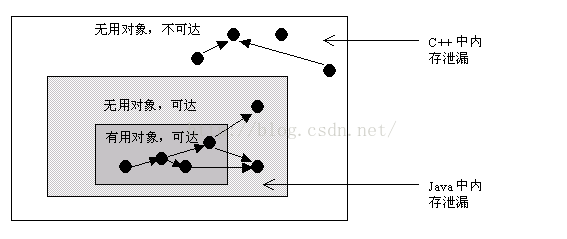
一、Java 中的內存洩漏 內存洩漏大家都不陌生。簡單粗暴地講,就是該被釋放的對象沒有釋放,一直被某個或某些實例持有卻不再被使用,導致 GC 無法回收。在 Java 中,
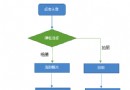 Android 用戶頭像更換功能的完整實現流程
你可能覺得更換頭像很簡單——對使用者而言,在微信上換個頭像不過是點擊頭像、選擇拍照或相冊、裁剪返回而已。但對程序員來說,要完整實現這套流程其實頗費功夫。本文就來梳理一下頭