

編輯:關於 Android 程式設計
淘寶與京東的商品詳情頁有個共同細節:商品資訊那一屏滑到底後,可以繼續往上推,把圖文詳情那一屏頂上來。這個效果不需要任何特殊 API,用兩個 ScrollView 加上一個自定義 ViewGroup 就能完成。本文把實作過程與踩到的坑一次講清楚。
淘寶的實作:

我們做出來的效果:
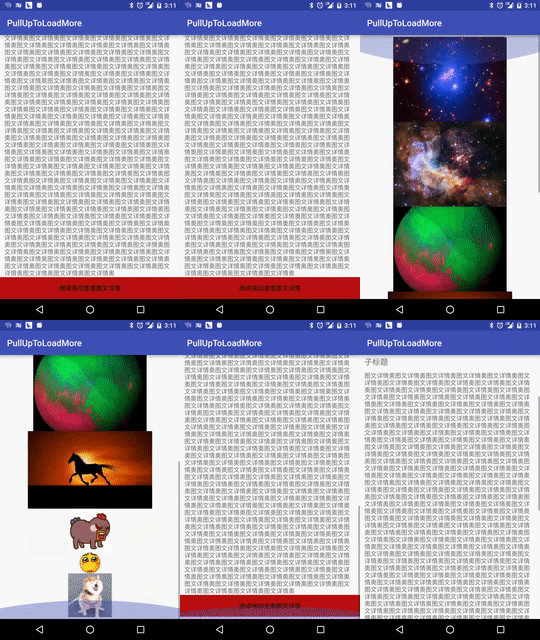
把兩個 ScrollView 垂直堆疊,交給自定義的 ViewGroup 管理排列與滑動事件。第一屏放商品資訊,第二屏放圖文詳情。
佈局檔:
<RelativeLayout xmlns:android="https://schemas.android.com/apk/res/android"
    xmlns:tools="https://schemas.android.com/tools"
    android:layout_width="match_parent"
    android:layout_height="match_parent"
    tools:context="com.baoyunlong.view.pulluptoloadmore.MainActivity">

    <com.baoyunlong.view.pulluptoloadmore.PullUpToLoadMore
        android:layout_width="match_parent"
        android:layout_height="match_parent"
        android:orientation="vertical">

        <com.baoyunlong.view.pulluptoloadmore.MyScrollView
            android:layout_width="match_parent"
            android:layout_height="match_parent"
            android:fillViewport="true">

            <LinearLayout
                android:layout_width="match_parent"
                android:layout_height="match_parent"
                android:orientation="vertical">

                <ImageView
                    android:scaleType="fitXY"
                    android:src="@drawable/a1"
                    android:layout_width="match_parent"
                    android:layout_height="180dp" />

                <TextView
                    android:text="這裡是標題"
                    android:textSize="18dp"
                    android:layout_marginRight="10dp"
                    android:layout_marginLeft="10dp"
                    android:layout_marginTop="10dp"
                    android:layout_width="match_parent"
                    android:layout_height="wrap_content" />

                <TextView
                    android:layout_marginTop="10dp"
                    android:text="子標題"
                    android:layout_marginLeft="10dp"
                    android:layout_marginRight="10dp"
                    android:textSize="18dp"
                    android:layout_width="match_parent"
                    android:layout_height="wrap_content" />

                ......
                <LinearLayout
                    android:layout_height="0dp"
                    android:layout_weight="1"
                    android:gravity="bottom"
                    android:layout_width="match_parent">

                    <TextView
                        android:layout_width="match_parent"
                        android:layout_height="wrap_content"
                        android:height="50dp"
                        android:background="#b11"
                        android:gravity="center"
                        android:text="繼續拖動查看圖文詳情"
                        android:textColor="#000" />
                </LinearLayout>
            </LinearLayout>
        </com.baoyunlong.view.pulluptoloadmore.MyScrollView>

        <com.baoyunlong.view.pulluptoloadmore.MyScrollView
            android:layout_width="match_parent"
            android:layout_height="match_parent"
            android:fillViewport="true">

            <LinearLayout
                android:layout_width="match_parent"
                android:layout_height="match_parent"
                android:gravity="center"
                android:orientation="vertical">
                <ImageView
                    android:layout_width="wrap_content"
                    android:layout_height="wrap_content"
                    android:src="@drawable/a1" />
                <ImageView
                    android:layout_width="wrap_content"
                    android:layout_height="wrap_content"
                    android:src="@drawable/a3" />
                .....
            </LinearLayout>
        </com.baoyunlong.view.pulluptoloadmore.MyScrollView>
    </com.baoyunlong.view.pulluptoloadmore.PullUpToLoadMore>
</RelativeLayout>
onMeasure 與 onLayout 把子 View 依序往下排:
public class PullUpToLoadMore extends ViewGroup {

    public PullUpToLoadMore(Context context) {
        super(context);
    }

    public PullUpToLoadMore(Context context, AttributeSet attrs) {
        super(context, attrs);
    }

    public PullUpToLoadMore(Context context, AttributeSet attrs, int defStyleAttr) {
        super(context, attrs, defStyleAttr);
    }

    @Override
    protected void onMeasure(int widthMeasureSpec, int heightMeasureSpec) {
        super.onMeasure(widthMeasureSpec, heightMeasureSpec);
        measureChildren(widthMeasureSpec, heightMeasureSpec);
    }

    @Override
    protected void onLayout(boolean changed, int l, int t, int r, int b) {
        int childCount = getChildCount();
        int childTop = t;
        for (int i = 0; i < childCount; i++) {
            View child = getChildAt(i);
            child.layout(l, childTop, r, childTop + child.getMeasuredHeight());
            childTop += child.getMeasuredHeight();
        }
    }
}
(1)處於第一屏時:第一個 ScrollView 已滑到底、手勢方向朝上,這時事件應該由父 View 接手,也就是讓 onInterceptTouchEvent 回傳 true,父 View 再用 scrollBy() 把第二屏滾上來。
(2)處於第二屏時:第二個 ScrollView 已在頂部、手勢方向朝下,同樣把事件交給父 View,反向滾回第一屏。
(3)手指離開螢幕時:依滑動速度決定回弹到第一屏還是第二屏,速度用 VelocityTracker 取得。
(1)滑到「繼續拖動查看圖文詳情」後放手,再重新往上拖卻推不開
仔細體驗淘寶與京東會發現,它們在這個節點是可以一氣呵成的,體驗明顯更好。問題出在 ScrollView 原始碼的 onTouchEvent 預設會呼叫 parent.requestDisallowInterceptTouchEvent(true),把父層攔截的權限拿掉,於是 onInterceptTouchEvent 不會被觸發,寫在 onTouchEvent 裡的滾動邏輯自然也不會跑。解法是覆寫 dispatchTouchEvent,把子 View 的這個請求駁回:
@Override
public boolean dispatchTouchEvent(MotionEvent ev) {
    // 防止子 View 禁止父 View 攔截事件
    this.requestDisallowInterceptTouchEvent(false);
    return super.dispatchTouchEvent(ev);
}
(2)ScrollView 沒有現成的滾動監聽
ScrollView 不提供滾動事件回調,也就無法判斷有沒有到頂或到底。這裡繼承一份,自己在 onTouchEvent 中對外拋出狀態:
public class MyScrollView extends ScrollView {

    private ScrollListener mScrollListener;

    public void setScrollListener(ScrollListener scrollListener) {
        this.mScrollListener = scrollListener;
    }

    public MyScrollView(Context context) {
        super(context);
    }

    public MyScrollView(Context context, AttributeSet attrs) {
        super(context, attrs);
    }

    public MyScrollView(Context context, AttributeSet attrs, int defStyleAttr) {
        super(context, attrs, defStyleAttr);
    }

    @Override
    public boolean onTouchEvent(MotionEvent ev) {
        switch (ev.getAction()) {
            case MotionEvent.ACTION_MOVE:
                if (mScrollListener != null) {
                    int contentHeight = getChildAt(0).getHeight();
                    int scrollHeight = getHeight();
                    int scrollY = getScrollY();
                    mScrollListener.onScroll(scrollY);
                    if (scrollY + scrollHeight >= contentHeight || contentHeight <= scrollHeight) {
                        mScrollListener.onScrollToBottom();
                    } else {
                        mScrollListener.notBottom();
                    }
                    if (scrollY == 0) {
                        mScrollListener.onScrollToTop();
                    }
                }
                break;
        }
        boolean result = super.onTouchEvent(ev);
        requestDisallowInterceptTouchEvent(false);
        return result;
    }

    public interface ScrollListener {
        void onScrollToBottom();
        void onScrollToTop();
        void onScroll(int scrollY);
        void notBottom();
    }
}
public class PullUpToLoadMore extends ViewGroup {

    public static String TAG = PullUpToLoadMore.class.getName();

    MyScrollView topScrollView, bottomScrollView;
    VelocityTracker velocityTracker = VelocityTracker.obtain();
    Scroller scroller = new Scroller(getContext());

    int currPosition = 0;
    int position1Y;
    int lastY;
    public int scaledTouchSlop;   // 最小滑動距離
    int speed = 200;
    boolean isIntercept;
    public boolean bottomScrollVIewIsInTop = false;
    public boolean topScrollViewIsBottom = false;

    public PullUpToLoadMore(Context context) {
        super(context);
        init();
    }

    public PullUpToLoadMore(Context context, AttributeSet attrs) {
        super(context, attrs);
        init();
    }

    public PullUpToLoadMore(Context context, AttributeSet attrs, int defStyleAttr) {
        super(context, attrs, defStyleAttr);
        init();
    }

    private void init() {
        post(new Runnable() {
            @Override
            public void run() {
                topScrollView = (MyScrollView) getChildAt(0);
                bottomScrollView = (MyScrollView) getChildAt(1);

                topScrollView.setScrollListener(new MyScrollView.ScrollListener() {
                    @Override public void onScrollToBottom() { topScrollViewIsBottom = true; }
                    @Override public void onScrollToTop() { }
                    @Override public void onScroll(int scrollY) { }
                    @Override public void notBottom() { topScrollViewIsBottom = false; }
                });

                bottomScrollView.setScrollListener(new MyScrollView.ScrollListener() {
                    @Override public void onScrollToBottom() { }
                    @Override public void onScrollToTop() { }
                    @Override public void onScroll(int scrollY) {
                        bottomScrollVIewIsInTop = (scrollY == 0);
                    }
                    @Override public void notBottom() { }
                });

                position1Y = topScrollView.getBottom();
                scaledTouchSlop = ViewConfiguration.get(getContext()).getScaledTouchSlop();
            }
        });
    }

    @Override
    public boolean dispatchTouchEvent(MotionEvent ev) {
        this.requestDisallowInterceptTouchEvent(false);
        return super.dispatchTouchEvent(ev);
    }

    @Override
    public boolean onInterceptTouchEvent(MotionEvent ev) {
        int y = (int) ev.getY();
        switch (ev.getAction()) {
            case MotionEvent.ACTION_DOWN:
                lastY = y;
                break;
            case MotionEvent.ACTION_MOVE:
                if (topScrollViewIsBottom) {
                    int dy = lastY - y;
                    // 向上滑動且仍在第一屏
                    if (dy > 0 && currPosition == 0) {
                        if (dy >= scaledTouchSlop) {
                            isIntercept = true;
                            lastY = y;
                        }
                    }
                }
                if (bottomScrollVIewIsInTop) {
                    int dy = lastY - y;
                    // 向下滑動且已在第二屏
                    if (dy < 0 && currPosition == 1) {
                        if (Math.abs(dy) >= scaledTouchSlop) {
                            isIntercept = true;
                        }
                    }
                }
                break;
        }
        return isIntercept;
    }

    @Override
    public boolean onTouchEvent(MotionEvent event) {
        int y = (int) event.getY();
        velocityTracker.addMovement(event);

        switch (event.getAction()) {
            case MotionEvent.ACTION_MOVE:
                int dy = lastY - y;
                if (getScrollY() + dy < 0) {
                    dy = getScrollY() + dy + Math.abs(getScrollY() + dy);
                }
                if (getScrollY() + dy + getHeight() > bottomScrollView.getBottom()) {
                    dy = dy - (getScrollY() + dy - (bottomScrollView.getBottom() - getHeight()));
                }
                scrollBy(0, dy);
                break;
            case MotionEvent.ACTION_UP:
                isIntercept = false;
                velocityTracker.computeCurrentVelocity(1000);
                float yVelocity = velocityTracker.getYVelocity();
                if (currPosition == 0) {
                    if (yVelocity < 0 && yVelocity < -speed) {
                        smoothScroll(position1Y);
                        currPosition = 1;
                    } else {
                        smoothScroll(0);
                    }
                } else {
                    if (yVelocity > 0 && yVelocity > speed) {
                        smoothScroll(0);
                        currPosition = 0;
                    } else {
                        smoothScroll(position1Y);
                    }
                }
                break;
        }
        lastY = y;
        return true;
    }

    @Override
    protected void onMeasure(int widthMeasureSpec, int heightMeasureSpec) {
        super.onMeasure(widthMeasureSpec, heightMeasureSpec);
        measureChildren(widthMeasureSpec, heightMeasureSpec);
    }

    @Override
    protected void onLayout(boolean changed, int l, int t, int r, int b) {
        int childCount = getChildCount();
        int childTop = t;
        for (int i = 0; i < childCount; i++) {
            View child = getChildAt(i);
            child.layout(l, childTop, r, childTop + child.getMeasuredHeight());
            childTop += child.getMeasuredHeight();
        }
    }

    // 以 Scroller 實作彈性滑動
    private void smoothScroll(int tartY) {
        int dy = tartY - getScrollY();
        scroller.startScroll(getScrollX(), getScrollY(), 0, dy);
        invalidate();
    }

    @Override
    public void computeScroll() {
        if (scroller.computeScrollOffset()) {
            scrollTo(scroller.getCurrX(), scroller.getCurrY());
            postInvalidate();
        }
    }
}
原始碼已放在 GitHub 上。整體而言,這個控制項的關鍵不在繪製,而在事件移交的時機判斷:什麼時候該讓子 ScrollView 自己滾,什麼時候該由父層接手,以及速度不足時如何回弹。把這三個條件想清楚,剩下的就是 scrollBy 與 Scroller 的例行工作。
 Android 搜索 suggestions 實現搜索聯想:SearchRecentSuggestions 完整實踐
所謂搜索 suggestions(搜索建議、搜索聯想),就是當用戶在搜索框裡輸入某個關鍵詞後,系統自動給出幾條包含相近關鍵詞的候選項,用戶可以直接點擊而不必輸完。 這個功
 Android For JNI(四):C 數組、指針、堆棧內存與 malloc
在 JNI 開發中,C 語言基礎是無法繞開的一環。本文將圍繞 C 語言中的數組、指針、堆內存、棧內存以及 malloc 函數展開,並通過一個簡單的學生學號管理示例,幫助大
 高德地圖怎麼看街景?手機版三步驟教學
想先「走一遍」還沒去過的城市,街景服務是最方便的辦法。手機版高德地圖裡就藏著這個功能,操作相當簡單。 第一步:點開右上方的功能按鈕 開啟手機版【高德地圖】,點擊螢幕右上
 JAVA 基礎再回首(二十三):基本類型流、記憶體操作流、打印流、隨機訪問流、合併流與序列化流
有些日子沒寫了,這陣子確實比較忙,抱歉。話不多說,我們把 IO 流剩下的幾個知識點一次收尾。 一、操作基本資料類型的流 這一組是 DataInputStream 與 D