

編輯:關於 Android 程式設計
依指定的圖像路徑與目標尺寸產生縮圖,這個做法有兩個明顯好處。
其一,內存開銷可控。整個流程分三次解碼:第一次 bitmap 實際上為 null,目的只是讀出原圖的寬高;第二次依照比例做 inSampleSize 縮放後再讀一次;第三次才是最終要用的縮圖。中間不會出現「先把幾 MB 的原圖完整載入再縮」的浪費。
其二,畫面不會變形。Android 2.2 起提供的 ThumbnailUtils 在生成縮圖時會保留原始比例,不像早期那樣把圖片硬拉成指定尺寸而導致拉伸。
 /**
 * @param imagePath 圖像的路徑
 * @param width     指定輸出圖像的寬度
 * @param height    指定輸出圖像的高度
 * @return 生成的縮略圖
 */
public static Bitmap getImageThumbnail(String imagePath, int width, int height) {
    Bitmap bitmap = null;
    BitmapFactory.Options options = new BitmapFactory.Options();

    // 第一次只讀取寬高,此時 bitmap 為 null
    options.inJustDecodeBounds = true;
    bitmap = BitmapFactory.decodeFile(imagePath, options);
    options.inJustDecodeBounds = false;

    // 計算縮放比
    int h = options.outHeight;
    int w = options.outWidth;
    int beWidth = w / width;
    int beHeight = h / height;
    int be = 1;
    if (beWidth < beHeight) {
        be = beWidth;
    } else {
        be = beHeight;
    }
    if (be <= 0) {
        be = 1;
    }
    options.inSampleSize = be;

    // 第二次讀入縮放後的 bitmap
    bitmap = BitmapFactory.decodeFile(imagePath, options);

    // 利用 ThumbnailUtils 生成最終縮圖,並回收輸入 bitmap
    bitmap = ThumbnailUtils.extractThumbnail(bitmap, width, height,
            ThumbnailUtils.OPTIONS_RECYCLE_INPUT);
    return bitmap;
}
 /**
 * 獲取視頻的縮略圖。
 * 先用 ThumbnailUtils 取一個影片截幀,再縮放到指定尺寸。
 * 若目標寬高都小於 MICRO_KIND,kind 就用 MICRO_KIND 以節省內存。
 *
 * @param videoPath 視頻的路徑
 * @param width     指定輸出視頻縮略圖的寬度
 * @param height    指定輸出視頻縮略圖的高度
 * @param kind      參照 MediaStore.Images.Thumbnails 中的常量:
 *                  MINI_KIND = 512 x 384,MICRO_KIND = 96 x 96
 * @return 指定大小的視頻縮略圖
 */
public static Bitmap getVideoThumbnail(String videoPath, int width, int height, int kind) {
    Bitmap bitmap = null;
    // 獲取視頻的縮略圖
    bitmap = ThumbnailUtils.createVideoThumbnail(videoPath, kind);
    bitmap = ThumbnailUtils.extractThumbnail(bitmap, width, height,
            ThumbnailUtils.OPTIONS_RECYCLE_INPUT);
    return bitmap;
}
inSampleSize 只接受整數,且解碼時會取 2 的冪次近似,所以實際縮放比例未必精準——這也正是後面還要再走一次 extractThumbnail 的原因:前者負責把內存壓下來,後者負責把尺寸修準。
OPTIONS_RECYCLE_INPUT 會回收中間產生的 bitmap,在列表大量載入縮圖的場景下能明顯降低 GC 壓力。但要注意:回收後不要再回頭使用那個中間物件,否則會拿到「bitmap 已回收」的異常。
另外,createVideoThumbnail() 在部分客製化 ROM 上可能回傳 null(例如影片格式不支援或檔案已損壞),呼叫端最好加上空值判斷再往下走。
 Android 自定義控件特效:點擊屏幕在指定位置繪製擴散圓環
之前在三星手機上看到過點擊屏幕出現水波擴散的特效,覺得挺有意思,於是嘗試自己實現了一個類似的效果:每次觸摸屏幕,就在點擊位置生成一個逐漸變大、逐漸透明的圓環。 一、
 深入解析 Android Studio 專案的組成結構
原文鏈接 專案總覽 在 Android Studio 中,一個專案囊括了某支 App 所需的全部內容:原始碼、相依資源、測試程式碼,以及各項 build 組態。當你建立一
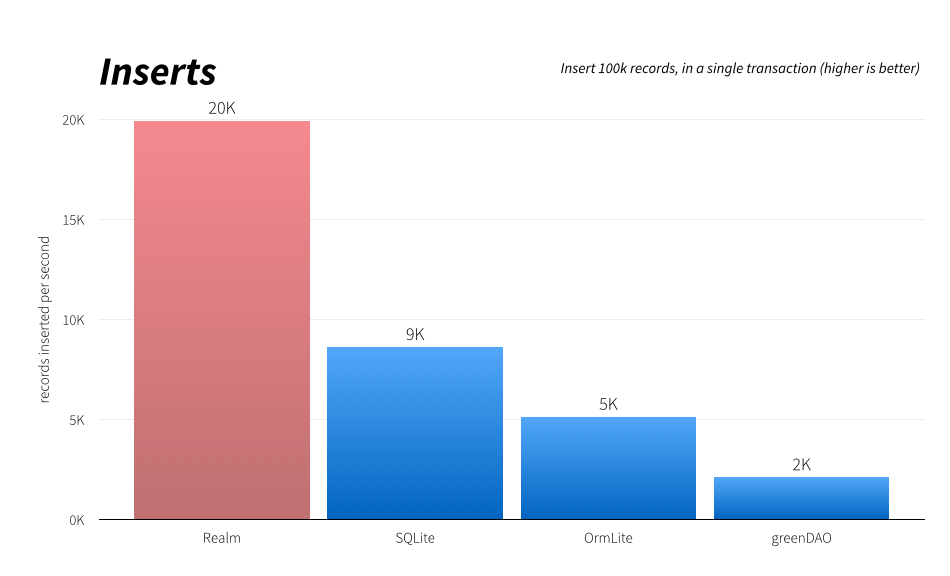 Realm 行動資料庫入門:跨平台 ORM、效能優勢與學習重點
Realm 是什麼Realm 是一套跨平台行動資料庫引擎,支援 iOS、OS X 與 Android。它並非建立在 SQLite 之上的 ORM,而是使用自有核心引擎,目
 Android Studio 使用 android-pdf-viewer 的問題與解法
需求背景 在 Android 中顯示 PDF,常見做法是先用 DownloadManager 下載檔案,再透過 PDFView 元件渲染。本文以 Android Stud