

編輯:關於 Android 程式設計
在 Android 遊戲開發中,我們常常需要像 PC 一樣在螢幕上進行雙擊操作。然而,Android 1.6 版本以前並未提供完善的手勢識別類;Android 1.5 的 SDK 雖然有 android.view.GestureDetector.OnDoubleTapListener,但實測卻無法正常工作,原因不明。最終我們採用了下面的解法:
public class TouchLayout extends RelativeLayout { public Handler doubleTapHandler = null; protected long lastDown = -1; public final static long DOUBLE_TIME = 500; public TouchLayout(Context context) { super(context); } public TouchLayout(Context context, AttributeSet attrs) { super(context, attrs); } public TouchLayout(Context context, AttributeSet attrs, int defStyle) { super(context, attrs, defStyle); } public boolean onTouchEvent(MotionEvent event) { this.handleEvent(event); if (event.getAction() == MotionEvent.ACTION_DOWN) { long nowDown = System.currentTimeMillis(); if (nowDown - lastDown < DOUBLE_TIME) { if (doubleTapHandler != null) doubleTapHandler.sendEmptyMessage(-1); } else { lastDown = nowDown; } } return true; } protected void handleEvent(MotionEvent event) { switch (event.getAction()) { case MotionEvent.ACTION_DOWN: //Do sth 這裡處理即可 break; case MotionEvent.ACTION_UP: //Do sth break; } } }
核心思路其實很樸素:每次 ACTION_DOWN 時記錄時間戳,若與上一次按下的間隔小於 500 毫秒(DOUBLE_TIME),就判定為雙擊,並透過 Handler 發送訊息觸發後續處理。這樣一來,即使不使用系統的雙擊手勢類,也能穩定地攔截到螢幕的雙擊行為。
以上就是 Android 螢幕雙擊事件捕獲的示例,後續會繼續補充相關資料,希望能幫助到開發 Android 應用的朋友。
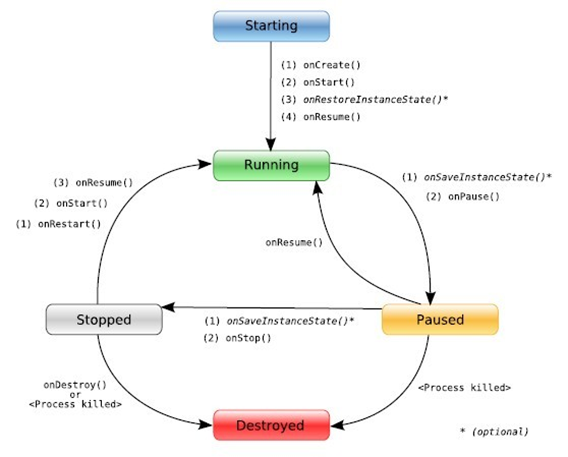 Android 學習筆記(四):Activity 全景解析——生命週期、通信、啟動模式與系統調用
一、Activity 是什麼 Activity 是 Android 四大組件之一,用於承載 View、提供用戶交互入口。它本身並不繪製界面,而是創建一個窗口,在其上進行繪
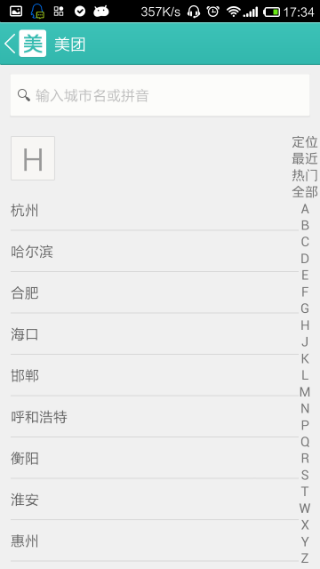 仿微信通訊錄字母索引:Android自定義View完整實踐
一、先看效果熟悉智能手機的朋友一定不會陌生:無論是微信、小米的聯繫人,還是 QQ、美團的城市選擇頁,列表右側往往懸著一列 A~Z 的字母。手指沿著它滑動,列表便精準地跳到
 用 Android 打造手機版模擬信號示波器
先前簡單介紹過 AudioRecord 與 AudioTrack 的用法,這次我們結合 SurfaceView,動手做一個 Android 版的手機示波器。近來物聯網話題
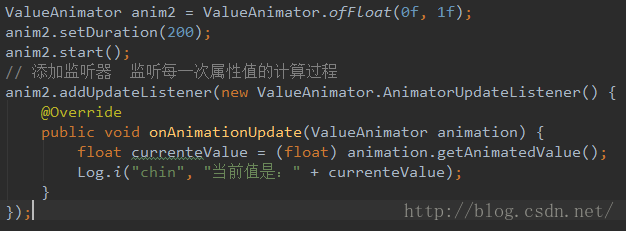 Android 动画进阶(三):属性动画 PropertyAnimation 完全指南
属性动画的问世,正是为了弥补前两种动画模式的不足(它是 Android 3.0 之后才有的)。其特点在于:真实地改动 view 的属性,并且能支持自定义属性动画,基本上能