

編輯:關於 Android 程式設計
圖片加載、分割、縮放、文字描邊——這些都是圖形處理中的基本功。本文把這些常用操作封裝進一個 Utils 工具類,便於在項目中直接調用,適合遊戲開發與日常 UI 場景參考。
package cn.szbw.util; import Android.content.Context; import android.graphics.Bitmap; import android.graphics.BitmapFactory; import android.graphics.Canvas; import android.graphics.Matrix; import android.graphics.Paint; public class Utils { /*** * 加載本地圖片 * @param context:主運行函數實例 * @param bitAdress:圖片地址,一般指向R下的drawable目錄 * @return */ public final Bitmap CreatImage(Context context, int bitAdress) { Bitmap bitmaptemp = null; bitmaptemp = BitmapFactory.decodeResource(context.getResources(),bitAdress); return bitmaptemp; } //2.圖片平均分割方法,將大圖平均分割為N行N列,方便用戶使用 /*** * 圖片分割 * @param g * :畫布 * @param paint *:畫筆 * @param imgBit *:圖片 x *:X軸起點坐標 * @param y *:Y軸起點坐標 * @param w * :單一圖片的寬度 * @param h *:單一圖片的高度 * @param line *:第幾列 * @param row * :第幾行 */ public final void cuteImage(Canvas g, Paint paint, Bitmap imgBit, int x, int y, int w, int h, int line, int row) { g.clipRect(x, y, x + w, h + y); g.drawBitmap(imgBit, x - line * w, y - row * h, paint); g.restore(); } //3.圖片縮放,對當前圖片進行縮放處理 /*** * 圖片的縮放方法 * * @param bgimage *:源圖片資源 * @param newWidth *:縮放後寬度 * @param newHeight *:縮放後高度 * @return */ public Bitmap zoomImage(Bitmap bgimage, int newWidth, int newHeight) { // 獲取這個圖片的寬和高 int width = bgimage.getWidth(); int height = bgimage.getHeight(); // 創建操作圖片用的matrix對象 Matrix matrix = new Matrix(); // 計算縮放率,新尺寸除原始尺寸 float scaleWidth = ((float) newWidth) / width; float scaleHeight = ((float) newHeight) / height; // 縮放圖片動作 matrix.postScale(scaleWidth, scaleHeight); Bitmap bitmap = Bitmap.createBitmap(bgimage, 0, 0, width, height, matrix, true); return bitmap; } //4.繪制帶有邊框的文字,一般在游戲中起文字的美化作用 /** * 繪制帶有邊框的文字 * @param strMsg * :繪制內容 * @param g *:畫布 * @param paint *:畫筆 * @param setx *:X軸起始坐標 * @param sety *:Y軸的起始坐標 * @param fg *:前景色 * @param bg * :背景色 */ public void drawText(String strMsg, Canvas g, Paint paint, int setx, int sety, int fg, int bg) { paint.setColor(bg); g.drawText(strMsg, setx + 1, sety, paint); g.drawText(strMsg, setx, sety - 1, paint); g.drawText(strMsg, setx, sety + 1, paint); g.drawText(strMsg, setx - 1, sety, paint); paint.setColor(fg); g.drawText(strMsg, setx, sety, paint); g.restore(); } }
這段工具類涵蓋了四個高頻操作:CreatImage 負責從資源加載圖片;cuteImage 透過 clipRect 裁剪實現大圖的行列分割,特別適合精靈圖或拼圖場景;zoomImage 借助 Matrix 按比例縮放圖片;drawText 則通過在文字四周描邊再覆蓋前景色,實現漂亮的描邊文字效果,常用於遊戲中的標題美化。把這些方法沉澱成工具類,能大幅提升開發效率。
更多關於Android相關內容感興趣的讀者可查看本站專題:《Android圖形與圖像處理技巧總結》、《Android開發入門與進階教程》、《Android調試技巧與常見問題解決方法匯總》、《Android多媒體操作技巧匯總(音頻,視頻,錄音等)》、《Android基本組件用法總結》、《Android視圖View技巧總結》、《Android布局layout技巧總結》及《Android控件用法總結》
希望本文所述對大家Android程序設計有所幫助。
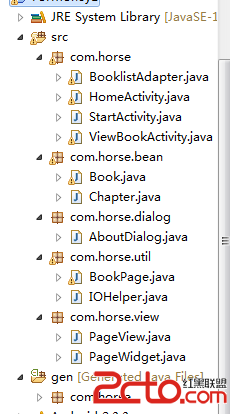 Android 電子書翻頁效果實作解析
做電子書應用時,翻頁效果往往是最能提升閱讀體驗的細節之一。本文以一個簡單的 Android 電子書範例為基礎,說明如何透過自訂 View、Bitmap、Canvas 與觸
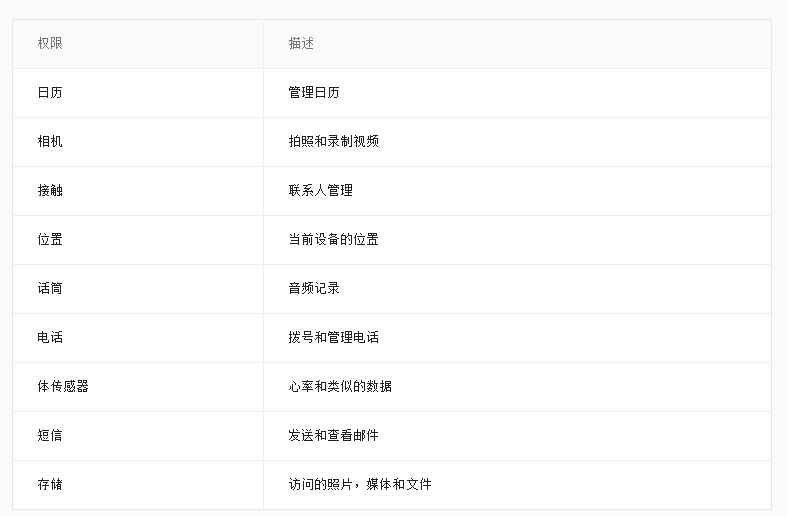 Android 6.0 執行期權限機制完整指南
權限模型概述 權限分組 Android 把權限劃分成若干群組,目的是讓使用者能一次性的、以較少的操作完成同類授權。例如授予「聯絡人」群組,就同時涵蓋了讀取與編輯聯絡人
 仿 Android Market 的全屏 Loading 效果:不用 ProgressDialog 也能做
需要等待時,多數人第一個想到的是 ProgressDialog。但仔細觀察 Android Market(Play 商店)的載入畫面會發現,它並沒有跳出任何彈窗,而是整個
 第三十七講:Android 資料儲存之 SD 卡讀寫
傲不可長,欲不可縱,樂不可極,志不可滿。—— 魏 徵 本講主題:SD 卡。 前一講談到用 File 做資料儲存,但那類檔案是存在應用程式自己的私有目錄裡,容量受限。當你