

編輯:關於 Android 程式設計
本文代碼以 MTK 平台的 Android 4.4 為分析對象,與 Google 原生 AOSP 存在一些差異,閱讀時請注意。
主題是:設備開機過程中,SIM 卡在 Framework 層是怎麼一步步被初始化起來的。
源碼開頭的這段註釋,基本上就是整個模組的說明書:
/*
 * Once created UiccController registers with RIL for "on" and
 * "unsol_sim_status_changed" notifications. When such notification arrives
 * UiccController will call getIccCardStatus (GET_SIM_STATUS). Based on the
 * response of GET_SIM_STATUS request appropriate tree of uicc objects will
 * be created.
 *
 * Following is class diagram for uicc classes:
 *
 * UiccController
 *     #
 *     |
 *   UiccCard
 *  #        #
 *  #        #
 *  |        |
 *  |        |
 *  |        ------------------ CatService
 *  |                            |
 * IccRecords                  IccFileHandler
 *     ^                            ^
 *     ^                            ^
 *     |                            |
 * SIMRecords----                ----SIMFileHandler
 * RuimRecords-----            ----RuimFileHandler
 * IsimUiccRecords---        ---UsimFileHandler
 *                   |        |
 *                   |        ---CsimFileHandler
 *                   |        ----IsimFileHandler
 *
 * Legend:
 *   #  stands for Composition
 *   ^  stands for Generalization
 */
翻譯過來就是:UiccController 創建後會向 RIL 註冊兩個通知——射頻「on」和 unsol_sim_status_changed;通知到達後它調用 getIccCardStatus(即 GET_SIM_STATUS);根據返回結果,再構建出一整棵 UICC 對象樹。顯而易見,UiccController 就是 Android 對 SIM 卡管理的總控。
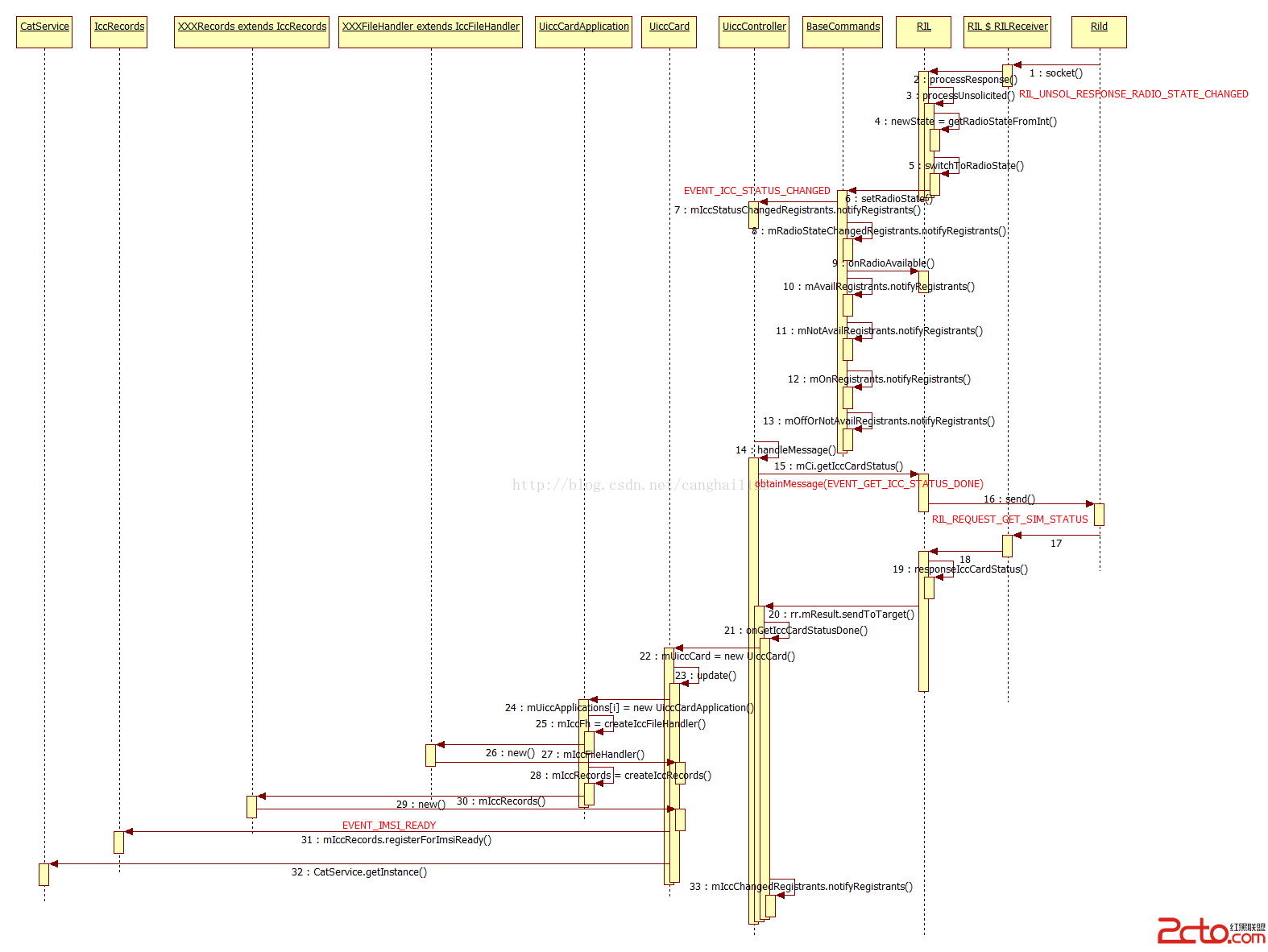
(右鍵復制圖片地址,在瀏覽器中打開即可查看大圖。)
初始化發生在 phone 進程啟動時。PhoneFactory.makeDefaultPhone() 負責創建默認 Phone,在 MTK 的雙卡流程中會走到 MTKPhoneFactory,反編譯 static_gemini_intermediates 庫可以看到類似下面的邏輯:
{
    for (int l2 = 0; l2 < PhoneConstants.GEMINI_SIM_NUM; l2++)
        if (j1 == l2) ai[l2] = j;
        else ai[l2] = 1;

    I = new RIL(context, ai[0], l, 0);
    J = new RIL(context, ai[1], l, 1);
}
UiccController.make(context, I, 0);
UiccController.make(context, J, 1);

GSMPhone agsmphone[] = new GSMPhone[PhoneConstants.GEMINI_SIM_NUM];
也就是說,每個 RIL 創建完成後,緊接著就用 UiccController.make() 完成對應卡座的初始化。
public static UiccController make(Context c, CommandsInterface ci, int simId) {
    synchronized (mLock) {
        if (FeatureOption.MTK_GEMINI_SUPPORT) {
            if (mInstance[simId] != null) {
                throw new RuntimeException(
                        "UiccController.make() should only be called once");
            }
            mInstance[simId] = new UiccController(c, ci, simId);
            return mInstance[simId];
        } else {
            if (mInstance[0] != null) {
                throw new RuntimeException(
                        "UiccController.make() should only be called once");
            }
            mInstance[0] = new UiccController(c, ci);
            return mInstance[0];
        }
    }
}
這裡用的是單例模式,之後通過 getInstance() 取用:
public static UiccController getInstance(int simId) {
    synchronized (mLock) {
        if (FeatureOption.MTK_GEMINI_SUPPORT) {
            if (mInstance[simId] == null) {
                throw new RuntimeException(
                        "UiccController.getInstance can't be called before make()");
            }
            return mInstance[simId];
        } else {
            if (mInstance[0] == null) {
                throw new RuntimeException(
                        "UiccController.getInstance can't be called before make()");
            }
            return mInstance[0];
        }
    }
}
構造函數做的事非常關鍵——它把一整套事件註冊了下來,這是後續狀態機能被驅動的前提:
private UiccController(Context c, CommandsInterface ci, int simId) {
    if (DBG) log("Creating UiccController simId " + simId);
    mContext = c;
    mCi = ci;
    mSimId = simId;

    mCi.registerForIccStatusChanged(this, EVENT_ICC_STATUS_CHANGED, null);
    // TODO remove this once modem correctly notifies the unsols
    mCi.registerForOn(this, EVENT_ICC_STATUS_CHANGED, null);
    mCi.registerForVirtualSimOn(this, EVENT_VIRTUAL_SIM_ON, null);
    mCi.registerForVirtualSimOff(this, EVENT_VIRTUAL_SIM_OFF, null);
    mCi.registerForSimMissing(this, EVENT_SIM_MISSING, null);
    mCi.registerForSimRecovery(this, EVENT_SIM_RECOVERY, null);
    mCi.registerForSimPlugOut(this, EVENT_SIM_PLUG_OUT, null);
    mCi.registerForSimPlugIn(this, EVENT_SIM_PLUG_IN, null);
    mCi.registerForInvalidSimDetected(this, EVENT_INVALID_SIM_DETECTED, null);

    IntentFilter filter = new IntentFilter();
    filter.addAction("android.intent.action.ACTION_SHUTDOWN_IPO");
    filter.addAction(GeminiPhone.EVENT_INITIALIZATION_FRAMEWORK_DONE);
    filter.addAction(TelephonyIntents.ACTION_SIM_INFO_UPDATE);
    filter.addAction(ACTION_RESET_MODEM);
    mContext.registerReceiver(mIntentReceiver, filter);
}
step 1:rild 主動上報射頻狀態變化 RIL_UNSOL_RESPONSE_RADIO_STATE_CHANGED。
step 4:對整型狀態值做映射,得到 Framework 內部的 RadioState:
private RadioState getRadioStateFromInt(int stateInt) {
    RadioState state;
    /* RIL_RadioState ril.h */
    switch (stateInt) {
        case 0:  state = RadioState.RADIO_OFF;                break;
        case 1:  state = RadioState.RADIO_UNAVAILABLE;        break;
        case 2:  state = RadioState.SIM_NOT_READY;            break;
        case 3:  state = RadioState.SIM_LOCKED_OR_ABSENT;     break;
        case 4:  state = RadioState.SIM_READY;                break;
        case 5:  state = RadioState.RUIM_NOT_READY;           break;
        case 6:  state = RadioState.RUIM_READY;               break;
        case 7:  state = RadioState.RUIM_LOCKED_OR_ABSENT;    break;
        case 8:  state = RadioState.NV_NOT_READY;             break;
        case 9:  state = RadioState.NV_READY;                 break;
        case 10: state = RadioState.RADIO_ON;                 break;
        case 15: state = RadioState.RADIO_OFF;                break;
        default:
            throw new RuntimeException("Unrecognized RIL_RadioState: " + stateInt);
    }
    return state;
}
剛開機時射頻通常處於 RADIO_OFF,隨後轉為 RADIO_ON。
step 6:setRadioState() 保存新狀態並與舊狀態比對,據此觸發一系列通知(step 9 ~ step 13 等):
protected void setRadioState(RadioState newState) {
    RadioState oldState;
    synchronized (mStateMonitor) {
        Rlog.v(LOG_TAG, "setRadioState old: " + mState + " new " + newState);
        oldState = mState;
        mState = newState;

        // CTA 特性:未插卡時 sim1 也算 radio on,此時狀態為 SIM_LOCKED_OR_ABSENT
        if (oldState == mState && mState != RadioState.SIM_LOCKED_OR_ABSENT) {
            return;   // 狀態未變化
        }

        if (mState.getType() == 0) {
            mSimState = mState;
            mRuimState = mState;
            mNvState = mState;
        } else if (mState.getType() == 1) {
            if (mSimState != mState) {
                mIccStatusChangedRegistrants.notifyRegistrants();
            }
            mSimState = mState;
        } else if (mState.getType() == 2) {
            if (mRuimState != mState) {
                mIccStatusChangedRegistrants.notifyRegistrants();
            }
            mRuimState = mState;
        } else if (mState.getType() == 3) {
            mNvState = mState;
        }

        mRadioStateChangedRegistrants.notifyRegistrants(
                new AsyncResult(null, mState, null));

        if (mState.isAvailable() && !oldState.isAvailable()) {
            mAvailRegistrants.notifyRegistrants();
            onRadioAvailable();
        }
        if (!mState.isAvailable() && oldState.isAvailable()) {
            mNotAvailRegistrants.notifyRegistrants();
        }
        if (mState.isOn() && !oldState.isOn()) {
            mOnRegistrants.notifyRegistrants();
        }
        if ((!mState.isOn() || !mState.isAvailable()) &&
            !((!oldState.isOn() || !oldState.isAvailable()))) {
            mOffOrNotAvailRegistrants.notifyRegistrants();
        }

        // 無線制式變化事件(GSM <-> CDMA)
        if (mState.isGsm() && oldState.isCdma()) {
            mVoiceRadioTechChangedRegistrants.notifyRegistrants();
        }
        if (mState.isCdma() && oldState.isGsm()) {
            mVoiceRadioTechChangedRegistrants.notifyRegistrants();
        }
        // ... 其餘分支同理
    }
}
step 7:通知所有註冊了 mIccStatusChangedRegistrants 的觀察者——SIM 卡(GSM 卡與 USIM 卡)狀態已變化、卡已就緒。前面看過 UiccController 的構造函數就知道,EVENT_ICC_STATUS_CHANGED 關聯了兩個 RIL URC 事件,除了射頻狀態變化,還有 RIL_UNSOL_RESPONSE_SIM_STATUS_CHANGED。所以無論是射頻還是卡狀態發生改變,都會第一時間通知到 UiccController。
step 8:關心這件事的主要有三方——GsmServiceStateTracker(更新網絡狀態)、SIMRecords(通過 IccFileHandler 讀取卡內置緊急號碼)、SIMRecordsEx(向 RILD 查詢 20 位 Iccid)。
step 14:處理 step 7 發出的通知。
step 15 ~ 16:發起 RIL_REQUEST_GET_SIM_STATUS 請求,查詢當前卡狀態。
step 17 ~ 20:Rild 回送結果,responseIccCardStatus() 負責解析 Parcel:
private Object responseIccCardStatus(Parcel p) {
    IccCardApplicationStatus appStatus;
    IccCardStatus cardStatus = new IccCardStatus();

    cardStatus.setCardState(p.readInt());
    cardStatus.setUniversalPinState(p.readInt());
    cardStatus.mGsmUmtsSubscriptionAppIndex = p.readInt();
    cardStatus.mCdmaSubscriptionAppIndex = p.readInt();
    cardStatus.mImsSubscriptionAppIndex = p.readInt();

    int numApplications = p.readInt();
    // 限制最大應用數量
    if (numApplications > IccCardStatus.CARD_MAX_APPS) {
        numApplications = IccCardStatus.CARD_MAX_APPS;
    }

    cardStatus.mApplications = new IccCardApplicationStatus[numApplications];
    for (int i = 0; i < numApplications; i++) {
        appStatus = new IccCardApplicationStatus();
        appStatus.app_type       = appStatus.AppTypeFromRILInt(p.readInt());
        appStatus.app_state      = appStatus.AppStateFromRILInt(p.readInt());
        appStatus.perso_substate = appStatus.PersoSubstateFromRILInt(p.readInt());
        appStatus.aid            = p.readString();
        appStatus.app_label      = p.readString();
        appStatus.pin1_replaced  = p.readInt();
        appStatus.pin1           = appStatus.PinStateFromRILInt(p.readInt());
        appStatus.pin2           = appStatus.PinStateFromRILInt(p.readInt());
        cardStatus.mApplications[i] = appStatus;
    }
    return cardStatus;
}
step 21:onGetIccCardStatusDone() 更新卡狀態。若 mUiccCard 尚未創建(首次運行),先 new 再更新:
private synchronized void onGetIccCardStatusDone(
        AsyncResult ar, boolean isUpdateSiminfo) {
    if (ar.exception != null) {
        Rlog.e(LOG_TAG, "[SIM " + mSimId + "] Error getting ICC status. "
                + "RIL_REQUEST_GET_ICC_STATUS should never return an error", ar.exception);
        return;
    }

    IccCardStatus status = (IccCardStatus) ar.result;

    if (status.mCardState == IccCardStatus.CardState.CARDSTATE_PRESENT) {
        if (DBG) log("onGetIccCardStatusDone, disableSimMissingNotification "
                + "because card is present");
        disableSimMissingNotification();
    }

    if (mUiccCard == null) {
        // ALPS01311133: SIM 熱插拔時也需要更新 SIM Info
        mUiccCard = new UiccCard(mContext, mCi, status, mSimId, isUpdateSiminfo);
    } else {
        mUiccCard.update(mContext, mCi, status, isUpdateSiminfo);
    }

    mIccChangedRegistrants.notifyRegistrants();
}
step 23:UiccCard.update() 中,若 UiccCardApplication 尚未創建則先創建,同時按卡類型創建對應的 IccFileHandler 子類(負責讀卡)與 IccRecords 子類(負責記錄卡數據);否則直接更新。
public void update(Context c, CommandsInterface ci,
                   IccCardStatus ics, boolean isUpdateSimInfo) {
    synchronized (mLock) {
        if (mDestroyed) {
            loge("Updated after destroyed! Fix me!");
            return;
        }

        CardState oldState = mCardState;
        mCardState = ics.mCardState;
        mUniversalPinState = ics.mUniversalPinState;
        mGsmUmtsSubscriptionAppIndex = ics.mGsmUmtsSubscriptionAppIndex;
        mCdmaSubscriptionAppIndex    = ics.mCdmaSubscriptionAppIndex;
        mImsSubscriptionAppIndex     = ics.mImsSubscriptionAppIndex;
        mContext = c;
        mCi = ci;

        for (int i = 0; i < mUiccApplications.length; i++) {
            if (mUiccApplications[i] == null) {
                // 新增的 Application
                if (i < ics.mApplications.length) {
                    mUiccApplications[i] = new UiccCardApplication(
                            this, ics.mApplications[i], mContext, mCi);
                    mIccRecords = mUiccApplications[i].getIccRecords();
                    mIccFileHandler = mUiccApplications[i].getIccFileHandler();
                }
            } else if (i >= ics.mApplications.length) {
                // 已移除的 Application
                mUiccApplications[i].dispose();
                mUiccApplications[i] = null;
            } else {
                // 其餘的走更新
                mUiccApplications[i].update(
                        ics.mApplications[i], mContext, mCi);
            }
        }

        if (mIccRecords != null) {
            mIccRecords.registerForImsiReady(mHandler, EVENT_IMSI_READY, null);
        }

        if (mUiccApplications.length > 0 && mUiccApplications[0] != null) {
            // 初始化或重新初始化 CAT 服務
            mCatService = CatService.getInstance(mCi, mContext, this);
        } else {
            if (mCatService != null) {
                mCatService.dispose();
            }
            mCatService = null;
        }

        sanitizeApplicationIndexes();

        RadioState radioState = mCi.getRadioState();
        if (isUpdateSimInfo) {
            // SIM 卡熱插拔會走到這裡
            if (radioState != RadioState.RADIO_UNAVAILABLE) {
                if (mCardState == CardState.CARDSTATE_ABSENT) {
                    mAbsentRegistrants.notifyRegistrants();
                    mHandler.sendMessage(
                            mHandler.obtainMessage(EVENT_CARD_REMOVED, null));
                    if (FeatureOption.MTK_GEMINI_SUPPORT) {
                        Phone defaultPhone = PhoneFactory.getDefaultPhone();
                        ((GeminiPhone) defaultPhone)
                                .setSimInsertedState(getMySimId(), false);
                    }
                } else if (oldState == CardState.CARDSTATE_ABSENT
                        && mCardState != CardState.CARDSTATE_ABSENT) {
                    mHandler.sendMessage(
                            mHandler.obtainMessage(EVENT_CARD_ADDED, null));
                }
            }
        }
        mLastRadioState = radioState;
    }
}
而 UiccCardApplication.update() 中,如果應用狀態變為 APPSTATE_READY,還要接著做幾件事:
if (mAppState != oldAppState) {
    if (DBG) log(oldAppType + " changed state: " + oldAppState + " -> " + mAppState);

    // 狀態變為 READY 時補查 FDN 狀態(之前可能失敗過),並查詢 PIN1 狀態
    if (mAppState == AppState.APPSTATE_READY) {
        queryFdn();
        queryPin1State();
    }

    notifyPinLockedRegistrantsIfNeeded(null);
    notifyReadyRegistrantsIfNeeded(null);
}
如果 SIM 卡處於鎖定狀態,這裡就會通知上層彈出解鎖界面。
step 31:通知去讀取 SIM 卡的 IMSI。
step 32:創建 SIM Toolkit 的 Telephony 服務。
step 33:通知所有關注 mIccChangedRegistrants 的觀察者,例如 IccCardProxy——它代理各種類型的 SIM 卡,向上屏蔽差異。
把這條鏈路串起來看:rild 上報射頻狀態 → RIL 映射為 RadioState 並發通知 → UiccController 收到後發起 GET_SIM_STATUS → Rild 回送卡信息 → 解析後構建 UiccCard / UiccCardApplication / IccFileHandler / IccRecords 對象樹 → 逐層通知 IccCardProxy 等上層組件。
這個過程的設計要點在於「事件驅動 + 對象樹懶構建」:UiccController 自己不存儲具體卡數據,只做調度;真正的數據由 IccRecords 持有,讀卡動作由 IccFileHandler 完成,而差異化的卡型(SIM / USIM / RUIM / CSIM / ISIM)則通過不同子類來吸收。
後續還有很多狀態變化,牽涉面頗廣,這裡先說到這兒。
未完待續,若有理解不周之處,歡迎指正。
 Android SlidingDrawer 抽屜效果的實作指南
SlidingDrawer 能將內容隱藏在螢幕外,並允許使用者透過「手柄」(handle)將其滑出顯示。它可以垂直或水平滑動,由兩個 View 組成:一是可拖動的 han
 Android Aspose.Words Mail Merge 入門
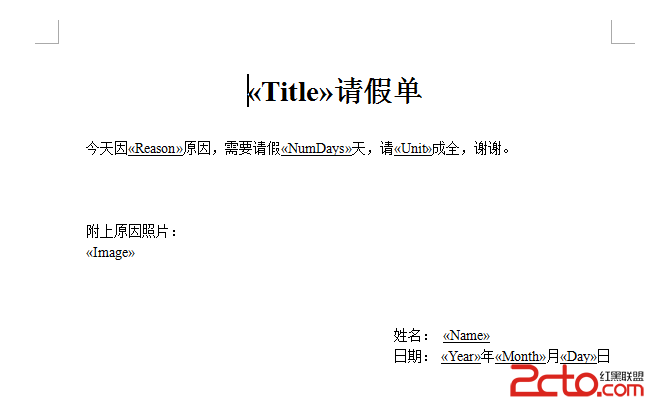
Mail Merge 郵件合併常用於大量產生通知、證書或群發郵件。它會以範本為基礎,從資料來源取出欄位,替換範本中的合併域,再輸出多份文件。基本流程在 Android 上
 圖像類 App 如何將 Crash 率從 2.2% 降至 0.2%
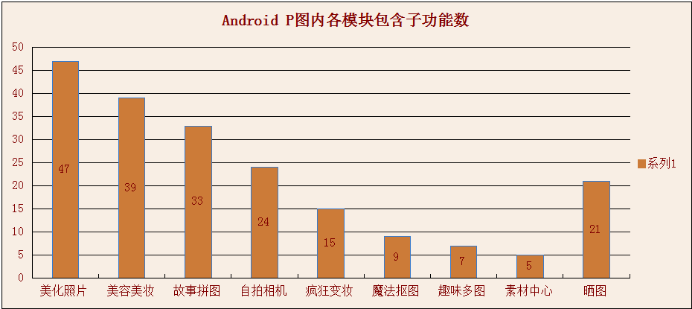
圖像處理類應用通常包含大量依賴 GPU、底層算法與內存資源的模塊,例如濾鏡、人臉檢測、美白、磨皮、美妝、拼圖與相機。這類應用一旦在多廠商 Android 設備上出現兼容性
 Android 頁面平移動畫:用 overridePendingTransition 實現手機衛士式切換
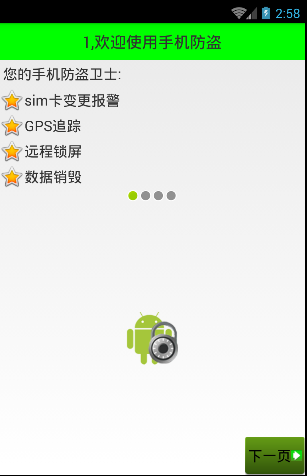
本文用四個界面串起一組平移動畫,模擬手機衛士設定向導左右切換的過渡效果。 先想清楚四段位移 導航界面切換時,本質上是「新頁面進場 + 舊頁面退場」兩段動畫同時播放。以屏