

編輯:關於 Android 程式設計
實際開發中,LayoutInflater 是個出場率極高卻常被誤解的類別。它的作用有點像 findViewById(),兩者卻不是同一回事:LayoutInflater 負責找出 res/layout/ 底下的 XML 版面檔並把它「實體化」成 View 物件;findViewById() 則是在已經存在的 View 樹中,找出某個具體的子元件。
· 若版面尚未被載入,或需要動態載入,用 LayoutInflater.inflate()。
· 若版面已經載入(例如 setContentView() 之後),用 Activity.findViewById() 取得其中的元件。
一句話分辨:inflate 是「把 XML 變成 View」,findViewById 是「在 View 裡找 View」。
LayoutInflater 本身是抽象類別,官方宣告如下:
public abstract class LayoutInflater extends Object
// 1. 呼叫 Activity 的方法
LayoutInflater inflater = getLayoutInflater();

// 2. 用靜態方法
LayoutInflater inflater = LayoutInflater.from(context);

// 3. 直接從系統服務取得
LayoutInflater inflater = (LayoutInflater) context.getSystemService(Context.LAYOUT_INFLATER_SERVICE);
這三種寫法看起來不同,本質卻完全一樣。從原始碼可以看出端倪:
getLayoutInflater()
Activity 的這個方法其實是轉呼叫 PhoneWindow 的版本,而 PhoneWindow 在 constructor 中這樣寫:
public PhoneWindow(Context context) {
    super(context);
    mLayoutInflater = LayoutInflater.from(context);
}
LayoutInflater.from(context)
public static LayoutInflater from(Context context) {
    LayoutInflater LayoutInflater =
            (LayoutInflater) context.getSystemService(Context.LAYOUT_INFLATER_SERVICE);
    if (LayoutInflater == null) {
        throw new AssertionError("LayoutInflater not found.");
    }
    return LayoutInflater;
}
結論:三種方式最終都是呼叫 Context.getSystemService()。
這個 API 是 Activity 相當重要的一個方法,依傳入的 NAME 取得對應物件並轉型成該服務。常用的服務對照如下:
| 傳入的 Name | 回傳的物件 | 用途 |
|---|---|---|
| WINDOW_SERVICE | WindowManager | 管理已開啟的視窗 |
| LAYOUT_INFLATER_SERVICE | LayoutInflater | 取得 XML 中定義的 View |
| ACTIVITY_SERVICE | ActivityManager | 管理應用程序的系統狀態 |
| POWER_SERVICE | PowerManager | 電源相關服務 |
| ALARM_SERVICE | AlarmManager | 鬧鐘服務 |
| NOTIFICATION_SERVICE | NotificationManager | 狀態列通知服務 |
| KEYGUARD_SERVICE | KeyguardManager | 鍵盤鎖服務 |
| LOCATION_SERVICE | LocationManager | 位置服務,如 GPS |
| SEARCH_SERVICE | SearchManager | 搜尋服務 |
| VIBRATOR_SERVICE | Vibrator | 手機震動服務 |
| CONNECTIVITY_SERVICE | ConnectivityManager | 網路連線服務 |
| WIFI_SERVICE | WifiManager | Wi-Fi 服務 |
| TELEPHONY_SERVICE | TelephonyManager | 電話服務 |
依 SDK 文件,這個方法的重載版本如下,回傳值都是 View:
public View inflate(int resource, ViewGroup root)
public View inflate(XmlPullParser parser, ViewGroup root)
public View inflate(XmlPullParser parser, ViewGroup root, boolean attachToRoot)
public View inflate(int resource, ViewGroup root, boolean attachToRoot)
使用示意:
LayoutInflater inflater = (LayoutInflater) getSystemService(LAYOUT_INFLATER_SERVICE);
View view = inflater.inflate(R.layout.custom, (ViewGroup) findViewById(R.id.test));
// 錯誤寫法:EditText editText = (EditText) findViewById(R.id.content);
// 必須從 inflate 出來的 view 上找
EditText editText = (EditText) view.findViewById(R.id.content);
第二個參數 root 也可以傳 null,但這會失去版面參數(layout_width / layout_height)的解析,實務上盡量傳入真正的父容器。
· inflate 與 findViewById 是兩件不同的事。
· inflate 找出 res/layout 下的 XML 並將其實例化。
· findViewById 是在既有的版面樹中找特定元件。
· 三種取得 LayoutInflater 的方式本質相同,都是走 getSystemService()。
理解這個分工之後,自訂控制元件、Adapter 的 getView()、Dialog 的自訂版面等常見場景,就不容易再搞混該用哪一個了。
 Android Activity 螢幕方向鎖定與旋轉時的資料保存機制詳解
現在的手機多半內建方向感應器,螢幕會依姿勢自動橫豎切換(前提是未鎖定方向)。但有時我們的應用只允許在單一方向下運作,這時就得鎖定 Activity 的螢幕方向。另一個常見
 IDA 動態調試 Android 的 DEX 文件實戰
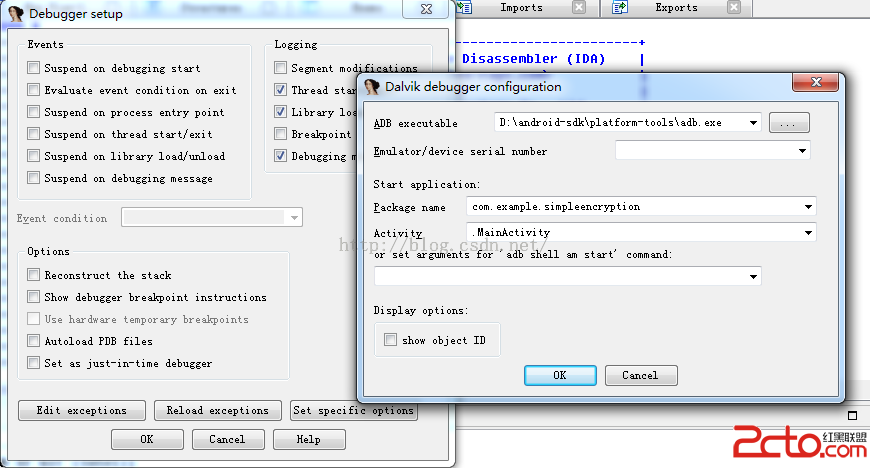
0x00 本文以阿里比賽第一題為例,講解如何動態調試 dex 文件。首先確保 AndroidManifest.xml 中 android:debuggable=true。
 Android 把文字清單轉存為 PNG 圖片
「能不能把這段文字輸出成一張圖?」這個需求聽起來奇怪,實際場景卻不少:分享成績單、產生邀請卡、把伺服器回傳的清單做成票券。做法並不難,關鍵是先算好畫布高度,再用 Canv
 Android 數據庫事務:SQLite 的原子性操作與命令行調試技巧
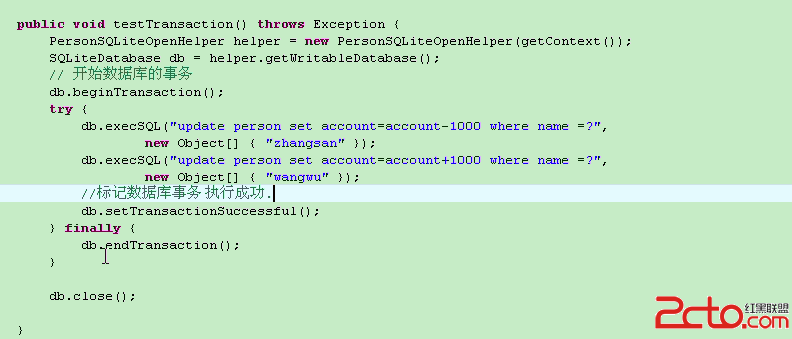
做本地數據存儲時,只要涉及「多條語句必須一起成功或一起失敗」的場景,事務就是繞不開的概念。轉賬扣款、批量導入、狀態流轉,任何一步中途失敗都可能留下髒數據。 事務的核心概