

編輯:關於 Android 程式設計
項目裡需要把普通參數和文件一起提交給後端,用 Java 模擬 HTTP POST 時,這個需求比想像中要麻煩一些。單純傳參數、或者單純傳一個文件,用 URLConnection 拼一拼也就過去了;但一旦變成「多個文件 + 若干普通字段」的組合,麻煩就來了。
網上翻了一圈,主流做法是改用 Apache 的 HttpClient,配合 MultipartEntity 組裝多段表單。筆者一開始試了好幾次都拿不到參數,折騰半天才發現癥結所在:走 multipart 上傳時,服務端不能再依賴 request.getParameter() 取值,必須改用文件上傳組件(如 Commons FileUpload)去解析整個請求。
下面把客戶端與服務端兩邊的代碼都梳理一遍。示例基於 HttpClient 4.2 系列,jar 包可自行下載引入。
客戶端代碼:
import java.io.ByteArrayOutputStream; import java.io.File; import java.io.IOException; import java.io.InputStream; import org.apache.http.HttpEntity; import org.apache.http.HttpResponse; import org.apache.http.HttpStatus; import org.apache.http.ParseException; import org.apache.http.client.HttpClient; import org.apache.http.client.methods.HttpPost; import org.apache.http.entity.mime.MultipartEntity; import org.apache.http.entity.mime.content.FileBody; import org.apache.http.impl.client.DefaultHttpClient; import org.apache.http.util.EntityUtils; /** * * @author <a href="mailto:just_szl@hotmail.com"> Geray</a> * @version 1.0,2012-6-12 */ public class HttpPostArgumentTest2 { //file1與file2在同一個文件夾下 filepath是該文件夾指定的路徑 public void SubmitPost(String url,String filename1,String filename2, String filepath){ HttpClient httpclient = new DefaultHttpClient(); try { HttpPost httppost = new HttpPost(url); FileBody bin = new FileBody(new File(filepath + File.separator + filename1)); FileBody bin2 = new FileBody(new File(filepath + File.separator + filename2)); StringBody comment = new StringBody(filename1); MultipartEntity reqEntity = new MultipartEntity(); reqEntity.addPart("file1", bin);//file1為請求後台的File upload;屬性 reqEntity.addPart("file2", bin2);//file2為請求後台的File upload;屬性 reqEntity.addPart("filename1", comment);//filename1為請求後台的普通參數;屬性 httppost.setEntity(reqEntity); HttpResponse response = httpclient.execute(httppost); int statusCode = response.getStatusLine().getStatusCode(); if(statusCode == HttpStatus.SC_OK){ System.out.println("服務器正常響應....."); HttpEntity resEntity = response.getEntity(); System.out.println(EntityUtils.toString(resEntity));//httpclient自帶的工具類讀取返回數據 System.out.println(resEntity.getContent()); EntityUtils.consume(resEntity); } } catch (ParseException e) { // TODO Auto-generated catch block e.printStackTrace(); } catch (IOException e) { // TODO Auto-generated catch block e.printStackTrace(); } finally { try { httpclient.getConnectionManager().shutdown(); } catch (Exception ignore) { } } } /** * @param args */ public static void main(String[] args) { // TODO Auto-generated method stub HttpPostArgumentTest2 httpPostArgumentTest2 = new HttpPostArgumentTest2(); httpPostArgumentTest2.SubmitPost("https://127.0.0.1:8080/demo/receiveData.do", "test.xml","test.zip","D://test"); } }
幾個值得留意的細節:文件用 FileBody 包裝,普通字段用 StringBody 包裝,兩者通過 addPart 的 name 區分,這個 name 就是服務端接收時的屬性名。響應處理完記得調用 EntityUtils.consume 釋放連接,finally 裡再關閉 ConnectionManager,否則連接池會被佔著不放。
服務端代碼:
public void receiveData(HttpServletRequest request, HttpServletResponse response) throws AppException{ PrintWriter out = null; response.setContentType("text/html;charset=UTF-8"); Map map = new HashMap(); FileItemFactory factory = new DiskFileItemFactory(); ServletFileUpload upload = new ServletFileUpload(factory); File directory = null; List<FileItem> items = new ArrayList(); try { items = upload.parseRequest(request); // 得到所有的文件 Iterator<FileItem> it = items.iterator(); while (it.hasNext()) { FileItem fItem = (FileItem) it.next(); String fName = ""; Object fValue = null; if (fItem.isFormField()) { // 普通文本框的值 fName = fItem.getFieldName(); // fValue = fItem.getString(); fValue = fItem.getString("UTF-8"); map.put(fName, fValue); } else { // 獲取上傳文件的值 fName = fItem.getFieldName(); fValue = fItem.getInputStream(); map.put(fName, fValue); String name = fItem.getName(); if(name != null && !("".equals(name))) { name = name.substring(name.lastIndexOf(File.separator) + 1); // String stamp = StringUtils.getFormattedCurrDateNumberString(); String timestamp_Str = TimeUtils.getCurrYearYYYY(); directory = new File("d://test"); directory.mkdirs(); String filePath = ("d://test")+ timestamp_Str+ File.separator + name; map.put(fName + "FilePath", filePath); InputStream is = fItem.getInputStream(); FileOutputStream fos = new FileOutputStream(filePath); byte[] buffer = new byte[1024]; while (is.read(buffer) > 0) { fos.write(buffer, 0, buffer.length); } fos.flush(); fos.close(); map.put(fName + "FileName", name); } } } } catch (Exception e) { System.out.println("讀取http請求屬性值出錯!"); // e.printStackTrace(); logger.error("讀取http請求屬性值出錯"); } // 數據處理 try { out = response.getWriter(); out.print("{success:true, msg:'接收成功'}"); out.close(); } catch (IOException e) { e.printStackTrace(); } }
服務端關鍵是 upload.parseRequest(request),它會把請求體拆成一組 FileItem。遍歷時用 isFormField() 判斷當前這項是普通字段還是文件:前者直接 getString("UTF-8") 取值(指定編碼,避免中文亂碼),後者則通過 getInputStream() 逐塊讀寫落盤。
實踐中還有兩點建議:落盤目錄最好做日期分層,避免單層文件過多;上傳接口應校驗文件類型與大小,並對檔名做淨化處理,防止路徑穿越。
以上就是本次分享的 HttpClient POST 上傳參數與文件實例,希望對大家有所幫助。
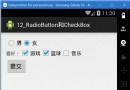 Android 元件詳解:RadioButton 單選按鈕與 Checkbox 複選框全攻略
在 Android 的表單設計裡,RadioButton(單選按鈕)與 CheckBox(複選框)是最常見的兩種選擇型元件。它們外觀相似、用法接近,但承載的互動邏輯截然不
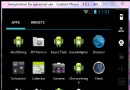 Android 實現點擊 ImageView 挑選本地圖片並即時顯示
需求很常見:點一下 ImageView,叫出系統相簿,選完照片後直接換上去。核心只是一個隱式 Intent 加上 onActivityResult。 執行結果: 模擬器
 Android View 事件分發機制詳解:dispatchTouchEvent、onInterceptTouchEvent 與 onTouchEvent
當使用者點擊畫面時,事件會從 Activity 一路傳遞到 PhoneWindow,再到 View 或 ViewGroup。理解事件分發機制,是處理衝突、手勢與自訂控制項
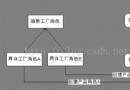 抽象工廠模式在 Android 中的應用
抽象工廠模式是什麼抽象工廠模式屬於物件建立型模式,是工廠方法模式的延伸。當系統需要建立多個產品族,且這些產品之間存在搭配關係時,抽象工廠模式特別適合。主要角色抽象工廠模式