

編輯:關於 Android 程式設計
上一篇我們處理了 Bitmap 的基本操作,並對比了不同方案的效率與內存佔用,結論是:圖片用得多,OOM 幾乎必然找上門。
那怎麼把 OOM 的概率壓下去?早期普遍的做法是 SoftReference 軟引用,但這條路已經走不通了——從 Android 2.3(API Level 9)開始,垃圾回收器變得更傾向於回收只持有軟引用或弱引用的對象,軟引用因此不再可靠。本篇要介紹的是 LRU 算法,以及基於它的 LruCache 與 DiskLruCache 兩個實用工具。
LRU 是 Least Recently Used 的縮寫,中文譯作「最近最少使用」。基於這種策略的緩存會維持一定的數據量,超出閾值時就把最久未被訪問的數據淘汰掉。
舉個例子:緩存上限設為 10000 條,未超量時隨意添加;一旦達到上限,每加入一條新數據就要淘汰一條舊數據,保證總量恆定。而「淘汰哪一條」正是 LRU 的 answer——最久沒被讀取的那一條。
1)初始化
這裡緩存的對象是 Drawable 而非 Bitmap,理由是前者在內存佔用上更有優勢(上一篇的對比測試已經驗證過這一點)。
int maxMemory = (int) Runtime.getRuntime().maxMemory();//獲取系統分配給應用的總內存大小 int mCacheSize = maxMemory / 8;//設置圖片內存緩存占用八分之一 mMemoryCache = new LruCache<String, Drawable>(mCacheSize) { //必須重寫此方法,來測量Bitmap的大小 @Override protected int sizeOf(String key, Drawable value) { if (value instanceof BitmapDrawable) { Bitmap bitmap = ((BitmapDrawable) value).getBitmap(); return bitmap == null ? 0 : bitmap.getByteCount(); } return super.sizeOf(key, value); } };
sizeOf 必須重寫。LruCache 需要知道每個條目佔多少空間才能判斷是否超標,默認實現返回 1,那就完全失去了意義。這裡用 getByteCount() 取真實字節數。
另外,把緩存上限設為可用內存的八分之一是個經驗值,留出餘量給其他部分使用;如果圖片是應用的核心內容,可以適度調高,但不宜超過四分之一。
2)寫入內存緩存
/** * 添加Drawable到內存緩存 * * @param key * @param drawable */ private void addDrawableToMemoryCache(String key, Drawable drawable) { if (getDrawableFromMemCache(key) == null && drawable != null) { mMemoryCache.put(key, drawable); } }
3)讀取
/** * 從內存緩存中獲取一個Drawable * * @param key * @return */ public Drawable getDrawableFromMemCache(String key) { return mMemoryCache.get(key); }
4)移除單條
/** * 從內存緩存中移除 * * @param key */ public void removeCacheFromMemory(String key) { mMemoryCache.remove(key); }
5)清空
/** * 清理內存緩存 */ public void cleanMemoryCCache() { mMemoryCache.evictAll(); }
順帶一提,LruCache 底層就是一個 LinkedHashMap,靠它把訪問順序串起來,才能高效定位到最久未使用的條目。
內存緩存容量有限,且進程一結束就清空。要讓圖片在下次啟動時還能用,就需要磁盤緩存。DiskLruCache 並非官方類,需要自行引入:https://github.com/JakeWharton/DiskLruCache
1)初始化
File cacheDir = context.getCacheDir();//指定的是數據的緩存地址 long diskCacheSize = 1024 * 1024 * 30;//最多可以緩存多少字節的數據 int appVersion = DiskLruUtils.getAppVersion(context);//指定當前應用程序的版本號 int valueCount = 1;//指定同一個key可以對應多少個緩存文件 try { mDiskCache = DiskLruCache.open(cacheDir, appVersion, valueCount, diskCacheSize); } catch (Exception ex) { }
appVersion 這個參數值得留意:當版本號變化時,DiskLruCache 會自動清空舊數據。這正好符合直覺——應用升級後,之前緩存的圖片可能已經失效了。
2)寫入
/** * 添加Bitmap到磁盤緩存 * * @param key * @param value */ private void addBitmapToDiskCache(String key, byte[] value) { OutputStream out = null; try { DiskLruCache.Editor editor = mDiskCache.edit(key); if (editor != null) { out = editor.newOutputStream(0); if (value != null && value.length > 0) { out.write(value); out.flush(); editor.commit(); } else { editor.abort(); } } mDiskCache.flush(); } catch (IOException e) { e.printStackTrace(); } finally { DiskLruUtils.closeQuietly(out); } }
寫入走的是「編輯—提交」兩段式:edit() 拿到 Editor,寫完 commit() 生效,中途出問題則 abort() 撤銷。這種設計保證了不會留下半個損壞的文件。
3)讀取
/** * 從磁盤緩存中獲取一個Drawable * * @param key * @return */ public Drawable getDrawableFromDiskCache(String key) { try { DiskLruCache.Snapshot snapShot = mDiskCache.get(key); if (snapShot != null) { InputStream is = snapShot.getInputStream(0); Bitmap bitmap = BitmapFactory.decodeStream(is); Drawable drawable = DiskLruUtils.bitmap2Drawable(bitmap); //從磁盤中讀取到之後 加入內存緩存 addDrawableToMemoryCache(key, drawable); return drawable; } } catch (IOException e) { e.printStackTrace(); } return null; }
注意最後那行:從磁盤讀出來之後順手寫入內存緩存。這樣下次訪問同一張圖就直接命中一級緩存,不必再解碼一次。
4)移除與清空
/** * 從磁盤緩存中移除 * * @param key */ public void removeCacheFromDisk(String key) { try { mDiskCache.remove(key); } catch (Exception e) { } }
/** * 清理磁盤緩存 */ public void cleanDiskCache() { try { mDiskCache.delete(); } catch (Exception e) { } }
單獨的緩存組件還不夠,需要一個調度流程把它們串起來。這裡用了你一點 RxJava 的知識,不熟悉的話建議先了解操作符的基本概念。
1)異步調度
內存緩存讀取很快,可以在主線程直接做;磁盤讀取和網絡下載都涉及 IO,必須切到工作線程。
public void disPlay(final ImageView imageView, String imageUrl) { //生成唯一key final String key = DiskLruUtils.hashKeyForDisk(imageUrl); //先從內存中讀取 Drawable drawableFromMemCache = getDrawableFromMemCache(key); if (drawableFromMemCache != null) { imageView.setImageDrawable(drawableFromMemCache); return; } Observable.just(imageUrl) .map(new Func1<String, Drawable>() { @Override public Drawable call(String imageUrl) { // 參數類型 String //從磁盤中讀取 Drawable drawableFromDiskCache = getDrawableFromDiskCache(key); if (drawableFromDiskCache != null) { return drawableFromDiskCache; } //網絡下載 return download(imageUrl); // 返回類型 Drawable } }) .subscribeOn(Schedulers.io()) // 指定 subscribe() 發生在 IO 線程 .observeOn(AndroidSchedulers.mainThread()) // 指定 Subscriber 的回調發生在主線程 .subscribe(new Action1<Drawable>() { @Override public void call(Drawable drawable) { // 參數類型 Drawable imageView.setImageDrawable(drawable); } }); }
三級讀取的順序是:內存 → 磁盤 → 網絡,命中即返回。這是幾乎所有圖片加載庫的通用骨架。
2)網絡下載與雙寫
private Drawable download(String imageUrl) { HttpURLConnection urlConnection = null; ByteArrayOutputStream bos = null; InputStream ins = null; try { final URL url = new URL(imageUrl); urlConnection = (HttpURLConnection) url.openConnection(); ins = urlConnection.getInputStream(); bos = new ByteArrayOutputStream(); int b; while ((b = ins.read()) != -1) { bos.write(b); } bos.flush(); byte[] bytes = bos.toByteArray(); Bitmap bitmap = DiskLruUtils.bytes2Bitmap(bytes); String key = DiskLruUtils.hashKeyForDisk(imageUrl); Drawable drawable = DiskLruUtils.bitmap2Drawable(bitmap); //加入內存緩存 addDrawableToMemoryCache(key, drawable); //加入磁盤緩存 addBitmapToDiskCache(key, bytes); return drawable; } catch (IOException e) { e.printStackTrace(); } finally { if (urlConnection != null) { urlConnection.disconnect(); } DiskLruUtils.closeQuietly(bos); DiskLruUtils.closeQuietly(ins); } return null; }
下載成功後同時寫入兩級緩存,下次訪問就能直接命中。
ImageLoadManager.java
public class ImageLoadManager { private LruCache<String, Drawable> mMemoryCache;//內存緩存 private DiskLruCache mDiskCache;//磁盤緩存 private static ImageLoadManager mInstance;//獲取圖片下載單例引用 /** * 構造器 * * @param context */ private ImageLoadManager(Context context) { int maxMemory = (int) Runtime.getRuntime().maxMemory();//獲取系統分配給應用的總內存大小 int mCacheSize = maxMemory / 8;//設置圖片內存緩存占用八分之一 mMemoryCache = new LruCache<String, Drawable>(mCacheSize) { //必須重寫此方法,來測量Bitmap的大小 @Override protected int sizeOf(String key, Drawable value) { if (value instanceof BitmapDrawable) { Bitmap bitmap = ((BitmapDrawable) value).getBitmap(); return bitmap == null ? 0 : bitmap.getByteCount(); } return super.sizeOf(key, value); } }; File cacheDir = context.getCacheDir();//指定的是數據的緩存地址 long diskCacheSize = 1024 * 1024 * 30;//最多可以緩存多少字節的數據 int appVersion = DiskLruUtils.getAppVersion(context);//指定當前應用程序的版本號 int valueCount = 1;//指定同一個key可以對應多少個緩存文件 try { mDiskCache = DiskLruCache.open(cacheDir, appVersion, valueCount, diskCacheSize); } catch (Exception ex) { } } /** * 獲取單例引用 * * @return */ public static ImageLoadManager getInstance(Context context) { ImageLoadManager inst = mInstance; if (inst == null) { synchronized (RequestManager.class) { inst = mInstance; if (inst == null) { inst = new ImageLoadManager(context.getApplicationContext()); mInstance = inst; } } } return inst; } public void disPlay(final ImageView imageView, String imageUrl) { //生成唯一key final String key = DiskLruUtils.hashKeyForDisk(imageUrl); //先從內存中讀取 Drawable drawableFromMemCache = getDrawableFromMemCache(key); if (drawableFromMemCache != null) { imageView.setImageDrawable(drawableFromMemCache); return; } Observable.just(imageUrl) .map(new Func1<String, Drawable>() { @Override public Drawable call(String imageUrl) { // 參數類型 String //從磁盤中讀取 Drawable drawableFromDiskCache = getDrawableFromDiskCache(key); if (drawableFromDiskCache != null) { return drawableFromDiskCache; } //網絡下載 return download(imageUrl); // 返回類型 Drawable } }) .subscribeOn(Schedulers.io()) // 指定 subscribe() 發生在 IO 線程 .observeOn(AndroidSchedulers.mainThread()) // 指定 Subscriber 的回調發生在主線程 .subscribe(new Action1<Drawable>() { @Override public void call(Drawable drawable) { // 參數類型 Drawable imageView.setImageDrawable(drawable); } }); } /** * 添加Drawable到內存緩存 * * @param key * @param drawable */ private void addDrawableToMemoryCache(String key, Drawable drawable) { if (getDrawableFromMemCache(key) == null && drawable != null) { mMemoryCache.put(key, drawable); } } /** * 從內存緩存中獲取一個Drawable * * @param key * @return */ public Drawable getDrawableFromMemCache(String key) { return mMemoryCache.get(key); } /** * 從磁盤緩存中獲取一個Drawable * * @param key * @return */ public Drawable getDrawableFromDiskCache(String key) { try { DiskLruCache.Snapshot snapShot = mDiskCache.get(key); if (snapShot != null) { InputStream is = snapShot.getInputStream(0); Bitmap bitmap = BitmapFactory.decodeStream(is); Drawable drawable = DiskLruUtils.bitmap2Drawable(bitmap); //從磁盤中讀取到之後 加入內存緩存 addDrawableToMemoryCache(key, drawable); return drawable; } } catch (IOException e) { e.printStackTrace(); } return null; } /** * 添加Bitmap到磁盤緩存 * * @param key * @param value */ private void addBitmapToDiskCache(String key, byte[] value) { OutputStream out = null; try { DiskLruCache.Editor editor = mDiskCache.edit(key); if (editor != null) { out = editor.newOutputStream(0); if (value != null && value.length > 0) { out.write(value); out.flush(); editor.commit(); } else { editor.abort(); } } mDiskCache.flush(); } catch (IOException e) { e.printStackTrace(); } finally { DiskLruUtils.closeQuietly(out); } } private Drawable download(String imageUrl) { HttpURLConnection urlConnection = null; ByteArrayOutputStream bos = null; InputStream ins = null; try { final URL url = new URL(imageUrl); urlConnection = (HttpURLConnection) url.openConnection(); ins = urlConnection.getInputStream(); bos = new ByteArrayOutputStream(); int b; while ((b = ins.read()) != -1) { bos.write(b); } bos.flush(); byte[] bytes = bos.toByteArray(); Bitmap bitmap = DiskLruUtils.bytes2Bitmap(bytes); String key = DiskLruUtils.hashKeyForDisk(imageUrl); Drawable drawable = DiskLruUtils.bitmap2Drawable(bitmap); //加入內存緩存 // addDrawableToMemoryCache(key, drawable); //加入磁盤緩存 addBitmapToDiskCache(key, bytes); return drawable; } catch (IOException e) { e.printStackTrace(); } finally { if (urlConnection != null) { urlConnection.disconnect(); } DiskLruUtils.closeQuietly(bos); DiskLruUtils.closeQuietly(ins); } return null; } /** * 從緩存中移除 * * @param key */ public void removeCache(String key) { removeCacheFromMemory(key); removeCacheFromDisk(key); } /** * 從內存緩存中移除 * * @param key */ public void removeCacheFromMemory(String key) { mMemoryCache.remove(key); } /** * 從磁盤緩存中移除 * * @param key */ public void removeCacheFromDisk(String key) { try { mDiskCache.remove(key); } catch (Exception e) { } } /** * 磁盤緩存大小 * * @return */ public long diskCacheSize() { return mDiskCache.size(); } /** * 內存緩存大小 * * @return */ public long memoryCacheSize() { return mMemoryCache.size(); } /** * 關閉磁盤緩存 */ public void closeDiskCache() { try { mDiskCache.close(); } catch (Exception e) { } } /** * 清理緩存 */ public void cleanCache() { cleanMemoryCCache(); cleanDiskCache(); } /** * 清理磁盤緩存 */ public void cleanDiskCache() { try { mDiskCache.delete(); } catch (Exception e) { } } /** * 清理內存緩存 */ public void cleanMemoryCCache() { mMemoryCache.evictAll(); } }
DiskLruUtils.java
final class DiskLruUtils { /** * 關閉輸入輸出流 */ public static void closeQuietly(/*Auto*/Closeable closeable) { if (closeable != null) { try { closeable.close(); } catch (RuntimeException rethrown) { throw rethrown; } catch (Exception ignored) { } } } /** * 獲取versionCode */ public static int getAppVersion(Context context) { try { PackageInfo info = context.getPackageManager().getPackageInfo(context.getPackageName(), 0); return info.versionCode; } catch (PackageManager.NameNotFoundException e) { e.printStackTrace(); } return 1; } public static String hashKeyForDisk(String key) { String cacheKey; try { final MessageDigest mDigest = MessageDigest.getInstance("MD5"); mDigest.update(key.getBytes()); cacheKey = bytesToHexString(mDigest.digest()); } catch (NoSuchAlgorithmException e) { cacheKey = String.valueOf(key.hashCode()); } return cacheKey; } public static String bytesToHexString(byte[] bytes) { StringBuilder sb = new StringBuilder(); for (int i = 0; i < bytes.length; i++) { String hex = Integer.toHexString(0xFF & bytes[i]); if (hex.length() == 1) { sb.append('0'); } sb.append(hex); } return sb.toString(); } /** * Bitmap → bytes */ public static byte[] bitmap2Bytes(Bitmap bm) { if (bm == null) { return null; } ByteArrayOutputStream baos = new ByteArrayOutputStream(); bm.compress(Bitmap.CompressFormat.PNG, 100, baos); return baos.toByteArray(); } /** * bytes → Bitmap */ public static Bitmap bytes2Bitmap(byte[] bytes) { return BitmapFactory.decodeByteArray(bytes, 0, bytes.length); } /** * Drawable → Bitmap */ public static Bitmap drawable2Bitmap(Drawable drawable) { if (drawable == null) { return null; } // 取 drawable 的長寬 int w = drawable.getIntrinsicWidth(); int h = drawable.getIntrinsicHeight(); // 取 drawable 的顏色格式 Bitmap.Config config = drawable.getOpacity() != PixelFormat.OPAQUE ? Bitmap.Config.ARGB_8888 : Bitmap.Config.RGB_565; // 建立對應 bitmap Bitmap bitmap = Bitmap.createBitmap(w, h, config); // 建立對應 bitmap 的畫布 Canvas canvas = new Canvas(bitmap); drawable.setBounds(0, 0, w, h); // 把 drawable 內容畫到畫布中 drawable.draw(canvas); return bitmap; } /* * Bitmap → Drawable */ public static Drawable bitmap2Drawable(Bitmap bm) { if (bm == null) { return null; } BitmapDrawable bd = new BitmapDrawable(bm); bd.setTargetDensity(bm.getDensity()); return new BitmapDrawable(bm); } }
工具類裡最值得留意的是 hashKeyForDisk:直接把 URL 當文件名顯然不行(帶協議符號、參數、可能超長),所以先用 MD5 提煉成定長十六進制串。這一步是所有磁盤緩存方案的必備環節。
以上就是基於 LRU 的雙層圖片緩存實現,希望對大家的學習有所幫助。
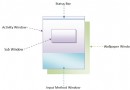 WindowManagerService 如何計算 Activity 大小與組織窗口
在 Android 系統中,同一時間雖然只有一個 Activity 處於激活狀態,但 WindowManagerService 需要管理的窗口並不只一個。例如 Activ
 Android 如何清除應用程式快取:讀取大小並跳轉系統設定
清除快取可以分成兩種情況:一種是清除手機 ROM 內部儲存空間的快取,另一種則是清除 SD 卡上的快取。本文著重說明第一種,也就是如何讀取各個應用程式的快取資訊,並引導使
 Android 利用動畫讓背景逐漸變暗:ValueAnimator 實作
在 PopupWindow、Dialog 或底部選單等互動中,常需要讓背景逐漸變暗,以突顯前景內容。相比使用 Handler 手動刷新透明度,使用 ValueAnimat
 實作地圖加列表的 POI 周邊搜尋:以高德 SDK 為例
先看成果:以公司附近的國貿為中心點,上方是地圖,下方是地理位置列表。 有些產品只顯示位置列表(例如社群軟體的打卡位置),但「地圖 + 列表」是很常見的組合。它有個專門的