

編輯:關於 Android 程式設計
先看成果:以公司附近的國貿為中心點,上方是地圖,下方是地理位置列表。
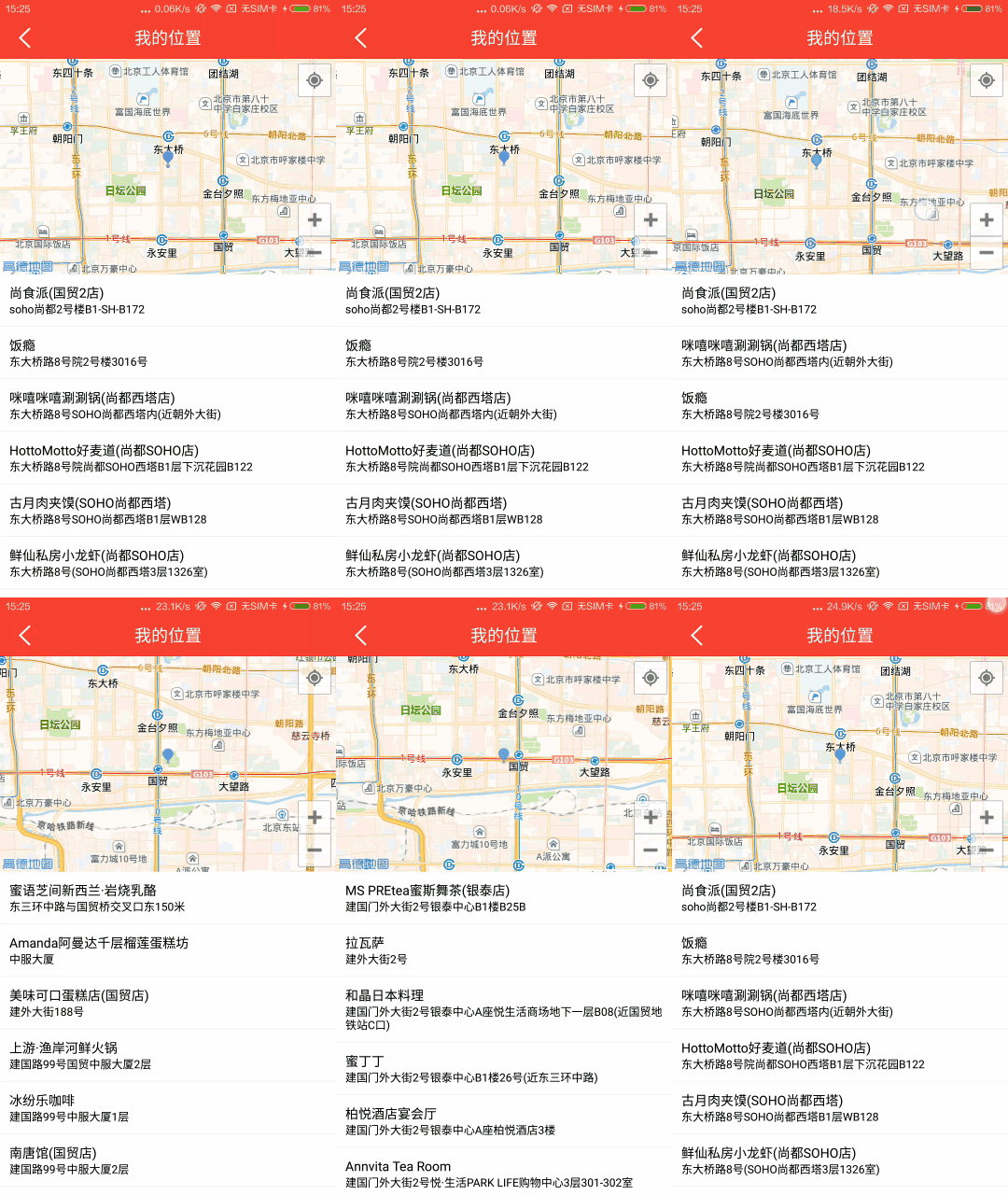
有些產品只顯示位置列表(例如社群軟體的打卡位置),但「地圖 + 列表」是很常見的組合。它有個專門的名稱:POI 周邊搜尋。
這個效果做起來其實不難,前提是你得先讀過地圖 SDK 的 API 文件。這裡使用的是高德地圖的 Android SDK,SDK 的環境配置本文不展開,文末會附上學習連結。
整體步驟如下:
1、利用地圖的定位能力取得使用者目前位置
2、依位置資訊呼叫 POI 搜尋,取得地點列表
3、用 ListView 呈現列表
4、當使用者拖動地圖時,取得新的地圖中心座標,再重跑第 2~3 步
<LinearLayout xmlns:android="https://schemas.android.com/apk/res/android"
    android:layout_width="match_parent"
    android:layout_height="match_parent"
    android:orientation="vertical" >

    <com.amap.api.maps2d.MapView
        android:id="@+id/map_local"
        android:layout_width="match_parent"
        android:layout_height="0dp"
        android:layout_weight="2" />

    <ListView
        android:id="@+id/map_list"
        android:layout_width="match_parent"
        android:layout_height="0dp"
        android:layout_weight="3"
        android:divider="@color/space"
        android:dividerHeight="1dp"
        android:scrollbars="none" />
</LinearLayout>
public class New_LocalActivity extends Activity
        implements LocationSource, AMapLocationListener,
                   AMap.OnCameraChangeListener, PoiSearch.OnPoiSearchListener {

    @BindView(R.id.map_local) MapView mapView;
    @BindView(R.id.map_list) ListView mapList;

    public static final String KEY_LAT = "lat";
    public static final String KEY_LNG = "lng";
    public static final String KEY_DES = "des";

    private AMapLocationClient mLocationClient;
    private LocationSource.OnLocationChangedListener mListener;
    private LatLng latlng;
    private String city;
    private AMap aMap;
    private String deepType = "";// poi 搜索類型

    private PoiSearch.Query query;// Poi 查詢條件類
    private PoiSearch poiSearch;
    private PoiResult poiResult;      // poi 返回的結果
    private PoiOverlay poiOverlay;    // poi 圖層
    private List<PoiItem> poiItems;    // poi 數據
    private PoiSearch_adapter adapter;

    @Override
    protected void onCreate(Bundle savedInstanceState) {
        super.onCreate(savedInstanceState);
        setContentView(R.layout.activity_new__local);
        ButterKnife.bind(this);
        mapView.onCreate(savedInstanceState);
        init();
    }

    private void init() {
        if (aMap == null) {
            aMap = mapView.getMap();
            aMap.setOnCameraChangeListener(this);
            setUpMap();
        }
        deepType = "餐飲";// 這裡以餐飲為例
    }

    // -------- 定位 Start --------
    private void setUpMap() {
        if (mLocationClient == null) {
            mLocationClient = new AMapLocationClient(getApplicationContext());
            AMapLocationClientOption mLocationOption = new AMapLocationClientOption();
            mLocationClient.setLocationListener(this);
            mLocationOption.setOnceLocation(true);
            mLocationOption.setLocationMode(AMapLocationClientOption.AMapLocationMode.Hight_Accuracy);
            mLocationClient.setLocationOption(mLocationOption);
            mLocationClient.startLocation();
        }

        // 自定義系統定位小藍點
        MyLocationStyle myLocationStyle = new MyLocationStyle();
        myLocationStyle.myLocationIcon(BitmapDescriptorFactory
                .fromResource(R.drawable.location_marker));// 設置小藍點圖標
        myLocationStyle.strokeColor(Color.BLACK);              // 圓形邊框顏色
        myLocationStyle.radiusFillColor(Color.argb(100, 0, 0, 180)); // 圓形填充顏色
        myLocationStyle.strokeWidth(1.0f);                     // 圓形邊框粗細
        aMap.setMyLocationStyle(myLocationStyle);
        aMap.setLocationSource(this);
        aMap.getUiSettings().setMyLocationButtonEnabled(true);
        aMap.setMyLocationEnabled(true);
    }

    /** 開始進行 poi 搜索 */
    protected void doSearchQuery() {
        aMap.setOnMapClickListener(null);// 進行 poi 搜索時清除掉地圖點擊事件
        int currentPage = 0;
        // 參數一:搜索字符串;參數二:poi 搜索類型;參數三:搜索區域(空字符串代表全國)
        query = new PoiSearch.Query("", deepType, city);
        query.setPageSize(20);// 每頁最多返回多少條 poiitem
        query.setPageNum(currentPage);

        LatLonPoint lp = new LatLonPoint(latlng.latitude, latlng.longitude);
        poiSearch = new PoiSearch(this, query);
        poiSearch.setOnPoiSearchListener(this);
        // 設置搜索區域為以 lp 為圓心、周圍 5000 米範圍
        poiSearch.setBound(new PoiSearch.SearchBound(lp, 5000, true));
        poiSearch.searchPOIAsyn();// 異步搜索
    }

    @Override
    public void onLocationChanged(AMapLocation aMapLocation) {
        if (mListener != null && aMapLocation != null) {
            if (aMapLocation.getErrorCode() == 0) {
                mListener.onLocationChanged(aMapLocation);
                latlng = new LatLng(aMapLocation.getLatitude(), aMapLocation.getLongitude());
                aMap.animateCamera(CameraUpdateFactory.newLatLngZoom(latlng, 14), 1000, null);
                city = aMapLocation.getProvince();
                doSearchQuery();
            } else {
                String errText = "定位失敗," + aMapLocation.getErrorCode()
                        + ": " + aMapLocation.getErrorInfo();
                Log.e("AmapErr", errText);
            }
        }
    }

    @Override
    public void activate(OnLocationChangedListener listener) {
        mListener = listener;
        mLocationClient.startLocation();
    }

    @Override
    public void deactivate() {
        mListener = null;
        if (mLocationClient != null) {
            mLocationClient.stopLocation();
            mLocationClient.onDestroy();
        }
        mLocationClient = null;
    }

    @Override
    public void onCameraChange(CameraPosition cameraPosition) { }

    @Override
    public void onCameraChangeFinish(CameraPosition cameraPosition) {
        latlng = cameraPosition.target;
        aMap.clear();
        aMap.addMarker(new MarkerOptions().position(latlng));
        doSearchQuery();
    }

    @Override
    public void onPoiSearched(PoiResult result, int rCode) {
        if (rCode == 0) {
            if (result != null && result.getQuery() != null) {
                if (result.getQuery().equals(query)) {// 是否是同一條搜索
                    poiResult = result;
                    poiItems = poiResult.getPois();// 取得第一頁數據,頁數從 0 開始
                    if (poiItems != null && poiItems.size() > 0) {
                        adapter = new PoiSearch_adapter(this, poiItems);
                        mapList.setAdapter(adapter);
                        mapList.setOnItemClickListener(new mOnItemClickListener());
                    }
                } else {
                    Logger.d("無結果");
                }
            }
        } else if (rCode == 27) {
            Logger.e("error_network");
        } else if (rCode == 32) {
            Logger.e("error_key");
        } else {
            Logger.e("error_other:" + rCode);
        }
    }

    @Override
    public void onPoiItemSearched(PoiItem poiItem, int i) { }
    // -------- 定位 End --------

    @Override
    protected void onResume() {
        super.onResume();
        mLocationClient.startLocation();
    }

    @Override
    protected void onPause() {
        super.onPause();
        mLocationClient.stopLocation();
    }

    @Override
    protected void onDestroy() {
        mLocationClient.onDestroy();
        super.onDestroy();
    }

    private class mOnItemClickListener implements AdapterView.OnItemClickListener {
        @Override
        public void onItemClick(AdapterView<?> parent, View view, int position, long id) {
            Intent intent = new Intent();
            intent.putExtra(KEY_LAT, poiItems.get(position).getLatLonPoint().getLatitude());
            intent.putExtra(KEY_LNG, poiItems.get(position).getLatLonPoint().getLongitude());
            intent.putExtra(KEY_DES, poiItems.get(position).getTitle());
            setResult(RESULT_OK, intent);
            finish();
        }
    }
}
範例中的 Activity 是以 startActivityForResult 方式啟動的,因此點選某個位置後,會把該位置的資訊回傳給上一頁。
我第一次準備實作這個效果時也一頭霧水,因為當時對地圖 API 還缺乏整體認識。後來看了不少資料,把地圖的幾個功能點串接起來,才做出設計圖中的成果。可見先建立 API 的全貌觀,再動手組合,往往比埋頭試錯更有效率。
本文作者:他叫自己MR張
以上就是本文的全部內容,感謝作者的分享,希望對大家的學習有所幫助,一起共同進步。
 Android 開發實用技巧彙編:Application、ListView 排序、浮點數格式化、占位符與動態載入圖片
一、Application 的用途 1. Application 基本概念 建立時機:Application 在啟動時會呼叫其無參數的建構方法來建立實例。 建構方法:Ap
 自定義半圓滾動菜單控件:位置修正與滑動回調實踐
前言本文整理自一個半圓形滾動菜單自定義控件的實作思路。相比單純讓菜單跟手轉動,這個控件更著重兩個細節:滑動結束後的位置自動修正,以及滑到中央項目時觸發回調,方便外部業務做
 Android Studio 導入 GitHub 開源專案常見問題排查
下載與匯入專案 GitHub 上有許多好用的開源專案,但直接匯入 Android Studio 時,常會遇到 Gradle 版本、SDK 設定或專案結構問題。本文以圖片輪
 Android 異步任務利器 AsyncTask 詳解
一、AsyncTask 是什麼 Android 中實現異步任務主要兩條路:Handler 和 AsyncTask。 Handler 模式需要為每個任務起一條新線程,任務完